


🎬 Elevate your workspace with HD clarity and effortless versatility!
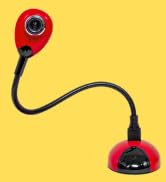
The HUE HD portable USB camera and visualiser is a sleek, lightweight device designed for professional video conferencing, live streaming, and educational use. Featuring 1080p HD resolution, a flexible gooseneck for dynamic positioning, and manual focus for precise image control, it offers plug-and-play compatibility across Windows, macOS, and Chrome OS without the need for drivers. Perfect for managers and creatives working remotely or in hybrid environments, it combines portability with professional-grade performance backed by a 3-year warranty.
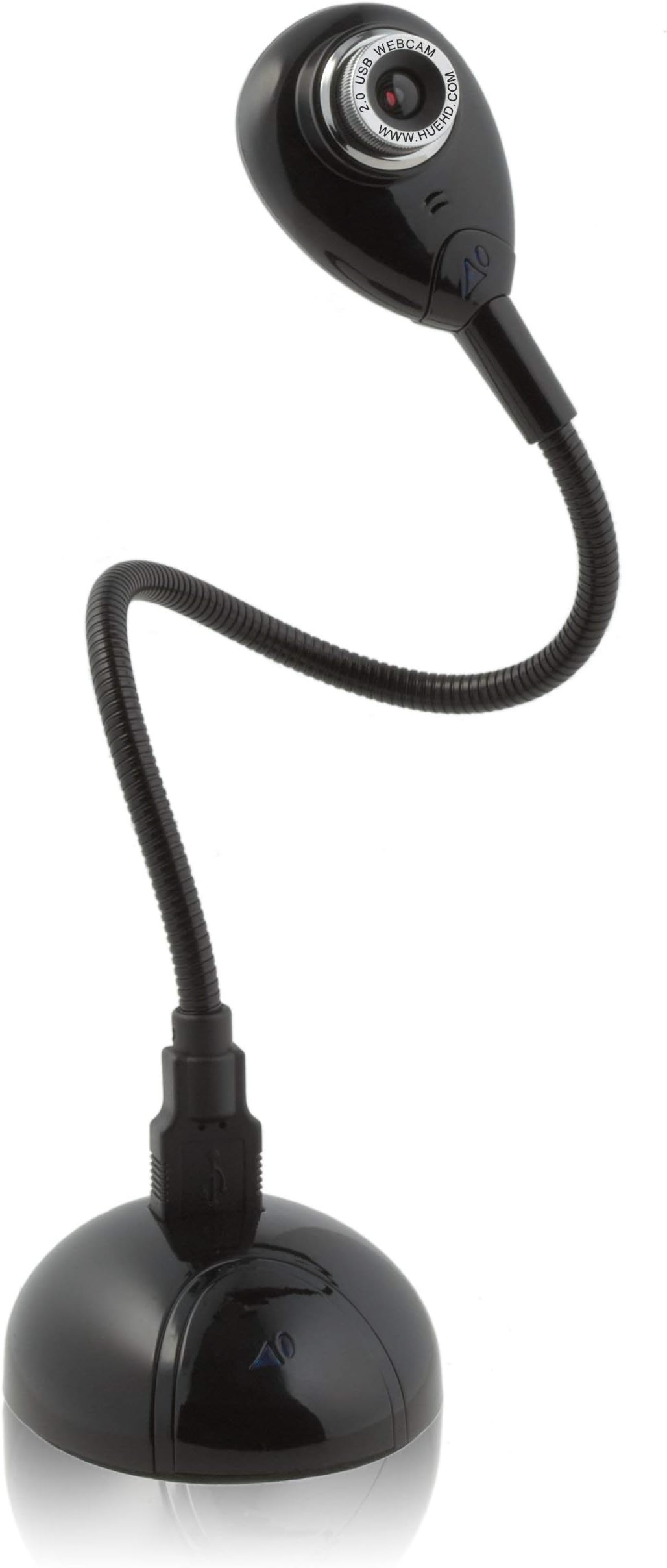









| ASIN | B000TTIP40 |
| Antenna Location | video conferencing, live streaming, games, work from home, remote monitoring, note sketch, education (classroom teaching, homeschooling, online tutoring, online tutoring, making instructional tutorials, recording live demonstrations and animation), real-time live video, recording sound and video, sharing student work, magnifying small items, creating educational content and work remotely |
| Are Batteries Included? | No |
| Best Sellers Rank | 94,355 in Computers & Accessories ( See Top 100 in Computers & Accessories ) 674 in Webcams |
| Box Contents | HUE camera, Camera base, USB to mini-USB cable |
| Brand | HUE |
| Brand Name | HUE |
| Camcorder Type | Webcam |
| Colour | Black |
| Compatible Devices | Computer, laptop, tablet, smartphone |
| Customer Reviews | 4.1 out of 5 stars 2,652 Reviews |
| Digital Zoom | 4 x |
| Exposure Control Type | Automatic |
| File Format | JPEG |
| Flash Memory Bus Interface Type | SD |
| Flash Memory Speed Class | 10 |
| Flash Memory Type | CompactFlash |
| Flash Memory Video Speed Class | V10 |
| Flash memory type | CompactFlash |
| Focus Type | Manual Focus |
| Form Factor | Compact |
| Has Image Stabilization | No |
| Image Aspect Ratio | 16:9 |
| Image Stabilization Type | Digital |
| Item Dimensions D x W x H | 50.8D x 36.6W x 14H centimetres |
| Item Weight | 0.79 Pounds |
| Lens Type | normal |
| Manufacturer | HUE |
| Maximum Display Resolution | HD |
| Maximum Focal Length | 50 Millimeters |
| Maximum focal length | 50 Millimeters |
| Model Name | HUE HD camera |
| Model Number | HD0004 |
| Network Connectivity Technology | USB |
| Number of Speakers | 1 |
| Operating System | Windows, macOS, Chrome OS, Linux |
| Photo sensor technology | CMOS |
| Product Features | USB, color, real-time |
| Product Warranty | 3-year manufacturer's warranty, with access to full customer support. |
| Sensor Type | CMOS |
| Shooting Modes | Automatic |
| Style Name | without Carry Case |
| Supported Audio Format | AAC, MP3 |
| Supported Image Format | JPEG |
| UPC | 853284001313 |
| Unit Count | 1.0 count |
| Video Capture Format | H.264, MPEG-4 |
| Video Capture Resolution | 720p |
| Video capture format | H.264, MPEG-4 |
| Video capture resolution | 720p |
| Water Resistance Level | Not Water Resistant |
| White Balance Settings | Auto |
| Zoom | Digital |
D**R
easy peazy
I love this webcam. I did the normal research about webcams and chose this one based on the reviews on this site about how easy it was to set up, the quality of the picture and of course, the price. This is a fantastic webcam. I have windows vista but the household also has windows 7. This webcam is easy to install on both versions. The product information is spot on and the other reviews correct. I spent 15 minutes setting it up from the CD, doing the various audio and visual testing, setting up a skype account and that was it. Done. I was using it with no problems straight off. I have a Dell inspiron laptop. You need to follow the hints and tips about having light behind you when you use it. what i like about the bendy arm or the separate base, is i can move the webcam to focus on other people sitting in on the conversation with me so everyone is part of the conversation but I can still look at the computer screen. With built in webcams you have to move the screen away. The bendy arm is a real bonus. The blue webcam light didnt bother me at all. Picture quality is great. I havent seen tons of other webcams so can only compare with the 3 others I have seen. This Hue webcam is superior.
P**R
Good camera but will not work with Mac system 10.6.3!
I bought this camera shortly before the system software upgrade 10.6.3 and it worked perfectly with Skype. I did not use the camera again until shortly after installing the new system update and found that it did not work. I contacted the seller (premier-express) thinking that the camera was faulty. They responded quickly and made enquiries. They informed me that the camera (and most other web cams) would not work with Skype since the new software upgrade. Evidently Skype are now working on this problem and will in the future bring out an update. They offered to allow me to return the web cam should I wish. I decided to keep the web cam because I was able to use it with parallels desktop running Windows XP. One can also use Apple QuickTime to take still pictures. This is not entirely satisfactory, but to their credit premiere-express have offered to allow me to return the web cam should Skype not produce a software upgrade in the near future. I had no complaints with the camera it produces good quality pictures and allows me to position the camera wherever I want. I have a 30 inch Mac monitor so a clip on camera would not be ideal. Apart from the software problems that I've had I would recommend this product which I believe is good value for money.
M**K
video quality
Came across this at Amazon, while browsing, what a clever design, well worth the investment, the first thing that strikes you is the almost true colour imaging, and clarity, but it also has many output features, and settings etc, I use Vista, remember with this device install CD driver first, connect the Cam when instructed, for trouble free install, I am not able to advise on other computer platforms, unlike most web cams, which remain ON while plugged in, this operates only on program request, saving power, the base lamp remains ON to let you know its plugged in ready, First class device,
B**G
OK for the price... but just OK
I am generally pleased with this product, although now I only use it for video calls on Skype. Some reviewers reported audio feedback which made their Skype sessions insufferable. I have not experienced any such problems despite having the cam in front of my speakers and I suspect that these reviewers have an older version of Skype installed which pre-dates the call quality and feedback reduction improvements. For reference, at the time of writing I was using the manufacturer's driver version 5.7.19.121, and version 4.0.0.206 of Skype. The only problems I have had with this item are as follows: - Dead pixel. There is one dead pixel on the sensor which is annoyingly right in centre frame and appears as a white dot on video, which leaves a faint trail when there is movement. - Flexibility. A very minor issue, but the neck is not as flexible as you might hope. It does not like acute angles, and will topple over if it becomes unbalanced. - Focusing. Can be tricky to focus accurately with the manual focus. - Whine. When the microphone and video capture are used at the same time, I have noticed a whine in the audio playback. I think this is EM feedback in the microphone caused by the image sensor being powered up. The problem is not evident when using the microphone on its own. Apart from that, the quality is great. It has great resolution and a whole raft of video effects which can be very fun. Installation is really easy too. At this price, it's recommended for both Skypers and Youtubers. ** Update: 27/06/09 ** I contacted the manufacturer through their web site and reported the dead pixel. By the end of the day they had shipped a replacement head/neck to me at no charge, as well as prepaid packaging to send the old one back. What excellent service! Shame the new camera head has three dead pixels as opposed to one, but they are in less prominent places. Also the neck is a lot more flexible and holds its position more happily.
J**.
Hue HSB webcam
A Win 7 Pro 64bit upgrade made my last cam defunkt. This Hue Cam is better than I had hoped. It required no set up just plug it in. The picture is perfect and with the built in mic, it works fine with Skype or messenger. One of my monitors has USB throughput so I just plug the Hue in at the side and the flexible stem holds it in position perfectly. The 360 degree rotatable head means I can watch for the postman out of the window too. The supplied USB base unit means I can use it anywhere on any machine. It is a great bit of kit at a reasonable price.
M**A
Dont do it!
What a disappointment. Before being even slightly tempted to buy this product, please read the reviews on the other colours/versions of this same webcam. You will see a recurring theme - it does not work. At all. First of all, from a hardware point of view: the idea is great, nice big flexable neck so that you can put your webcam 'here you want'. Except you cant - the base is too small/light, and the thing just falls over! Also, the lense is manual focus, which is a pain. But that doesnt even come close to the main problem - this product is the complete opposite of 'plug and play'. In fact, after many 'hardware malfunction' and 'device not recognised' messages in both windows vista and xp, followed by the manufacturers software from the original CD failing to recognise the device I actually did a clean install of both OS's. Still no luck. Too much stress. Sending mine back. source: Computer scientist with years of hardware/software/windows professional experience.
B**T
Does the job.
I use the camera for e-learning and it delivers what was promised. On the website it seems to be higher then it is, but with four paperbacks underneath I can show a full page. In an advertisement elsewhere the camera was announced as 1920x1080, but in Amazon the correct resolution is stated: 1280x720, and that's enough for a good image on the screen. I didn't test the sound quality, because I already have a good external Mic. I don't recognize any of the criticism in the other reviews. The camera fits well in the base and in win10 the camera was recognized immediately. The camera doesn't come with software. No problem: I use the free program: YAWCAM. It's simple, but it shows the camera image on the screen (upside down if I want) and that's all I need. I recommend this camera to everyone and especially to all my colleague teachers.
S**C
Wish I'd paid more for the auto focus and longer arm
I bought this handy visualiser to demonstrate techniques to my art class. As we're using surface pros, I plugged it directly into the tablet and was able to immediately use it through the camera function (no set up required). Having used it for a good while I have a few reflections: 1) This is super quick and easy to use - I take it out of the drawer, plug it in and it's ready to go. I don't bother with the base. 2) The armature is a little short for my set up. I need to put the computer on a box and even then it won't show an A5 page comfortably. It's good for closeups and detail though. 3) The lens requires a manual focus. While not the end of the world, it would be easier not to have to check it everytime. 4) It doesn't show the sutleties of colour as well as I would like for my purpose (that could also be due to my projector, but in fairness, I've found every visualiser I've used in the past awful for demonstrating colour blending!) In summary: a good little visualiser which does the job. I wish I'd gone for the next model up, for the autofocus and longer neck.
C**T
Un must have, surtout pour les profs!
Un article qui facilite la vie d'un prof car on peut projeter facilement une page de manuel/ cahier au tableau. On peut expliquer une activité manuelle comme dans les tutoriels. Bonne qualité , facile à installer !
E**.
Angesteckt und läuft....
Habe mir die Kamera zum chatten zugelegt. Die Bildqualität und der Ton sind erstaunlich gut und auf meinem Mac Mini brauchte ich das Teil eigentlich nur anstecken und alles läuft perfekt. Gute Sache, sieht schick aus und liefert eine sehr gute Qualität. Zwei Daumen hoch. Bin immer wieder überrascht wie simpel das alles auf der Apple Plattform funktioniert. Als ehemaliger Windows User stelle ich mir angesichts der Tatsache - bei Apple einfach anstecken und passt- echt die Frage warum ich mir diesen Windows Kram so lange freiwillig angetan habe?
B**A
Cool retro-futuristic design
I bought it to use Skype when my laptop (MacBook Pro) is connected to an external monitor that has no built-in camera. As promised, no separate software installation was needed--it worked right away. Inevitably you have to decided where to put it when looking at the computer screen and the camera at the same time (so basically you have to put it in front of the monitor to do both). But that's not a product flaw. Also used it on my Dell, again with no problems. Cool retro-futuristic design ...
ノ**P
お奨めします
軽くて、使いやすく気に入りました。値段を考えるととてもお得感があります。よかったです!
T**E
Die Kamera macht, was man für das Geld erwarten kann / nicht mehr und auch nicht weniger
Wir haben im Unternehmen nun 30 Kameras dieses Typs für Video-Conferencing im Einsatz. Wir haben bewusst keine Kamera genommen die "oben" auf den Monitor geklemmt wird. Die Kamera wird unkompliziert von Win7/Win10 und den letzten drei Releases von MacOS erkannt. Das Zusammenspiel mit WebEx, Zoom und GoToMeeting klappt. Die gute Bewertung bei Preis/Leistung bezieht sich auf den ursprünglichen Preis von 40EUR und nicht die absurd hohen Preise die zu Corona-Zeiten aufgerufen werden.
Trustpilot
2 days ago
3 weeks ago