🎶 Bring your cassette memories into the digital age—because vintage deserves a comeback!
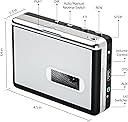
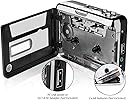
The Reshow Portable Cassette Tape Player is a lightweight, battery-operated device that plays and digitizes cassette tapes directly to MP3 files via USB—no PC needed. Featuring auto-reverse recording, included earphones, and a USB charger, it offers an affordable, user-friendly solution for preserving analog audio collections in a modern, portable format.


| ASIN | B0BMVNXWGW |
| Best Sellers Rank | #97,450 in Electronics ( See Top 100 in Electronics ) #104 in Portable Cassette Players & Recorders |
| Brand | Reshow |
| Customer Reviews | 3.9 out of 5 stars 719 Reviews |
| Digital Recording Time | [EO] |
| Format | MP3 Audio |
| Hardware Interface | USB |
| Headphones Jack | 3.5 millimeters |
| Item Weight | 0.3 Kilograms |
| Manufacturer | Reshow |
| Memory Storage Capacity | 32 MB |
| Mfr Part Number | Re-006 |
| Microphone Form Factor | Built-In |
| Microphone Operation Mode | Speech recognition mode |
| Model Number | Re-006 |
| Number of Batteries | 2 AA batteries required. |
| UPC | 796112667032 |
E**R
Easy Analog to Digital dubbing for Your cassettes
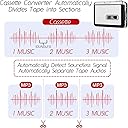
For years, I have been an avid audiobook listener, a journey that began in the era of 'Books on Tape'—a term synonymous with the pioneering company of the time. I must have accumulated 100+ titles on cassette tape, which I played on my Sony Walkman and the cassette deck hooked up to my stereo. As technology evolved, so did my listening habits, transitioning from the iconic Sony Walkman to Apple's revolutionary iPod, and ultimately, to the convenience of my iPhone. What I appreciate about audiobooks in a digital format is the ability to re-listen to them after a while, and their handy presence right on my phone. While I was excavating my crawl space recently, I unearthed my venerable collection of 'audiobook cassettes. Through my old Denon tape deck, I was thrilled to once again discover the high quality of these productions, from the narration to the sound engineering. And with so many great titles, from Sherlock Holmes with John Gielgud to Ken Follett, to Clive Cussler, I wanted to rediscover them again, but conveniently in a digital format. I initially recorded these analog gems directly into my computer, which required the purchase of specialized software and an adapter. This worked well, but it was time-consuming. I had to monitor the audio levels of the files once they were recording, and then use a second software program, Audacity, to edit it all together and export the native files as MP3s. (Some of these titles were six or eight cassettes in length!) I found that this process was tying up my computer for long periods. So, after digitizing a couple of Clive Cussler epics in this way, I convinced myself there had to be a better, more convenient way to transfer my audiobooks from an analog cassette into a digital mp3 format. I googled "Tape to Digital Converter" which led me to Amazon and this product. When it arrived, I immediately went through the 8-page folded panel instructions that were included. It's worth noting that the instructions are articulated in clear, comprehensible English, a refreshing departure from the usual perplexing 'Engrish' translations. I realized that not only could I record cassettes, but I could also PLAY them from a powered speaker, or headphones (there is a pair of ear-bud style phones supplied) as the unit can function as a tape player/recorder with both Aux line-in and output ports. The recording process is multi-faceted and easy with a standard USB drive, which you insert on the side of the unit. You can choose to record in two modes, "manual" and "auto." The manual mode will record the cassette side "as is" and you will have to turn it off manually once it has stopped. You can select auto-reverse and it will also record the other side, but you will have to stop it manually or it will continue to record each side in a continuous loop. If you choose auto mode, the software will detect the space between tracks and save each into separate files. If a song has a pause longer than two seconds, it will detect this as a new track and record the one song into two files. But, this is easily fixed as you can recombine the files in Audacity. In terms of price and functionality, this product represents unparalleled value. I am more than halfway through digitizing my entire collection of books on tape...it's like getting a whole new audiobook club membership for one low price! The overall process saves me a lot of time. As an FYI, if you have audiobooks on CDs, it will transfer those as well through the "Aux-in" jack. My laptop is relatively new, and they have eliminated external drives from these, so now I "rip" them via this unit. One final note, if you have just one boxed set of audiobooks on tape, you can sell it on eBay after you have digitized it, and the unit has paid for itself! I wholeheartedly endorse this product as the most efficient, economical, and user-friendly method for digitizing your cherished analog cassettes and other 'vintage' recordings, music included!
J**A
Good quality for the price
Good quality conversion. Good playback speed control. Music pitch seemed to be fine. It's consistent enough that I can detect flaws in the original recordings. Tape playback volume (not memory card playback volume) affects recording volume on the memory stick. You have to remember to turn the volume all the way up before converting cassette to mp3. If you don't have the volume up, the recording will be quiet and you'll have a lot of background noise. It didn't work with a regular thumb drive. Using a 32GB micro SD card and thumb drive adapter worked fine. It doesn't have a tape counter. I used the stopwatch on my iPhone to keep track of time.
M**.
Works as advertised
I got this to convert an interview my father did of his mother back in 1973. Naturally, the interview was on a cassette tape. This converter had the right combination of a good rating and a reasonable price - did not want to spend too much just to convert three cassettes. The device comes with headphones (of the cheap economy class airline variety), but that allows you to listen to the tape while it is being played. You then put a thumb drive in the USB port on the converter and click one button to start recording to the USB. You click the same button to stop. While the device can operate with batteries, you can also power off of a USB port on a computer (or charger), which is what I did. Everything worked well, and the sound from the USB file accurately reflects what was on the tape. I was able to play the MP3 on both a Mac and a Windows based PC. My only complaint is that as a senior citizen, I found the very small lettering on diagrams in the users manual to be hard to read. Ditto for the symbols on the device buttons. Nevertheless, this grey hair made it work.
G**F
A Piece of Junk That Doesn't Work--Save Your Money
What a flimsy piece of junk. I have no idea why this ranked so high on a Buyers Guide list. I bought this to transfer treasured old tapes of my family from when I was a child. I tried repeatedly to transfer the first one, and all I could ever get it to grab was 16 seconds of it. The blinking green light indicated it was recording the whole thing to the thumb drive, so I only realized after playing it all the way through that it had transferred almost none of it. When I plugged the USB drive into my computer, it uploaded a half dozen empty or 16-second MP3 files. Even if it worked, the ergonomics of this thing are terrible. The buttons are so tiny I can barely make out the markings on them. The battery compartment cover is flimsy and poorly designed, making it hard to get back in place. It even popped open once while the cassette--which lays on top of it--was inside. The cherry on top: this machine generates a ton of noise when you press record that isn't there if you are just playing the tape. Since you can only listen with headphones, your ears get blasted by that racket without warning. I'm returning this and will look for something better. I'd give this zero stars if I could.
F**N
Easy way to convert audio cassettes at an affordable price
This cassette to mp3 converter provides the user with an easy way to digitize audio cassettes at a very reasonable price. If you have the right expectations upfront, you will be happy with its performance. For example, this equipment is not going to produce a file with stereophonic quality. Occasionally, there can also be some background noise on the file, especially if there are quality issues with the original cassette. You do need to read the instructions to use it and to identify the functions of the buttons on the front and sides of the device, but once you understand these things, the converter is easy to use. What is most important to me is to be able to easily and quickly digitize the numerous cassette tapes that I have, many of which contain audio of family members who are no longer with us. Once the audio is converted to a USB flash drive, the file is easily uploaded to a computer. Without this simple device, my cassettes would just remain in storage, never be heard, and the analog magnetic tape recordings would continue to degrade.
D**N
As advertised... almost.
I have an extensive collection of audio cassettes from the 1960s through the 2000s. I have those tapes for long road trips. While I still have most of the original albums and have converted those to MP3 files, these cassettes contain radio programs as well as music I got from records I borrowed from friends. As I've already ripped my CDs and digitized my album collection, I needed something to do the same for my tape collection. I bought this product specifically because my ancient tape player quit. As a tape player, this works quite well. The sound quality is, of course, not only dependent on the condition of the cassette but also the speaker / earbuds etc. you pipe it through. Even using my worst speakers and my oldest cassettes, the sound is as good as my old Aiwa tape deck. The quality of the tape sound translates well to digital. Just one problem: the automatic sensing of "dead space" on the tape often does not work. To give a gross example, the player does not automatically recognize the end of a side. I expected the player to shut off, either at the end of ONE side or after playing BOTH sides. Instead, for any MP3 file containing the dead space (and the leader!) at the end of a cassette side, I got silence on the MP3 file. For example, the file generated for the beginning of Side 2 of one cassette had nearly three minutes of dead space... the silence at the end of Side 1 and the silence of the leader going through the cassette twice. Of course, that means it's not good at recognizing the silence between songs. If it can't detect the silence of there being NO TAPE, just a leader, it certainly can't recognize the silence between actual recordings. I tried this on several home-made tapes with specific silence periods of around 2-4 seconds and most of my files had more than one song. Two of the files contained entire SIDES of a 90-minute cassette (that's about 45 minutes of music). I needed an MP3 editor to chop up the files into something usable. -> Review of the product as a tape player (e.g., Walkman): 5 stars. Good sound quality, easy to use. -> Review of the product as a tape-to-MP3 recorder (why I bought this): 2 stars. Counts double. Ease of use good, quality good, the fact I have to edit the files... no good. Overall review: (5 + 2 + 2) / 3, 3 stars. Well, at least it didn't cost much.
S**K
SO helpful!
My first reaction at unboxing was that the Reshow Cassette to .mp3 converter seemed a little flimsy, which I had honestly expected for the low price. However, that impression was quickly abated with my first cassette to MP3 conversion. I hooked it up to mt Dell all-in-one PC with the provided USB cable for power, inserted, my first cassette and a USB thumb drive and just because my cassettes were 30 years old, fast forwarded and rewound in the hopes that would tighten the tape a little bit. It records real time, of course, so the process takes a while, but the results are staggering. Over the next few weeks, I converted every single one of my 49 hoarded-in-storage cassettes, and now I have them all on my PC and backed up in iCloud) more or less (haha) for eternity. Most of the tapes were live single track demos and my Alaska band’s live performance soundboard cassette copies, and I heard many many things that made me smile and a few that made me cry. I took the cassettes, pulled out just a few for my son, and threw them away. I highly recommend this device, and if I ever find any other cassettes, I will use it in the same manner. Kudos, kudos, kudos.
S**B
Does the job relatively easily
After comparing specs and reading reviews on many similar items, decided to try this one and I pretty happy with it so far. It seems the only options available these days for digitizing cassette tapes are devices in this price range that are all very similar, or getting a real tape deck and an computer audio interface for it. I've had a dual tape deck hooked up to my computer for decades, but hadn't used it in years and discovered it no longer functions :( Buying a new one would easily cost over $200, so wanted to try the this item as a cheaper option, and so far I've digitized several tapes with a good enough result that I can finally get rid of the original tapes. Pros: • Very inexpensive. • The process of digitizing to MP3 is fairly simple and hands free, once you figure it out. • Once you start digitizing, you don't have to monitor it the whole time. I have not heard any unexpected glitches in the resulting MP3s that have required redoing anything. Cons: • The audio quality is not exactly hi-fidelity. There is some hum and hiss even when the tape is not in motion, but it's not terrible (noise floor is around -60db). On the resulting MP3, you only notice it in the pause between tracks. When a song is playing you can't really tell. Especially if the music is loud. I'm mostly transferring metal (ie speed core/thrash) so pristine quality is not required. Might not be good though for more delicate music like classical :) • The whole thing seems very fragile. I would not plan on taking this places and using it to just play tapes like an old Walkman. I will only be using it at home to digitize tapes. The door that you have to open seems particularly fragile, and when you close it, it doesn't click shut with a very solid feeling. • Even though it has an auto-reverse function, I would recommend only playing tapes one direction and then flipping the tape over to play the other side, so that you are always using the same playback head, for consistency with the audio. • I would also recommend doing the transfers with the volume level / recording level as high as possible for a better signal/noise ratio. • Some of the button placement is weird and not intuitive, and the labels are tiny and nearly impossible to read. The manual leaves a bit to be desired, but with it you can figure out the few buttons that are involved in the digitizing process and what order to do things in. • It has a feature where you can have it auto-detect the pause between songs and make each one a separate MP3 file. Personally I didn't find this reliable enough to be useful. Too many cases where it falsely detects a gap or doesn't detect a legit one. I found it much easier to just create one MP3 file per side of the tape, then chop it up in an audio editor like Audacity. • The ear buds it comes with are terrible. I would recommend using actual headphones with a 1/8th inch adapter, or at least higher quality ear buds. Summary: I'm happy enough with it that I'm going to use it to digitize my entire cassette tape collection, and finally be able to get rid of the physical tapes. (A lot of it is original music that isn't available commercially.)
A**R
price / performance, pretty good
I would have given it 5 stars, the volume control not accurate, you have to play with volume control before you commit your mp3 final recording to your USB drive, otherwise not bad.
P**P
Usless
Did not work
P**T
Garbled output
Looks cheap ad flimsy. Output on to a FAT32 formatt memory stick was garbled and sounded as though it was recorded under water. Will keep it just to play cassettes rather than convert them. Am using Audacity for conversion with much more control.
Trustpilot
2 weeks ago
1 month ago