


Desertcart purchases this item on your behalf and handles shipping, customs, and support to EGYPT.
🎮 One Remote to Rule Them All — Master Your Media with a Swipe!
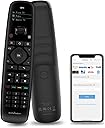
The SofaBaton U2 Universal Remote is a powerful all-in-one controller compatible with up to 15 devices including TVs, soundbars, and streaming players. Featuring Bluetooth and infrared connectivity, it offers an extended 35-foot signal range and an ergonomic design with an OLED display. Its customizable app allows effortless device setup, button reassignment, and macro creation, making it the ultimate smart remote for a clutter-free, streamlined entertainment experience.


| ASIN | B0BY8P1HZM |
| Additional Features | Ergonomic |
| Battery Type | Lithium-Ion Polymer |
| Best Sellers Rank | #67,142 in Electronics ( See Top 100 in Electronics ) #3,858 in Remote Controls (Electronics) |
| Brand | SofaBaton |
| Button Quantity | 15 |
| Color | black |
| Compatible Devices | DVD/Blu-ray Player, Home Theater, Set Top Box, Stereo System, Television |
| Connectivity Technology | Bluetooth, Infrared |
| Controller Type | Sofabaton APP |
| Customer Reviews | 3.3 out of 5 stars 857 Reviews |
| Item Dimensions L x W x H | 7.87"L x 1.97"W x 1.18"H |
| Manufacturer | Sofabaton |
| Max Number of Supported Devices | 15 |
| Maximum Number of Supported Devices | 15 |
| Maximum Range | 35 feet |
| Model Name | U2 |
| Model Number | U2 |
| Number of Batteries | 2 AA batteries required. (included) |
| Special Feature | Ergonomic |
| UPC | 795063906597 |
J**R
Best option since Harmony
This is a great replacement for the older Harmony remotes and certainly better than any standard IR-learning remote on the market. That said, there are some differences that can be frustrating if you don’t understand them, and I’m convinced this is where most of the negative reviews are coming from. First the good The U2 remote has great IR range. I’ve read that the U1 had problems in this area, but I’ve not seen any issues with the U2 model. Can control up to 15 devices and has a database of hundreds of thousands of devices for control. I had no problem getting all of my devices added and they all work as expected. The shape and feel of the remote is good, fits nicely in the hand. Button placement is intuitive you can often find buttons by feel alone, which is good given that there is no backlight. Button pushes register quickly on devices via either IR or Bluetooth. This makes for a highly responsive experience. Buttons can be customized with a large database of options per device. If you can’t find that one unique button, however, you can resort to a learning function to “learn” it from your original remote. I had no issues with this. Now the not-so-good The setup is done via an app on the phone that connects to the remote via Bluetooth. I found the app to be very basic with few customizable options. For instance, coming from the Harmony family, you could program every button with actions from any device and customize fast presses or low presses for each button. I found no such option with the U2. The app is good enough but very basic. Some will appreciate that but for someone in the IT field like me, I would have appreciated more options. Macros are not allowed for Bluetooth devices. This may not affect you if you use only IR devices or do not wish to utilize Macros, but this would be a nice option to have if you are using Bluetooth devices. There are no “Activities” like you had with Harmony. You can work around this with Macros, but it’s not quite as intuitive as the Harmony system. Button clicks are loud. Not a huge deal, but you definitely hear it when you push a button down. No backlight! You can typically feel your away around the buttons as they’re all shaped slightly differently but still, a backlight would have been nice. Programming is done using Bluetooth to connect to the remote. This connection is broken once you setup your first Bluetooth device to be controlled by the remote. That means you have to re-pair with the app each time you want to make changes. Not a huge deal, but a bit of a nuisance. I did find that the remote re-connects to the programmed Bluetooth devices automatically, however, so it’s not as bad as it could be. So, with all that said, I’ve very much enjoyed this remote! It has been a solid replacement for my older Harmony models. I would highly recommend this to anyone with multiple remotes and many IR or Bluetooth devices. There is a bit of a learning curve though, so don’t get too frustrated when you first start out. If you stick with it, I’m confident you’ll be very pleased and will be able to make this remote work for you!
D**N
What should be easy proves to be difficult
First of all I should have read the negative reviews before I ordered not one but two Sofabaton remotes with the intention of replacing my much loved Logitech Harmony remotes that became useless when I foolishly decided to allow my cable provider to remove my slow but relatively dependable cable and install fiber optic with Sagemcom control streaming boxes. Sure I negotiated a much better price for my package but the resulting tech issues have cost me a huge amount of time and angst over the past two weeks. The problem is that many reviews describe the Sofabaton as a worthy replacement for the Harmony and even Wirecutter rated it as "best buy". I'll take that up with the NY Times this week but here's my review of a few of the issues. 1) Pairing this remote with my basic bedroom setup of Samsung TV and sound bar plus a Roku 4K device for streaming was a nightmare. I was stuck between trying to get someone (anyone!) from Optimum to help figure it out and having to communicate with Sofabaton's support tech people who are HQ'd and responding from Hong Kong. Much the same as many other tech gizmo manufacturers you can't reach them by phone and this leads to extended email communication that comes in as Chinese but AI translates to English. This means frustrating communications as well as time gaps when you're trying to figure out terminology and pairing. 2) Eventually I was able to connect my streaming device to the new remote but ONLY by the "teaching from the original remote". Trying to enter the model number of even a relatively new soundbar proved very difficult as Sofabaton recommended a different model number and when finally paired reduced the soundbar to a silent brick. It took hours to figure out how to disengage the remote pairing and get the sound bar to operate. 3) In other reviews that are more positive I read that users liked the button setup and overall feel of the device. I have to strongly disagree on a few items: The keys are tiny and unlit and if your lights are off and you're going to sleep good luck on figuring out where the power button is. The screen is very poorly backlit (expectable on a low priced device) and very difficult to see the tiny print of the loaded devices. When I finally got the TV and sound bar connected using the roller scrolling device was pretty clunky. After everything finally got connected it turned out that the "6" key was nonfunctional and when hit would send the channel selection into wild unspecified channels. 4) My one positive comment is that despite working with a 12 hour time difference and using AI to translate language the response of the Sofabaton tech support was good. Their responses were as prompt as they can manage and while clear the terminology issues created by language differences is an issue. The problem is that the device is not easy to program in the "Macro" settings where the reason for a universal remote lies. What's the point of a universal remote if you can't even pair the most simple of operations easily or at all? My final comment is that I now have to go back to work and try to find a universal remote that is comparable to my Harmony at least in terms of function and ease of programming. I'm very disappointed with the Sofabaton.
M**B
Pretty easy to setup but a button stopped working after 1 month
UPDATE 2: Since Sofabaton replaced the defective one and told me to just keep the old one, I figured I'd take it apart to see what was wrong with it and just get an idea of the construction. The good news is it's relatively easy to open up (there are two screws under the rubber "nubs" on the bottom, just FYI). The buttons use a metal disc/membrane style. I was able to peel up the plastic covering the number section and I did see some corrosion or something on that metal disc for the "4" button which is why it didn't work. I used a little IPA to clean it, put it all back together, and it's working now. The metal discs are only held in place by the plastic sheet so if you had to do this on some other key in the middle, you may have trouble trying to get to it, but fortunately for me it was on the edge. So far, so good, I put this in my other room controlling just a few devices and it's working good so far. I'm attaching a photo of my disassembly and testing. I used an external power supply to test it out in place of a battery when I was working on that button (screwdriver is pointing to that flaky "4" button disc). My replacement is still doing well too. It seems like sometimes it doesn't "wake up" when I press a button even though the screen turns on. I've noticed this after a few days, and pulling the battery and putting it back in actually seems to get it working better. "memory leak" possibly? :) UPDATE: I reached out to the manufacturer and they were very helpful in sending out a replacement U2 remote which solved the issue (where the "4" button wasn't sending anything). Curiously, when setting up the replacement (I still wish there was a backup/restore feature) I noticed that the Denon AVR-S930H I previously used was now missing some of the discrete "input" commands, but I used a S950H model instead which had them all. So that tells me their command database gets changed/updated and maybe not always for the better. You might have to experiment with similar models to find one that has what you need. And I'm still hopeful that future app and/or firmware updates will add some of the missing functionality I'm hoping for. --- Original review: I wanted a replacement for my aging Logitech that's been having issues. This one seemed to fit the bill the best out of all the options. It was pretty easy to setup using the app on my Android phone. A couple things became apparent though after using it for a bit. PROS: - I like the bluetooth support and I programmed a few keys to manage my HTPC so I could play/pause, etc. without having to use my wireless keyboard. - The app is pretty basic but easy to use, not much of a learning curve. - The IR power seems to be about the same as my Logitech was. At least, it works from the same distance and I don't feel like I have to be aiming right at the device like some cheaper remotes I've had over the years. CONS: - The "4" button no longer sends anything, no matter what device I'm controlling. It doesn't show anything on the display to indicate it's sending IR, like it does for other buttons. That's just weird. Maybe it never worked... I don't remember if I'd seen it working before, but I noticed after 1 month that when controlling my Xfinity X1 box, which I finally got to respond by adding an IR repeater (known issue with weak IR receiver on the XG1v4 box), I could put in any other # but not 4. Then I tried on my Tivo, Blu-Ray, Denon receiver, etc. and nothing, it just doesn't send, as if the button is physically dead. It clicks fine (super loud clicks like all the others), so maybe it's software/electronic related? - Once you setup a device, you have ZERO ways of modifying the type of device. Yes, you can modify key assignments, but you can't change what the device is. Like if you get a different Blu-Ray player, you can't change from Samsung to Sony, you have to delete the old device and setup a new one from scratch. Normally that wouldn't be terrible, but in my case I had a bluetooth device to control my HTPC and I had all kinds of custom buttons setup for it. Then I switched to a different computer and wanted to pair it up again with the new one and keep all of those button assignments, but you can't do that! I had to delete it and then spend a bunch of time remembering what all the customizations were. I should be able to pair it to a new device, right? - This brought up another aspect - there's no way to backup your configuration, or even view how your devices are setup. I have a list of all my devices (makes, models, etc) but maybe I want to make sure I put in the right info when I set it up? But again, all you can do in the app really is change the display name and modify buttons. - The remote does not have distinct buttons for things like page up/down that most cable boxes have (or I could have used that for Tivo thumbs up/down which is how I had my Logitech doing it with those separate up/down buttons on those). I worked around it by using a couple of the "color" buttons for page up/down but that only makes sense to me. Good luck to anyone else using the remote with instructions taped to it. :) The other color buttons I used to mimic the Xfinity "A", "B" (didn't care about C or D) buttons, so again, doesn't make a bunch of sense, but those are less common across other remotes so I'm fine with that. It would have been great to have a couple of "customizable" buttons though, for generic use. In the end, given the shortcomings and the fact that "4" doesn't work at all, I'm probably going to eat the cost of this and it'll become e-waste, unless the support email I sent to Sofabaton results in getting a replacement or something. I don't know if I can exchange through Amazon since I didn't keep the packaging, but I'll try that avenue if Sofabaton doesn't come through for me. On the flip side, if Sofabaton and/or Amazon does get me a replacement eventually, I'll bump my review, because the other cons I mentioned were kind of known in advance and maybe, just maybe, those could be addressed for the most part with some software/app updates, and my workaround for missing customizable buttons is good enough that I could live with it.
B**Y
Great remote, but poor quality control
As a universal remote, it is fantastic. Huge number of devices. Ability to reassign buttons to any device so while on cable box, the volume controls the sound bar. However, quality control is terrible. I've had to return/replace remotes that didn't function fully upon arrival. Scroller wheel works poorly. Batteries last less than 3 months. Other remotes last 6 months.
V**E
Excellent value for a universal remote that offers bluetooth, infared, an app, and macros!!!!
Fantastic remote! I'm currently using it to control my FiOS set top box, Amazon Fire Stick 4K Max, and a 50" TCL TV. The remote itself is well built, with a good selection of buttons. The app is fantastic, and easily gets you up and going creating macros or adding devices. I can't understand why the app has such a low rating on the Google Play Store. The app itself is easy to use and works great, it's just not as polished looking as some of the bigger companies might be able to afford to do. The one gripe I have with the app, is if you have a device added to your remote that requires a bluetooth connection, then upon using the app you have to press the bottom two buttons on the remote for it to disconnect from the BT device it's connected to so it can connect to the smartphone you have the app installed. For the most part it switches back and forth easily, though there are times it wont connect to the smartphone and you have to keep trying to reconnect until you have success. The only cons or suggestions I have are... 1. I hate the scroll wheel, which is used to select your device. I always wind up accidentally moving the scroll wheel when I pick up the remote, then I have to go check to ensure it's set for the device I'm currently using. If they re-design this remote, they should abandon the scroll wheel and replace it with three buttons. Up, down, and a button to add your most used devices to give quick access. 2. When creating a macro, I don't see an option to automatically change the device on this remote. For example, if I create a macro to switch to the port my FireStick is on, I also want this remote to automatically switch to the FireStick device I have stored on this remote. Instead, you have to manually use the scroll wheel to do that. 3. The buttons have a fairly soft and quiet click to them, but they could be quieter. Theses days, manufactures are focusing on making buttons very soft to the press and very quiet. This remote control manufacture should implement their remote buttons to feel like they do on a current model FiOS STB remote control or how Logitech designed their buttons on their Logitech MX Master 3S mouse. Overall, I'm very happy with this remote, and feel the remote is well worth the cost.
C**P
Eats AA batteries like candy!
Device works, but it leaves a lot to be desired in a number of ways. After owning for about a year, these are my observations. The learn feature is really nice. However, it doesn’t work very well with Roku systems. There are Roku systems that don’t use IR, and these will need to be manually configured. These are not older Roku devices. They were bought in 2024. It’s possible to get the remote to work with these systems but, if you struggle with technology, don’t buy this remote. You will have to program the remote manually for the Roku. Once the remote is programmed, if it does lose its configuration or things get flaky, you just reload your configuration from your phone. Works quickly and well. My biggest complaint about this remote is, it eats batteries like candy. I’ve had universal remotes that worked just fine in the past that didn’t need batteries every 3 months or so. I don’t know why that would be but, I can speculate that it has a little to do with the video screen. That should stay off until the device is picked up or, better yet, until a button is pushed. It seems to come on randomly, possibly from faint vibrations we humans can’t feel. I say that last part sarcastically. I have no idea what is really going on. I have learned the batteries are dying over time from the symptoms it produces. At first, it seems like not all the devices come on unless the remote is aimed directly at them, mostly struggles with my Sony 4k. Then, eventually, it becomes necessary to push most of the buttons 2 to 3 times before the function responds. I tried moving the batteries around inside the remote, and that seems to work for a day but, eventually it will no longer manage my Sony 4k at all. As soon as I replace the batteries, the remote again functions normally for another 3 months or so. A battery tester shows the batteries are weakened but, they still test in the lower area of the green on the scale. That should mean they’re good enough for most devices. Recently the LCD screen became unreadable. After about a week of this the LCD stopped working altogether. These are very creative devices but not well built or engineered, no matter what you may read in reviews by those who have used them only a short time before leaving a review. Honestly, I probably wouldn’t recommend someone buying this remote. I wouldn’t unless there were assurances they fixed the battery issue, which I cannot find any information about. I can’t help but believe others are struggling with the same issue.
J**K
After 2 months I definitely recommend!
Update 01/03/2025: After almost 2 months this remote is still going strong. Have not had to put in new batteries yet, the original ones are still good. The double-clicking issue that I talked about below is still happening, but sporadic. I'm guessing that it is a problem with the remote, but is a minor irritant. I've had to reconnect it back to my phone twice now, in order to reset the programming. Don't know what is happening but those were early on and haven't had to do that for the past month. Other than those two minor issues, it works as good or better than I could have hoped. I definitely recommend it for those of you who are looking for a Harmony replacement. Original review 11/12/2024: Like most others, I have been needing to replace my old Harmony remote for awhile now. After reading all of the reviews I decided to take a chance on this one because most indicate that it works a lot like the Harmony which I loved. I was a bit apprehensive because I'm 70 yo and have forgotten more than most people ever learn about computers and programming. Since I really had no other options (within my budget) I went ahead and purchased this, and so far I'm glad that I did. First things: Programming was very simple, it immediately recognized my LG TV, Sony stereo, Roku streaming box and Sony blue ray player. I did have to go in and manually set the volume up, down and mute on the TV, Roku and DVD so that they used the stereo for audio, but that was very easy to do. The remote, from the start, works exactly as needed so far, although there my be some functions that will need to be adapted that I haven't found yet. There are a couple of things that I see as "not a problem" but keeping a watch on, and that is that most of the buttons want to "double click" when you push them. A little irritating, but after a week it doesn't seem to be as bad as at the start, so either there is a break in period where it gets better or I'm learning to push gentler so it doesn't register the 2nd click. The 2nd thing that keeps my rating at only 4 stars is that it uses 2 AA batteries instead of having a charger and internal batteries. Maybe I'm just used to the Harmony, but that would be a huge improvement. Overall I'm very happy with the results, not perfect, but good enough for $50 compared to $300 for a new Harmony without any support. Wholeheartedly recommend!
D**K
I really wanted to like this remote.
Of course no support for a new 2023 tv. The TCL 2023 lineup (75Q750G in my case) ditched roku (thankfully) and went to Google Tv (the best tv os out there!!!). Unfortunately this makes all previous TCL remotes and support pretty much non existent. First let me say that i played around with this remote for around 5 hours, finally getting it to a semi-ok state. Unfortunately to achieve this, I am using many IR commands instead of bluetooth. On the new remotes there are short and long presses for certain buttons (for instance home button, a single press take you to the home screen, a long press would take you to settings, the power on/off actually seems like its 2 different commands as well as when hooked up bluetooth, the remote will only power off the tv, it will not power it on, etc etc). This alone makes it very hard to program the remote to the buttons with short press keys. After browsing the forums, it looks like support has been non existent for some time now, which is very upsetting. Being one of the only universal replacements after harmony, you would think sofabaton would support the latest and greatest and make sure they stay on top of new releases, but that is not the case. Also no mic for voice control? There are literally 9$ universal remotes that actually support voice control, but a 60$ fancy remote cant? The device often lags before it send commands. Ive also seen it send a double command a few times. I uploaded a screenshot of my current profile, as you can see the bluetooth profile only supports the buttons outlined in red (which the numbers and playback controls arent even present on the tcl remote and are just a waste) and all the blue outlined buttons are custom IR commands. And to top it off, I lose all long press functions of the stock remote as well. What a joke huh? Ive also uploaded pictures of the stock remote, and tv model just incase somebody from sofabaton actually reads this and wants to help the community and their brand. Unfortunately thats just half of it. So the reason I even bought this remote is because I own a bose sound bar that lacks ARC(HMDI port) and uses optical and I do not want to have to use 2 remotes. (I also have a gripe with TCL not allowing their remotes to be programmed to support more than just the tv like the remote that comes with the ONN device, which happens to be the best remote imho.) Well thankfully the bose system uses IR, so that was actually an easy setup. The problem is when I went to create a macro to turn the sound bar on and off when i press the power for the tv. It maybe worked twice out of the 10 times I tested it, to the point I got rid of it and they have separate power buttons. The remote is much bigger than it should be, and makes it feel a bit clunky and outdated. As I stated before, I really wanted to like this remote, but I am having a hard time doing so. An updated TCL bluetooth profile that actually works would be a start.
F**A
Superou minhas expectativas.
Bom, apesar de inúmeras avaliações negativas, pelos mais diversos motivos, e observando que as avaliações também estão misturadas entre U1 e U2, resolvi comprar uma unidade deste controle. Tenho um Harmony 650, mas infelizmente alguns botões começaram a falhar o que deixa a experiência muito ruim. Enfim, sobre o Sofabaton U2, que comprei no dia 13/05/25 e foi entregue na minha casa no Brasil no dia 19/05/25, mais rápido do que algumas compras feitas aqui, posso dizer neste pequeno tempo utilizando, que superou e muito minhas expectativas. A facilidade em programá-lo e criar as Macros, é muito satisfatória, apesar de não ter as "Activities" a forma fácil de usar o scroll pra trocar entre os dispositivos, torna desnecessária qualquer "activities", pois ao selecionar o dispositivo e apertando o botão que configurou a macro, ele faz o trabalho parecido ao de uma "activity". Faço comparação com o Harmony no que eu utilizava nele, e não em recursos que existiam, mas não eram utilizados por mim, portanto minha comparação é muito pessoal e pode ser que não atenda a necessidade de outros. Tive um Harmony One por volta de 2012 e 2014, porém quebrei pisando em cima sem querer (Claro), fiquei muito chateado e comprei o 650, mencionei isso, pois a quantidade de dispositivos parece que não, mas faz diferença, o ONE tinha a possibilidade de usar 15 o 650 cai pra 5, o que é uma diferença grande. O Sofabaton U2, tem a possibilidade de utilizar 15 dispositivos entre Infravermelho e Bluetooth, e as macros funcionam com botões de dispositivos IR e BT misturados, o que eleva ainda mais as possibilidades de combinações. Vou voltar em outro momento para complementar minha experiencia com o controle, mas posso dizer que é um excelente produto, muito bem construído, bons materiais, e apesar do preço podemos classificar em uma categoria acima de muitos controles vendidos por aí. Resumindo, boa construção, facilidade de configuração e uso, me deixou satisfeito com o controle adquirido na Amazon EUA (Minha primeira compra na Amazon USA). *Em avaliações onde a reclamação era referente ao Wake, com a possibilidade de acender a tela ao pegar, isso não acontece, portanto pra não ter esse aborrecimento, deixe a opção ativada, mesmo que provavelmente gaste um pouco mais de pilhas, mas nada que um par de recarregáveis não resolva. **Em avaliações onde a reclamação era referente ao barulho das teclas, acredito que por ter comprado em 2025 essa seja uma nova remessa ou não tenho tanta sensibilidade com o barulho dos botões, pois o original da minha TV Philips de 2024 é mais alto do que o do U2. ***Em avaliações onde a reclamação era referente ao apontamento do IR, não tive esse problema, em nenhum momento precisei direcionar o controle para o dispositivo como se fosse uma mira laser, bem tranquilo e sem falhas. ****Utilizando em Vídeo Games, somente funcionou nativamente no Xbox Series, no PS5 só funciona através do CEC, que funciona bem, mas não é de forma Nativa. Acho que por enquanto é isso, espero ter ajudado com a minha experiencia inicial.
W**E
Is A Nice RC
Is good for old people to use it compare with modern RC which very less button
Y**V
Poor quality
Takes several presses and seconds to wakeup. After sleep recognizes several presses suddenly. In 2 months several buttons lost click response.
S**U
Easy to setup, program and use. Great price.
Great remote for replacing all your remotes. It's easy to setup and use but can use lights under the buttons for use in the dark. The learning feature is easy to use and you can program all the buttons very quickly. I found that there aren't enough buttons for all the commands on some remotes so you have to choose the ones you absolutely need. The other way around this is to create 2 remotes and splt the commands over these. I put basic functions on the first and setup functions on the second. Overall it's a great remote.
F**N
Não substitui um Logitech
Duas coisas: alcance ruim e banco de dados de equipamentos muito fraco. No meu caso, dois problemas sérios. Eu possuo um HT, receiver, MD, Cd player, etc e não programei quase nada - os mais modernos ok, ou seja, praticamente não me serviu. Então fica a dica: dá conta do básico mas nunca vai substituir um Logitech. Paciência.
Trustpilot
3 weeks ago
2 months ago