Desertcart purchases this item on your behalf and handles shipping, customs, and support to EGYPT.
🖱️ Elevate your workspace with precision and comfort — because your productivity deserves the best!
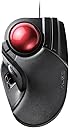
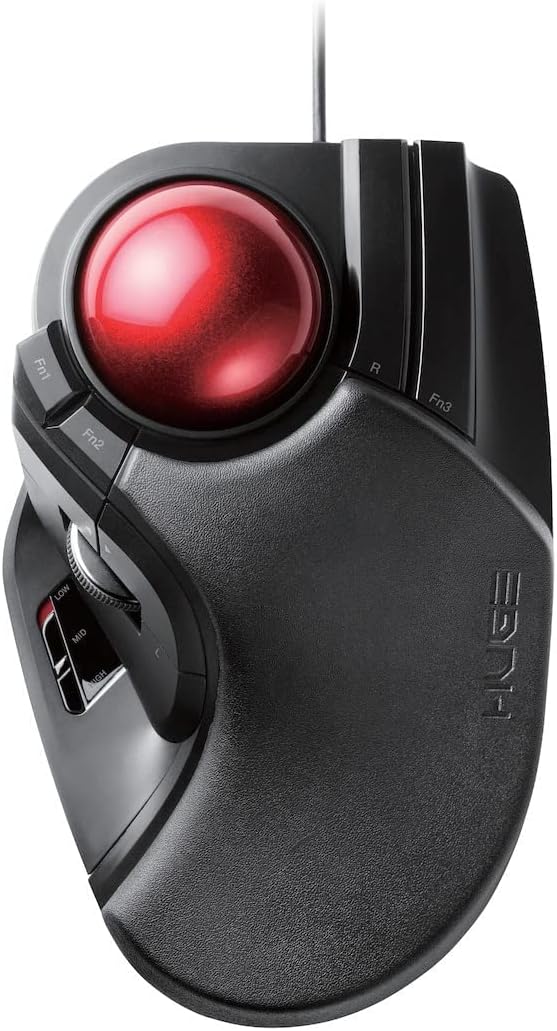
The ELECOM Huge Trackball Mouse (M-HT1URBK) is a wired, finger-operated device featuring a large 52mm trackball for smooth, precise cursor control. Equipped with a high-performance optical sensor offering switchable DPI settings (500/1000/1500), it supports efficient navigation with 8 programmable buttons including horizontal scroll. Designed ergonomically with a low-resistance palm rest, it reduces wrist strain for extended use. Maintenance is simple thanks to easily removable ball bearings that resist dust buildup. Compatible with Windows and macOS, this mouse is ideal for professionals seeking enhanced productivity and comfort.


| ASIN | B07353DBP9 |
| Additional Features | 4 Way Scrolling, Ergonomic Design, Programmable Buttons |
| Antenna Location | Graphic Design, Office, Personal, School, Video/Photo Editing |
| Best Sellers Rank | #26 in Computer Trackballs |
| Brand | エレコム(ELECOM) |
| Button Quantity | 8 |
| Color | Black / Red ball |
| Compatible Devices | Laptop, Personal Computer |
| Connectivity Technology | Wired |
| Customer Reviews | 4.2 out of 5 stars 2,094 Reviews |
| Enclosure Material | Plastic |
| Global Trade Identification Number | 04953103308169 |
| Hand Orientation | Right |
| Hardware Platform | PC; Mac |
| Included Components | 2 x AA Battery, Product Manual, Trackball |
| Item Dimensions L x W | 7.2"L x 4.5"W |
| Item Type Name | ELECOM Wired Finger-operated Large size Trackball Mouse 8-Button Function with Smooth Tracking, Precision Optical Gaming Sensor (M-HT1URBK) |
| Item Weight | 9.44 ounces |
| Manufacturer | ELECOM CO., LTD |
| Mfr Part Number | M-HT1URBK |
| Model Name | HUGE |
| Model Number | M-HT1URBK |
| Mouse Maximum Sensitivity | 1500 dots_per_inch |
| Movement Detection | Optical |
| Movement Detection Technology | Optical |
| Number of Batteries | 2 AA batteries required. |
| Number of Buttons | 8 |
| Operating System | Windows 11、Windows 10、Windows RT8.1、Windows 8.1、Windows 7、Windows Vista、macOS 13 Ventura |
| Power Source | Corded Electric |
| Range | 5.0 meters |
| Special Feature | 4 Way Scrolling , Ergonomic Design, Programmable Buttons |
| Style Name | Wired Trackball Mouse |
| Unit Count | 1 Count |
| Warranty Description | 1 year manufacturer |
N**L
Finally! Thank You, Thank You, Thank You!
Update (7/13/2023): I purchased an alternative that seemed close in 'stature' to this mouse because I wanted Bluetooth connectivity, as mentioned earlier for my notebook(s) in case I travel. In general I wanted to just use one mouse. The idea is I use it on my PC (using usb dongle) and then BT elsewhere. Anyway, I got a Nulea, which is nice but it still doesn't hold a flame to this mouse. The back of the Nulea is almost slippery compared to the HUGE and is not as wide, thus, it just doesn't feel as comfortable. My hand sort of just wants to slide off the surface, which makes the material they popped on the HUGE pretty thoughtful. Update (5/10/2023): This has remained my absolute favorite mouse. Wear and tear is so very low even though I use it daily. All I can hope for now is that they make an almost identical updated version, but wireless AND Bluetooth and maybe even a plug-in for a wire so I can buy one to use with my notebook(s), basically a Deft Pro version of this mouse. Again, I personally love and highly recommend this device. This is THE PERFECT finger trackball mouse for bigger hands (and even perhaps, for any hands). Initial Review: I'm one of the unfortunate few index trackball addicts. I cannot use a regular mouse for very long and I certainly can't use a regular mouse for any sort of gaming. That being said, what started me on this terrible journey was a Logitech Marble Trackman - that trusty trackball that's still around. Shortly after succumbing to the trackball, I moved on from that to a Logitech Cordless Trackman Optical, this is where things went wrong. It was for me, the perfect device. A trackball mouse that just seemed to fit perfectly in my right hand. It had a few extra buttons that came in handy for games. My first lasted 2 years and the second lasted roughly the same except just before this one died Logitech decided to discontinue the product - oh, %^#t. I went through phases of tech grief, which are sort of similar to regular grief. I denied that the product was discontinued and convinced myself that the product was cycling, which is when they sometimes discontinue the product and re-release it in a few months with different colors or a different name. This did not happen. I then became quite angry, which I know is quite silly but hey, it happened - because I felt betrayed by the company. How can you, as a company, release 1001 different models of the same mouse but just 1 very, very, very basic model to cater to index finger trackball users? I then entered the bargaining phase, which is where the tech part of this comes in. I took to their forum, Twitter, Facebook, anywhere I figured I could nudge the company into getting the idea that we (index finger mouse users) exist, enough so to at least bring another model to market. I came pretty close to publicly begging. After months and not a peep from the company, I became sad - depressed isn't the word I'd use, again, this is not real grief, just tech grief. I felt sad because I felt really uncomfortable and out of place using a regular mouse and nothing else was working for me. I tried several from various companies like Kensington and the thumb trackball from Logitech (which I cannot use, whatsoever). Finally came acceptance. A slap in the face recently is that the company introduced a new thumb trackball, as if their M570 weren't enough, they released the sleek MX Ergo Plus - Ouch. I bought a new Logitech Trackball, the basic one, you know and that was that for some time. Enter Elecom, a foreign company that doesn't seem to be on the radar yet. One day I decided to do another search for trackball mice and I discovered the Deft or EX-G series, whatever they call it. I bought it and it turned out to be a great cordless Trackball, however, the ball never quite felt right and the shape was just off enough to make it, not quite a gamer mouse for me, though I could use it for everyday PCing, etc. Finally, finally, I get what I want/need. They've released a larger version that is, perfect, for what it's worth. I can't really explain how great it feels so I'll say this. I wrote those previous anecdotes for a reason, so you could/can identify with me. If you've ever used that darn Logitech Cordless Optical Trackman OR the Microsoft Trackball Explorer, which is very similar in feel, then this is it, folks, this is the trackball for you. At first, it feels a bit large, too big in fact - but give it a few, just like the Trackball addiction sneaking up on us, the device eventually becomes just right. I don't quite remember how my hand was when I used the previous devices but I think the most jarring difference is that you won't have to contort your ring finger to right-click, as the buttons lay right under your hand in a naturally open position. The top of the device is large and there's soft padding so you literally just lay your hand down on top of it, it's very comfortable. There are some extra buttons that I haven't figured out how to use since I haven't read the manual (3 function buttons) but you get the staple of an advanced Trackball otherwise, you get a clickable scroll wheel in addition to 2 clickable buttons (forward/backward for browsers) just above it. All of these tend to work universally and are easily bindable in games. The left button is under the scroll wheel in a really great position, IMHO, as my thumb sits right there. The 3rd function button lies beside the right clicker. There's a switch on the device that seems to increase trackball speed manually vs. through software. So far, it's a fantastic device. I got the corded version and am seriously considering buying 2 or 3 more and just putting them away, just in case. I'm giving it some time to see what if anything happens to the device after months of use. Thank you Elecom and Thank you seller and Amazon! Just came back to say that after many months, the mouse still works perfectly. I own 2 now. 1 for my main system and another for my work system. I'm going to buy 2 more as I mentioned before to put away, just in case Elecom decides to call it quits on production. I also have my eye on the Bluetooth model that I will likely use with my mobile devices - I'll see. The HUGE is so great, I'm not sure I want to change the formula.
K**S
Trackball 5 Stars, Software 2.5
The Elecom Huge is the first finger trackball I have ever used. I have used the famous Logitech M570 and I quite liked it. However I have heard from others that they prefer fingertip balls best. After trying this thing out for a few weeks I can definitely say that I am one of them. The thumb balls were much more natural to use at first since the key placements (at least on the m570) were pretty much identical to what you would find on a regular mouse. It really didn't take me long to adjust to this trackball though. I have heard that break in on this trackball is must and after owning this thing for a few weeks I will have to 100% agree. When I first started to use this trackball It was very notchy. What I mean by this is that when you go to move the trackball it initially sticks until you start moving it. It is really smooth under constant motion though. I almost sent it back after the first day or two, but decided to give it the full week as recommended. I have used it for about 2 weeks collectively since I bought it (off and on usage). Every day that I have used the trackball it has gotten smoother. I would say it is about 90% smoother now and I'm sure over another week it will be perfect. The button placement is actually really great. It seems weird until you actually start using it. The biggest Achilles heal to this thing is the software. Once you actually get everything up and running it's actually pretty good, but it is quite buggy (or at least my version is). Getting to it can be a pain but once downloaded it's pretty straight forward. It is supposed to have gesture functionality but mine has never actually worked. I have read that uninstalling and reinstalling helps but that hasn't helped me at all. I think it's a huge oversight for the software to require that you delete all other mouse software before installing this for it to work. I can't speak for everyone but I have several mice that I use (since I am not comfortable enough to use this thing for gaming yet) and having to uninstall that for this work is crazy. The other thing that this thing does differently from the m570 is the fact that it is much flatter, this can stress your wrists if you don't position your hand just right. I will have to disagree with many people who say that this mouse is only for small handed people. I have pretty big hands and every time I put my hand on the HUGE it feels like it was made for my hand. What helped me is turning the mouse to about the 1 o'clock position (maybe 1:30) and a few inches past shoulder width so my arm slightly rotates outward so my forearm and hand are aligned. The part of my hand that wrests on it makes a backward C shape, from the pad at the top of your hand (metacarpals) around the outside of my hand and stops right almost at the center of the bottom of my palm. I have my hand slightly rotated outward to put the pressure on this backward C part of my hand to not put strain on the delicate parts of my hands. My pointer finger rests in the center of the ball while my middle and ring fingers sit on the buttons. I only bring my middle finger to help with bigger swipes and then I move it back to the button so I don't over stress my joints. For people with smaller fingers or hands you can even use 3 fingers to move the ball, I was actually subconsciously doing this for a few days before I made myself break the habit. This is quite comfortable for me but I think it could benefit greatly from a tilting function. I have seen several 3D printed add on mods to help with this. As it is though at just over 50$ it was definitely worth it to try out. The biggest advice I can give you is to use the natural oils in your hands to break the trackball in, I have heard of some people using some sort of dry lube to help but I don't think you need to go that far. I just played with the trackball a lot while I was at my desk and this really helps to break it in faster. I'm sure someone else who works at a desk full time could break this thing in faster than me, but so far it is getting their. If your bearings don't smooth out after...let's a month, you can always replace the bearings with some other ones, there are a few YouTube videos I have seen that show it in detail (that is if you love everything else about the mouse). For a bit more "traditional" button layout you may want to check out the Elecom Deft Pro that has a smaller track ball and has been reported to have smoother bearings straight out of the box. It isn't as huge but for some it may be more comfortable. I hope this helps! If anything crazy happens for the better or worse I will be sure to right an update. Cheers!
A**M
Great trackball, but you must replace the bearings for an optimal experience.
I love this thing. It has almost everything I want in a trackball. It is comfortable to use for long sessions at my desk. The buttons are great. The scroll wheel makes a nice, but quiet, tactile click when you scroll with it. The only problem I have is the 'hard start' of the track ball itself. I tried a number of different things, but ultimately I fixed it with by replacing the existing corundum/ruby bearings with 2.5mm zirconium bearings for $7 and 20 minutes with a small screwdriver. I would have given 5 stars if I didn't need to first take it apart for it to work properly.
G**R
Fits Large Hand Like A Glove
The mouse is out of the box and connected for about 30 minutes and works great so far. I have been a 23 year trackball user, and every time I am forced to use a regular mouse like at work, I always look forward to my trackball. I know it's difficult for regular users who have never mastered the art of the trackball to get comfortable, as their is a learning curve, but I love them. Once mastered I never wanted to give it up. I started out with microsoft Trackball Explorer which I loved until it eventually died, then luckily I purchased Logitech Trackman just prior to them discontinuing the model. Logitech doesn't even make a trackball that utilizes the middle fingers other than a cheap 20 dollar model that has no features and is just plain with no gaming abilities! That original Logitech Trackman mouse I had is still going strong after over 10 years, however the software started conflicting with Win10 & 11 and I kept having to disconnect/reconnect to USB to get it to be recognized. I had been looking at the limited availability of a decent trackball mouse over the years and the Elecom product always seemed to be the best design and quality, especially as the reviews were positive. So I pulled the trigger and purchased the Deft model. That small mouse arrived and I knew after like 20 minutes it was too small for my hand. In order for me to have my index and middle fingers properly, comfortably placed on the trackball, my wrist would have to be behind the body of the mouse and floating above the plastic, not in contact with anything. It was a bad combination for me. To slide my hand down and forward to rest comfortably on the mouse, my fingers would be way in front of the ball. So I returned it and ordered the 'Huge' model. At first it was like, Ruh Roh this thing is huge... appropriately named but it looked like maybe oversized?? But after resting my hand on it and then connecting and using the mouse, it was obvious this one was going to be a winner just based on ease of use, comfort, it's just a little getting used to the button placement. I quickly realized the size of the mouse includes the bulk of the mouse closer to the forearm/wrist, which is soft foam and designed to be a wrist rest. It works! My prior mouse didn't have any soft resting area for the wrist but didn't really need it because it fit so perfectly in the hand. Now that I have a wrist 'rest' I am glad that it was thoughtfully included. As for the software to customize, there are plenty of settings to program to my liking, the only glitch was on first launching, it opened in Japanese so it took a minute or two to find the drop down and switch to English. Not enough for a ding on star rating but just a noticeable annoyance. It's a bit early to give this mouse a more definitive review, but I would say out of the box and with a couple of tweaks, it looks like this mouse is going to satisfy my needs adequately. The pointer is smooth and not too slow or fast, and scrolling windows is also not jumpy or to fast. Other reviews were on the mark as this mouse is a winner out of the gate.
O**5
Okay to Test if You Like Using Trackballs
Relatively speaking, this is a very cheap trackball, and this is built like you'd expect for a cheap trackball mouse. I used it for long enough to realize that I massively prefer using my fingers to move a cursor around over using my whole wrist, and I'm now moving on to a higher quality product. I first thought that - the name of the product being "Huge" - my hand would be dwarfed by its size, but in person it's so small as to be uncomfortable. I had to fold up a small towel to fill the space where my hand naturally rests to reach all the buttons and the actual surface of the mouse, and my hands aren't large. The bright red ball feels very nice and weighty in the hand, and I'd even call it the highest quality component in the whole mouse. It's a shame that weight is actually a disadvantage in a trackball mouse, as I can feel it working against me when I'm trying to get the ball loose and rolling. Other reviewers mention the static friction, and I think that it's overblown as an issue. Similar to this product, many mass-market mice mount the ball on static low-friction points, which allow the ball to roll smoothly once it's moving but ultimately are immobile surfaces that can stick against the trackball when you're trying to push it from a stop. My next mouse will have actual bearings, but for some reason all the trackball mice that use bearings are almost twice the cost of the Elecom Huge here. This is why I'm putting my halfhearted recommendation behind this product for someone new to trackball mice; if you don't mind what your mouse precision is, it does a good job of relieving stress on your wrist compared to a normal mouse, and most other trackball mice will have similar performance in this price range. There are other quality issues that aren't any big deal on their own, but amount to a disappointing result when taken together. The base of the mouse was uneven, and rocked and wandered its way across my desk whenever I removed my mousepad from under it. The ball is unreasonably difficult to remove for cleaning. The buttons are made of cheap plastic and have sharp, exposed edges that will catch your fingers as you're using them, and are placed in an awkward, narrow configuration that doesn't fit the rest of the shape of the mouse. If I were missing the last joint in every finger of my right hand and had an extra joint in my thumb, the mouse would fit perfectly. Or if I place a folded up towel under my hand. None of the buttons have a great click feel, but the middle click under the scroll wheel is particularly terrible. The middle click. I hate the middle click. I stopped using this mouse because of the middle click button. The way the middle click button works is that you have an exceedingly cheap, plastic assembly that holds the axle and sensor for the scroll wheel, which is itself mounted on another hinge so that the whole assembly can move in and out when pressing the button, which was bafflingly placed as far from the axis of rotation as possible. Because physics, this hopefully arbitrary, more likely sadistic design cruelly forces the user to press with all the might of their thumb to get the middle click button to actuate, and because of the cheap construction the mouse wheel squishes halfway into the device before anything happens. It honestly feels as if you're breaking something every time you use the middle click button. But wait! There are programmable buttons elsewhere on the device. Could I program one to middle click instead? Sometimes, but for some reason the key binding would fail for me occasionally. I still recommend this mouse for most people because I don't believe most people use middle click at all; I didn't either until I started doing some work with software that uses middle click as much as left or right click, and I had to return to my old mouse for that and that alone. I'm genuinely disappointed, because despite all of its other failings I was happy using the Elecom Huge for anything except for work, and I expect many other people will be perfectly happy with this trackball mouse if they have no need of that button. Look elsewhere if you do CAD or GIS work, or if you already know what using a trackball mouse is like and want something better than what you have. I don't have many points of comparison, but I doubt that this will be a major improvement over any other devices in its class, except for the ones that omit scroll wheels.
L**N
Comfy!
I have long fingers. 7.5" from fingertip to wrist crease. I'm a software developer and also a PC gamer. As I spend more and more time in front of a computer - often 12 hour days nowadays - comfort is critical. In the past I've tried many different trackballs and mice, and everything has had some downside. Recently after starting to have chronic wrist pain, I made it my mission to find the best pointing device. I have tried many different options of mice and trackballs. Up until a few weeks ago, I settled with an older Logitech G5 mouse. Basically, it's the classic MX518 shape. You may have done some research on mice, ergonomics, etc, and read about palm vs claw posture. At my size hands, you're kidding yourself if you think you can pull off true palm posture with ANY mouse. They're simply not big enough. Trust me, I've been searching for the one, but it doesn't exist. With the G5, I found I used something close to palm posture for daily work, then claw posture for agility when gaming. I tried a couple vertical mice. The one I did manage to find that was large enough to wrap my hand around didn't have the wheel in the right place. Additionally, I found the whole movement very clumsy as you have to move your entire forearm. Even if I got better, there was no way I could ever game with it. After a solid week (maybe I'd get used to it?) I determined it was futile. Then I began looking into trackballs. Years ago I tried a Logitech Trackman Marble, and I still had that lying around and decided to give it a whirl. It's alright... wish it was larger to offer more palm support. I am pretty good with it, and can game with it with similar agility to a mouse. The failure is the lack of a wheel. I simply couldn't live without it at work. I've seen coworkers with Kensingtons, and decided to try those next. Kensington Orbit: I immediately wrote off the Orbit for being too small. Kensington Expert: Tried this for a few days. IMHO, the angle on it is all wrong. It's way too tilted... almost as if it was designed for a desk that was too high above your legs, and you're bending your elbow putting your forearm above parallel to compensate. I tried to overcome this with different height wrist wrests, which helped somewhat, but ultimately my wrist was never straight and would cramp after an hour or two. Kensington Slimblade: This is similar to the Expert, but lower and much less angled. On paper, it seemed like it solved the shortcoming of the Expert. I found a wrist rest height that worked well with it. Twisting the ball to function as a scroll wheel? Some people hate it, but I actually kinda liked it. My wrist didn't though... I scroll a lot, and it was simply too much motion involved. I did game with it once, and while I was fairly accurate, it didn't seem very sensitive. Next was this Elecom. Seems Amazon clumps reviews together, so I'll mention I have the URBK aka "Huge" wired only version. This thing is GREAT! Size is nearly perfect. I didn't realize beforehand that the area you rest your hand on is actually some kind of firm foam which is quite nice. The left click (thumb) feels natural, as does the scroll wheel placement. I'm really sold on the thumb scroll wheel. It's the least fatiguing of any setup I've used. My hand falls on it naturally, using the index and middle finger for the ball and my ring finger on the right click. I haven't bothered to install the software to program the other buttons, as I have never really used them on any device. For gaming, this is great! It's definitely faster and more sensitive than the Kensingtons, even when the switch is on my favored medium sensitivity. Sometimes when making a large movement I find myself using my ring finger on the ball as well, but it seems to flow well... much better than hitting the edge of a mouse pad and having to lift a mouse and re position. Bottom line: My fingers are moving, not my wrist, so I am happy and comfortable. I'm considering getting more of these for other computers. If your hands are largish and you struggle to find something that fits well, definitely give this a try!
S**T
Nice Trackball, But App Leaves A Lot To Be Desired
First, this thing is huge, a bit larger than I wanted, but I also didn't want too small of a device. Overall though I think it does give a nice relaxed feel. Second, the speed of the cursor movement is really high, which is nice. On my old Logitech device I had to set the adjustment to the highest speed and not be entirely satisfied, where on this I can use a lower speed and be happy with the speed. Third, the layout is not bad, with the scroll wheel being particularly well located (and also functions well) and the ball in fact being "huge." I find the default "left" button to be too low, however, and so reassigned it to a different button. And I do like the slope of the device at the rear, where the back of your hand rests. So overall the device design is good, but unfortunately the same cannot be said for the app which is necessary if you want to change the button assignments, and you probably will. First, just getting the app to display in English was a challenge, because that entails not only figuring out which pull down menu (in Japanese by default??) is for language, but also exiting the program and relaunching to actually get English. Second, the label on the mouse for the buttons does not match the app (e.g. Fn3 on the mouse is Button 8 in the app). So you have to hunt around in the app to find the right item to change. And there simply are not enough choices--there are a lot more buttons than useful choices. As a result I have about three buttons set to "left," and some just set to not do anything. So a good device which you should be able to setup with only a moderate amount of hassle, but the app should be much better than it is. Edit: I decided to return the device due to the app. Windows Task Manager was showing it using a considerable amount of CPU resources--typically between 5-10 percent. Very odd for a trackball/mouse app. Not knowing what the app was doing I didn't trust it and wanted it gone. Note I did not edit the title of this review--the app was always the shortcoming of the device. On a different note, I did note that in the few days I used it one of the buttons starting making noise at times, which didn't give me trust on longevity. That contributed to the decision, but a device driver/app that uses about 1/4 of the processor power of a backup or virus scan is not good.
J**L
Great Trackball, Had Software Issue That Was Quickly Resolved - Terrific Support
I really like the trackball and the physical parts of it. Initially, I had a really frustrating issue with the software. Per the printed directions that came with this trackball, I went to the USA Elecom website and downloaded the control software. (There are enough doodads and options on this trackball that you really do need that control software. It will be very hard to use efficiently if you try to run it with the Microsoft default mouse driver. I am not sure what would happen if you tried to do that on a Mac. I do not have access to a Mac so can't test that.) Once I completed the control software installation, I launched the control and was immediately dismayed. It seemed to run OK, but ALL of the text in the user interface was in Japanese! I wish I could speak Japanese, but unfortunately, I cannot. I could not think of a way to fix this and felt super-frustrated and disappointed. I wrote the initial version of this review, praising the hardware and trashing the software. While my review was pending Amazon's approval, I checked out the website a bit more thoroughly. I was hoping to find a solution to my problem. Initially, I did not find anything that seemed to address my problem. But I did find a way to submit a request for help and alternatively an e-mail address that I could send my request to. I did both but was not optimistic that this issue would be resolved or if it was, not quickly. (These days, so many tech companies are unwilling to invest in good support.) I was very pleasantly surprised to receive a quick and thorough response early the next morning. There were detailed instructions that told me how to use the control that was not prominent in the software's user interface to switch the language from Japanese to English. Super easy to do. I probably should have noticed that control and not needed to have had it pointed out to me. In fact, because I had downloaded the software from what was labeled as their USA website, it did not even occur to me to look for a "default language control." And the language control did not stand out in the user interface, so I simply did not notice it. But now, both the hardware and the software are working great. I am super happy with the device and really happy with the support I received. I give this trackball a double thumbs up!
R**B
Very nice to use and feels great under hand. Even better with ZrO2 bearing mod.
Very happy with this purchase the Elecom Huge is definitely huge, but I have bigger hands so it feels quite nice. All the buttons fall nicely under my fingers and are easily in reach, with the exception of the scroll wheel which I think is a little far back for my thumb, but I have found a way to use the ball for scroll anyway. I did change out the bearings from the stock artificial ruby ones to G5 rated Zirconium Dioxide ones and it makes all the difference, the stock ones are a little scratchy, but also the trackball itself likes to be worn in too. I think its a finish or substance on that ball that takes some use, after a few days of frequent use the smoothness just got even better. I am not using the Elecom configuration software at all, I'm using HID-remapper by jfedor2 on github. Basically it's a Raspberry Pi Pico board that sits inline between any HID device and a computer and remaps any input. It's much much more powerful than what most configuration utilities can do, it supports macros and layers and is configurable with WebHID. All the buttons on this revision of the Huge are now standard inputs, so can be interpreted and intercepted much easier, unlike previous revisions. I've remapped left click to Fn1 and I have another button that toggles the ball to be the scroll wheel, super useful. All the internal switches are common and easily sourced and replaceable, it does come with Chinese Omrons for primary buttons, and the others are commonly found square micro switches. So should the stock ones fail, I know I can replace them all.
K**R
Tasarımı için almıştım.
Tasarımını beğenip almıştım. Beklediğim kadar rahat, hassas, konforlu ve kullanışlı bir ürün değil. Kötü de değil tabii. İdare eder.
G**G
大きく安定していて使いやすい
結構、大きいです。 その分、安定していて使いやすいです。 これまで、MicrosoftのTrackball Explorerを18年使用してきました。 その間、Logicoolも使用しました。 Logicoolの方がボールの動きも軽く、使いやすかったのですが、長く使用していると表面がベトベトしてきたので捨てました。 しかたなくMicrosoft Trackball Explorerを使用していました。 こちらはボールの動きが少し重いのが気になりましたが、耐久性は抜群でした。 さすがに支点のすり減りが限界に近いため、今回この商品を購入しました。 ちなみに有線タイプにしています。 購入前にはちょっと大きすぎるかな?と思ったのですが、机の上はそれ程狭い訳でもないですし、マウスの様に動かすものではないので、大きさは気になりません。 それどころか、この大きさのお陰で手を乗せる安定性も抜群ですし、手を置く部分が柔らかいので快適です。 この柔らかい部分の耐久性がやや心配ですが、1ヶ月使用した感じでは全くヘタリもないです。まだ、これからですけどね。 それでも操作中に少し動くこともあるので、もうちょっと重量があるか滑り止めを工夫すると尚良いです。 肝心のボールはこれまで使用したどのトラックボールよりも大きいのですが、動きはどのトラックボールよりも軽いです。非常に快適です。 軽すぎてマウスポインタが行き過ぎてしまう感もなきにしもあらず・・・。まぁ、慣れでしょう。 難点を挙げるとすれば、親指操作の左クリックの上にあるブラウザ「進む」「戻る」ボタンが親指操作ではちょっと押し難いです。特に手前のボタンは親指では押し難いですね。これは薬指ボタンに割り当てると良いかもしれませんが、私は会社のセキュリティ上、アプリは入れられないので変更不可で、これはあきらめてます。 とは言え、非常に満足しています。やはりトラックボールは大きい方が使いやすいです。 買って正解でした。これは良いものですね。
A**R
LA precisione è il punto debole, ma forse...
Per dolori al braccio destro devo ridurre gli sforzi muscolari. Sono pasato ad un mouse verticale ed ho avuto un decisivo miglioramento, ma volevo provare anche un mouse con trackball. Ho bisogno di effettuare movimenti di estrema precisione, e dopo accurate ricerche pensavo di aver trovato il dispositivo ideale (aggiungo che mi serviva cablato, perché non posso fidarmi del wireless). Il mouse sembra ben fatto, ergonomicamente sembra adeguato, ma ha un grave difetto (che, a dire il vero, altri recensori avevano rilevato): una volta che la pallina è in movimento tutto è OK, si comanda bene con una o due dita, ma il problema è all'inizio del movimento: serve uno sforzo maggiore, e questo porta ad una sensazione di "scattosità", tutto l'opposto di quello che avevo cercato. Ho letto che forse il problema si può risolvere sostituendo gli zirconi rossi su cui si appoggia la palla con palline di ceramima di grado G5. Le ho appena ricevute da Amazon, ma l'intervento è piuttosto delicato e complesso. Appena le avrò montate, se ci riesco senza fare danni, aggiornerò la recensione. Se il difetto fosse eliminato, il mouse si meriterebbe 5 stelle. Aggiornamento: dopo aver acquistato su Amazon le sfere QUARKZMAN 2.5mm G5 in ceramica, bianche, ed aver seguito passo passo le istruzioni di un video che si trova facilmente su youtube (cercando Elecom HUGE trackball bearing replacement), con un lavoro abbastanza facile (solo grazie al video, altrimenti meglio non provare) di un quarto d'ora, immediatamente la situazione è DRASTICAMENTE cambiata. Ora la sfera è morbidissima, non ha inerzia e divengono possibili i movimenti più fini in maniera naturale. Già dopo sole 24 ore sono in grado di usarlo al posto del mause normale, ed immagino che con la pratica la situazione migliorerà ulteriormente. A questo punto lo consiglio caldamente, visto che la versione con cavo costa meno di quella wireless ed è certamente più sicura in impieghi critici.
C**O
Funktioniert sehr gut!
Bei mir rollte die Kugel auf Anhieb perfekt und wesentlich flüssiger und geschmeidiger als bei meinem vorherigen Logitech TrackMan Marble! Allerdings nicht lange, denn nach ungefähr einem Tag Benutzung wurde die Kugel zunehmend schwergängiger und wies zuletzt ein unangenehmes Losbrechmoment bei kurzen Korrekturen auf - Hautfett? Nach einer Reinigung mit Wasser und Seife war sie dann sogar noch schwergängiger! Auch eine Reinigung mit Alkohol brachte nichts - ebenso ein leichter Überzug von Silikonöl, was den Effekt der ruckeligen "Anfahrt" zurückbrachte. Die Lösung war dann tatsächlich, den Trackball erneut mit Alkohol zu reinigen, mit Graphit einzureiben und vorsichtig abzuwischen. Ich wollte allerdings erst Talkum probieren, hab den aber im Saustall der Werkstatt nicht gefunden - dafür fiel mir das Graphit in die Hand! Damit läuft er jetzt wieder wie anfangs, aber die dunklen Finger sind dauerhaft auch keine Lösung... Ich würde mir so sehr wieder einen Trackball mit drei Kugellagern zurückwünschen, wie meinen ersten Marconi von 1987! Der lief auch noch butterweich, wenn die Kugel bereits dreckverklumpt war! Und man konnte ihn in eine Richtung anstoßen - dann lief er dahin und konnte mit einem kurzen Tip genau an der gewünschten Stelle gestoppt werden. War ja ursprünglich ein kanadisches Militärteil für Radarstationen von 1952 (also NOCH älter als ich)... Das Teil wirklich für sehr große Hände gedacht. Die Verwendung eines Mauspads dahinter zur Handgelenksauflage ist wegen der Größe leider nicht mehr möglich und das zwar gelgefüllte Pad des Trackballs ist doch erheblich härter als so ein glattes Gelpad. Immerhin ist es mit einem fein genarbten Kunstleder bezogen, denn die Stoffpads, welche oft auch angeboten werden, scheuern über kurz oder lang, wenn man den Trackball so intensiv nutzt, wie ich. Probleme habe ich mit der schmalen rechten Maustaste, welche direkt rechts neben der Kugel liegt und der andererseits weit links unter dem Drehrad liegenden linken Maustaste, welche vorne ganz leichtgängig auslöst, aber nach hinten hin immer schwergängiger wird. Eigentlich haben beide aber einen erheblich höheren Druckwiderstand als beim TrackMan. Dies alles dürften jedoch Gewöhnungsprobleme sein - im großen und ganzen fühle ich mich mit dem Trackball auf Anhieb wohler, als mit allen anderen Alternativen, welche ich bisher probiert habe. Update: Nach ein paar Tagen habe ich mich nun an so ziemlich alle Funtionen gewöhnt, bis auf die doch recht schmale rechte Maustaste, bei der ich mich oft nicht entscheiden kann, ob ich sie mit Ringfinger oder Mittelfinger bedienen soll - die Kugel ist so groß, daß ich sie oft mit Zeigefinger und Mittelfinger gleichzeitig "bespiele" und um die rechte Taste zu treffen, nehme ich dann den Mittelfinger zu ihr runter. Es wäre besser, den Ringfinger zu verwenden, aber mit dem lande ich immer wieder auf der direkt daneben liegenden Fn3-Taste. Hier wäre eine einzelne, breitere Taste eindeutig besser! Mit der linken Taste komme ich mittlerweile gut klar und gewöhne mich sogar zunehmend an das Scrollrad Die Kugel läuft nun wieder dauerhaft seidenweich, nachdem ich sie mehrmals mit Graphit nachpoliert habe. Auch den Talkum hatte ich mittlerweile gefunden, aber bei dem ist der "Sanftanlauf" nicht ganz so gut, wie beim Graphit. Die anfänglichen Beschwerden am Handgelenk bei der Auflage sind verschwunden, nachdem ich das gesamte Gerät etwas zum Körper hin ausgerichtet schräg gestellt habe und den Stuhl ein klein wenig höhergestellt - schon passte es perfekt. Mittlerweile habe ich auch Grafikaufgaben damit bewältigt, welche mindestens genauso gut gelangen, wie vorher mit dem TrackMan und kann sagen, daß ich nun völlig zufrieden mit dem Gerät bin! Deshalb erhöhe ich die Sternezahl nun auf fünf! Update 2: Ein weiteres Problem mit Hautfett tritt von Zeit zu Zeit auf, denn der gezahnte Gummiring am Scrollrad dehnt sich bei Kontakt mit gewissen (leider bisher nicht nachgewiesenen) Bestandteilen auf der Haut extrem aus, sodaß er einen um fast 5 Millimeter größeren Umfang erreichen kann. Entsprechend "staut" sich das nun lose und nicht mehr in der Nut liegende Band beim Drehen des Scrollrades vor der Antriebsachse und bremst den Vorschub böse aus! Dies vergeht aber nach einigen Tagen wieder. Trotzdem ist es ärgerlich und behindert das flüssige Arbeiten mit dem Gerät enorm, wenn es denn auftritt! Hier wäre ein unempfindlicherer Kunststoffring anstelle des Gummibandes hilfreich. Diese starke Quellung von Latex habe ich auch schon andererwärts feststellen können - Lösemittel, Hautcremes und vor allem Bienenwachs lösen es in diesem Fall aus.
Trustpilot
3 days ago
2 weeks ago