Desertcart purchases this item on your behalf and handles shipping, customs, and support to EGYPT.
⌨️ Elevate your workflow with the keyboard that works as smart as you do.
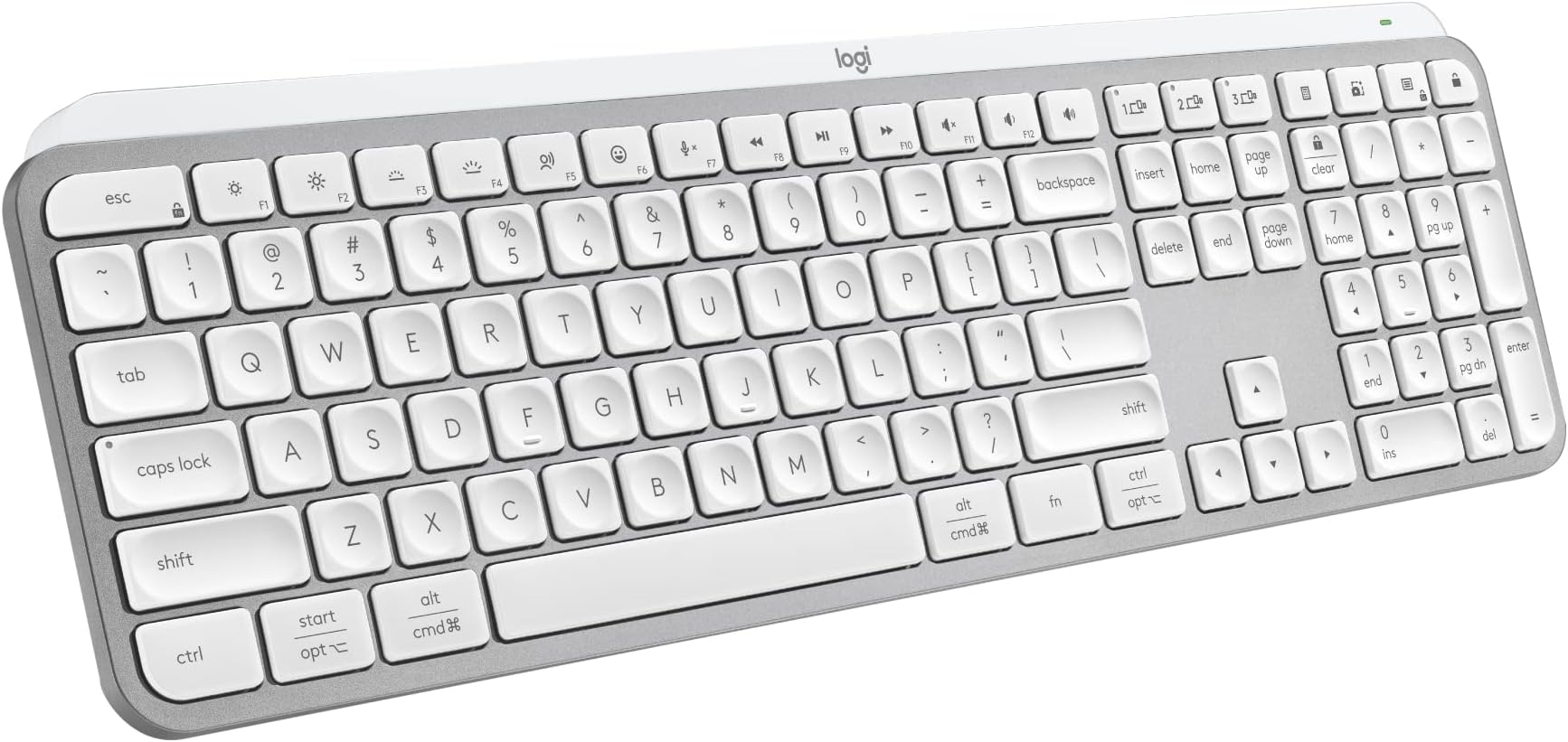
The Logitech MX Keys S Wireless Keyboard in Pale Grey offers a premium low-profile design with spherically-dished keys for a fluid, precise typing experience. Featuring smart backlighting that senses your hands and adapts to ambient light, it supports multi-device Bluetooth pairing for up to 3 devices and is USB-C rechargeable with up to 10 days of battery life. Customize your workflow with Smart Actions shortcuts via the Logi Options+ app, making repetitive tasks effortless. Compatible across major OS platforms, this keyboard blends ergonomic comfort, sustainability with recycled plastics, and cutting-edge tech for the modern professional.


| Additional Features | Wireless |
| Antenna Location | Business |
| Asin | B0BKVZK4TH |
| Best Sellers Rank | #4 in Computer Keyboards |
| Brand | Logitech |
| Built In Media | Logi Bolt USB Receiver, MX Keys Keyboards, USB Cable, User Documentation |
| Button Quantity | 104 |
| Color | Pale Grey |
| Compatible Devices | Laptop |
| Compatible Operating System Family | Windows |
| Connectivity Technology | Bluetooth |
| Customer Reviews | 4.4 4.4 out of 5 stars (3,732) 4.4 out of 5 stars |
| Enclosure Material | Plastic |
| External Testing Certification | Não aplicável |
| Hand Orientation | Ambidextrous |
| Item Dimensions L X W X H | 17.74"L x 5.81"W x 1.56"H |
| Item Weight | 1.8 pounds |
| Keyboard Backlighting Color Support | RGB |
| Keyboard Description | Wireless |
| Keyboard Layout | QWERTY |
| Manufacturer | Logitech |
| Mechanical Keyboard Switch Model | Romer-G |
| Mfr Part Number | 920-011559 |
| Minimum Required Operating System Version | Windows 11 |
| Model Name | MX Keys Master |
| Model Number | 920-011559 |
| Number Of Items | 1 |
| Number Of Keys | 104 |
| Number Of Packs | 1 |
| Number Of Sections | 8 |
| Power Source | Battery Powered |
| Style Name | MX Keys S |
| Switch Type | Mechanical |
| Unit Count | 1 Count |
| Upc | 097855187857 |
| Warranty Description | 1 Year Limited Hardware Warranty |
User
Perfect, Smooth Typing, Easy Set-up
My first MX Masters keyboard finally wore down after 4.5 years and a few letter keys (A, T and delete) popped off and would not work consistently when pressed. The rest of the keyboard still worked fine. I did not hesitate to buy a new one during Prime Day when I saw these on sale. Smooth, quiet typing and scrolling experience and works exactly as described. The Bluetooth pairing was easy, love the led back lighting and keyboard switching is seamless between my work laptop and my home PC. A bonus is that the keyboard will give a warning when the battery is low and you can still use the keyboard while it's charging. Just follow the simple picture instructions printed right inside the box cover.
User
Best Keyboard I’ve Used EVER - Buy It
First off, super nice packaging. Minimal and not wasteful. Then you have the keyboard itself, high quality, very nice weight to it. Perfect for desktop work and still light enough to use it on your laptop or wherever really. Switching between my work computer and both of my iPads is a seamless and simple task. Literally one button for each device and you’re instantly connected and ready to type. I use this for my workstation at my office for my windows based laptop/double monitor setup. I have my iPad Pro 13” M5 with the Magic Keyboard setup on my desk but I find that I basically use the Magic Keyboard as a stand for my iPad unless I’m going mobile. The keys are perfect for my style. They’re concave and quiet. They have just enough travel. Backspace is easy to find (which I have issues with on a normal windows wired keyboard). And the backlit keyboard is great. It times out after about 30-60 seconds of no use but I’m sure you can change that in the settings. I use it in concert with my MX S mouse and between the two, they make my work life much easier. I do wish that you could cross from your iPad to your PC with the mouse without the switch but that’s a separate product. The keyboard files like a premium aluminum material. Great color. Just what I expected. Overall, great investment. I won’t be returning it. I haven’t tested battery life yet so I can’t speak for that.
User
Premium keyboard that has earned a permanent spot on my desk
I’ve been using the Logitech MX Keys as my primary keyboard for about 18 months, and it’s easily one of the best productivity upgrades I’ve made. As someone who spends hours each day typing, working with spreadsheets, and switching between multiple devices, this keyboard has been outstanding.The key feel is excellent—quiet, tactile, and consistent, with just enough travel to remain comfortable during long work sessions. The backlighting is smart and responsive, automatically adjusting when needed without being distracting. Battery life has also been exceptional; even after 18 months, I’m still impressed by how infrequently it needs charging, and how nice it fits on my desk setup.One feature that tech enthusiasts will appreciate is the seamless multi-device connectivity. Being able to switch instantly between my computer, tablet, and other devices with dedicated buttons has become something I can’t live without.Build quality and color is exactly what you’d expect from Logitech’s premium lineup. The keyboard feels solid, stable, and durable, with no noticeable degradation after daily use for a year and a half.If you’re a developer, analyst, IT professional, content creator, or anyone who spends significant time at a keyboard, the MX Keys delivers a premium typing experience that’s absolutely worth the investment.
User
Natural feel, responsive keys.
Product Review: Logitech MX Keys S Wireless Keyboard - The Ultimate Typing Companion!I recently upgraded my keyboard to the Logitech MX Keys S Wireless Keyboard, and I must say, it's been an absolute game-changer for my daily productivity and overall typing experience. This premium keyboard has everything you could ever want in a typing companion and more!The first thing that struck me was the natural key feel. The keys on the MX Keys S have just the right amount of resistance, providing a satisfying tactile feedback with every keystroke. Typing on this keyboard feels effortless and smooth, making it a joy to use for extended periods of work or leisure.What truly impressed me was how quiet this keyboard is. The keys are so discreet and soft, making it the ideal choice for those late-night work sessions when everyone else is asleep. No more loud clacking sounds to disturb the peace! Yet, despite its whisper-quiet operation, the keys still manage to deliver that delightful clicky feel.Durability and sturdiness are other standout features of the Logitech MX Keys S. The keyboard feels incredibly well-made, and you can instantly tell it's designed to withstand heavy usage over an extended period. The materials used are of excellent quality, giving it a robust and premium look that will undoubtedly stand the test of time.The MX Keys S comes equipped with fantastic back lighting that elevates your typing experience even further. The illuminated keys not only look cool but are also incredibly practical, especially in dimly lit environments. The back lighting adapts to ambient lighting conditions, making it easy to type effortlessly in any setting.One of the most significant advantages of the Logitech MX Keys S is its seamless multi-device connectivity. With the Easy-Switch technology, you can effortlessly switch between multiple devices, whether it's your computer, tablet, or smartphone. This feature is a game-changer for those of us who work across different platforms and devices regularly. It's as simple as the push of a button, and you're instantly connected to a new device.In conclusion, the Logitech MX Keys S Wireless Keyboard has exceeded all my expectations. The natural key feel, quiet operation, sturdy build, and fantastic back lighting make it a joy to use. Its ability to effortlessly connect to multiple devices is the icing on the cake. Whether you're a professional who spends long hours typing or simply someone who appreciates a top-notch typing experience, this keyboard is an investment worth making. I highly recommend the Logitech MX Keys S to anyone in need of a reliable, versatile, and enjoyable keyboard for both work and leisure!
User
It's a great keyboard, but read me if you're buying the white version...
It's a beautiful keyboard, and it's solidly built with many functions you don't get in your run of the mill keyboard. I bought it because I needed something that would work with both my Windows PC and my Mac at the same time, and this fit the bill. However, the print on the white keys gets drowned out when the backlighting is on. Because the keyboard is compatible with both Windows PC and Mac, you need to be able to read the keys to determine which key on this keyboard takes the place of which key on the Mac Magic Keyboard. For example, the "command" key that you would normally find on a Mac Magic Keyboard is combined with the "Alt" key. But unless you have the keyboard memorized, you would not know which key it is because you can't read it when the backlighting is on. I had to turn the backlighting off to be able to read the keys, and even then it was difficult in low lighting. I ended up returning it and buying the black version just so I could read the keys. It's disappointing because the white keyboard looked just like my Mac Magic Keyboard that I had to put in storage to use this one that works with both computers. And, it was really beautiful (as much as a keyboard can be!). But, at least I can read the keys now!And, I should mention the black keyboard is fantastic. I love it and it works beautifully for both my Windows PC, and my Mac. I would recommend it, especially if you need a multi-device keyboard. It works with up to 3 devices; 1 device with the included dongle, and 2 devices via Bluetooth. It's great!
User
Great Keyboard
Very nice keyboard.Upon opening initial feel is very high quality, heavy feel which is nice. Takes a bit to fully charge but you can use it while its charging. Very easy to pair via Bluetooth so you dont need to use the dongle. Has a nice smooth texture nice to the touch. The backlit keyboard comes in handy and is easily adjustable with the logi options+ desktop application. Sticks to where you place it on your desk well and does not slide around. A little spendier than other keyboards but is well worth it in my opinion.Only con I have found is it uses the new logi options + app and not the original so had to download in order to customize.Highly recommended.
User
Thoroughly disappointed and here's why:
I bought this keyboard, and am thoroughly disappointed with it.Reasons why:- NO print key button! WTF? --do not waste my time telling me there is an image-snip button on the right side above the numpad --why move it? Why not put those three connection buttons here instead and leave the print key button alone? Why-oh-why Logitech???- The Function keys are all jammed together instead of being in groups of four --this really messes up touch typists as F2 is where F1 used to be and they are all off --there should be a GAP between each group of four function keys- By default, the traditional F1, F2, etc. is overridden with crappy assigned functions and you have to install their crappy keyboard software to un-override function keys back to traditional settings (i.e., when you hit F5 it sends "F5" instead invoking some weird function with a stick figure with radio waves shooting out of its head --no joke look at it!)- The LOCK key is where the calculator key is normally at --yep, you go to hit calculator and BOOM you go to the lock screen instead of quickly launching the calculator --who at Logitech thought this would be a great idea to constantly prank hard-working people???- The receiver is NOT COMPATIBLE with hundreds of other perfectly working Logitech mice --this means you have to install two dongles for a keyboard and mouse- It connects to 3 different keyboards, but hey if you switch to another computer only the keyboard is switched and NOT your mouse??? Pathetic shortsightedness by Logitech.- The calculator button is in a bad place for those used to hitting it in the upper righthand corner --Logitech has been doing this for decades and they moved it- The typing is pure crap --just as you go to push down the key it bottoms out instantly --I just cannot get used to it- NO LINUX SUPPORT! -ok, I am used to this but when you need Windows software to make the function keys work as an actual function key AND the settings do not persist during OS swaps this makes for an unusable keyboard especially with the removal of Print Screen, Scroll Lock, and Pause/Break keys.- No dedicated Mute and volume Up/Down keys --yep, Logitech pulls a fast one on their customers by assigning these to function keys- The ESCAPE key is not a standalone square on the upper lefthand of the keyboard --instead, it is twice normal width and invades part of the space where F1 would normally be creating havoc for touch typists- The illumination is too low and does not want to consistently come on as expected no does it always stay on while in use --sometimes it flickers, this could have been worse making periodic strobe lighting but hey, the brightness is so low you do not have to worry about that at all- There is no palm rest --I thought I could get used to this, but nope my wrists and fingers began to get fatigued because they've been using keyboards with integrated palm rests for several decades now- You CANNOT adjust the keyboard height --it is stuck at the precise angle delivered out of the boxAfter a week of trying to get used to all of this, I gave up and plugged my Logitech K800 back in. I sooooo wish Logitech made a direct replacement for my beloved K800 keyboard when they phased it out. I have wasted several hundred dollars buying keyboards to replace the K800 and still have not found a winner. To me, the K800 is a great productivity hound. I bought three over the past decade and replaced one every three years or so once I wore down the home key nubs.Does anyone know of a comparable replacement for the K800?
User
This Keyboard Rocks
The keyboard I've been waiting for. I type a lot, play video games and guitar. I do a lot with my hands and at a high enough level that high-performance tools can make a huge difference.The MX Keys S is a high-performance tool. I was using an old Logitech wireless keyboard and thought it was fine. We are human, we can adapt to almost anything. But after 5 minutes with this keyboard I felt like I was driving a Ferrari.It's assignable buttons are really cool and extremely easy to use. The action of the keys is a dream. I didn't know if I'd like the concave keys, but I absolutely love them because they give your fingers information that is beyond what your brain can process and it enhances accuracy. It is quite and feels like a good laptop keyboard. Key spacing seems closer and I like it A LOT. I use it on the dongle, but I'm sure the bluetooth works great. I haven't done a full speed test yet, but suffice to say, I'm going to smoke my record set on the old keyboard.Lastly, it's made of aluminum and has the heft and feel of quality gear. Setup was almost easier than falling off a log. I've been using Logitech pretty exclusively for about 30 years but I have no association with them. If you're on the fence about buying this keyboard, do yourself the favor and buy it now. I wish I'd bought this years ago. I want to keep typing because this thing feels like butter, but I'll close for now.
User
Excelente producto
es como se describe
User
Diferente.
Me parece más gris que blanco.
User
Recommend
Excellent. I love this keyboard and it was 100% worth the higher price tag. After trying a cheaper alternative (keychron) that stopped working after two days, I decided to swallow the higher price tag and try the Logitech mx keys. I’m so glad I did! This keyboard is everything that I was looking for in my attempt to find something similar to the Apple Magic Keyboard but for windows. It is thin but very sturdy. It feels well constructed (albeit a bit heavy). The Bluetooth works perfect and the switching between 3 different devices works flawlessly.The keystrokes are smooth and feel really satisfying. Low key travel but still solid. The backlight worths great and turns off after a period of time so as to not drain battery. Can’t speak to battery life yet as I have only been using it for 3 days.Excellent purchase would recommend.
User
Great quality
Re: Logitech MX Keys S Wireless Keyboard, Low ProfileThis is a fairly expensive keyboard but it's also the nicest keyboard I've used. It's low profile, which I like a lot. It's heavy (i.e. it feels substantial and not cheaply built). It switches easily & wirelessly between 3 different devices - a function I use often and love. I've found it to be a great investment for my home workspace. I'm on the computer or some other device daily, so the cost is worth it.
User
Acabo de abrir en una de esc tiene mancha como despintado
Se conecta muy facil para multipositivos en general se ve de buena condicion sin embargo llego en una con mancha como despintado espero q no se despinte con tiempos de uso ya que este teclado esta muy caro aunque tiene muy buena tecnologia de multi conexcion
Trustpilot
1 month ago
2 weeks ago