Buy anything from 5,000+ international stores. One checkout price. No surprise fees. Join 2M+ shoppers on Desertcart.
Desertcart purchases this item on your behalf and handles shipping, customs, and support to EGYPT.
🚀 Upgrade your PC’s Bluetooth game—connect farther, faster, and smarter!
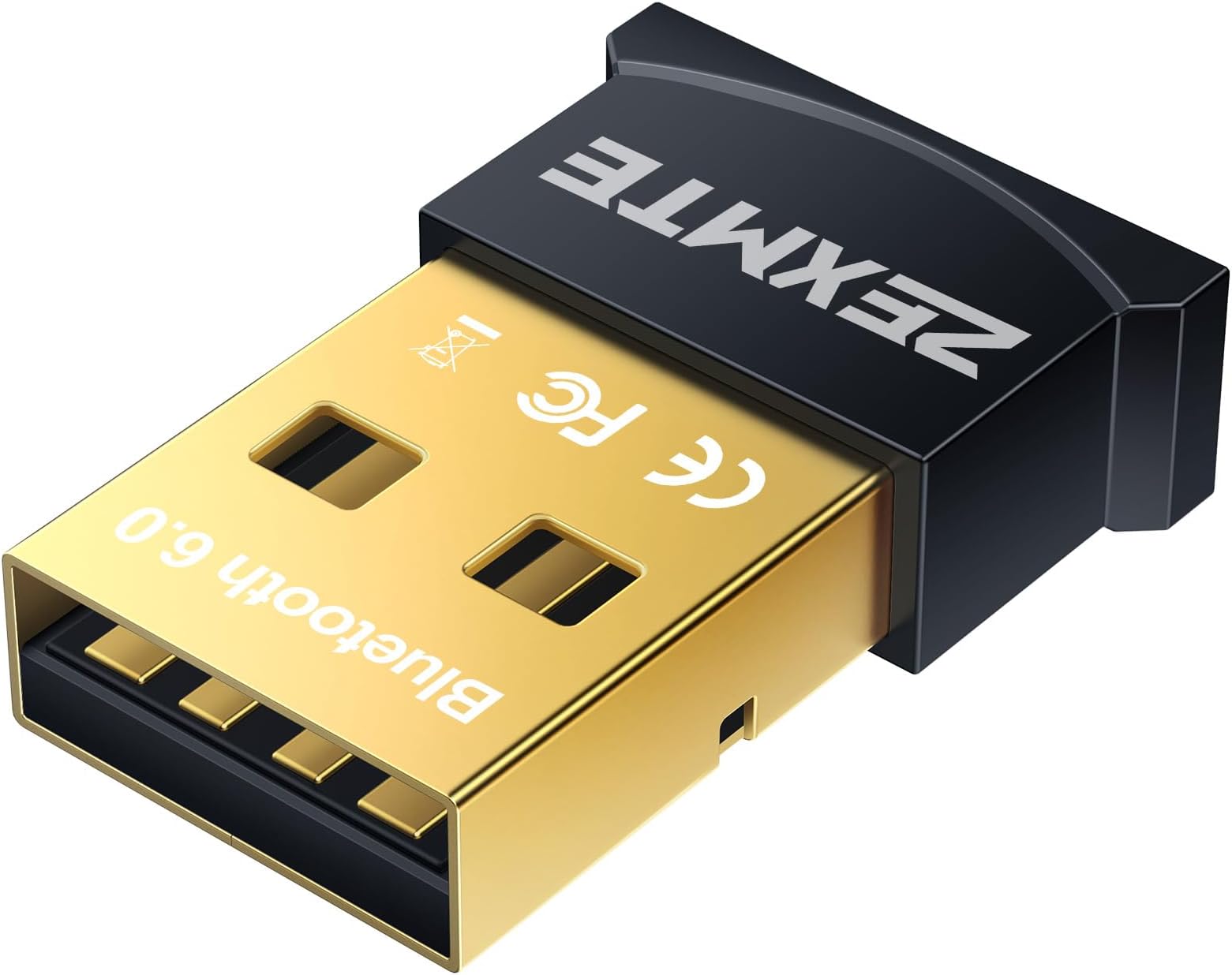
The ZEXMTE 5.1 USB Bluetooth Adapter transforms any Windows 8/10/11 PC into a powerful Bluetooth hub with a long 50-meter range, stable Bluetooth 5.1 connectivity, and plug-and-play ease. Its built-in FPC antenna and multi-device support make it ideal for professionals seeking reliable wireless audio, peripherals, and file transfers without interruptions or complex setup.


| ASIN | B0775YF36R |
| Best Sellers Rank | #47 in Bluetooth Network Adapters |
| Brand | ZEXMTE |
| Color | black |
| Compatible Devices | Bluetooth keyboards, mice, headsets, speakers, and mobile devices |
| Compatible Operating System Family | Windows |
| Customer Reviews | 4.3 out of 5 stars 19,971 Reviews |
| Data Link Protocol | Bluetooth, USB |
| Data Transfer Rate | 3 Megabits Per Second |
| Hardware Interface | USB |
| Item Dimensions L x W x H | 0.59"L x 0.2"W x 0.83"H |
| Manufacturer | ZEXMTE |
| Mfr Part Number | 0054 |
| Minimum Required Operating System Version | Windows 7 |
| Model Number | 0054 |
| Product Dimensions | 0.59"L x 0.2"W x 0.83"H |
| UPC | 785004244130 633322767254 |
| Unit Count | 1.0 Count |
| Warranty Description | 1 year |
B**0
Reliable plug and play Bluetooth adapter
I bought this adapter to use at work. Not gonna lie, I have tons of idle time at work and I mainly use that time to listen to educational podcasts or to watch lectures on YouTube. Before I bought this, I was using my bluetooth earbuds to listen and watch things on my phone. With this adapter, I can add bluetooth connectivity to our computers at work. It saves my phone battery and looks a lot more like I'm working (which is all my supervisors care about) than having my phone out. I basically bought this adapter on a whim just to see if I could get it to work with the work computers. These computers are maxed out with all of the windows enterprise security functions. None of the wifi adapters I've tried work at all on these computers so I was very skeptical as to whether this would even work. To my surprise, there was almost no setup required and the plug and play functionality proved to be true. I liked the adapter so much that I bought a second one to use with my home computer. This adapter has worked almost flawlessly in every computer I've plugged it into. This includes both Windows 10 and Ubuntu Linux. It even worked in the terrible aftermarket USB 3 card in my server and both the factory usb ports and the Usb 3 expresscard in my Ubuntu laptop. I will mention the 2 problems that I have experienced. After I got the second adapter, I stopped paying attention to which adapter I was using and windows did not like this. If I wasn't using the same adapter as I was using when I paired a device, windows would refuse to connect and it would refuse to delete the device. This was resolved by switching to the other adapter. Another reviewer mentioned terrible audio quality, which I disagree with. The audio quality has been great with every device I've used but one. One of the computers at work does not play nicely with this adapter for some reason. About 50% of the time, the audio ends up being slightly distorted. This I've found not to be a problem with the adapter but with the computer. I have no idea how to fix it but out of the 10+ computers I've used this on, there was one that didn't like it. There may be a way to fix the audio quality on that computer but I don't have administrator privileges on that computer so I basically just avoid using it on that computer. All told, this was one of the best purchases I've made on Amazon. It's not often that I buy more than one of the same product. If you need an easy way to add Bluetooth functionality to any computer, I highly doubt you will end up regretting your purchase.
M**K
Great and compact.
Works great. Connection is strong (use these for headphones to my computer) throughout the house. Plug and play easy.
M**C
works great no setup drama
Plugged this into my desktop which has no built in bluetooth and it just worked, recognized my headphones right away without needing to mess with any drivers. The range is solid and I have not had any drops even from another room. The little blue blinking light gets kind of annoying in a dark room but that is really the only thing I would change about it.
H**K
Plug and play bluetooth connection for a great price
I bought this to pair with my Logitech K380 keyboard to the computers in the computer lab at school and it works perfectly. The computers run Windows 10, which allows for plug and play bluetooth without the need to install drivers. I plugged the dongle into the computer and went to settings and paired my keyboard just like if the computer had its own bluetooth. If you don't have a Windows 10 computer, you might need to install drivers, but this dongle comes with an 80mm disc with drivers in case you need them. The dongle is also small, but not too small. Logitech's unifying receivers are really small and difficult to remove from a computer. In my case, where I plug the dongle into a public computer, I need to be able to unplug it without issue. This dongle is large enough to allow me to unplug it easily. If I had to choose anything negative about this, it's that the blue status light gets annoying quick. It blinks to let you know it's broadcasting bluetooth, meaning there's no doubt whether or not it's working, but it never stops blinking, which I imagine can get annoying quick when it's on a laptop in a dark room. Other than that, this dongle is great. I haven't noticed any drop in connection compared to a 2.4 Ghz wireless connection, which can get interference from other wireless connections. That being said, I don't think anyone else in the lab is using a bluetooth computer, so I am in an optimal environment.
J**A
Plug & Play, Impressive Performance, Versatile, Great Price
Works with Windows 10 as advertised, plug and play. I made the mistake of buying the TP link first, due to its greater range, but after a nightmare of downloading drivers and devices not pairing I gave up. Then I bought the ZEXMTE, and both my headphones and game controller paired on the first attempt. I have a big living room and so far no connectivity issues whatsoever. Can't recommend this little adapter enough. Pros: •Plug and play with Windows 10, pairs straightaway with multiple kinds of devices with no need to download drivers. •Strong, fast connection for gaming. Audio sounds great. Cons: •Connection might drop if you wander out of the room holding your controller or have your headphones on. However the range is plenty for even a large size room so I don't really consider this a con; its expected behavior. Seriously buy this thing, you wont be disappointed. And buy it first, don't make the mistake I did! And if you did, buy this one for peace of mind.
E**E
Couldn't Get It to Work, Paticularly With Nintendo Switch Pro Controller
Running Windows 7 x64, installed drivers from x64 folder from disc. This thing seems to work (kind of, I'll get into that more in a bit) sometimes. The first time I opened up the "add a bluetooth device window" and went to "all", there were about 5 items detected there under "other", had no idea what these were as it just listed MAC addresses for them all. (I live in an apartment building, most certainly other people's stuff). Anyway, so it looked like it was picking up stuff, and that was a good sign. I was in particular trying to pair up a Nintendo Switch Pro Controller to use with my PC. Pressed the sync button on the controller, refreshed the device list, and the controller wasn't showing up. In fact, all of the other mysterious devices weren't showing up anymore either. Tried searching over and over again, still nothing. Restarted PC, went back into device discovery, still nothing. Pulled the dongle out of my front side USB ports on my tower, stuck it in one on the rear. Suddenly, I could see the Pro controller along with the other mystery devices again! Yay! (which is odd, because I know the front side USB ports work, I use them all the time for a variety of things) Then clicked to pair the controller and in the bottom right of the window get the message "please wait...pairing started...". Then sometime later it comes up with a message "No pairing response received". Looking at my Switch controller I notice that the sync lights on the bottom of the controller had turned off, and suspected that to be the issue. The problem here, is upon pressing the sync button, it only stays in discovery mode for 1 minute (I timed it), and then turns off. Press sync on the controller again, press "retry" in the connection software . . . pro controller is not showing up on the device list anymore, nor is anything else . . . again. Switched the dongle once more from one USB slot to another, everything shows up again. Try to connect controller. Same issue once more. And once again, everything disappears from the device list. So this thing seems to only work some of the time, and only after I first plug it in to a USB, and then fails shortly afterwards. And when it does work, it will not pair my Pro Controller within a 60 second window. It's either takes too long to do it (which seems ridiculous, you also can't hold the sync button to make it go past 60 seconds, it turns off regardless) or it just plain won't do it. One last note, the blue light on the dongle was flashing the entire time when it's plugged in, so I don't know why it would only detect things for the first attempt upon moving it.
J**L
Revised: The BT adapter not at fault
I bought this Bluetooth device 5 months ago. It was easy to set up; upon plugging it in, Windows 10 automatically downloaded the drivers. It scanned and found my Bluetooth receiver plugged into my Bose radio's AUX jack; and the audio was excellent playing CD's and MP3's from my desktop computer. I had not used it for the past few months and now the computer acts like it does not exist. I can see the unit if in the "Devices and Printers" screen in Win 10 but it does not appear in the Device Manager list unless I select the "Show hidden devices" from the View menu. Trying to update the driver and run the Windows BT Troubleshooter did not work. Finally, I plugged the unit into my laptop and it didn't work there either; which indicated it was toast. The only good thing about it was that it was inexpensive and I did not lose more $. UPDATE: I changed the review to 5 stars due to the excellent customer service; after reading the above review, they immediately sent me a new unit. Unfortunately, this unit did not work with my computer either, BUT: this tells me that I might have an issue with my USB ports and it might not be the fault of the product. I also had a problem with my web cam and it took considerable fiddling with my computer's USB drivers to get it to work - I suspect a recent MS Win 10 update might be the culprit. The sad reality is that not ALL external devices will work with ALL computers and operating systems. I certainly can't blame it on this seller, who at least tried to do the right thing. The unit did operate flawlessly prior to to OS update. If you buy it and it doesn't work, let them know and they either replace or refund.
R**Y
Works great!
I picked this up to use with my work computer, since it doesn't have a built-in BT receiver and I wanted to use the Sennheiser Momentum True Wireless, and it works great! Connection is nearly instant, and the installation process (Windows 10) couldn't be simpler - just plug in, wait a moment, and you should be good to go. Upon removing my earbuds from their charging case they connect in less than 2 seconds, and audio quality is excellent. Usually with Bluetooth audio there's a bit of a delay, but using the MTW with this adapter, if there is a delay it's completely imperceptible (note, however, that the delay also depends on the audio device). Anyway, I'm sure there are plenty of options that are just as good, and maybe better, but this works just as expected and I couldn't ask for anything more from a BT adapter. 10/29/2020 EDIT: I had to remove 2 stars due to a new issue I noticed. At work I use the Momentum True Wireless on my work PC, and at home I use the Sony WH-1000XM3 on my home PC. I own 2 of these Bluetooth adapters, and I have 1 in each PC. Since working from home during the pandemic I've continued with the same routine, but I recently had to send my Momentum's in for repair, and am now using the Sony headphones on both PCs. Well, presumably because I'm using the same dongle on both PCs, this doesn't work seamlessly as one might expect. I have to remove and re-pair them every time I switch PCs. For example, if I'm using my work PC and connected to the headphones, and I then power down my work PC and switch to my home PC, the only way to connect them to my home PC (despite having already been paired) is to remove the BT device from "Bluetooth & other devices" in Windows settings, and pair them again. Clicking "Connect" simply does not work. This is just an annoying extra step, but in terms of product design this was a pretty considerable oversight, so I can no longer rate this 5-stars.
M**A
Funciona
Funciona incluso después de 3 años con uso ocasional....
C**S
As simple as it gets (Win 10)
It is plugandplay on Win 10. No driver needed, but those who need one according to their reviews might download it directly from realtek as the dongle uses a realtek chipset.
S**L
Good product
Quick connection ,but price is high .
A**A
Compatibile con Linux Mint 20
Perfettamente compatibile con Linux Mint 20, una volta avviato il sistema basta inserire la chiavetta e da menu (l’equivalente dello start in Windows) basta cercare Bluetooth. Una volta fatto, in basso a destra compare l’icona del bluetooth e, dal prossimo avvio, il bluetooth si avvierà automaticamente.
A**S
AAA
worked as advertised - thank you
Trustpilot
1 month ago
5 days ago