We remain fully operational. Our teams are working around the clock to ensure your deliveries continue safely.

قم بتنزيل التطبيق


معلومات عنا
حقوق الطبع والنشر © 2024 Desertcart Holdings Limited
قم بتنزيل التطبيق


🚀 Print Fast, Print Smart, Print Future-Ready!
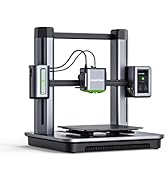
The AnkerMake M5C is a premium 3D printer designed for professionals and enthusiasts seeking speed, precision, and convenience. Featuring a blazing 500 mm/s print speed powered by PowerBoost 2.0, wireless multi-device control, and a durable 300°C all-metal hotend, it delivers high-quality prints with up to 50 μm resolution. Its 7×7 auto-leveling system, ultra-direct extruder, and flexible magnetic bed ensure reliable, hassle-free operation. Compatible with diverse filaments including PLA, ABS, TPU, and carbon fiber blends, the M5C is the ultimate tool for fast, detailed, and versatile 3D printing.



| ASIN | B0C2HQHRNZ |
| Best Sellers Rank | 46,665 in Business, Industry & Science ( See Top 100 in Business, Industry & Science ) 57 in 3D Printers |
| Brand | AnkerMake |
| Colour | Black |
| Customer Reviews | 4.4 4.4 out of 5 stars (334) |
| Date First Available | 17 April 2023 |
| Item Weight | 12.8 kg |
| Manufacturer | Anker |
| Manufacturer Part Number | V81103C5 |
| Material Type | Metal |
| Model Number | V81103C5 |
| Number of Items | 1 |
| Product Dimensions | 46.6 x 37.4 x 46.7 cm; 12.8 kg |
D**.
Best First 3D Printer
So I purchased this as my first printer and I have been nothing but continuously impressed. I’d wanted one for a while and for my university final year engineering project, it made sense for me to have easy access so I bit the bullet and purchased this. Of course I did my research before and this just seemed to tick all my boxes. Firstly, the build quality is excellent for this price point with heavy duty plastics and metals that make it seem much more premium in both feel, weight and looks. The assembly process was incredibly easy, and once built that was basically it. The app is great and the slicer impressed me with how versatile it is. Print quality is as good as can be expect if not a little better, I was blown away by some of the things this little printer could do for the money. Had some issue with bed adhesion with a Wood PLA, but I’m fairly certain that’s an issue with the cheaper PLA itself or my settings moreso than the printer or plate. All in all, I would (and have) recommend this printer to anyone looking for a first printer, and it’s a cherry on top that it’s just a nicely finished product.
L**E
Best Beginners 3D Printer
After lots of research in the minefields of the 3D Printing world I took the hit and purchased the AnkerMake M5C. The main appeal to me was the printing speed and the user interface of the app/slicer. Which both stood up to their reputation post purchase. The printer is self feels solid and well-made. If you're considering jumping into the world of 3D printing I can personally recommend this printer. Note: This was purchased on Black Friday at very competitive price.
C**L
Good prints but annoying usbc cable.
Makes cracking good prints but the annoying thing is every time i start to use the printer i get an error that the usb cable which plugged into the extruder is not connected causing it not to heat up, so every time i,m having to unscrew the cable give it a wobble then it works fine.
M**B
Very easy to setup , sturdy
I've always considered 3d Printing to be extremely complicated to get into , i took this out of the box and had it connected to my phone in 20 minutes , and then my laptop shortly after There is a QR code on the back of one of the vertical axis support (actually there are 2 ignore the white one at the base ) that's about 4 inch up from base which you connect to from the phone app software ,once that's done you can then tell your printer the details for your Wi-Fi setup and your pc/laptop will then be able to find it you can also connect directly by USB-C but only if you don't have wireless... The only thing to really let this down the the infeed for the ribbon/tape its a wee bit flimsy but easy to get used to considering how little I had to pay for it in black Friday deal . IT is buy far the best value for money for an entry level printer , and looking at some of the reviews it can go toe to toe with some of the higher end models as well
S**N
Really simple to set up easy to use, great start for 3d printing.
So I was contemplating buying this for a while and my partner persuaded me to purchase it with her when the price dropped. The unit is really well packaged and easy to assemble, believe it or not the advert is probably right where it only takes around 15 minutes to get the parts together. For some reason I had it in my head that it would have some test filament in there but didnt seem too, so I had to wait the extra day for that to arive. Since then I couldn't be happier, it was amazingly simple to be able to just pick a model off the app and send it to the printer and watch it get to work. There are a few settings I wasn't able to find on the app for Android or iOS so you will definetly want to have a laptop or desktop to hand to be able to edit some parts of the models, or print multiple at once. I wasnt sure I would be able to get much use out of a 3d printer but it turned out really handy, printing minature phone stands and towel clips the night before going on holiday because we forgot to get them in advance. Using something called gridfinity to help organise everything in our drawers. And just recently we started being able to sell products from the printer to our colleagues and family friends for Christmas gifts. There is a bit of a learning curve if you want to do some of the more advanced things but for 90% of the things you want its basically similar to downloading an image of the internet and sending it to an inkjet printer. The app itself has good reminders and tutorials on maintinence and replacements parts for the printer if needed. Overall pretty happy 10/10
R**R
Brilliant starter 3d printer
As a starter 3d printer the ankermake M5C is a brilliant introduction into the 3d print world. Easy to assemble and setup and link to your Wi-Fi, PC and dedicated phone app, it means you can be making your first 3d prints within an hour. I have used this extensively since my purchase and can honestly say the process is seamless and the results, after some minor tweaking of the print settings, have been excellent. I only hope they make an updated printer with a larger print volume as my last project was limited in scope due to the 220 x 220 print bed area.
H**C
Printer not functioning out of the box. No support
We bought this printer for my son for Christmas. We bought it on the amazon deals day in October but didn't open it until boxing day. Unfortunately the printer will not work at all. We have tried every troubleshooting video on the ankermake site but nothing has worked. My son is very disappointed not to be able to use his main christmas present. Anker no longer seem to have support on their site. No one is answering our emails and no other form of communication seems to be available. I can't return the item any more as we have passes the month mark. All we want is a working printer that is fit for purpose but this at the moment was a very expensive mistake causing an upset child.
P**D
Cette imprimante est très bien, que ce soit votre première imprimante 3d ou pas il n'y a pas vraiment de raisons d'aller voir ailleurs à ce prix. - L'installation n'est pas un casse tête mais faire les réglages de paramètres d'impression sera inévitable et ne sera pas facile au début. - Le logiciel d'impression ankermake studio (slicer) est complet, vraiment pas besoin de chercher à utiliser PrusaSlicer ou Cura. - l'imprimante est précise et rapide, à moins de vouloir faire des petites figurines très particulières pas besoin d'utiliser la tête d'impression 0.2 mm fournie. PAR CONTRE : VOUS NE POUVEZ PAS PRENDRE N'IMPORTE QUEL FILAMENT ET ESPERER QUE TOUT FONCTIONNE DU PREMIER COUP. NE JAMAIS LAISSER LES PARAMÈTRES PAR DÉFAUT SI VOUS UTILISEZ UNE BOBINE PAS ANKERMAKE. LES CONSIGNES NE MENTIONNENT PAS NON PLUS L'OFFSET DE L'AXE Z QU'IL EST IMPÉRATIF DE REGLER POUR CHAQUE BOBINE UTILISÉE. CELA INFLUE SUR L'ADHÉSION DE LA PREMIÈRE COUCHE QUI PEUT TOUS SIMPLEMENT FAIRE QUE LA PIECE SE DECROCHE EN PLEINE IMPRESSION. Consignes pour débutants : mettre les réglages du slicer sur expert et régler les paramètres bobine : température tête et lit conseillé fournisseur, le plus important : ajuster la vitesse. Si c'est une bobine pas Cher (PLA par exemple) il faudra mettre les vitesse à 100 mm/s ou moin et l'accélération de même. Reglez l'offset dans l'appli en imprimant un modèle d'une couche de hauteur seulement. Regardez des vidéos et renseignez vous bien !!! Conseil de projet très cool pour confirmé : utilisez le logiciel meshroom gratuit pour reproduire en 3d n'importe quel objet de chez vous à l'aide de plus de 20 à 100 photos. Vous pouvez ensuite le réimprimer a l'échelle que vous voulez. Vous devrez certainement éditer le scan avec Autodesk meshmixer (gratuit).
I**I
ممتازه جدا، خلال ١٠ دقايق خلصت التركيب ، عشر دقايق ثانيه علشان تساوي السطح (auto leveling )، وتبدا طباعه شريتها من ثلاث ايام والى الان ما وقفت طباعه طول الفتره
A**R
Surprisingly good feature set for such a low price point. One of the fastest and most accurate printer but one of the cheapest as well. The print head can reach up to 300 deg. Print bed can each up to 100 degrees. Full metal hot end with magnetic textured steel print plate. Amazing build quality with Wi-Fi function and great mobile app. Many people say that the slicer is not good but don't listen to these comments as Anker make slicer is great and very beginner friendly. The printer has not failed a single print yet and I have printed very complex models since getting these printers. Surprisingly it has a very convenient feature to add pause in the slices after a specified layer to change the reel manually which is amazing and looks like quite unknown feature. High recommended for anyone looking to get into 3D printing.
C**N
È la mia prima stampante 3d e mi ha convinto, oltre che il prezzo, la sua semplicità di montaggio ed utilizzo. E poi è bella da vedere. Ho stampato con entrambi gli ugelli d la qualità finale dipende molto dalle plastiche utilizzate. Sono molto soddisfatto e la consiglio.
T**R
Because Carbon Fiber Filled Nylon Filament PA-CF needs around 300 C temperature, product nozzle is deteriorated. It is not easy to clean after. After a few prints, you have to change nozzle with new one. Producer company should remove this item PA-CF from this printer specification.
ترست بايلوت
منذ أسبوعين
منذ شهرين