🚀 Unlock rapid, flawless 3D printing—because your ideas deserve to lead the pack.
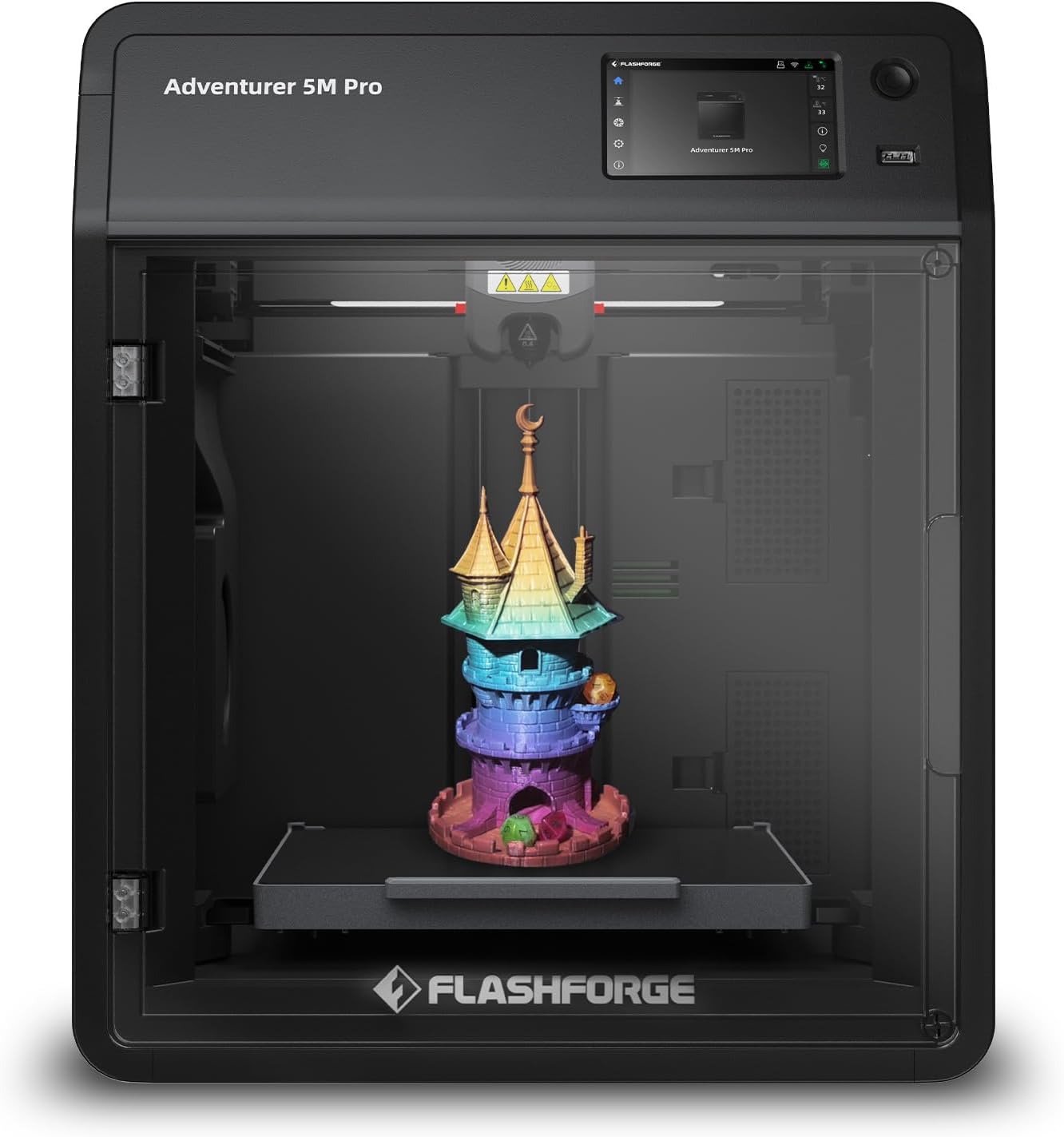
The FLASHFORGE Adventurer 5M Pro is a high-speed, Core XY all-metal 3D printer featuring a quick-detachable 280°C nozzle and a 220x220x220mm build volume. It combines rapid 600mm/s travel speeds with smart auto bed leveling and multi-material compatibility, all controlled remotely via a dedicated app. Designed for professionals and makers seeking reliable, precise, and versatile printing with minimal setup time.


| Best Sellers Rank | #590 in Industrial & Scientific ( See Top 100 in Industrial & Scientific ) #1 in 3D Printers |
| Brand | FLASHFORGE |
| Color | Adventurer 5M Pro |
| Customer Reviews | 3.9 out of 5 stars 851 Reviews |
| Item Weight | 32.1 Pounds |
| Material | PLA/ABS/PETG/ASA/TPU/PC/PLA-CF/PETG-CF |
| Product Dimensions | 15.75"D x 14.96"W x 17.83"H |
F**N
WOW 5 stars (update)
Final update: As you can see from the whole message, initially there was massive disappointment when receiving this item. Fortunately it seems to have been a rare isolated incident. FlashForge has proven to have OUTSTANDING customer service/ support. They made sure I received the full refund and without waiting a month for Amazon to go through the slow process. They also offered troubleshooting solutions, which unfortunately didn’t help with this specific printer. Furthermore I spent my morning with a buddy who finally unboxed his FlashForge printer of the same model and we have been making prints together non-stop. We were set up and printing in about 15 minutes. Unlike the damaged one I received, the printer heats quickly and runs smooth. The auto level is excellent. It is so user friendly that a child can figure it out. So far today all prints have been successful and we’ve been having lots of fun. Helpful tips to get started: You can edit all the specifications after downloading the computer program.. and it is simple. (Download free prints from Printables.com or Thingiverse.com etc.) once you unzip files and open them in FlashForge you can easily choose size/scale and choose if you want it to create stands and/or a base which really help with most builds. There is a sidebar on the right hand side of the program and scrolling over each option explains what it is for. Knowing that I was refunded in full and the issues were due to damages with that specific device, I will be continuing and looking forward to doing business with FlashForge. (Opening a different model today). The quality customer service and quality product outshines their competitors for sure. Original review: Incredibly disappointed. Massive letdown.. Incredibly disappointed. Even worse, my child was let down. I’m hoping this was a problem with the individual printer but after the initial few preprogrammed prints.. not one print has been successful. Even some of the preprogrammed ones stopped working. I watched what seems like every tutorial, thinking I was doing something wrong. I wasn’t. This printer is designed specifically to be easy to understand and assemble. Unfortunately, the filament would randomly stop feeding, but the printer would continue as if it was printing. So after 35 minutes of printing.. it would stop feeding for 10-30 seconds if not completely.. making the entire print a waste. Wasted a LOT of time, wasted lots of filament, wasted all this money and lead to constant let downs. There was also a major issue with prints not sticking to the tray bed and getting lifted and taken for a ride.. taking it out of the precise location and also tangling it up when I tried very basic single and/multi-part prints. (Yes, even with the glue that they specifically provide to avoid this.) On top of that and other issues like seemingly poor heating, it doesn’t seem to be capable of printing anything that’s not just a reshaped brick. You can build the same stuff with Play-Doh molds.. I am sending it back for a refund and will most definitely be reviewing the process. I truly hope that this company will give me the full refund and takes care of their loyal customers. I am truly hoping this was a one time thing and that I have no issues with future products. — Update 1: Amazon FlashForge seller contacted me and offered a full refund. Considering many factors I don’t know if this will truly be honored/issued. They later sent a troubleshooting message. However, by then I had already tried everything and I had someone who 3D prints for a living come look at it. I was assured I need a refund. I was also told not to replace the wasted filament with my own money. If that affects the refund, then legal action will be taken (cost free for me). I purchased at least 11 spools of FlashForge brand filament, which were not cheap, and another expensive printer (from their website) which I will not open unless/until I receive full refund for this one. How they treat loyal customers will speak volumes. Which is important, especially when investing in a company with so many competitors. At this time, multiple people and two businesses (whom do big YouTube reviews on products they purchase and use) are awaiting results. I hope to and would love to come back with great news of a company that outshines the rest because the alternative would be me left disappointed and them dealing with the results of bad business. I am frustrated and concerned due to the amount of people getting ripped off online these days.
M**K
Great printer. Software installation issues.
Lengthy… I apologize. I purchased this after spending several weeks researching 3D printers. Their price points are all over the place and, as to be expected, the more features they have the more expensive they run. The initial reason for wanting a 3D printer is to make custom cutters for polymer clay. After reading dozens of reviews for different printers, I decided that this model from Flashforge would meet our needs and allow for more complicated projects in the future. It arrived the day after I ordered it (yay, Prime). Nice heavy duty box and excellent packing so it arrived in pristine condition. It is an impressive looking piece of equipment and seems to be well built. Unboxing and setup took about 30 minutes and was relatively painless. The relative part came with things that even the FlashForge website doesn’t make clear. So, I’ll have a go at it. There is a fair amount of software you need. The Flashforge website has flashy descriptions of what these do but does not really say what you need to get started. To begin with, you need FlashMaker. This is an app for iPhone, iPad, or an Android device. It is available from the app stores for the related devices. You will not be able to set up the printer without it as you have to make an account to register it and finish the setup. Once you have it, the setup is fairly straightforward and the display/touch screen on the printer guides you through the process easily. It did take a few tries to get it attached to the WiFi network but patience paid off. In the full disclosure department, we am newbies. So there was the need for a 3D application that we could use to create the projects to send to the printer. We didn’t want to spend a fortune on this and after looking at all the options, I found TinkerCAD for the iPad. It is an Autodesk product (think AutoCAD), is web based (though the is an app in the Apple App Store for the iPad that connects you to where you need to be), and it is free. Granted, I am sure if you are going for heavy engineering type 3D, you probably want a higher end application and most likely a higher end printer. I watched 3 YouTube videos on TinkerCAD and I was creating 3D objects in less than an hour. You can design directly in the app though I’ve taken another route for the time being. You’ll still need this in the process though to create the .STL files you will need later. I also learned how to create designs in Procreate on my iPad that could be exported out as PNG files. These need to be converted to .SVG files to be able to use them in TinkerCAD. There are a number of free web based conversion sites available. Then there is printing. Oh boy! Flashforge talks about a number of software applications on their website but it is very unclear what you need them for. Short answer: the .STL files from TinkerCAD need to be converted to .GX files for the printer to use. The printer comes with a thumb drive (USB A) that contains a Software folder with two applications: FlashPrint 5 and Orca-Flashforge. FlashPrint 5 is, as far as I can tell, a more consumer friendly version with fewer bells and whistles than Orca. Herein is the rub. I do almost all my graphics on my iPad and these applications require a desktop/laptop computer running either Windows, MacOS, or Linux. In my case, I have a MacBook Pro running the latest version of MacOS (Sequoia 15.0.1). Much to my surprise, the applications on the thumb drive, would not install as they were considered legacy version and not compatible with my OS. The versions on the drive were updated as of 04/28/24, which was before the latest version of the MacOS was released. I tried Flashforge’s website and had the same issue. The haven’t updated the installers for the newest version. That’s when the panic set in as I was now looking at an expensive device that I could not use. Fortunately we had an older MacBook Air that we had not updated. It is running MacOS Monterey 12.6.1. Crisis averted and I got the applications installed. I was able to import the .STL file and run the slicer to produce the .GX file for printing. If I had installed Orca, I could apparently send the file to the printer via WiFi (my next project). Using FlashPrint 5, I went old school and downloaded the .GX file to the thumb drive. The printer has a USB A port. Popped in the drive, let the printer warm up, and voila! A 3D object. By the way, the HEPA filtration system on the Pro does a great job of keeping the fumes down. Other than the software installer mess, the process was relatively painless and I must say that is it a deeply satisfying experience to handle your first 3D object. In closing, this is a very cool printer and I’d recommend it to anyone who wants a reasonably priced entry level device. Save yourself a world of frustration and make sure you have: 1. Your phone or tablet with Flashmaker installed so you can setup your printer. 2. A computer with the capability of installing FlashPrint 5 and/or Orca-FlashForge* 3. And, of course, a 3D application capable of producing .STL files, which seem to be one of the most common types. Hope this overly long dissertation was helpful. *My guess is the MacOS version prior to Sequoia (MacOS 15) will work based on the dates on the installer files, but that is exactly what it is: a guess). I will be initiating a conversation with Flashforge about getting the installers updated.
P**Y
Software & hardware issues after 2 months
After 2 months of printing models with just PLA the printer now makes a loud clicking and rattling noise whenever the extruder makes quick xy movements, and the printer freezes and becomes unresponsive after finishing each print until it is restarted by power cycling. Even though it technically still prints fine, this makes me question when the noise will get worse and how long the printer will last. It is also inconvenient to spend a few minutes to turn off the printer, turn it back on, and then wait for it to load to the home screen between each print. Sometimes I need to restart the printer 2-3 times before it starts printing. I contacted their 'after sales' support team, but the agent couldn't help with any of the issues. The apparent language barrier made communication a tad more difficult as well. I gave up after two weeks of trying different suggestions and troubleshooting steps through email. For the first month of printing, there were several positive points. The 5M Pro is friendly for beginners, does not require much calibration, and printed detailed models with decent quality. I was expecting the printer to last for a year, but you get what you pay for...
L**N
Amazing printer for 3D newbie
As a newbie to the 3D printing craze, this printer has been absolutely amazing for our family. Setup of this machine was quick and painless, and we immediately began printing a variety of different items! The Adventurer 5M Pro 3D printer, has been extremely fast and reliable, we have not had one print that did not turn out beautifully. The touch screen is very intuitive to use, and has made repeat printing of jobs super quick, even for my seven year old to navigate! The enclosed design makes a noticeable difference—quieter operation, better temperature stability, and cleaner results with more demanding filaments. It feels solid and thoughtfully engineered, not like a budget printer pretending to be premium.
J**Y
Great Starter Printer
Great Starter printer, easy to start making prints the day its delivered. Wish it would stay connected and remember my internet IP instead of typing on a kind of outdated touch screen every time i turn it on, but hey the price and what you get is still there. I would say this a great beginner to Intermediate printer. Orca Flashforge makes slicing as a newbie simple. But save yourself some time and frustration and do your own research on print speed and settings. All the presets provided will make prints for sure, but detail and quality lacks. So if your buying it based on the speed, don't let that trick you when buying a printer. All quality prints take time.
A**Y
Awesome First Printer!
This is my introduction to 3d printing. The machine has worked perfectly for every job so far. I love it. Connected right up to my network for sending prints from my computer to the printer. It's nice that it came with a usb drive as well for copying prints if I wanted to. Everything looks so good coming out of this printer. Changing filaments is easy, gettibg going only takes minutes. I love the internal air circulation for abs, asa and others, as well as the external circulation for pla. I went with this printer because I wanted to try materials that are a bit harder. On that note: you get a normal 0.4 nozzle AND a 0.6 hardened steel nozzle with it, which is great. Overall I am very happy with my new printer. Before you dive in, take a minute to research various materials and their ideal bed and nozzle temperatures. Most spools also include this on the side of the spool, but i'd still recommend researching what others have their machines set at. This will help you get the most out of your prints.
C**E
Great printer. Slight issues with ASA otherwise it's perfect for what I need.
Great printer! No issues so far with pla or pteg I've had issues with asa even on 500c on extruder and 105c on plate with adhesive on the plate and internal air filtration not sure why but using flash forge basic asa I'm still having issues getting it to stick to the plate on some builds. Otherwise an amazing printer and fast!
D**E
OMG!
I have the worst luck in the world, or these printers are junk. I bought this wanting a good XYCore 3D machine and had seen some really decent to good reviews on them. When I got mine, the packaging was excellent, the structure was sound, the ease of assembly (what little there is) was nice, and finally the setup was painless. However, I managed to do the auto leveling / anti-vibration, I printed a test model from the printer storage and it was nice. I then connected my Orca slicer via WiFi and loaded a model to print to the machine. I watched as it printed the first few layers and it seemed to be doing great. I walked away and was doing other things, but then I heard something that didn't sound good. I turn to look and can't see so I get up to go investigate, before I get to the printer I hear another unpleasant noise. By the time I got to the printer (across the 21 sq foot room), the print was an absolute mess. I proceeded to remove the failed print and checked the print area and the nozzle to make sure all was clear. I was so lost as to why it made such a mess and just figured it was a fluke. I went back to my computer to check the gcode and/or resend it and try again. I removed the prior gcode file, sent the new one, and hit print from my pc. I go to the printer, it performs a nozzle clean moves to 0,0 heats up, and does nothing else. After a few minutes, I canceled the print from the panel on the machine and tried again only to get the same results. I reboot the machine and try again and get the same results, a wipe, a move heating up, and then nothing. So, I go to my PC and load a different print. To my dismay and total dissatisfaction the printer rinses and repeats the above steps. So, I am truly aggiated by now but I stay with it and decide to do a reset on the printer and try again. Walked through the reset and setup and all went well. Got to the point to do a print and nothing! I wrote this long review because I want you to know that my 1-star rating is justified by my experience. So, if you decide to buy this machine, I wish you the best.
ترست بايلوت
منذ 3 أسابيع
منذ أسبوعين