We remain fully operational. Our teams are working around the clock to ensure your deliveries continue safely.

قم بتنزيل التطبيق


معلومات عنا
حقوق الطبع والنشر © 2024 Desertcart Holdings Limited
قم بتنزيل التطبيق
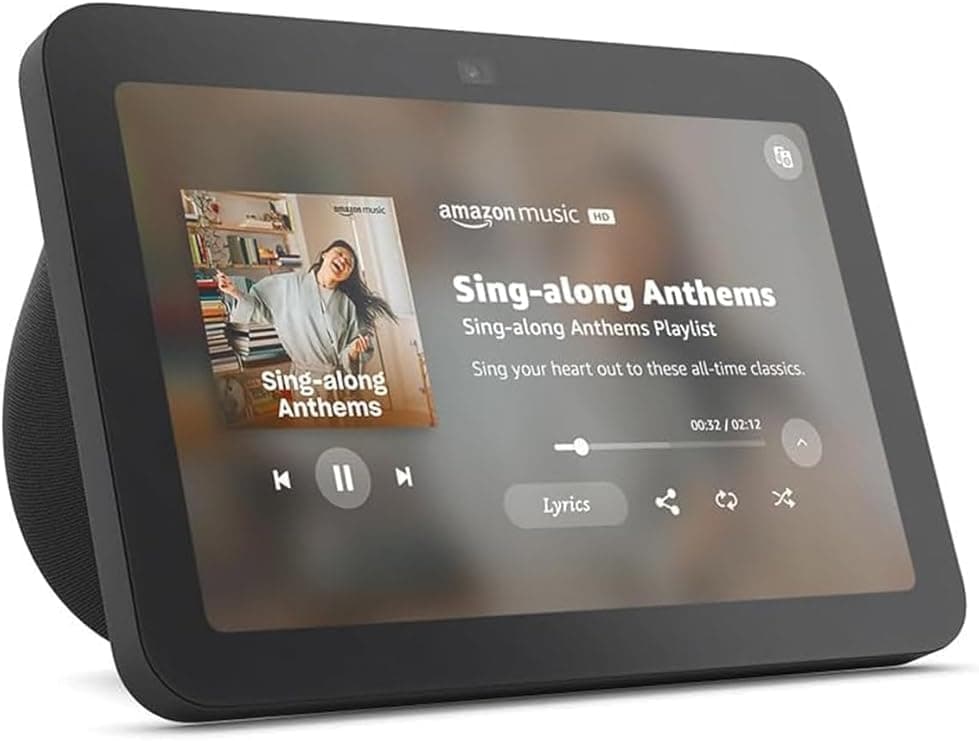
🏡 Elevate your smart home vibe with Echo Show 8 — where style meets next-gen control!
The Echo Show 8 (3rd Gen) is a sleek 8-inch HD touchscreen smart display featuring room-filling spatial audio, a 13 MP auto-framing camera for crystal-clear video calls, and an integrated Zigbee, Matter, and Thread smart home hub. Designed for seamless entertainment and effortless home automation, it also prioritizes privacy with physical camera shutters and mic controls, all wrapped in sustainable materials.
| Size | 7.9” x 5.5” x 4.2” (200mm x 139mm x 106mm) |
| Weight | 36.6 oz (1034 grams) Actual size and weight may vary by manufacturing process. |
| Display | 8.0” HD touch screen |
| Camera | 13 MP centered camera with built-in shutter (Photo quality/size may vary) |
| WiFi connectivity | Dual-band WiFi supports 802.11a/b/g/n/ac WiFi networks. Does not support connecting to ad-hoc (or peer-to-peer) WiFi networks. |
| Smart Home Hub | Zigbee + Matter + Thread Border Router |
| Bluetooth connectivity | Advanced Audio Distribution Profile (A2DP) support for audio streaming from your mobile device to Echo Show 8 or from Echo Show 8 to your Bluetooth speaker. Audio/Video Remote Control Profile (AVRCP) for voice control of connected mobile devices. Hands-free voice control is not supported for Mac OS X devices. Bluetooth speakers requiring PIN codes are not supported. |
| Audio | 2 x 2” full range neodymium drivers with passive bass radiator |
| System requirements | Echo Show 8 comes ready to connect to your WiFi. The Alexa app is compatible with Fire OS, Android, and iOS devices and also accessible via your web browser. Supported operating systems. Certain skills and services may require subscription or other fees. |
| Setup technology | Amazon WiFi simple setup enables customers to connect smart devices to their WiFi network in a few easy steps. WiFi simple setup is another way Alexa is always getting smarter. Learn more about frustration-free setup. |
| Processor | Octa-Core SoC with Amazon AZ2 Neural Network Engine |
| Accessibilty features | To enable features that personalize Alexa to your abilities, go to Settings → Accessibility. • Tap to Alexa enables access to Alexa via touch, instead of speech, through on-screen tiles or a keyboard, including the ability to save your favorite actions. • Adaptive Listening provides customers more time to finish speaking before Alexa responds. • Preferred Speaking Rate enables customers to control how fast or slow Alexa speaks. • Alexa Captioning, Call Captioning, and Closed Captioning provide text captions in any mode for supported content. • Show and Tell helps customers who are blind or visually impaired identify products when you say “Alexa, what am I holding.” • VoiceView screen reader enables access for customers who are blind or visually impaired. • Screen Magnifier enables customers to zoom in/out, and pan around the screen. • Notify When Nearby will play notification sounds when you’re detected near your Echo device. • Kindle Read Aloud will have Alexa read your Kindle books aloud. • Real Time Text enables customers to type live text in a video call. • Alexa Accessibility features also include settings for Color Inversion, Color Correction, Request Sound and more. |
| Warranty and Service | 1-year limited warranty and service included. Optional 1-year, 2-year, and 3-year extended warranty available for U.S. customers sold separately. Use of Echo Show 8 is subject to these terms. |
| Included in the Box | Echo Show 8, Glacier White power adapter (30W)/cable (4.9 ft.) and quick start guide. |
| Generation | Echo Show 8 (3rd Gen) - 2023 release |
| Privacy Features | Wake word technology, streaming indicators, microphone/camera off button, built-in camera shutter, the ability to view and delete your voice recordings, and more. Visit the Alexa Privacy Hub to explore how Alexa and Echo devices are designed to protect your privacy. |
| Language | Alexa speaks English and Spanish |
| Alexa Skills & Features | Alexa makes your life easier, more meaningful, and more fun by letting you voice control your world. Alexa can help you get more out of the things you already love and discover new possibilities you've never imagined. Discover and learn what Alexa can do. |
| Software Security Updates | Learn more about these software security updates. If you already own an Amazon Echo, visit Manage Your Content and Devices for information specific to your device. |
| Amazon Sidewalk | Sidewalk uses Echo and Ring devices to securely keep other devices connected and help find lost items by reporting their approximate location to the owner. Sidewalk can enable supported devices to remain connected even when wifi is lost or the supported devices are outside the range of their home wifi. Sidewalk uses a small portion of your internet bandwidth and the approximate location of your devices to provide these benefits to you and your neighbors. Sidewalk is turned on for your device unless you have previously turned it off. You can turn off Sidewalk at any time. Learn more about Amazon Sidewalk. |
A**T
Great device, very practical
I absolutely love this Echo Show 8. The screen is clear and the sound quality is great. It’s very easy to set up and works perfectly with Alexa. I use it every day to watch videos, check the weather, control smart home devices, and make video calls. It’s very convenient and responsive. The design looks modern and fits nicely in my kitchen. Overall, it’s a great device and I highly recommend it.
A**A
The perfect kitchen companion
I absolutely love my white Amazon Echo Show 8—it has become one of the most useful and enjoyable additions to my kitchen. The clean white design looks modern and minimal, and it blends beautifully with my kitchen décor without feeling bulky or out of place on the counter. One of my favorite things about it is how convenient it makes everyday tasks. While I’m cooking, I can simply ask Alexa to pull up recipes, set multiple timers, convert measurements, or add items to my grocery list without having to stop what I’m doing. The 8-inch screen is the perfect size—large enough to easily read recipes or watch quick cooking videos, but compact enough that it doesn’t take up too much counter space. I also love using it to play music or podcasts while I’m in the kitchen. The sound quality is surprisingly great, filling the room without sounding tinny or too loud. It makes cooking, cleaning, and even just making coffee in the morning feel more enjoyable. Another feature I use a lot is the ability to quickly check the weather, calendar reminders, and news while I’m starting my day. The display quality is bright and clear, and the touchscreen is very responsive. It’s also nice that it can show rotating photos when it’s idle—it almost feels like a digital picture frame, which adds a cozy touch to the kitchen. Overall, the Echo Show 8 has been incredibly practical and fun to use. It keeps me organized, entertained, and makes cooking so much easier. If you’re looking for a smart display that’s functional, stylish, and easy to use, I highly recommend it. It has truly become a little kitchen assistant that I didn’t realize I needed but now wouldn’t want to live without.
K**S
fun for everyone
I’ve been using the Amazon Echo Show 8 for a while and it’s been really handy around the house. The screen is a great size—not too big but big enough to see easily from across the room—and the picture quality is sharp. Setting it up with Alexa was effortless, and I use it daily for timers, weather, and quick video calls. The sound is noticeably better than my old Echo, with clearer vocals and fuller audio for music and videos. It also works well as a smart home hub to control lights and plugs without any fuss. Overall it feels solid and useful without being overly complicated.
M**G
1000x recommend
Will forever recommend the echo show 8. Easy to use if you want as a hub for your home, turning on lights, looking at home cameras, playing music to simple requests. Love the big display, great sound quality, overall good purchase
J**Y
Great video conference and Alexa features but still needs some work!
The Echo Show 8 is a solid unit with excellent sound and video. Pros: - Video is sharp and easy to read. - Sound is clear and can go from soft to quite loud which is good if in a larger/noisier room. - Unit is solid with some good weight to it. - Video conference camera does pan, tilt and zoom. Cons: - Unit sits at a permanent angle which isn't good if you're trying to sit it on a flat surface and have it aimed straight ahead. Instead, unit can be propped to provide a better angle at close range. - Camera focuses on weird spots and not sure if it is following sound or motion but there is a tendency to get some weird camera shots and not be focussed on someone talking. - Camera takes too long to readjust position with multiple people in the room. - Camera is not manually adjustable. - Alexa will sometimes just start responding even though the wake word wasn't actually spoken. The funny part is that "Alexa" will recognize that fact if you. bring it up and apologize. - Screen keeps coming on even when Alexa is instructed to leave it off permanently. - There's no way to cast the video to a larger screen. Due to the funky camera shots and lack of being able to share video to a larger device, the rating for me is four stars. Other than that, the unit is wonderful.
B**S
Wonderful
A great product at a great price. Sounds great and Performs as expected.
A**S
Full of ads and not very user friendly
TLDR: I work as a developer and love smart home products. I could not believe how difficult this thing is to set up. Will probably return it because I'm pretty certain that an ipad glued to a bluetooth speaker would be leagues better than this. Full complaint: So I purchased the echo show 8 for the primary purpose of being the visual component to the security system which consists of 2 blink doorbells, and 3 blink cameras. I wanted to put it in my kitchen so I could also listen to music, watch tv, or ask questions while I cook. Here are some of my major frustrations: ~~~~~~~~Echo Show 8: 1. Generally, the UI is just plain terrible. It is really hard to find things I am looking for and many aspects I can only change on my phone. Like why are there settings that can only be changed on a smaller screen? ==>Amazon responded to this by saying that "Echo Show devices are more voice-command centric with an added visual/touch component" But literally every time you want the Echo Show to learn something new, you have to add it in the Alexa app on your phone... however, all Amazon needs to do is put the Alexa app on the tablet and all of these headaches would be solved! 2. The home screen is not customizable at all. Sure there is a settings page with like 3000 toggles for things that can flash across my screen in a individual, full screen, marquis fashion, but I don't know how that could possibly be helpful. I'm just supposed to stand there and stare until the weather or whatever happens to swipe by? Why can't I just have a screen with my most common apps on it? For example, I would love to have a home screen with a button for each of my common cameras, fire tv, and netflix. This is why I made the comment about a tablet glued to a bluetooth speaker would be better. I could have all the apps I want, where I want them. Siri will open the alexa/blink/spotify app for me. 3. Advertisements. This concern is also with my Fire Stick but why are there ads? This is not a subscription service, I PAID for this device. I remember Amazon played this game with the Kindle so that you could by a cheaper Kindle that would have ads on the lock screen, but now they just put ads everywhere no matter what. Why can I not turn off ads? ==> Amazon responded to confirm that you cannot turn ads off any of their devices! ==> This is number 3 on this list but is also number 1 on my list of reasons I will no longer buy any amazon tech products in the future. 5. Alexa will show me my cameras, but keeps telling me that it can't connect to either of my doorbells, even though I can view the doorbells in my Blink and Alexa apps on my phone. ==> Amazon tells me to disconnect them in the app and try again, but, as I've already said, if you put the app on the tablet, this issue would would not exist or be easier to solve. While this review is about the Echo Show, my primary reason for purchasing was to use with Blink systems, so I'm going to add my reviews on them here too: ~~~~~~Blink App/cameras 1. Can't add multiple accounts to system. There are 4 people that live in my home, why can't I add members to the household instead of having to give them my email/password? ==> It would also be great if I could give them different permissions or assign only certain doorbells/cameras as viewable to specific users. This is standard in almost all of the other smarthome gadgets I have that involve security (such as smart locks, etc) 2. If open my app to view the doorbell or cameras, it shows a live view for about 20 secs and then turns off. Why can't I just live stream? I'm still on the free trial, but it says I won't even be able to live stream at all if I don't pay a monthly fee, so, If I'm paying for a service, why can't I have the service?? 3. It takes way too long for any and all devices to load the camera view. This is especially critical when someone rings the doorbell and they have to wait for my app to open, then connect, and then for the audio to transmit 4. Speaking of audio, when I turn on my microphone, the person on the other side can barely hear me.
K**I
Worth every penny
Okay so I have been using this every day for a little bit now and think I can provide a good review. I debated for a while getting this because I have heard pros and cons about the Echo show 8 but here is an honest review. The display is a great size for my kitchen where I can look at recipes and things like that. It is not too bulky where it takes up a lot of space but provides enough of a screen to be able to see clearly. This item is so easy to use, I set it up before it was even delivered to my house so all I had to do was pull it out of the box and plug it in. It recognizes my voice and knows when it is talking to me which I think is awesome and feels more personable. Alexa is awesome at helping me be hands free and I love the timer function-I know basic but awesome when you cook and have your hands full. I used to use my apple watch to set a timer but now I can just tell alexa to set my timer and the times up tone is nice as well. I also really like the feature of setting your routine. I am able to walk in and say "Alexa i'm home" and she will play 10 minutes of Lil Wayne radio. I do wish I could add in my apple music but the google music library has A LOT of music too so it's not bad. I also REALLY like that I can go in there and tell Alexa to pull up my ring cameras and it will show me all of them at one time or if I ask for a specific one it will pull that one up to full screen. I also bought a dot so I can have one in my bedroom and I love being able to play music hands free when I am in the room cleaning or drop an announcement for my husband in the other room if I need to tell him something and can do it hands free (yes I can do this with Siri and tell her to call or text my husband but when I am cleaning I sometimes dont have my phone on me). Also you can link up the Ford Pass and tell Alexa to start your car and things like that which is always awesome on cold mornings (we haven't tried this yet but will be!). I bought this on a sale but I think it is worth the price either way. The wide range of things this can do alone makes it worth it in my opinion. I still am playing around with it too so I know there will probably be even more awesome features too!
ترست بايلوت
منذ شهرين
منذ 3 أسابيع