


🎤 Own the room, not the remote.
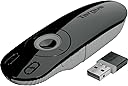
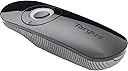
The Targus Laser Presentation Remote AMP13US combines advanced KeyLock technology to prevent accidental button presses with a powerful 50-foot wireless range via a mini USB receiver that stores inside the device. Featuring an ergonomic design, built-in laser pointer, and backlit buttons, it ensures professional, seamless presentations across Windows, Mac, and Chromebook platforms. Powered by included AAA batteries, this sleek remote is your ultimate tool for commanding attention and delivering flawless presentations every time.




| ASIN | B002NU5OAQ |
| Batteries | 2 AA batteries required. (included) |
| Battery Type | AAA |
| Best Sellers Rank | #62,800 in Office Products ( See Top 100 in Office Products ) #531 in Telephone Audio Conferencing Products |
| Brand | Targus |
| Color | Black |
| Computer Memory Type | DDR3 SDRAM |
| Customer Reviews | 4.5 4.5 out of 5 stars (1,087) |
| Date First Available | September 14, 2009 |
| Department | COMPUTER-OTHER -> COMPUTER ACCESSORIES |
| Is Discontinued By Manufacturer | No |
| Item Dimensions LxWxH | 8.8 x 6 x 2.5 inches |
| Item Weight | 3.68 ounces |
| Item model number | AMP13US |
| Language | English, French |
| Manufacturer | Targus |
| Power Source | Battery |
| Product Dimensions | 8.8 x 6 x 2.5 inches |
| Series | AMP13CA |
S**Y
Works Great
Pretty easy to set up and works flawlessly. Would prefer the laser button not be so large because it’s easy to accidentally press (I never really need to use it).
M**D
Nice presentation remote and remote mouse!
This remote works well and even has a dip switch to select/change between PC (Windows) and Mac (including Keynote)! it has two modes of operation as well, one of which is to control your mouse remotely (which does work on my Chromebook too). It works quite well, but I bought it in hopes of being able to use it with my Chromebook and PowerPoint Mobile. Unfortunately, it can only advance the PowerPoints in PowerPoint Mobile, it cannot go back to a previous slide. This is not Targus' fault though, it is Microsoft's. For some reason, Microsoft has STILL not made PowerPoint Mobile work with PgUp and PgDn keypresses to go to next and previous slides (PgUp and PgDn work fine on Windows PowerPoint! C'mon Microsoft, get with the program ... literally!). So I still give this remote 5 stars because for the price, it really does do a lot. It is an excellent presentation remote and/or remote mouse.
H**J
excellent product
I bought this for a college presentation, and it set me apart from the rest of my class, it can be used for mac PP or keynote, and PC, for power point so it is very versatile, the mouse functions work very well on both mac and pc, i have a mac the school has a pc, i actually use this as a remote for my mac when i watch hulu or netflix, very handy, the volume works on both platforms and the fact that the dongle fits into the unit when not in use is perfect for not loosing it, the controls are easy and intuitive. the laser pointer isn't too bright so in a daylight type of presentation setting you may not be able to see it. other than that. Perfect.
D**L
Good remote. No complaints.
Pros: This is a good remote for the price. The receiver is compact and can store inside of the remote. I've found range to have no issues in classroom settings (haven't used it outside of the classroom). The batteries seem to last a while. Also, the lock feature is handy when you're having someone use the remote who doesn't know what the extra buttons do. This remote works well with my Mac in Keynote and PowerPoint. The size and feel of the remote is just about perfect. It's easy to hold, but doesn't stick out of your hand while you're presenting. Cons: The remote has small plastic pieces that help secure the back onto the remote (you open up the back to store the receiver or to replace the battery). These pieces can easily become bent outwards if you don't put the back on just right. I was able to bend the pieces back in place, but I'll have to be more careful putting the back on when I do it next time. Also, I purchased one that died after about a year - it just stopped turning on. I tried replacing the battery with no effect. I wasn't too upset as I've been fairly hard on the remote over the last year (and it was just probably a dud). This fact didn't keep me from buying the same remote to replace the broken one - really there's not much better out there.
O**D
Absolutely the BEST!
I do some 20-30 one week presentations a year. I show in the screen Powerpoints, PDFs, and CAD drawings. After trying a few remote presentation pointers (even big names as MS or Logitech), none had the full functionality I needed, and some missing feature would make me go near the laptop and do the thing I needed with the good old mouse, thus losing momentum in the presentation (if you do these things, you know what I mean). A while ago I bought the Targus AMP02US, and leaving aside its 1960 look, the not so great buttons, and that the presentation button would send only the F5 command to Powerpoint (thus starting the presentation always at slide 1), it had all I needed: Mouse control, laser, next and previous slide and more. It was also difficult to do drag and drop keeping the left click down and use the mouse stick to move the cursor at the same time, plus the laser button couldn't be smaller. But all in all it was better than any previous pointer I had used. Then I upgraded to the AMP09US. It felt like a dream come true. All these problems where solved and a few bonuses were added: - The look is slick and elegant. - The receiver goes stored in the same body of the pointer, no need for a bag, no loose parts. - There is room for a spare battery in the pointer, so you can change it at once if you run out of juice in a middle of a presentation. - The presentation button sends now the right command to Powerpoint: Shift+F5, thus starting the presentation at the slide you've got in the screen. - The laser button is a big handy one, and is the same that moves the mouse cursor. - When in mouse mode, if you press the mouse stick (or laser button) it works as left click, thus making the drag and drop work like a dream. - The lightened buttons are white for next/prev slide, and green around the laser/mouse button. - In pointer mode (the central stick is the laser, the side buttons are next/prev slide) you can lock the non-essential buttons (then a discrete red light goes on), avoiding accidental commands. - In mouse mode (the central button is moves the cursor, and if pressed does left click, the side buttons are mouse left/right) the light is always green. - The color change is nice, because you look at the pointer and can see if you are in mouse/pointer -locked- mode, then hit the right command without much thinking. - Plus all the little features like screen darkening, presentation on/off, and multimedia volume. - In mouse mode the presentation on/off and screen darkening buttons will open MyPC folder, and hit the Windows Start Button. So you can access or run anything in the PC. - And for those who still stick to their Macs, it has a Mac mode too. If you are slightly dissatisfied with your current pointer, feeling that you still get the job done but something is missing, that the pointer could be a bit more comfortable, this one is the way to go. I couldn't be happier with this product. That's THE pointer. By the way, I've bought it at the airport for $80, because the nice look and specs looked promising; it really delivers all it says. If you run presentations professionally, go for it, it is a worthy investment.
T**Y
Works great for the price!
This is a great presentation remote for the price! Most of the time, this remote works flawlessly. I purchased this remote for my university program as we did not have a remote to use for presentations. Occasionally, I have had a few problems getting the remote to connect after being "off". This is resolved by turning on and off a few times until it works. Once it starts working, I have had no troubles. We have made it a full term without needing to replace the batteries. Instructors who have never used the remote have been able to pick it up and use it without any difficulty. The remote includes a laser pointer and a button to black out the Power Point screen. We have had no difficulties with either feature. The remote comes with a dongle that takes up one USB on the presenting computer. We present from a desktop without bluetooth so this was a must for us. However, if you do have bluetooth available, that may be a better (though more expensive) option for you.
C**Y
Excellent aide pour les présentations PowerPoint. Il fonctionne très bien et il très facile à utiliser. Tient bien en mains et suffisamment puissant pour être utilisé une bonne distance de l'ordinateur. Je suis très satisfait avec mon achat
R**A
Portable and handy. Easy to use and instant use with laptops.
I**E
Sehr handlich, funktionniert einbannfrei. Brauche es regelmässig auf viele verschiedene Geräte. Dieser Kauf hat sich gelohnt. Mein ständiger Begleiter. Danke.
S**W
So useful - it's changed my presentations, for the better.
A**R
Really good until now..
ترست بايلوت
منذ يوم واحد
منذ 4 أيام