We remain fully operational. Our teams are working around the clock to ensure your deliveries continue safely.

قم بتنزيل التطبيق


معلومات عنا
حقوق الطبع والنشر © 2024 Desertcart Holdings Limited
قم بتنزيل التطبيق
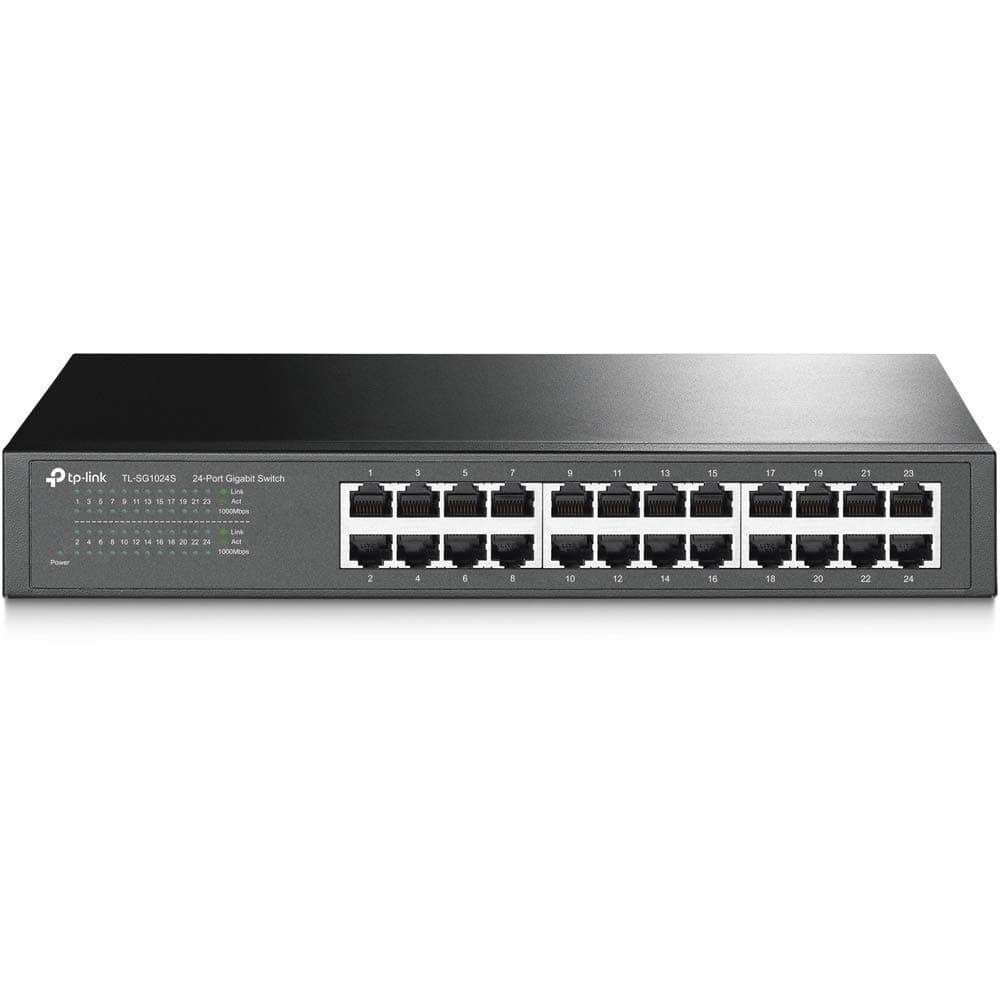
🚀 Elevate Your Network Game with Effortless Power & Silent Strength
The TP-Link TL-SG1024S is a 24-port unmanaged gigabit Ethernet switch designed for professionals seeking reliable, high-speed network expansion. Featuring energy-efficient technology, a fanless and quiet operation, and a sturdy metal casing, it offers plug-and-play simplicity and rackmount compatibility. Backed by a 3-year warranty and trusted by over 176,000 users, this switch delivers consistent performance and durability for modern workspaces.


| ASIN | B0779R9LJ3 |
| Best Sellers Rank | #1 in Computer Networking Switches |
| Brand | TP-Link |
| Built-In Media | 24-Port Gigabit Desktop/Rackmount Switch Power cord Installation guide Rackmount kit Rubber feet |
| Case Material Type | Metal |
| Color | Black |
| Compatible Devices | Desktop |
| Current Rating | 0.1 Amps |
| Customer Reviews | 4.7 out of 5 stars 176,538 Reviews |
| Data Transfer Rate | 48 Gigabits Per Second |
| Global Trade Identification Number | 06935364083540 |
| Interface | 24 10/100/1000Mbps RJ45 Ports (Auto Negotiation/Auto MDI/MDIX) |
| Item Dimensions L x W x H | 11.6"L x 7.1"W x 1.7"H |
| Item Type Name | TP-Link 24-Port Gigabit Desktop/Rackmount Switch (TL-SG1024S) |
| Item Weight | 3.44 Pounds |
| Manufacturer | TP-Link |
| Mfr Part Number | TL-SG1024S |
| Model Number | TL-SG1024S |
| Number of Ports | 24 |
| Platform | Not Machine Specific |
| Product Dimensions | 11.6"L x 7.1"W x 1.7"H |
| Switch Type | Unmanaged |
| UPC | 840460604024 845973083540 |
| Upper Temperature Rating | 40 Degrees Celsius |
| Voltage | 127 Volts |
| Warranty Description | Limited Lifetime Warranty |
D**Z
Works great
Needed to connect several devices and this switch works flawlessly, great build quality, sturdy and looks durable, maintains speed pretty consistently. Totally worth it's prices. Very easy to set up, plug and play.
X**R
Simple and functional switch!
What more is there to say about this thing? It's a 8-Port unmanaged gigabit switch that does exactly what any switch should do. This is a functional but quality little product. It's super compact and light, and would probably outlast me if given the chance. As for setup, what setup? Plug it in and connect your devices and you're good to go. I mean it really doesn't get any simpler, it's super affordable, works perfect, you can hang it on the wall or set it on a desk. It's a TP-Link product and I've never had any issue with the multitude of other TP-Link products I own. Also, if you think the price is too low, it's not. That's just TP-Link pricing, great functional products for less.
J**Y
Great TP- Link product.
I’ve been using TP- Link products for years for business and personal projects and I have yet to have anything fail. Knock on wood. I was in IT for a large corporation and started using some TP-Link products for some overseas projects when we ran into needs that we hadn’t anticipated. Their products were usually readily available at local shops so I got what I could to solve my needs. I had no clue if they were good quality or not but I needed the, so I went with them. Every TP product I have purchased is very good quality. I had used another well known brand for years but started noticing too many failures right after the warranty ended. I switched to TP-Link and like I said haven’t seen anything fail yet. Super easy to install, nice and compact and works great. The other brand switch was acting up and then failed completely so I purchased this and it is working great. Cont say enough how happy I have been with TP products. I’ve probably been using their products for 10+ years with no complaints. 👍🏻👍🏻👍🏻
A**H
Plug and Play... that's all there is to it.
I decided to change my wireless home camera set up to wired. Well, my router only has 4x 1Gbps LAN ports and I have my PC + 5 cameras at the moment. I wanted to just turn Wi-Fi off. I mean, Wi-Fi cams are so easy to hack. I've hacked my own and got my credentials + password. So, after having more and more neighbors move in nearby (ughhh), and knowing that I could see everything about their wireless networks, (I am a computer tech guy, I'm not naming software, but I can see who has Ring door bells, smart appliances, cameras and which routers they go to and which extenders are on that LAN). I didn't want anyone seeing me. So, wired, here I come. I have an 8 foot ( I think ) Cat8 (don't ask haha, family member had one) Ethernet cable going from my PC to router. That's port 1. Then I have port 2 going from my router to the TP-Link TL-SG108 8 Port Gigabit Switch. I bought it over the 5 port because... why not? The price was there to just go for the 8 port imo. Plus, I'm gonna fill it up eventually. Then I have the other two 1Gbps ports on my router going out to a camera. Then I have 3x cameras connected to the TL-SG108 Switch. So, so far, 4x connections. 1 from the router, 3x from cameras. Ping to cameras are still <1ms, just like the ones connected directly to the router. I'm using several 30ft and a 50ft Cat 7 ethernet cables from Amazon Basics. They work perfectly. My motherboard has 2.5Gbps Ethernet, so I would have liked to have went with a 2.5Gbps switch, but then I'd also need a 2.5Gbps Ethernet router... so yeah.. 1Gbps it is. Plus, it was way cheaper, anyways. I can't believe how cheap it is. It feels SOLID. Heavy for its size. That is ALWAYS a positive sign in the electronics world. Light electronics are cheaply made. This is not cheap. It doesn't even get warm to the touch. I'm excited and looking for more cameras to add to it haha. Oh, and yes, it's literally plug and play. It's as if all you're doing is adding more ports to your router. There is no other set up involved. To see the devices connected to the switch, you go to your router's admin page as normal. Zero set up other than plugging in the power adapter into it and then the wall. Then just plug your ethernet cable from your router to it. Now... any ethernet devices plugged into the switch will show up on your router and, as such, your home network. I'd buy more. I WANT 2.5Gbps so I'm ready to a 2.5Gbps router, but really, I'll probably have 10Gbps Ethernet on my motherboard by then. Ya can't keep up with the latest and greatest. Besides, my cameras don't come close at all to touching 1Gbps. I use H.264 encoding and they're older. For fun, I used "jpeg" encoding to hit 70Mbps, but it handled it fine. So I went back to H.264 and only run at 15Mbps combined speed. Update: I've now added another Ethernet cable to this TL-SG108 and plugged it into my Samsung SmartTV. Again, zero issues. It's handling everything I throw at it. 110% satisfied with this purchase. If I'm not careful, I'm gonna fill up all 8 ports and have to buy another one haha. Good thing my router is also powerful enough to handle all this (DIR-878). It's nothing special, but it, too, is part of the equation in handling so much data coming through the Ethernet cable that's going to the TL-SG108. I'll stop here... because I'm pretty much saying "I love it" over and over. DEFINITELY recommend it or whichever model you need with the amount of ports you need. I'd recommend future-proofing and going with the 8-port over the 5 port since you will be down 1 port from the get go since you have to plug your router into it. The price is not much more and you don't want to regret not getting the 8 port over the 5 port. BUT that depends on your needs. You may need a 5 port on one side of your house and another 5 port on the other end, I dunno. That's why I went with the 8 port... and then got some 35ft and 50ft Cat7 cables from Amazon Basics. LOVE IT!
J**0
Works as it should. No issues
Seems to function as it should. No real issues setting up.
S**A
Solid value and works great!
Great little unit that does exactly what it should. I have this connected to my Ugreen NAS home server and PC. Solid transfer rates. Nicely lit LEDs for activity. Great price. Couldn't ask for more.
S**S
Inexpensive 2.5gig 5 port switch that works great!
TP-Link TL-SG105S-M2 5 port 2.5gig switch I recently made the decision to upgrade my home/office network to 2.5gig. It turned out to be quite a project. My first pass was to replace the small 5 to 8 port switches in the network with equivalent 2.5gig ones. In this case, I replaced an old TP Link 1gig switch with a new TP Link 2.5gig switch. It was really easy and works well. The 1gig devices work just as they always did and the new 2.5gig file server link is really fast. I like this switch because it has LEDs to clearly show you what speed the ports are running at. If something I change causes a problem, it’s happened a lot as I upgrade links, I can see it. The switch has a metal case, no fan, and only gets mildly warm. I did put my own rubber feet on the switch to stop it from sliding around. Bottom line is that it works well and I’ll probably end up with 3 or 4 of them in my network.
K**R
Perfect for resolving slow internet issues
Update in 2024: This review is originally from 2020. This little thing is still going strong and lovely. It’s been moved several times as the home network has been changing and upgrading, and it keeps going. No complaints, just keeps working. Probably the most reliable piece of tech in my home network next to the UPS units I have for the machines. The original unit serves high demand steaming/upload download on the local network (NAS + servers in a proxmox setup). I have other units that service other parts of the home, and they work great. TLDR: If you have issues with Zoom, streaming services, or just overall spotty internet connection with your WiFi, you may want to consider getting the 5 port switch (not PoE! Save yourself some money) along with some CAT 6 cables (for gigabit internet). Unmanaged works fine for just ‘plug and play’. It’s insane how much it helps! You shouldn’t have to do much besides plugging in everything and selecting the ‘Ethernet’ option on the device if it doesn’t so automatically. They’re reliable and easy to setup and use. The long story: I had purchased the PoE one at first to allow it to later be utilized for a security station if need be (or if I had something fun to play with), but I also got the unmanaged 5 port (without PoE) on accident. The one WITHOUT PoE is much smaller (3/4 the size it feels like). I would recommend the 5 or 8 port if you just have a few things you wish to plug in to it. PoE is not something you should worry about unless you know your devices require it. My household has issues with WiFi, so many devices can’t connect well enough to have an enjoyable experience. WiFi extenders, a new router, etc, did not work for us in the past (and ended up causing many issues), so we resulted to using Ethernet for our most used devices. Our internet plan is top tier for our area, so we expected better connections. Turns out we just do a whole lot of internet stuff to bog down the main router and our bandwidth! The household setup: One switch (PoE 5 port, unmanaged) is at the router since the router only offers 2 Ethernet ports. This switch services a smart TV, computer, and free cable for whatever device we decide to plug in (be a laptop or game console). It also services another switch (5 port, unmanaged) across the house. That way we only have one Ethernet cable running across the house until we can put it under the house. The second switch services a WiFi station, computer, game console, and smart TV. The computer is on 24/7 and the TV is on a majority of the day and night streaming HD movies and shows from multiple services. All of these are fairly ‘heavy’ devices on this switch, as in they are constantly downloading or uploading content all waking hours of the day. All devices are connected with CAT 7 Ethernet cables, but CAT 6 work just fine. (I would recommend CAT 6 or CAT6a since it is certified to run gigabit. CAT 7 is overkill and I do not recommend it because of price and it’s not standardized as much as the others). Results: So far everyone in the household has noticed an improvement not only with the devices plugged into the switches, but also the overall WiFi quality. Smart phones are no longer ‘dropped’, the printer remains connected, and even most laptops are seeing better speeds and responsiveness on the WiFi. My household is especially polluted with plug and play devices (such as Amazon Echos, Ring Cameras, wireless smart plugs, etc), and all of these seem more responsive now that we have gotten the ‘heavy’ loads off of the WiFi. The second switch that is piggybacking off of the first switch has no issues, and all devices are able to preform to their peak. Even though not all of them are gigabit, they seem to greatly benefit from being on Ethernet. Zoom calls are much better too. Before we could only have 1 person on zoom but now everyone can get on so long as only one person is on WiFi. The switches do not heat too much and are easily concealable, but require power. I do not recommend stuffing them into a blanket closet or among pillows though, even though it’s tempting to hide their flashing lights. Overall they have exceeded my expectations. This review will be updated in the future if any issues arise.
ترست بايلوت
منذ شهر
منذ أسبوعين