We remain fully operational. Our teams are working around the clock to ensure your deliveries continue safely.

قم بتنزيل التطبيق


معلومات عنا
حقوق الطبع والنشر © 2024 Desertcart Holdings Limited
قم بتنزيل التطبيق
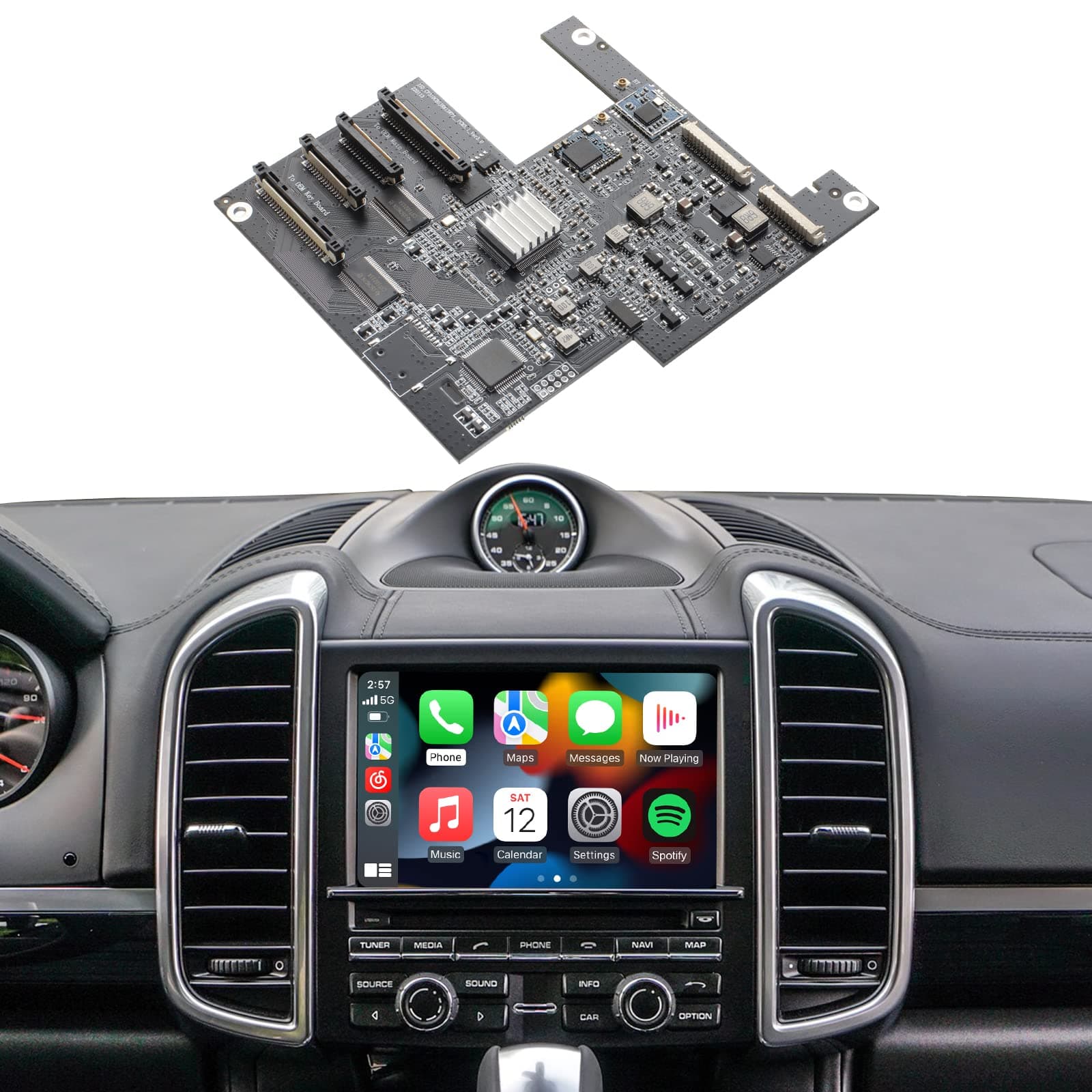
🚗 Upgrade your Porsche’s cockpit to wireless smart luxury — don’t get left behind!
The ISUDAR Gen 3 PCM 3.1 module transforms your Porsche Panamera, Cayenne, Macan, Cayman, Boxster, 911, or 718 with wireless Apple CarPlay and Android Auto, preserving the original PCM 3.1 system. Featuring a powerful Cortex A9 processor and 5GHz WiFi, it ensures stable connectivity and supports voice assistants, steering wheel controls, OEM and aftermarket cameras, and DSP sound tuning. Installation is non-destructive and straightforward, making it the ultimate upgrade for a seamless, smart driving experience.


| ASIN | B09Z1YJB72 |
| Are Batteries Included? | No |
| Audio Output Mode | Digital |
| Best Sellers Rank | 13,647 in Electronics & Photo ( See Top 100 in Electronics & Photo ) 195 in Car Stereos |
| Box Contents | Isudar Porsche PCM 3.1 wireless Carplay module |
| Brand Name | ISUDAR |
| Compatible Devices | Smartphone |
| Compatible with Vehicle Type | Car |
| Connectivity Protocol | Bluetooth, Wi-Fi |
| Control Method | Touch |
| Country of Origin | China |
| Customer Reviews | 3.6 3.6 out of 5 stars (71) |
| Display Type | touch screen |
| Human Interface Types | Buttons, Microphone |
| Item Weight | 0.69 Kilograms |
| Manufacturer | ISUDAR |
| Map Coverage Type | Mobile Device Dependent |
| Model Name | Gen 3 PCM 3.1 |
| Mounting Type | Dashboard Mount |
| Network Connectivity Technology | Bluetooth, USB, Wi-Fi |
| Operating Systems | Android, iOS |
| Product Features | Android Auto, Apple CarPlay, Bluetooth, Voice Control |
| Product Warranty | We provide professional after-sales service |
| Screen Size | 13 Inches |
| Supported Satellite Navigation System | GPS |
| Touch Screen Type | Capacitive |
| UPC | 768479113903 |
| Unit Count | 1.0 count |
P**N
Great addition
Works great in the car. Needed some help after I broke the antenna installing the PCM. Contacted Isudar and they provided new ones at a small cost. Excellent customer service.
M**T
Atrocious support
Really poor support devices keeps disconnecting from bluetooth. Sound keeps switching to different source. Multiple messages to support have gone without reply. Don't bother, if I could give least thana single star I would.
G**.
Great product and well made.
Firstly, product came next day and packaging was good. Installation was so easy, anyone can do it if you know how to hold a screwdriver. Soon as you plug it in it works and only used it for 24 hours but works great. Connects instantly and have had no issues as yet. Great product and a must upgrade.
P**A
Great Solution for CarPlay – With a Few Installation Quirks
I’ve only had this CarPlay module installed for a couple of days, but so far, I’m really impressed. It arrived the next day, which was a big plus. I was originally considering a replacement head unit from AliExpress, but the fact that I could keep my original Porsche system and simply add this module made the decision easy. While the product was listed as compatible with my 2015 Macan, there were a few small discrepancies I wish I had known in advance. For example, I had to double up on some pins during installation, and the green power cable didn’t fit where the instructions suggested — I had to find a workaround. Not a huge issue if you’re handy (I’m comfortable building computers), but worth noting. The installation process took about 3 hours and had its stressful moments. One frustrating bit was reattaching the CD cover — the added bulk from the new cables made it a tight fit. Better instructions or clearer video guides would have really helped here. Functionally, it works well and retains most of the car’s original features, which was my main goal. However, there are a few caveats: • The front parking sensors don’t show on screen unless the car is in reverse — they only beep otherwise. • The CarPlay connects via WiFi, which interfered with my dash cam’s connection. • Initially, I had the module on 5G WiFi, but the screen froze and even went fuzzy once. Restarting the engine fixed it, and switching to 2G seems to have solved the issue. • The screen brightness feels a bit low, and there doesn’t seem to be an option to adjust it. Despite these minor issues, I’m really happy with the result. The audio quality remains strong, the touchscreen is responsive, and overall, this is a much better solution than replacing the whole unit. For anyone moderately tech-savvy, I’d definitely recommend it — just be prepared for a bit of a learning curve during installation.
M**.
Works perfectly
Been looking at adding Android Auto to my 2012 Cayenne for awhile, other companies want £450 upwards, so was skeptic with this due to the cheaper price if it was going to work, I couldn’t of been more wrong, delivered next day, came with all the bits needed instruction's and video showing how, took about 30mins to install ( you do need a T8 torx screwdriver to take stereo apart), getting ribbons in is a little tricky, works with my aftermarket rear view camera, more than happy with this purchase, would fully recommend getting this rather than the more expensive one and it doesn’t need the extra box to work. Also compatible with CarPlay if I change my phone
J**K
DO NOT BUY, Unable to perform correctly
After buying and testing it out, using an aftermarket camera has been showing voltage shutdown issues on the PCM monitor, it also fails to work correctly after putting a rear camera on where instead of showing the camera it kicks you out of CarPlay and shows the sensors on the original system, have put in the correct settings in the CarPlay system to ensure it knows it has a aftermarket camera but no luck. It has a problem where randomly it will freeze, unable to respond and reset after a solid 1 minute or remains as a black out screen until ignition is turned off and then switch on to reboot it. It is unusable and inconvenient especially when driving, every time to start the car and have to hold the info button where it works sometimes, have tried via the aux option to open CarPlay but again works SOMETIMES. After what felt like the PCM has been fighting this aftermarket system, many trial and error attempts checking through the work done over and over, I decided to remove the CarPlay motherboard and returned to original Porsche system which shows no issues at all and working fine as it should, disappointed to say the least in believing this would work, stay away from this product, I still want my money back for this useless piece of junk.
A**H
Great modification
Really good to have CarPlay available on the std PCM, and so far it seems to work very well. The installation is quite complex, especially if you have DAB installed. Removing the PCM is OK, although it is a tight fit if your 911 has PDK, you need to put it into drive. Fitting the board is fiddly and the cables are delicate, so could be easily damaged. If you have DAB you need to use all of the risers to lift the CarPlay board to the top. I found the only way to route the cables out of the PCM was to unscrew the DAB connector from the back and squeeze the new cables through the gap. This leaves the DAB connector loose, but it can be reattached, albeit not straight due to cables. Refitting the PCM was difficult. The additional cables meant the unit would not easily push all the way in and there is no space to guide the cables out of the way, but eventually it pushed in. Took about 2 hours in total to fit.
T**E
Throughly pleased with the upgrade
I wanted to keep my Porsche 981S looking entirely stock and replacement head units are not an option for me as they tend to look ugly and spoil the cabin. Mine was professionally installed and every aspect works perfectly, complete and seamless integration with my iPhone and a few other features of the unit that I haven't used - e.g mirroring and camera installation options. Highly recommended and good value.
E**D
I am so pleased with the ISUDAR Apple CarPlay kit I installed in my 2014 Porsche Cayenne (PCM 3.1). It comes on almost immediately after starting the car and performs flawlessly. And all of the OEM equipment capabilities are still easily accessible if I ever need them. I did experience some challenges/ learnings installing it so highly recommend watching all the videos and carefully reading through the installation instructions. Along the way I managed to damage one of the ribbon cables and one of the data cables. Thankfully, after reaching out to ISUDAR tech support, they promptly sent out replacements for both. Some key learnings & tips to pass along: 1) Pay attention to the direction of the ribbon cables (blue band facing direction) if you need to detach both ends of a ribbon cable. It matters. 2) Heed the instructions provided on proper ribbon cable seating 3) Don’t detach the clips holding the ribbon cables, ever so gently pull them upwards until the cable releases. The clips can easily break. 4) If you find yourself detaching the front display from its ribbon cables make sure when you reassemble you attach the ribbon cables to the display first and then the other end to the ISUDAR sister board. This will provide you ample hand room to achieve a proper seating. Note this, if you reassemble the unit and you get a black screen a poor ribbon cable seating is likely your issue. 5) Inspect the wires coming into your OEM power connector to see if your vehicle is equipped with fiber optic sound system. If it is you will need to relocate those two fiber optic cables from the OEM power connector to the ISUDAR power connector. If your vehicle has fiber optic sound, they will be the two cables in the lower left-hand side as you look at the rear of the OEM connector. No sound and an inability to switch to other sources, e.g. FM, AM, SAT, AUX, should be your first clue that this is the issue.
J**N
The item did not work at all. I asked to be refunded or exchanged and jetsouq charged me 1100AED of fees. 70% of my order. Absolutely a scam.
J**.
The wireless cuts out alot like a lot the max I’ve gone before it cut out was 3 hour but it’s more like 20 mins. I got a anker cable to wire it it and at first it worked then work start cutting out very 30 seconds. It’s not very responsive I would stay away and get a better quality item.
H**.
I used this product to add Apple CarPlay functionality to the PCM in my Porsche. Installing the ISUDAR board was straightforward and didn’t require any specialized knowledge. However, I highly recommend reading the installation guide thoroughly and watching the suggested video tutorial before getting started. Patience is key—don’t rush the process! Summary of Installation Steps: 1. Carefully removed the PCM unit from the car and detached the CD unit. 2. Disconnected three ribbon cables from the original OEM board. 3. Installed three pins to create a platform for the new ISUDAR board. 4. Routed the ribbon cables through the ISUDAR board and connected the supplied antenna. Pro Tip: Take photos of all connectors and cables *before unplugging them. This will make reassembly much easier, especially with flat cables, which can be tricky to position correctly. While the product works well, the included paper manual could use significant improvement. For example, the instructions on reconnecting the fiber optic cables (essential for Bose systems) were easy to overlook. Additionally, the first-time setup could be clearer—though in my case, resetting the PCM allowed it to recognize the ISUDAR board quickly, and it smoothly guided me through the CarPlay setup process. Note to the Manufacturer: Improving the clarity of the instructions wouldn’t require much effort. Adding a troubleshooting section to the manual would also be a welcome enhancement.
P**A
Pretty simple install. Basically the same as all of the PCM 3.1 CarPlay internal upgrades. In the end, it is a 90% solution, but it preserves the interior and all functions, however inconveniently. Perfect platform if you don’t already have a backup camera. Adding it does add a fair amount of complexity to the install. I have two 2011 Cayenne S vehicles. These upgrades do seem to have inconsistent Bluetooth reliability. Works fine for weeks, then it drops and has to be reconnected as specified in the manual. I use the USB interface since CarPlay is hard on the battery and it keeps my phone charged and it has been rock solid regardless of brand, so far.
ترست بايلوت
منذ 4 أيام
منذ 3 أيام