
قم بتنزيل التطبيق


معلومات عنا
حقوق الطبع والنشر © 2024 Desertcart Holdings Limited
قم بتنزيل التطبيق

📸 Capture Life Remotely, Effortlessly, Everywhere!
The ATUMTEK Camera Remote Shutter is a compact, Bluetooth 5.2-enabled wireless remote control designed for iPhone and Android smartphones. With a 10-meter range and a powerful CR2032 battery supporting over 20,000 photo captures, it offers reliable, lag-free operation. The package includes two remotes and wrist straps for secure portability, making it an essential accessory for professional-quality selfies, videos, and remote photography.




| ASIN | B0CHFCFW5C |
| Batteries | 1 Lithium Metal batteries required. (included) |
| Best Sellers Rank | #32 in Camera & Camcorder Remote Controls |
| Customer Reviews | 4.6 4.6 out of 5 stars (2,226) |
| Date First Available | September 6, 2023 |
| Item Weight | 1.41 ounces |
| Item model number | ATYK165 |
| Manufacturer | ATUMTEK |
| Product Dimensions | 1.91 x 1.33 x 0.49 inches |
S**E
Simple solution for a phone on a raised tripod
Works great with my Pixel 9 Pro XL. Bluetooth paired quick and easy. I plan to use this to remotely control the phone camera shutter when recording video of basketball games. With this remote shutter, I can raise the camera on my tripod up above the heads of people walking by on the sidelines and still start and stop recording. At that height, I can still reach the handle on the tripod to pan the camera but I'm not quite tall enough to press the record button on the phone. Problem solved.
C**Y
Works with iPhone 14 Pro
Exactly what I was looking for as a shutter remote for my phone camera. With 2 fobs, I have a backup spare just in case. Paired easily with my iPhone 14 Pro. Works as expected. The only thing I had to figure out was that you need to have the camera app on your phone open for it to activate the shutter. Otherwise, it functions as just increasing the volume. Just remember to turn it off when finished using it. There's no indicator light for on/off. It is a little tricky to open the battery compartment but it was fine after I figured it out. I didn't want to break it before I even used it. They do come with batteries. That was nice. I would recommend for a simple phone camera remote.
I**A
PERFECT
I take photos at awkward angles, making it difficult to keep the phone steady. This was a breeze to link and worked perfectly. I wish that I had purchased this earlier.
C**T
These are easy to setup and simple to use.
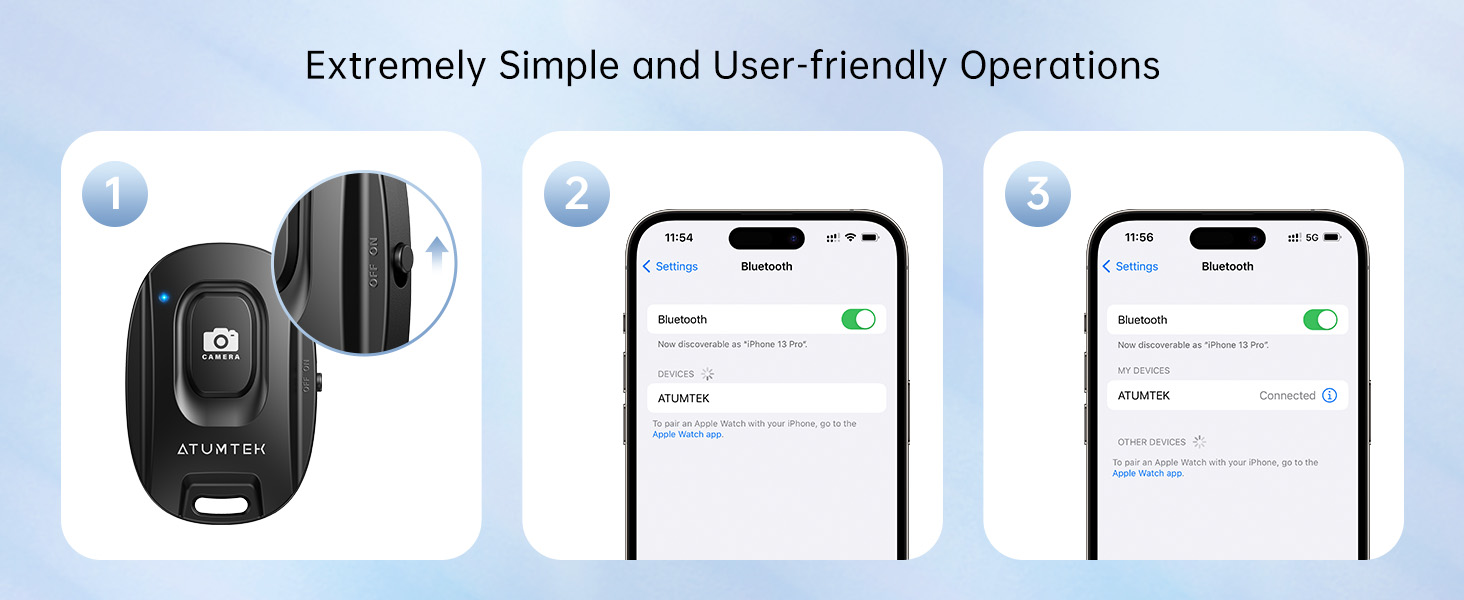
These are awesome and simple to setup and use. Pull up bluetooth on your phone, flip the switch on and choose the remote on your phone screen so it pairs. To use you flip the switch on the side on and then push the button. So easy. the I looked at some others that were chargeable etc but figured I didn't need something else to worry about charging so I chose these. There are two so you have a backup and you can replace the battery when it dies. My parents are in their late 70's and take a lot of selfies so I ordered these for my dad for Christmas because I know it will be easy for him to use. There is very little lag if any between pushing the button and the picture being taken. I'm not sure about the range. I know it's good for a solid 15 - 20 feet but that's about the extent of how far away I've been when taking a picture.
J**N
Nifty little gadget!
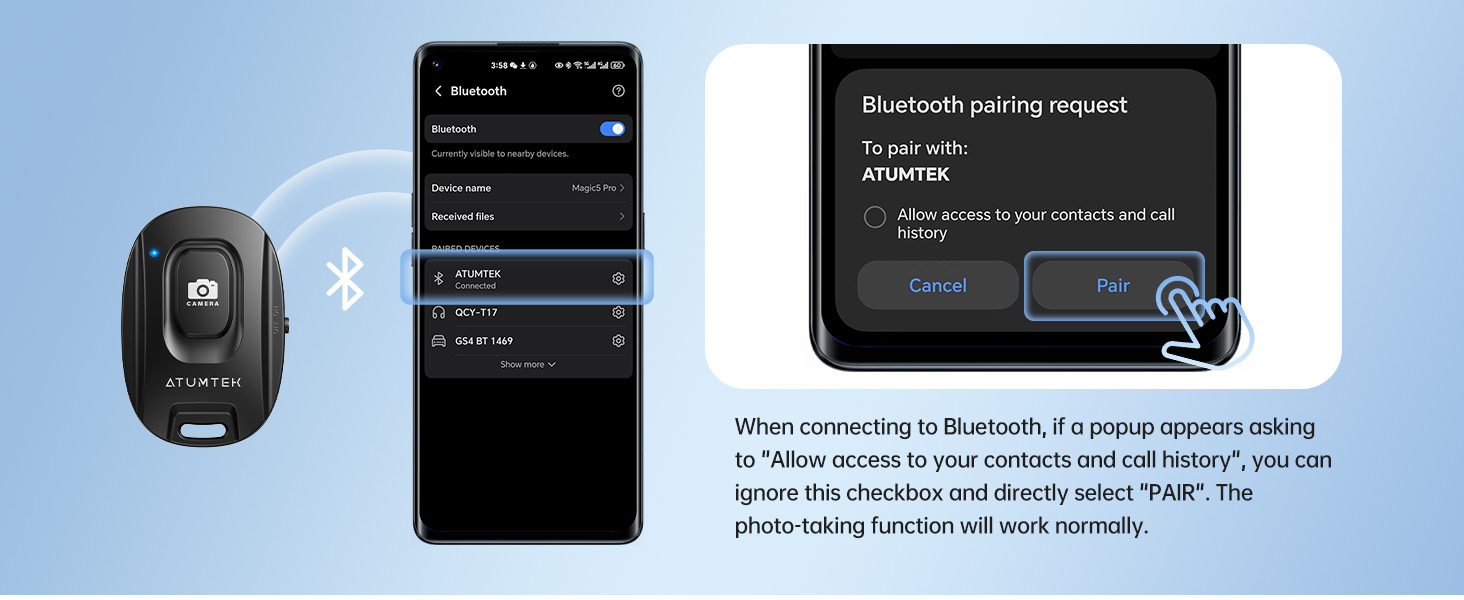
I recently purchased the ATUMTEK Camera Remote Shutter, and overall, I'm very pleased with it. It’s compact, easy to use, and pairs seamlessly with my iPhone via Bluetooth. The two-pack is a great bonus, allowing me to keep one as a backup. Pros: Easy Setup: Connecting it to my phone was quick and hassle-free. No extra app was needed, which was a big plus. Responsive Button: The shutter button works well with both photos and videos, providing instant response with minimal lag. Portable & Lightweight: Small enough to carry anywhere, and the included wrist strap adds convenience. Reliable Connection: The Bluetooth 5.2 connection is stable, even from a reasonable distance. Cons: Build Quality: While functional, the plastic feels a little flimsy. It would be nice if it were slightly more durable. No Battery Indicator: It would be helpful to have some way to check battery levels to avoid it dying unexpectedly. Instructions for Use: Turn On: Switch the device to the "ON" position (side switch). Pairing: Open your phone’s Bluetooth settings, find "ATUMTEK Shutter," and connect. Use: Open your camera app, press the button, and snap away! Turn Off: Switch it off when not in use to save battery. Overall, this is a solid product that delivers what it promises. With a few small improvements, it could easily be a 5-star item!
I**D
Great Little Remote plus Pairing Tips and More
Works Perfectly as a Camera or Video shutter/record button on a Android Samsung S25 and other Android and iPhones. It will start and stop a video or take a photo. Allows you to remotely trigger your phone’s camera via Bluetooth—great for photos and videos. Great for anyone using a tripod or phone stand, taking group shots, vlogging, or tired of touchscreen delays. It takes a Coin Lithium Battery 2032 which lasts a very long time. Remote Range Distance: 10m (33ft). Tips: The remote comes ready to pair via Bluetooth with your phone - the blue LED light will flash continuously after turning on the remote which means it's ready to pair with your phone (open Settings, Bluetooth on your phone). If you need to put the remote back into pairing mode, press and hold the remote shutter button for 3 seconds and the blue light will flash continuously again for pairing.
A**N
The correct setup of the phone
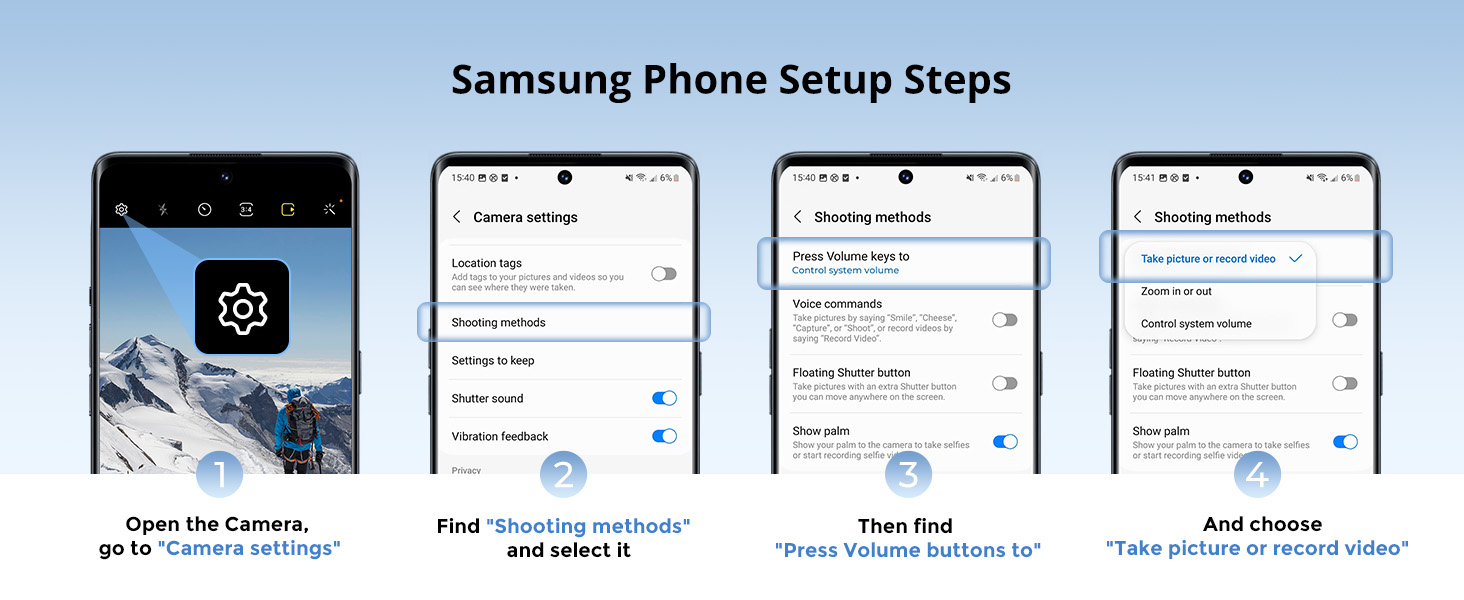
I bought a pair of black & white ATUMTEK Camera Remote Shutters for iPhone and Android Smartphones (2 Pack), Wireless Phone Remote Control Selfie Button for Photos and Videos (Bluetooth 5.2), Wrist Strap Included, Black & White on 08-19-25. There are two different Bluetooth sync connections: “ATUMTEK_Black” and “ATUMTEK_White.” Both work very well. During testing, it was able to trigger the camera from 50 feet away, which is a much greater range than the S-Pen! Note: Do not hold down the “CAMERA” button too long—it will continue taking multiple photos for as long as you press it. However, on the Galaxy S25 Ultra , you must adjust one setting to make the ATUMTEK shutter work (and possibly other brands): 1.1Open the Camera app 2. Tap the Quick controls icon (four small dots at the lower-right of the screen) 3. Tap the Settings icon (on the right side) 4. Go to Shooting methods 5. Select Press Volume buttons to (top of the list) 6. Choose “Take pictures or record video” Good luck!
T**Y
Great Little Shutter-Release
This remote shutter control is great. It's also affordable, and very compact. I recommend it! Also , setup was extremely easy. So long as your phone's Bluetooth is already switched on, the remote seemed to work as soon as I turned it on. Nice item.
A**W
Bardzo dobra jakość. Pozytywnie się aktywuje z moim smartfonem.
L**E
fait parfaitement le job
Y**S
Super afstandsbediening voor het maken van foto’s vanuit de hand of met een aangepast statief. Super eenvoudig te koppelen aan iPhone of iPad… aanrader
C**R
These are fantastic! Super easy to connect to your device. Nice and small so you can easily 'palm' it in your hand if you are taking a picture of yourself and the 'clicker' won't be visible in the image. HIGHLY RECOMMEND
タ**ン
シンプル機能で使いやすく、安価。
ترست بايلوت
منذ أسبوعين
منذ 3 أسابيع