


Desertcart purchases this item on your behalf and handles shipping, customs, and support to EGYPT.
🎨 Unleash your inner artist—wireless freedom meets pro precision!
The Wacom Intuos Small is a compact, Bluetooth-enabled graphic drawing tablet featuring a battery-free pen with 4096 pressure sensitivity levels. It offers a 6" x 3.7" active drawing area and versatile connectivity options (Bluetooth and USB-A), compatible with Mac, Windows, Chromebook, and select Android devices. Designed for digital artists, students, and professionals, it includes creative software and online tutorials, backed by Wacom’s 40+ years of industry leadership.
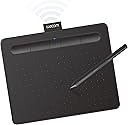





| ASIN | B079J2FSQ7 |
| Active Surface Area | 6 inches x 3.7 inches |
| Additional Features | Bluetooth |
| Best Sellers Rank | #1 in Computer Graphics Tablets |
| Brand | Wacom |
| Built-In Media | Pen tablet Small w/ BT Pressure-sensitive, battery-free Wacom Pen 4K PVC-free USB-A cable w ith cable tidy and L-shaped connector 3 extra standard nibs (located inside pen) nib removal tool on end of pen Quick start guide Regulation sheet Online User Guide and Important product information found in Wacom Desktop Center. |
| Color | Black |
| Compatible Devices | Mac (OS X 10.11 or later) or PC (Windows 7 or later) |
| Connectivity Technology | Bluetooth, USB-A |
| Customer Reviews | 4.4 out of 5 stars 5,632 Reviews |
| EU Spare Part Availability Duration | 7 years |
| External Testing Certification | Não aplicável, Não aplicável |
| Global Trade Identification Number | 00753218986870 |
| Item Dimensions L x W | 6.3"L x 7.87"W |
| Item Highlight | Battery-free pen, 4 ExpressKeys for shortcuts, works with Mac, Windows & Chromebook; Ideal for creators, students & teachers |
| Item Type Name | Wacom CTL4100WLK0 Intuos Bluetooth Pen Tablet, Small, Black |
| Item Weight | 8.82 ounces |
| Manufacturer | Wacom Technology Corporation |
| Mfr Part Number | CTL4100WLK0 |
| Model Name | Intuos S |
| Model Number | CTL4100WLK0 |
| Native Resolution | 4096 levels |
| Number of Items | 1 |
| Operating System | Compatibility with Windows 7 or later/macOS 10.10 or later/ChromeOS |
| Pressure Sensitivity | 4096 levels |
| Screen Size | 7 inches |
| Software Update Supported to Date | unknown |
| Special Feature | Bluetooth |
| Specific Uses For Product | Digital Art Creation, Photo Editing, Online Education, Writing, Designing, Note-taking, Remote Work |
| Target Audience | Student, Teacher |
| UPC | 753218986870 |
| Unit Count | 1 Count |
| Warranty Description | 1 year |
T**T
Love this tablet!
I love this tablet so much. I've made back the money I've spent on it and then some! The setup was easy! I believe all I had to do was go to the wacom website and download their driver software. It is very portable! It was compatible with all of my modern android devices via USB-OTG and Bluetooth. It is a very sturdy device, and it's smooth tapered edges are very comfortable to lay your wrist on while drawing. Overall, a magnificent purchase. The only complaint that I have about this devices is that the bluetooth mode has some significant input delay which prompts the user to prefer the USB connectivity option instead but if you are using the bluetooth mode just to doodle on a phone, tablet, or Bluetooth enabled PC, it's okay for at least that. But your patience will be tested for finer work if you insist on using the wireless bluetooth mode.
M**C
I love it!!
I haven't really used the bluetooth, I don't mind leaving it plugged in, but it's nice to have the option if I ever bring it somewhere where I don't want to use the wire. The tablet's surface feels nice and natural to draw on. It's the perfect size for my limited desk space, and it's very light and can be easily stored away. I'm very happy with my purchase!
D**D
Works great but battery life is limited
I have been using countless Wacom tablets for work for over 20 years. I got a wireless one specifically for traveling when I work mostly on my laptop. Overall I really like and I think the size is just perfect for all day working on a tablet. I tested this with a MacBook Pro 13 (M1), a MacBook Pro 16 (M1 Max) and a Windows 10 Asus Zenbook laptop. If you have the Wacom drivers installed, just connect it via bluetooth and it's good to go. I also have the exact same version of this tablet without the wireless option. Going back and forth between them they work almost identical. On my Windows laptop the wireless version has a tiny delay if you really try to look for it. In my normal work in Lightroom and Photoshop I do not see or feel any difference to the wired version. On my M1 MacBook Pro 13 the delay is significant. It gets really distracting. I assume the drivers are not written for the M1 yet. After I upgraded to the newer MacBook Pro 16 with M1 Max CPU, the delay is completely gone. It definitely is an issue with the first M1 MacBooks. If you connect the tablet to any laptop or computer with an USB cable it works flawless. Zero delay. Battery life is the only slight downside. If it's 100% charged I can work for 6 hours. Maybe a little longer. But that's it. Then you have to charge it again. The issue is that with such a short battery life you absolutely need to keep the charging cable with you all the time. I have to charge mine every day so the advantage of being wireless is really not there if I have to connect it with a cable daily. In other words, yes it is wireless but in every day work you will have to wire it up sooner than later.
C**E
Love Wacom, but the Bluetooth Battery Could Be Better
I love Wacom products, so I was excited to get this Intuos tablet—and overall, I really like it! The pen works great, and I especially love that it’s battery-free. The tablet is easy to use and has been a great addition to my setup. My one disappointment is the Bluetooth connection. The battery doesn't seem to stay charged for very long, so I find myself just using it with the cord instead. It still works perfectly that way, but the Bluetooth feature hasn't been as convenient as I hoped. Still, it's a solid tablet from a brand I love. Just don't be surprised if you end up keeping the cord nearby! 😅
M**O
Loved it!
My boyfriend got the same one for me, and we both loved it! It is very versatile, as you can use either the Bluetooth option or plug it directly into your computer.
J**A
does the job
This product is great, but has its flaws. I have used Wacom tablets for over a decade so I knew what I was getting into. Given you have a understanding and acceptance of the quality of Wacom products and their software/driver support, this product is great. it works just like their other tablets I have owned by them and setup and settings worked exactly the same for better or for worse. the downside is that some of the same problems I dealt with years ago are just still a thing for wacom. Most of the complaints being more on the software side of things. their application is just kind of odd and outdated. Sometimes it works, sometimes it doesn't. sometimes your tablet connects and sometimes it doesn't. Sometimes I have to launch the software again to see the tablet, and sometimes it just works. Wacom drivers have always had this like cursed specific process of doing things when you first install the drivers and that still seems to be true. its trivial actually to get it working (you just have to install the drivers before you connect it at all which usually people screw up by connecting it first because they are excited which installs weird default drivers not Wacom ones so its not good and then its this whole process to undo it all and make sure the right drivers are being used), but i just was hoping we had gotten to a point where maybe it would just be a but more plug and play. besides the software my only complaints about the device is its small battery life, and it doesn't seem to work with other wacom pens. I own a cintiq and I can use a variety of pens on it from other models. I was hoping I could use my pen with the eraser button but no dice. oh yeah no eraser button on the pen. seems silly but if your used to it and were thinking maybe this would be cool for travel/drawing on the go, then consider that.
N**E
Take One and You Won't Need to Call in the Morning!
I'm not going to talk about what a drawing tablet is for. Once you looked that up on the internet, you can consider this is a very reasononably priced tablet that many computer designers use. This one takes up little space on a desk and can be used both via USB-A cable or via BlueTooth wirelessly. One can buy inexpensive adapters that go from USB-A to USB-C if your computer does not have an older style USB-A port. The cable is important at least for charging it. Wacom has decades of experience and reputation and is considered the standard so just saying "wacom" is synonomous with "graphics tablet". They come in all sizes and much of what is the right size is often personal preference, how much one wants to spend and the space on a desk or your lap depending on how you work. In my field I am involved with buying and setting these up for designers so I don't come from the creative side. Working with a small tablet does not mean it equates to a small document. Tablets don't work exactly like that. BUT it can affect how you work on a large, detailed document all at once or only when zoomed in. Many designers who used to buy larger $350 units are happy with these as they take up less desk realestate The wireless pen might be more limited in the levels it can detect than the pen that comes with much more expensive unit and that makes sense. A smaller tablet becomes problematic and I consider this size the sweet spot for most design uses. BONUS - Users with carpal tunnel syndrome or those that want to avoid getting it often like tablets as they avoid the repetitious movement that a mouse does if used for drawing.
A**O
Excellent product, both for my Windows PC and my Android cellphone
This product is excellent and offers straightforward installation. It performs flawlessly with Windows 11 and Adobe Photoshop, and I was also able to utilize it with my Samsung S26 Ultra cellular device, albeit without pen pressure functionality due to the absence of an Android driver. I highly recommend this product.
K**G
Superb!
My son enjoyed the drawing pad. All is well, thank you!
A**T
Awesome design and performance.
This product's performance is better than I expected. It's small size, slim body and sleek design took my heart. I will recommend this product for all the graphic designers who are looking for a pen tab.
S**W
EXPERIÊNCIA EM 1 SEMANA DE USO (ATÉ O MOMENTO QUE ESCREVI ESTA AVALIAÇÃO)
- Chegou muito bem embalado, bem protegido e em perfeito estado. PONTOS POSITIVOS * Acabamento bonito, percebe-se que é um produto caprichado e bem fabricado/montado. * Conforto e praticidade em não se ter o cabo 100% do tempo é maravilhoso. * Zero perda de funcionalidade por ser bluetooth, funciona maravilhosamente bem como se fosse a cabo. * 3 pontinhas extras guardadas dentro da própria caneta. * Caneta não precisa de bateria. * Fácil instalação do driver e do aplicativo Wacom. * A duração da bateria tem boa autonomia, não desenho todos os dias, mas quando desenho, fico por horas e horas, com certeza mais de 3 ou 4 horas, em 1 semana fiz apenas 1 recarga, acredito que desenhei em 3 ou 4 dias essa semana. PONTOS NEGATIVOS (ou não, depende SE você achar negativo). >>>OBSERVAÇÃO: Talvez isso não aconteça com todo mundo, e acredito que comigo aconteceu por conta da minha outra mesinha que também era Wacom. * Tive um contratempo ao tentar registrar o produto para poder resgatar a licença do software que vem de cortesia por ter comprado um produto Wacom, ao entrar no aplicativo aparece uma notificação que leva direto para o site e fazer o registro, e não há nada que se possa fazer, o registro é totalmente automático bastando apenas esperar o processo acontecer, o problema é que a minha nunca registrava, e o registro aconteceu justamente quando desinstalei o driver e o aplicativo, sem chegar a reinstalar, como fiz a desinstalação depois de uma nova tentativa fracassada, no momento que desinstalou o site atualizou com a mensagem de registro bem sucedido. E por fim, reinstalei o driver e o aplicativo Wacom. * Mais como um aviso do que um ponto negativo na verdade, a primeira carga até 100% demorou bastante, foram algumas horas, mas a segunda já me pareceu bem rápida, e tinha descarregado até 10%. * Até certo nível de bateria, aparentemente a mesinha apresenta um leve delay, quando percebi que a bateria estava baixa conectei o cabo para carregar, voltou tudo ao normal, e quando completou a recarga e retirei cabo, tudo 100% também.
B**R
ممتاز
ممتاز بس تحتاج اليوتيوب عشان تعرف طريقة التشغيل، ولو ما تعرف انقليزي حتضيع
A**A
Compact and Reliable Drawing Tablet
The Wacom Intuos Small Bluetooth Graphics Drawing Tablet is a solid choice for digital artists and designers seeking a portable and responsive tablet. Its compact size makes it easy to carry, and the Bluetooth connectivity allows for a clutter-free workspace. The tablet features four customizable ExpressKeys, enhancing workflow efficiency. The included Wacom Pen 4K offers 4,096 levels of pressure sensitivity, providing precise control for detailed work. It's compatible with various operating systems, including Windows, macOS, and certain Android devices, making it versatile for different users. Overall, it's a dependable tablet that delivers consistent performance for both beginners and experienced artists.
Trustpilot
1 month ago
2 months ago