We remain fully operational. Our teams are working around the clock to ensure your deliveries continue safely.

قم بتنزيل التطبيق


معلومات عنا
حقوق الطبع والنشر © 2024 Desertcart Holdings Limited
قم بتنزيل التطبيق
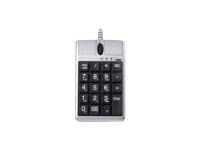
🖥️ Elevate Your Click Game!
Wired Numerical Mouse Keypad Standard asynchronous numerical keypad Mode switch between mouse – keypad Scissor-type key switch 800 dpi resolution USB Review: Great Product, Easy Fix for Macbook User - As an engineering student, I'm always using Excel (2008) for school. I ordered this product so that I wouldn't have to keep switching from the trackpad to the number keys, which was always a little tedious. It came in the mail today, and I immediately plugged it into my 13" Macbook (late 2008), and started testing it out. It worked in every program, except Excel! Every time I would enter a number into a cell, it would immediately delete the entry. I eventually opened the Keyboard Viewer to see what was happening, and realized that whenever a numerical key is pressed, the keypad sends a signal from the Num Lock key, then the number key, and then the Num Lock key again. On a full-sized mac keyboard, the Num Lock key's main function is Clear. This means that when a number is pressed, the keypad automatically clears the cell, enters the number, and then clears it! I was able to fix the problem by downloading a free (and handy) keyboard remapping program named KeyRemap4Macbook. There's no option to disable the Clear key, so you have to make one. Luckily, it isn't that hard to do. In the Misc & Uninstall tab, you have to press the Open private.xml button and open the file in a text editor (I used TextEdit). Enter the following text: item Disable Keypad Clear private.drop_keypadclear --KeyToKey-- KeyCode::KEYPAD_CLEAR, KeyCode::VK_NONE /item in between the script so it looks like this when you're finished: item Disable Keypad Clear private.drop_keypadclear --KeyToKey-- KeyCode::KEYPAD_CLEAR, KeyCode::VK_NONE /item Please note that "item" and "/item" should have carrots just like "" and "", and the first four lines in the first example (lines 3-6 in the second) should have two spaces before each one but the review section would not show any of these. Then just save the file, go to the Change Key tab in KeyRemap4Macbook and press the ReloadXML button in the upper right-hand corner. A new option to disable the Clear Key will appear at the top. Just check the box, and the problem is fixed! The Num Lock function still works on the keypad, and there should be no more issues with the data entry in Excel. What I just wrote above may look a little complicated, but it's really not that hard. I wouldn't let this small issue stop you from buying this product if you're looking for a great solution to the hassles of data entry on a MacBook. After using this for just one night, I'm kicking myself in the butt for not buying it sooner. I hope this review helps anyone who may have had this problem before, or is considering buying it and is worried it might not work with their Macbook. Review: Worked for a day - I hate giving a bad review. Fact is it was well built (as inexpensive things go) and a good idea. It just stopped working . I replaced it with a keypad-usb expansion and all is well. desertcart is awesome on returns, thank-you.
| ASIN | B000R4GL2U |
| Antenna Location | Office |
| Are Batteries Required | No |
| Best Sellers Rank | #5,551 in Computer Mice |
| Brand | iOne |
| Color | Silver |
| Compatible Devices | Büro |
| Connectivity Technology | Usb, Wired |
| Customer Reviews | 3.8 3.8 out of 5 stars (47) |
| Global Trade Identification Number | 04710947563594 |
| Hand Orientation | Ambidextrous |
| Item Weight | 217 Grams |
| Keyboard Backlighting Color Support | Single Color |
| Keyboard Description | USB |
| Keyboard Layout | QWERTY |
| Manufacturer | iOne |
| Movement Detection | Optical |
| Number of Keys | 3 |
| Operating System | Windows, macOS, Linux, Chrome OS, Android |
| Other Special Features of the Product | Portable |
| Power Source | Corded Electric |
| UPC | 736846868107 |
U**C
Great Product, Easy Fix for Macbook User
As an engineering student, I'm always using Excel (2008) for school. I ordered this product so that I wouldn't have to keep switching from the trackpad to the number keys, which was always a little tedious. It came in the mail today, and I immediately plugged it into my 13" Macbook (late 2008), and started testing it out. It worked in every program, except Excel! Every time I would enter a number into a cell, it would immediately delete the entry. I eventually opened the Keyboard Viewer to see what was happening, and realized that whenever a numerical key is pressed, the keypad sends a signal from the Num Lock key, then the number key, and then the Num Lock key again. On a full-sized mac keyboard, the Num Lock key's main function is Clear. This means that when a number is pressed, the keypad automatically clears the cell, enters the number, and then clears it! I was able to fix the problem by downloading a free (and handy) keyboard remapping program named KeyRemap4Macbook. There's no option to disable the Clear key, so you have to make one. Luckily, it isn't that hard to do. In the Misc & Uninstall tab, you have to press the Open private.xml button and open the file in a text editor (I used TextEdit). Enter the following text: item <name>Disable Keypad Clear</name> private.drop_keypadclear <autogen>--KeyToKey-- KeyCode::KEYPAD_CLEAR, KeyCode::VK_NONE</autogen> /item in between the <root> script so it looks like this when you're finished: <?xml version="1.0"?> <root> item <name>Disable Keypad Clear</name> private.drop_keypadclear <autogen>--KeyToKey-- KeyCode::KEYPAD_CLEAR, KeyCode::VK_NONE</autogen> /item </root> Please note that "item" and "/item" should have carrots just like "<root>" and "</root>", and the first four lines in the first example (lines 3-6 in the second) should have two spaces before each one but the review section would not show any of these. Then just save the file, go to the Change Key tab in KeyRemap4Macbook and press the ReloadXML button in the upper right-hand corner. A new option to disable the Clear Key will appear at the top. Just check the box, and the problem is fixed! The Num Lock function still works on the keypad, and there should be no more issues with the data entry in Excel. What I just wrote above may look a little complicated, but it's really not that hard. I wouldn't let this small issue stop you from buying this product if you're looking for a great solution to the hassles of data entry on a MacBook. After using this for just one night, I'm kicking myself in the butt for not buying it sooner. I hope this review helps anyone who may have had this problem before, or is considering buying it and is worried it might not work with their Macbook.
D**S
Worked for a day
I hate giving a bad review. Fact is it was well built (as inexpensive things go) and a good idea. It just stopped working <sigh>. I replaced it with a keypad-usb expansion and all is well. Amazon is awesome on returns, thank-you.
J**.
Using this on a DCS
Emerson Ovation DCS use. Works well and removes the need to use the keyboard for normal use.
R**S
Large sized, not for tiny hand, pricey, But functional and exactly what I wanted
My father has been an accountant all his life and previously he used to use a desktop so having a numeric keypad was not a problem but now with him using laptop but not wanting a large heavy laptop, we had to compromise on the numeric keypad part. His is a thin Lenovo laptop which doesn't have the numpad. Also he is not fond of using the touchpad and needs a real mouse. I had bought an exactly similar looking HP numeric keypad + mouse back in 2007 and it served us well for some time. But after it broke, we had to get a new one. HP wasn't selling that mouse keypad combo anymore and very less companies actually do. This is when I found the iOne Scorpius N4 which was same as the HP one. For use primary need was that it needed to be a single device with mouse and numeric keyboard functionality. Also the mathematical operation keys like +-*÷ should be big and not tiny. I say this because we did buy one other such combo device in between but its +-*÷ was not those keyboard buttons but tiny one which was not useful. Now the original iOne we bought back in 2011 or so also broke and we purchased another just few days back. I am hoping this works for more time. I am not giving it 5 stars because due to monopoly of companies making such combo devices, this is pretty costly at $34 or so. Also the device in itself is pretty big so if you have tiny hands, it may be difficult to operate. I think they should make it 80% of its current size.
J**E
Not a good product
I wanted a 10 key pad for my laptop and of course a mouse. This looked like it would fit the bill, but it is VERY difficult to work. It worked fine for about 2 weeks and then basically stopped. I have cleaned the sensor with a Qtip and window cleaner and continue to clean it with a dust rag. You have to have a mouse pad. 100% nonoperational without that. The mouse had basically stopped working, but after playing with it a while and switching the active buttons I've figured out that I can kind of use it in mouse only mode and number pad only, but not at the same time. It will not work with both active at once. When the mouse sits without touching it or moving it, it shakes. The cursor moves 100 mph. The roller to scroll up and down sticks constantly side to side which locks the window scroll. Because you have to constantly try and turn that off, the mouse opens up a ton of web pages that you didn't want open (if you're on a website). Overall, this thing is extremely hard to use comfortably. 100% not worth the money.
A**T
Didn't work for me
Even with the info posted in a review from another user I can not get this unit to work properly with the calculator function in my Macbook Pro. I'm really disappointed as this would have solved the mouse-10 key problem inherent in a laptop setup
E**E
AWESOME
This is an awesome little gadget. I use it for autocad and now I don't need a mouse and a keypad, I still have a second mouse for when I'm doing a lot of clicking, but when I need to select something and enter a number my hand doesn't have to move hardly at all, really wish they made a black one, all my stuff is black, so the silver is the old man out, my keys are silver too, it shows as black but there silver.
M**R
Good for about 8-12 months
I am on my 10th one. They break after about a year but I have found nothing else like it out there. I work with numbers all day and couldn’t image work with out it. I am about to order 2 more to get me through 2025 lol. No joke I just consider it the cost of doing business
ترست بايلوت
منذ 3 أسابيع
منذ شهر