🚀 Elevate your office game with speed, style, and seamless connectivity!
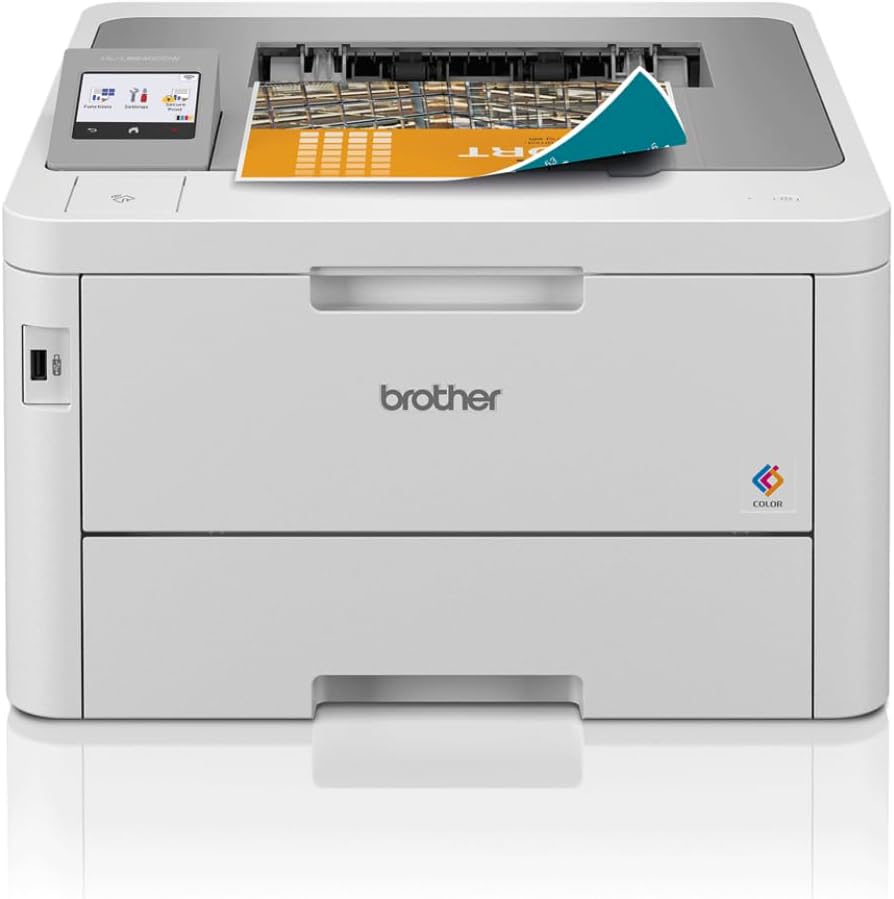
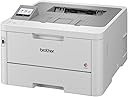
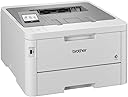
The Brother HL-L8240CDW is a professional compact color LED printer designed for busy offices and home workspaces. It delivers fast print speeds up to 30 ppm, supports versatile connectivity including Gigabit Ethernet and 5GHz WiFi, and features a user-friendly 6.8cm color touchscreen. With a large paper capacity expandable to 500 sheets and high-yield genuine Brother toner cartridges, it ensures efficient, high-quality color printing with minimal interruptions.


| ASIN | B0CNLT55R4 |
| Additional Printer Functions | All In One |
| B&W Pages per Minute | 30 ppm |
| Best Sellers Rank | 3,547 in Computers & Accessories ( See Top 100 in Computers & Accessories ) 48 in All-In-One Printers |
| Box Contents | Power cable, Printer, Toner Cartridges, User guide |
| Brand | Brother |
| Brand Name | Brother |
| Color Pages per Minute | 30 ppm |
| Colour | grey |
| Compatible Cartridge | TN248/TN248XL/TN249 |
| Compatible Devices | Laptops, PC, Smartphones, Tablets |
| Connectivity technology | Ethernet, USB |
| Control Method | Remote |
| Customer Reviews | 4.4 out of 5 stars 719 Reviews |
| Display Type | LED |
| Dual-sided printing | Yes |
| Duplex | Automatic |
| Global Trade Identification Number | 04977766832175 |
| Hardware Interface | Ethernet, USB 2.0 |
| Initial Page Print Time | 12.5 Seconds |
| Ink Colour | black, cyan, magenta, yellow |
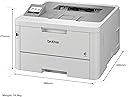
| Item Dimensions D x W x H | 44.6D x 39.9W x 27.4H centimetres |
| Item Type Name | Colour Laser Printer |
| Item Weight | 16.8 Kilograms |
| Item height | 27.4 centimetres |
| Manufacturer | Brother |
| Maximum Copy Resolution Black and White | 600 dpi |
| Maximum Copy Resolution Color | 600 x 600 dpi |
| Maximum Copy Speed Black and White | 30 ppm |
| Maximum Print Resolution Black and White | 1200 dots_per_inch |
| Maximum Sheet Capacity | 250 |
| Maximum print Resolution Color | 4800 x 1200 dpi |
| Media Size Maximum | 250 sheets |
| Model Name | HLL8240CDWQJ1 |
| Model Number | HLL8240CDWQJ1 |
| Model Series | HL-L8240 |
| Model name | HLL8240CDWQJ1 |
| Network Connectivity Technology | Ethernet, USB |
| Number of Trays | 2 |
| Other Special Features of the Product | 6.8cm Colour Touchscreen, Auto-Duplex, Internal Memory |
| Output sheet capacity | 250 |
| Paper Size | 21,0 x 29,7 centimeters |
| Power Consumption Size | 560 Watts |
| Print media | Envelopes, Labels, Paper (plain) |
| Printer Output Type | Colour |
| Printer Type | Laser |
| Printing technology | Laser |
| Product Warranty | 1 year manufacturer |
| Resolution | 600 x 600 |
| Scanner Type | Flatbed |
| Special feature | 6.8cm Colour Touchscreen, Auto-Duplex , Internal Memory |
| Specific Uses For Product | Office |
| Total USB Ports | 2 |
| Warranty Type | Limited |
A**T
Excellent Quality Printer/Scanner
Excellent quality printer which was easy to setup. Connecting to Wi-Fi this printer supports both Apple Air Print and printing from Android (with additional download). Fairly quiet for a laserjet of this size. So far toner usage has been fairly low and I have never once had any form of paper jam. The scanner is also great and feeds automatically, scanning. Both sides of the paper automatically. It also prints on both sides of the paper automatically with no manual intervention. The paper tray is also huge, meaning no need to keep refilling the paper.
A**Y
Exceptional Performance and Versatility: Brother MFC-L8690CDW Colour Laser Printer
I recently purchased the Brother MFC-L8690CDW Colour Laser Printer for my home office, and it has exceeded my expectations in every way. This all-in-one, wireless-enabled printer offers incredible performance and versatility, making it a valuable addition to my workspace. Firstly, the print quality is outstanding. The MFC-L8690CDW delivers crisp, vibrant colours and sharp text, which is essential for my line of work where I often create marketing materials and presentations. The printer's fast speed ensures that I never have to wait long for my documents to print, even when I have a large volume of work to complete. The scanner and copier functions are equally impressive. Scanning documents is a breeze, and the high-resolution scans make it easy to archive and share digital files. The copier is efficient and produces accurate reproductions, which is perfect for when I need to create multiple copies of important documents. Wireless connectivity has been a game-changer for me. The Brother MFC-L8690CDW easily connects to my home network, allowing me to print from my laptop, smartphone, and tablet without the need for a wired connection. The printer also features a USB 2.0 port and a network port, providing even more flexibility in how I choose to connect my devices. One of my favourite features of this printer is its user-friendly touchscreen interface. The large, intuitive display makes it easy to navigate through the various settings and functions, which saves time and streamlines my daily tasks. Moreover, the printer's robust build quality gives me confidence that it will stand up to the demands of a busy home office environment. The high-capacity toner cartridges are cost-effective, and I appreciate that the printer's design makes it easy to replace them when needed. In summary, the Brother MFC-L8690CDW Colour Laser Printer has been an exceptional investment for my home office. Its outstanding print quality, scanning and copying capabilities, and versatile connectivity options make it a reliable and efficient workhorse that I would highly recommend to others in need of a powerful all-in-one printer.
N**Y
High quality printing, easy to set up, I’d recommend purchasing!
Started a PGCE so lots of prep for classes needed and having this has been a game changer. It connects to WiFi wirelessly which means I can print from both my phone and laptop without a cable, I just downloaded the brother printer app on my phone. I’ve been using it for 4 months and I haven’t had to replace the cartridges yet. The print quality is excellent and it love that it lets me print on both sides without having to reload. It prints quietly and has a deep tray for paper which means that you don’t have to keep adding paper. I had researched a lot of printers before purchasing and I’m delighted to say that I haven’t had any issues, it’s very easy to use.
S**A
One of the best MFC machines for the price.
Great printer! Easy setup and ready to go in no time. Bought this for my dept at work and is a perfect size to share with about 10 people. Used the online driver setup and have had no problems so far. we are not using the wifi feature at this time so can't comment on that. It prints super fast and easily handles the loads of printing we do. A big selling point was the built in USB port at the front so we can scan docs to a flash drive right from the unit. Good all in one without the bulk of some other models. Recommend! Please note: Parts for this printers are very expensive and it is good for small business but not for big business.
E**R
Good Double Sided Colour Laser Printer for small office / home office
My first double sided colour laser was a Samsung (think it had tie in with Kyrocera?). It was big. It was fien for text but less good with photos. I used to print a third to a half of documents which were hard copies of PowerPoint workshop presentation for classroom candidates. It accepted non-Samsung toners but photos were even worse; the gradations were blotchy. Nevermind, got a Canon A3 photoprinter to print the certificates for candidates so as to avoid them feeling cheated of their course fees. Years later moved onto an all-in-one printer scanner by Canon. The photos and certificates output were fine especially once laminated but of course nowhere near the A3 photo printer quality. after 12 years the Canon won't print more than one sheet at a time. It served longer than its useful life and was not worth a service & repair cost. This was 2021 / 2022 and I was going to buy a HP colour laser as replacement, not cecessarily all-in-one. Had in mind a HP because of all the 40 or so my work assignments sent me to during the previous decades, one by one, brands stopped producing PC's etc. One by one, Sony VAIO, Toshiba, they disappeared. However HP brand remains the consistent brand one could find in countries few have heard of. But then in computer magazines I came across articles reporting HP (among others) have started putting recognition micro-chip onto inkjet cartridges. So a year later upon reading reviews by others here they kindly reminded me situation is same on laser toners. Thus no rush, spent a few months on and off reading as many reviews as possible to select replacement. It was thanks to other reviews that I chose this Brother for I would not have given Brother another thought. All I knew before this printer was Brother made sewinng machines, well in Asia where Singer didn't have as big a presence. Some good points of this Brother HL-L8260CDW. Partly due to it being just a printer rather than all-in-one, I could manually handle it to the first floor office by myself. However, the footprint size is still the same. It is also fortunate that the ventilation slots is on the right hand side because its placement is right angles on top of a filing cabinet (but unfortunately the button are therefore on the inside (butt against a wall)). No worries - saved by the fact that the machine sleeps and wakes very quickly. The Canon multifunction printer used to take couple minutes to wake up, warm up before able to print. This Brother can do it is about 15 seconds, not sure, but certainly far faster than booting up the laptop. So switch it on at the start of day and forget and it won't use much energy. The best aspect of this printer ? Yes indeed, it can use non-Brother toners. Amazon cookies popped Cool Toner. It even tempted me to buy it at a discount price of about £60 for a set of 4 colours. When setting up the printer, took out (almost tempted to bin the original Brother toners but didn't because that would not be responsible); anyway put the 3rd party toner cartridges instead. No complaints. Works fine but of course can't tell you now how good compared to original Brother toner. This was going too good to be true.Always wanted to get rid of the cable and cable protector around the office. So let's try wireless connection for printing. Not being a computer geek, here was the first hurdle. Owing tom company security policies and therefore the privacy settings used with FireFox browser, most things are disabled so as to prevent data leak of clients' data. Thus could not get onto the website support page indicated by the Brother documention which came with the printer. Nevermind. With different search engines and different browsers eventually found U-Tube tutorials. However, not quite enough tuturials to lead me by the hand to set it up. What is SSID and what is router? Is it any different with was supplied by the ISP? No mention. So using logic and thought it backwards, the laptops, all out laptops, could only connect wirelssly to one connection at a time. So deduced the wirelss printing facility must use this same "circuit". Thus what the tutorials referred to were what the ISP supplied (as I had not changed them). Hurray it worked. One after another got each laptop connected. They were Win7-64 Home, Win7-64 Pro, Win8.1, Win10, and Win11 operating systems. All connected 5 hours after unpacking the Brother printer. Would I recommend it ? Yes with one reservation. When taking old Canon to local municipal tip for disposal, they would not accept it - told me to take it to a waste business machine disposal company. But the local tip would have taken a smaller inkjet printer for disposal. This Brother would be the same but nevermind, the £ saved on ink by using laser toner would go towards proper disposal come ??? 10+ years time.
D**G
A pig to set up, but, a fantastic printer
This is a large printer, so it is probably best to double check that it will fit in the space available. This is NOT one of the small desktop laser printers. Out of the box, you remove some plastic clips and some tape with excellent instructions and then you can turn it on. Now the fun begins. The instruction for setting up WiFi in no way relate to the process. I was able to find a YouTube video, and then setup was a breeze. Why these steps were not in the instruction only the Head of Customer Confusion at Brother would know. Once set up on your WiFi network away you go. The print quality is exceptional, with strong, solid colours, and a very fast print speed. Would I buy it again? Yes, without hesitation. For the quality of print, and speed of print the price is exceptional value. This review is based on the single function (print) version of the HL-L8260CDW. Talking of which, why do printer manufacturers give their printers such stupidly long code names. But that is another rant, for another time. Hope this was helpful.
A**R
Rubbish, not fit for purpose. Very expensive to run
Good print quality, but the black toner only gave me 250 pages of text before running out. It says its a 1000 page yield, but mine was not. Perhaps a faulty toner? Amazon wasn't overhelpful so my only option was to returned it. At 250 pages per toner and toner at £80+ for a black, its very expensive to run and not really an option for home use. Very disappointed at the product and service. Update a few months later. Constant paper jams, finally ruined the fuser. Got Brother to send a replacement and paper jams on that from day 1. Nightmare and waste of money. Doubt they will take it back now
N**A
Just what I wanted
I love this machine. Prints well. Delivery was prompt. Easy to setup and install.
ترست بايلوت
منذ أسبوعين
منذ شهرين