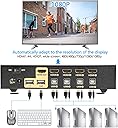
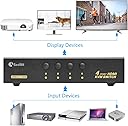
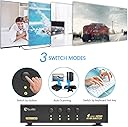
🔄 One switch to rule your multi-device empire!
The Sea Wit 4 Port USB HDMI KVM Switch empowers professionals to control up to four HDMI computers using a single keyboard, mouse, and monitor. Supporting full 1080p HD resolution with HDCP and EDID compliance, it offers versatile switching via buttons, hotkeys, or auto-scan. Compatible across Windows, Linux, and Mac systems, its robust metal casing ensures durability and heat dissipation, making it an ideal space-saving solution for dynamic multi-device setups.
| ASIN | B079FSD349 |
| Brand | Sea Wit |
| Color | 4 port hdmi kvm switch |
| Connectivity Protocol | Hdmi |
| Connector Type | Usb 2.0 |
| Customer Reviews | 3.6 3.6 out of 5 stars (48) |
| Date First Available | September 30, 2018 |
| International Protection Rating | IP54, IP67 |
| Is Discontinued By Manufacturer | No |
| Item Weight | 2.34 pounds |
| Item dimensions L x W x H | 7.87 x 1.65 x 2.95 inches |
| Item model number | SeaW-74H |
| Manufacturer | KAPOK |
| Mounting Type | Panel Mount |
| Operating Voltage | 5 Volts |
| Operation Mode | Automatic |
| Product Dimensions | 7.87 x 1.65 x 2.95 inches |
| UPC | 653472777545 |
| Unit Count | 1 Count |
J**N
Great KVM
Purchased two KVM switches for my company, 4 ports and 16 ports. Perfect for my needs. Setup is simple, switch is fast, device seems well-made:Metal case. non-slip mat. . If you need extra ports on your TV computer... buy this. Excellent and quality switch, Works straight out of the box, plug and play. Plug it in and it just works.The quality is much better than I expected, it feels like it,perfect solution to save much space.
J**.
Buggy, unreliable, incompatible.
I had numerous issues with the 8 port HDMI KVM. 1. When switching between ports using the keyboard shortcuts, the number keys that are pressed to switch ports are sent through to the computer. So after switching away from a port and then back again, you will see "123" characters typed in documents that were open. 2. Intermittently, if a system was powered down while it was selected, keyboard switching would stop working. 3. Key presses would occasionally act like the key was stuck down for a few seconds, causing repeated key presses to be seen on the computer. Saw this with two different keyboards, both used in other configurations without issue. It is possible this doesn't happen with the included PS/2 keyboard, but that is irrelevent as I can not use that keyboard for day-to-day work. 4. If a system was powered on and selected, but the system was not processing keyboard input, the keyboard switching would not work. In particular, during system bootup the key switching would work in the BIOS, then stop working while windows was loading, then start working again once windows was up. This is a significant problem for me as I need the KVM for kernel development/testing, and while a system is stopped in the kernel debugger or restarting the keyboard switching would stop working. 5. My basic Microsoft USB mouse would stop functioning intermittently, acted like it had been unplugged. The USB mouse works fine in all other tested configurations, just not with this KVM. PS/2 mouse that came with the unit did not have this issue, but including a PS/2 mouse with the KVM is not a solution to lack of basic USB mouse compatibility. Possible this issue was specific to my unit. 6. On 3 occasions, video stopped working on one port until the KVM was reset and the computer power cycled. Swapping video cables and video port on the computer after the first occurrence did not fix this. Possible this issue was specific to my unit. Unfortunately I had not fully tested the first one of these I purchased before the return window ended, so I am stuck with it. A second one I purchased I returned.
A**W
great HDMI KVM switch
exactly what I was looking for. Build quality is great, perfectly reliable, functions as intended without issue. Bear in mind that while it comes with cables for the keyboard and mouse, you must supply the HDMI cables to the source computers. troubleshooting tip: I have a gaming keyboard, which didn't work with this KVM. After some digging, I found the issue to be related with USB 3.0 ports, so ensure you're connecting the keyboard/mouse USB to a USB 2.0 port. If you don't have a USB 2.0 port, I worked around this by purchasing a USB port splitter (2.0) for ~$10.
L**X
Unreliable: Loses USB signal periodically.
I bought this in Oct 2018 to use with 2 Mac Pros and 1 Mac Mini. All 3 computers have the same OS, drivers, applications, and updates. By Jan 2019 the switch would periodically drop the USB signal to one of the computers. I'd switch to the other computers, and everything would be working fine on them. I'd swap the cables to see if maybe it was 1 bad USB port, but no. The problem is intermittent and inconsistent. Some days it would work fine, and on others it would be a pain in the neck. ZERO tech support for this as well. I can't trust it to get me through the day so it's an inconvenient headache and a waste of money.
A**S
... the switching is rather slow and it is not happy about passing through the HDMI signal from USB-C
It does the job but the switching is rather slow and it is not happy about passing through the HDMI signal from USB-C docks
K**R
UPDATE: Replacement Working Great
UPDATE (7/17/2018): The Seller (KAPOK) replaced the device - new device is working great again. As I said below, this is a very attractive, metal box with solid, responsive buttons and an LED indicating which port is active - so far so good! It has some weight to it too, so the weight of the cords don't pull it off the desk or move it around. Overall I love it - just hopeful this one lasts longer. Kapok responded very quickly and went above and beyond to replace the device which is very appreciated. Only taking 1 star off for the first lemon - it's kind of a lot to pay (~$80) for questionable life span and initial build quality. But hopefully this one can go the distance! --Original Post-- I have had this Sea Wit 4 port HDMI KVM Switch for 2.5 months and it has stopped working - only passes the keyboard and mouse signal, HDMI no longer working on any port. Build quality is nice - metal casing, not just plastic and the buttons have a nice solid click when pressed. Initially everything was great! But now after just 2.5 months, not working anymore. Furthermore, there is no way to contact the seller for support and their return / warranty policy is horrid: 30 day return, 60 day warranty. Who wants to spend $80 for something that works for 65 days? Hopeful that the seller will see these reviews and contact me.
T**U
Worked great for 1.5 years -- then totally malfunctioned...
The video switching works great, but the USB devices no longer switch over properly - mouse and keyboard connectivity is lost with a rude Win 10 message. You have to rotate through the devices manually several times before the mouse and keyboard resets properly. This USB malfunction happens on both WIRED and wireless keyboard and mouse. I tried everything to fix this, from new keyboards and mice, trying tweaked usb hub settings in Win 10 device manager, rebooting the machines, unplugging the KVM and starting over to perhaps cause a reset. Nothing worked.
ترست بايلوت
منذ أسبوع
منذ أسبوعين