🎮 Elevate your desk game with precision and comfort that never quits!
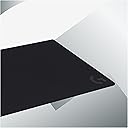
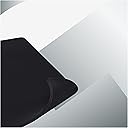
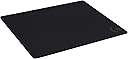
The Partyreal ABAA128 (Logitech G740) is a large, 5mm thick gaming mouse pad designed for PC users seeking enhanced control and comfort. Its medium resistance surface optimizes low DPI gaming by providing precise mouse tracking, while the consistent texture ensures maximum sensor accuracy. The non-slip rubber base keeps the pad firmly in place during fast movements, and the soft material cushions the wrist for extended use.
| Additional Features | Non-slip |
| Antenna Location | Gaming |
| Asin | B07W4DHRYJ |
| Best Sellers Rank | #249,328 in Office Products (See Top 100 in Office Products) |
| Brand | Logitech G |
| Color | Black/White |
| Customer Reviews | 4.6 4.6 out of 5 stars (3,979) 4.6 out of 5 stars |
| Enclosure Material | Rubber |
| Global Trade Identification Number | 05099206104365 |
| Item Dimensions L X W | 23.62"L x 18.11"W |
| Item Thickness | 5 millimeters |
| Item Type Name | gaming mousepad |
| Item Weight | 0.63 kg |
| Manufacturer | Logitech |
| Mfr Part Number | 943-000805 |
| Model Number | 943-000805 |
| Number Of Items | 1 |
| Shape | Rectangular |
| Size | Medium |
| Theme | Plain |
User
Wireless Revolution
TL;DR: $100 and worth it. Charges slowly, but will keep your mouse alive without plugging it in. Shame that only two mice work for it so far.When I first stumbled on this mouse pad, I scoffed and wrote it off as a gimmick. Mind you, I've spent this kind of money before on metal mouse pads from razer. I bought this for my wife just recently to "test" it, because she just got her first gaming computer and needed a mouse/mouse pad.As an avid PC gamer, I can't sing the praises of wireless mice enough, but the worst thing about them, is that they eventually die. Naturally, you'd want a rechargeable mouse so you don't have to worry about batteries, however, I always seem to forget to charge my current mouse because the charge lasts long enough that I don't think about it (roughly 3 - 5 days). Whenever my mouse does die, I get annoyed because I feel stupid for not charging it and then I have to deal with the cord.This mouse pad solves every problem with wireless mice. It continuously charges the mouse, so long as it's on the mouse pad(duh) even while in use. There is no lag or latency issues because the mouse communicates directly to the mouse pad. You'll never need to plug your mouse in again.The pad itself is excellent. It comes with two types of surfaces, a hard and soft one. You can swap them out and I haven't noticed a difference in charge times or connectivity with either. The pad is also huge, much bigger than I thought it would be. The charging isn't fast by any means, but its fast enough to keep your mouse from dying, even while gaming.The only negative I can see is that you'll have to spend $100 on the pad and then $100 on the mouse itself, but I don't take stars off for price. It's a premium product. I picked up the g903 with the pad and couldn't be happier with it. I wish I would've bought one for myself, but the wife has it, and that makes me sad.
User
Game-Changing Wireless Charging
The Logitech G POWERPLAY Wireless Charging System is a must-have for anyone using Logitech’s LIGHTSPEED gaming mice. This system eliminates the need to charge your mouse manually, keeping it powered while you play or work. The sleek design includes both cloth and hard mousepad options, so you can choose your preferred surface for precision or speed.Setup is seamless—just plug in the base, attach the POWERCORE module to your compatible mouse, and you’re good to go. It’s compatible with mice like the G502 LIGHTSPEED and PRO X Superlight, delivering reliable, lag-free performance. I never have to think about charging anymore, even during long gaming sessions.The mousepad itself is responsive and high-quality, with plenty of space for smooth movements. My only minor gripe is the higher price, but the convenience and performance make it well worth the investment. If you’re looking to declutter your setup and never worry about charging again, the Logitech G POWERPLAY is a no-brainer!
User
This product works flawless, and is probably not what you think it is.
I ordered this months ago, when the 903 was released. I was becoming more and more frustrated by the time it took to deliver on the product, but they did eventually deliver. So here goes after a weekend of using this coupled with a 903. have this setup, and coupled with a G910 Keyboard. The profiles are set up accordingly and I have more than 2 dozen games to try this out on.My first recommendation is do not allow the game to dictate the color profile. Really. There is a bug in firmware/software where games that "Flash" the keyboard lights during certain events cause the mouse(G903) stutter. This can cause you to lose the match or even worse, have to restart the computer. This is rectified by unplugging and plugging the mousepad back in. Just avoid the game controlled lighting effects and customize your own.As for the actual mouse pad. It does come with a soft and hard pad. These attach to the charging pad itself. They simply lift off, and can be replaced. The soft pad is the same quality and texture of 90% of gaming mouse pads. It feels no different, has no drag, and is really nice to use. Typical high quality soft gaming pad. The hard pad is the same. Its smooth, and is the quality you expect.The actual wireless charging system is really nice. Playing many different games, it was able to (extremely slowly) charge the mouse to 100%. I purposefully left the mouse at 20% when I hooked up this system. I then plugged it directly into a port (so the pad would shut down when the computer was turned off). Surely enough, it extremely slowly charged the mouse. It never went negative (lost battery). There is no dragging due to the wireless charging. I did use the mouse with the weight until the Powerplay System arrived just to get used to it.All in all, this is a solution that allows you to remove the wires for gaming, without giving up any performance. At 1000hz it out paces some wired mice. With a wireless charging pad the battery is a non issue. The pad itself is the same quality you get from just about any good gaming mouse pad. You can put any mouse pad you want (I tried it with two others including the Steel Series with no issues, they just happen to be smaller). I would highly recommend this setup, and couldn't be happier with it. The mouse itself should be separate review if gone in to great detail.
User
4 Years And Still Holding Strong
I just want to say, I didn't start writing reviews until the past 6 months, so this has been a long time coming. I originally bought this on Amazon February 8th...2019! I have used my G502 Lightspeed on this since both of these came out. Originally I was using the G903, but honestly, I didn't like the feel of it.This mouse pad is a game changer for me. No more anxiety worrying about when my battery is going to die, no more trying to remember I need to place my mouse in a certain spot or way on a charger for it to connect properly, and I don't need to remember to plug it in. Seriously, this is awesome. Takes seconds to set up and sync. Your mouse just....works. Think of having the dependability of connection of a wired mouse, but now wireless. It's weird to say, but it's an amazing concept.Out of the 4 years, I only had 2 minor hiccups with it. 1, at one point the puck/battery that connects to your mouse wasn't holding a charge. I was getting frustrated but when I finally took the puck back out, I found out my 4 year old at the time spilled juice. Even though it didn't really get anywhere, the mouse was splashed with it. Took the puck out and looked at the contacts, and they were "dirty". After cleaning the contacts, they work like new and haven't had a problem since. I'm still using the original puck/battery.The only other issue I had, and really not an issue, more of a PLEASE BE AWARE. I'm not used to keeping mousepads to the point of deterioration. After like 6-8 months, old ones feel grimey, I just end up throwing them away. Not these. I spent over 2 years with the hard and soft surface. Honestly, the soft surface is nice, but gets dirty real quick, so I mainly use the harder surface. The pads were literally falling apart from the constant every day use for both work and play. I bought replacement mats on Logitech's site last year and haven't had an issue since.Even though I mention 2 issues I had, that's both on me and in my opinion normal wear and tear. This has held up between 2 computers, 4 years of consistent use, my child being around, and 2 cats that live on my desk. I guess you can work hard, play hard, and even live hard and have a durable and dependable mouse pad.I highly recommend things a decent amount now when I notice quality or niche things, but this mouse pad...if you have a mouse that's compatible with it and you don't have this mouse pad, why? Get it, I swear to you this is a game changer. If you don't have either, I know it's expensive and a pretty big barrier to entry, but it's one of the few times I would say it's completely worth it. DO NOT break yourself if you don't have the spare money, but for anyone else, seriously give this a thought. Weird to type up an essay for a mouse pad, but that's just how good this is. Good job Logitech.
User
A Must-Have for the right mouse owners!
I've been using the Logitech G Powerplay Wireless Charging System for a few months now, and I'm absolutely loving it.The Powerplay is a wireless charging mousepad that uses a proprietary technology called Powercore. The Powercore module attaches magnetically to the bottom of your mouse, and it provides continuous wireless charging.This means that you never have to worry about your mouse running out of battery. As long as your mouse is sitting on the Powerplay mousepad, it will be charging.I love the convenience of the Powerplay. I don't have to worry about plugging in my mouse or changing batteries. I just put it on the Powerplay mousepad, and it's good to go.The Powerplay is also very well-made. The mousepad is made of high-quality cloth, and the Powercore module is made of durable plastic.I've been using the Powerplay for a few months now, and it's still going strong. I highly recommend it to anyone who owns a supported mouse.Pros:Continuous wireless chargingConvenient and easy to useWell-made and durableCons:Can be expensive
User
An essential wireless charging component for a Logitech G903 or G703 wireless mouse.
Logitech G Powerplay Wireless Charging System for G703, G903 Lightspeed Wireless Gaming Mice, Cloth or Hard Gaming Mouse PadI've been using a corded SteelSeries Sensei mouse (the Pro MLG edition). It's a great mouse but, after nearly five years of heavy use, it's buttons were beginning to wear out. I wanted to switch to a high-quality wireless mouse with long-lasting switches but it needed to be ambidextrous because I'm ambidextrous and usually use my left hand for the mouse. This led me to Logitech's G903. The one feature that the G903 offered that no other ambidextrous wireless mouse does is wireless charging. BUT wireless charging is an option and you must also purchase Logitech's PowerPlay mousepad for it to work. So I purchased my PowerPlay mousepad at the same time as my G903 mouse.I paid the full $99.99 plus tax to purchase it direct from Amazon. I've noticed that it has been very hard to find because most sellers who claim to carry it seem to be out of stock. Even Amazon was frequently out of stock and buyers had to backorder it and wait for delivery. Some sellers have taken advantage of the situation and are selling it for way over its suggested retail price. I've seen several sellers at other websites with prices over $140 and some as high as $250---for the PowerPlay mousepad only (no mouse). I hope Logitech gets their manufacturing ramped up to meet demand. I also hope they lower the price because $99.99 plus the price of the mouse ($149.99 for a G903 or $99.99 for a G703) is a lot!!!I waited until Amazon had the PowerPlay back in stock, then purchased both the G903 mouse and PowerPlay mousepad at the same time. Since my purchase, Amazon has run out of stock again and this time they are not accepting any more orders because they do not know when or if they will be able to get any more. I'm not sure what's going on but it looks like the supply situation is getting worse before it gets better.I'm just glad to finally have a high-quality wireless mouse that I never have to plug a charging cable into. The battery in my G903 mouse has a continuous runtime of only 24-32 hours (depending on how it's configured). But the PowerPlay mousepad charges the mouse while I use it so the battery never runs down. Plus, it regulates the charge level in order to keep the battery healthy and prolong its life. Wireless charging is huge in my book because plugging and unplugging a USB cable into the mouse for charging is the the weakest part of the design. Those tiny USB jacks are not designed to handle such frequent use and they wear out quickly. The PowerPlay mousepad does away with that. Hurrah!Pros -.-.-.-.-.-.-.-.-.-.-•– Charges mouse while the mouse is being used so the battery never runs down.•– Uses a smart charging circuit to vary the charge level in order to keep the mouse battery healthy.•– Includes an attached wireless communication receiver so it's always close to the mouse and only one USB port is needed.•– Includes two mousepad surfaces (one soft, one hard) so you can choose which surface is best for you.•– Includes RGB lighting. The mousepad lighting can be synced with the mouse lighting.Cons -.-.-.-.-.-.-.-.-.-.-•– The mousepad is too big for my work area. The mousepad alone is 13.5 x 11 inches. This does not include the attached receiver module.•– The USB cable routing from the receiver module is poor.Comments -.-.-.-.-.-.-.-.-.-.-This mousepad includes a PowerCore module that you insert into a G903 or G703 mouse (where the optional 10-gram weight goes). This PowerCore is necessary for the mouse to utilize the unique magnetic resonance charging system of the PowerPlay mousepad. This is not the inductive wireless charging system used by cellphones and other Qi-compatible or PMA-compatible devices. Logitech's magnetic resonance system is different and only the G903 and G703 mice work with it. Nor can you charge your cellphone or any Qi or PMA devices with the PowerPlay mousepad.The PowerPlay mousepad includes a built-in receiver module to wirelessly communicate with the mouse (it sticks off the side of the mousepad) and you plug it into your computer via the supplied USB cable. When using the PowerPlay mousepad, you do not use the receiver that came with the mouse. So you only need one USB port and, since the mousepad's receiver is always present next to the mouse, the communication is excellent and I haven't had any problems even though my wireless router is located only 3.25 feet (0.99 meters) away.The first time I plugged the receiver of the PowerPlay mousepad into my computer's USB port and turned on my G903 mouse, the mouse quickly paired to the receiver and began to work. (I never used the receiver that came with the mouse since I had the PowerPlay mousepad with its built-in wireless receiver. You should never use both receivers at the same time.) No special Windows drivers or software are required. However, if you want to control the unique features of the mouse and PowerPlay mousepad, then you need to download and install the Logitech Gaming Software (LGS). I'm running it under Windows 7 Ultimate (64-bit) and it seems to work well and is stable.I'm very happy with the performance of the PowerPlay mousepad. It keeps my G903 charged very well. It isn't a fast charger---it's only designed to supply the power consumed by the mouse as you use it. If you ever need to charge your G903 or G703 swiftly, you'll still need to connect a USB cable directly to the mouse. But, if you always use the PowerPlay mousepad as I intend to, that should never be needed.The only thing that I don't like about the PowerPlay mousepad is its large size. I'd be happy with an 9.5 x 8 inch mousepad. The 13.5 x 11 inch size is way too big for the available space in my work area. So I hope that Logitech will offer the PowerPlay in some additional sizes in the future. I'll definitely buy a 9.5 x 8 inch one if it ever becomes available.The Bottom Line -.-.-.-.-.-.-.-.-.-.-The PowerPlay mousepad works fantastically! I couldn't be happier with the way it keeps my G903 charged while I'm using it. But I wish it was smaller and I wish the cable routing from the receiver module was better (it just sticks straight out the back). It's pricey when you factor in the cost of the mouse. And Logitech seems to be having problems getting enough of them to market, allowing unscrupulous sellers to use dastardly price-gouging tactics. But, if you've got the budget for it, it works extremely well and makes high-performance wireless mouse use a pleasure.
User
Excellent Charging System!
Bought this to go along with my Logitech G Pro X Superlight 2. What a fantastic combination. Never having to charge the mouse has been awesome. The mouse surface is pretty nice. I'm not a heavy gamer, mainly a weekend warrior. I do a lot of engineering/3d printing design with it. It would be nice if it was a little larger or they make one that integrates into a larger desk pad. If you are looking for a Wireless Charging System for a compatible Logitech mouse, I would do it. Might be expensive, but worth it.
User
4 years old and still going strong with expansion mod
My Logitech Powerplay mouse pad is 4+ years old and still going strong. It keeps my G502x Plus around 78% to 88% constant battery charge at 85% RGB brightness and 1min auto-sleep time. This maximizes any logitech mouse's battery lifetime by keeping it in the "goldilocks charge zone."I use a 2 two Glorious XL mouse pads to increase the mouse pad's playable surface area since I play a lot of e-sports FPS shooter games. Search for "Logitech Powerplay XXL" on youtube if you want the full details, but the Glorious XL mousepad is the perfect thickness to enable this mod at 16"x18" surface area.The one thing that you should NEVER do is bend the Powerplay, even slightly. Doing so can sever the delicate internal charging antenna mesh and cause sections of the mouse pad to cease working. I've read a few older reviews stating that their logitech mice cannot maintain a good charge -- this is a sign that their powerplay may have suffered internal damage. My powerplay is only used on hard sit/stand riser desk and handled with care. If you can keep this in mind, your unit will outlast most other mouse pads. I've already replaced my surface mouse pads a few times, but the Powerplay keeps right on going.
User
Excelente
Excelente producto, muy útil y me encanto
User
Great Product
I had the mouse only and bought this powerplay pad to get the wireless charging feature. All the parts were there and it worked with my mouse without any issues.Great Product.
User
awesome pad
Great mouse-pad, ingenious idea to charge a mouse from the pad
User
Best wireless charging pad for Logitech mice
If you use a Logitech Lightning wireless mouse as much as I do this pad makes you're life easy. Keeps the battery in the mouse constantly charged. I've used this for over 4 years now and still work perfectly. Edges on the fabric are still in good shape, if you slide your hand over the edges then the adhesive will start to lift as one corner has started for me. Logitech mice can be set up for wireless transmission using the pad so you don't need to plug in an addition USB receiver. Initial price of $299 is a bit steep but worth it for comfort.
User
Funciona y ya
Pues si tienes algun mouse compatible funciona muy bien. Lo malo es que al actualizar firmware pierde la conectividad con lo demas que sea lightspeed. Tenia conectado mi 905 tkl. Pero pidió una actualizacion de firmware y dejo de conectarlo. Tuve que volver a sacar el dongle de lightspeed del teclado para conectarlo de nuevo. Medio un fastidio pero pues funciona muy bien con el mouse.
Trustpilot
3 weeks ago
2 weeks ago