
قم بتنزيل التطبيق


معلومات عنا
حقوق الطبع والنشر © 2024 Desertcart Holdings Limited
قم بتنزيل التطبيق
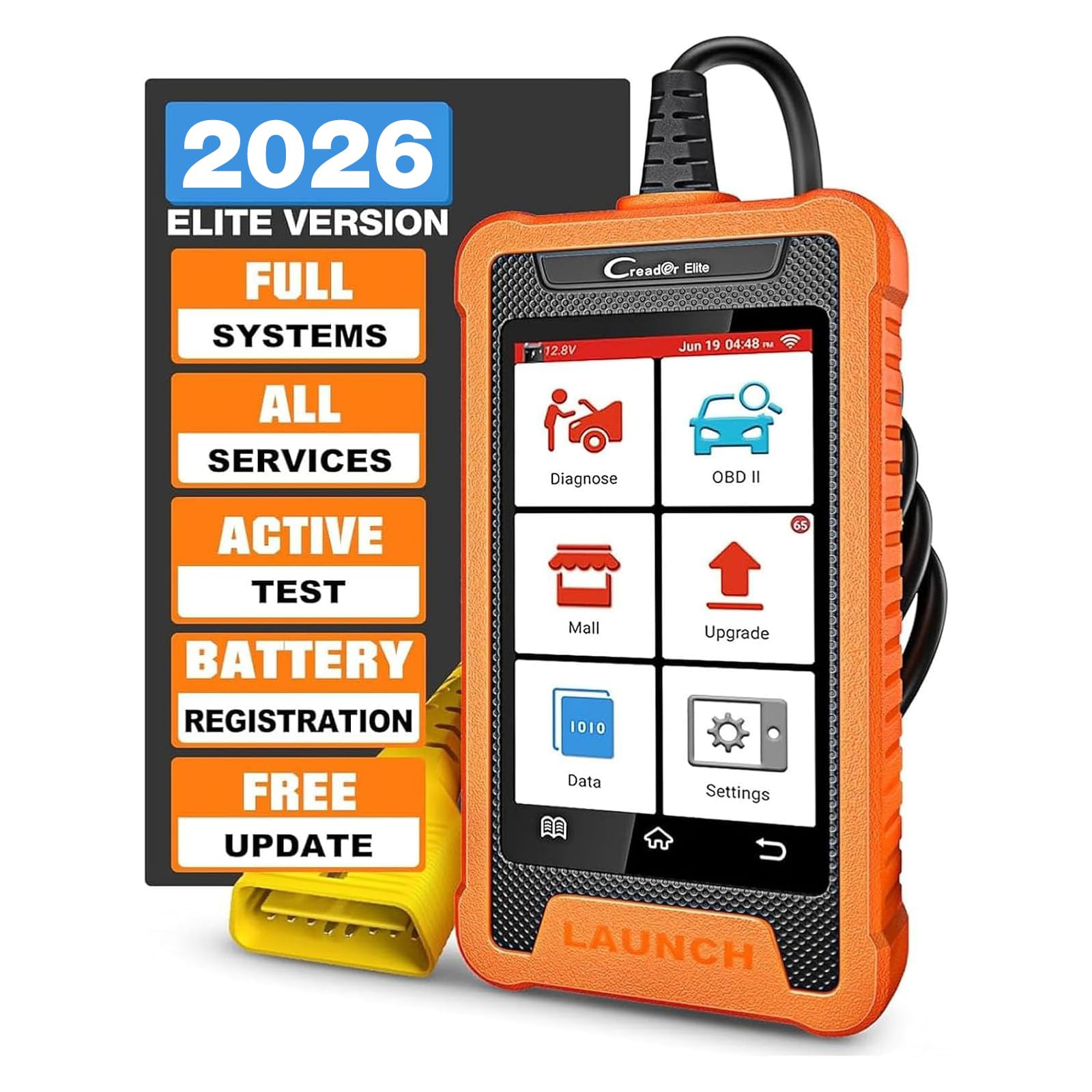
🚗 Diagnose smarter, drive safer—your Toyota’s new best friend!
The LAUNCH Creader Elite is a cutting-edge bi-directional OBD2 scanner tailored for Toyota and Lexus vehicles, featuring a 4-inch Android touchscreen, full OE-level system diagnostics, and exclusive reset functions. It supports auto VIN recognition, multi-language options, and offers lifetime free WiFi updates, empowering millennial professionals to maintain their cars efficiently and confidently with professional-grade tools at their fingertips.


| ASIN | B0D176ZCXQ |
| Batteries | 1 Lithium Ion batteries required. (included) |
| Best Sellers Rank | #23,691 in Automotive ( See Top 100 in Automotive ) #126 in Automotive Code Readers & Scan Tools |
| Brand | LAUNCH |
| Customer Reviews | 4.2 4.2 out of 5 stars (427) |
| Date First Available | 17 April 2024 |
| Item Weight | 608 g |
| Item model number | YZB14 |
| Manufacturer | LAUNCH |
| Manufacturer Part Number | YZB14 |
| Model | LAUNCH Creader Elite Bi-Directional OBD2 Scanner for Toyota Lexus |
| Package Dimensions | 27.99 x 21.79 x 5.59 cm; 608 g |
A**I
Items didn't boot at all
It's look like you guys sent me bad items
W**.
I purchased this to check the diagnostic codes on my 2003 Toyota Matrix and 2015 Toyota RAV4. Inside the box comes a usb charger, Users manual and quick start guide along with the scanner. The scanner has a 4" display and is encased in a rubber case. The cord that plugs into the OBD2 port is sturdy. A protective cover comes on the end of the cord to protect the terminals on the end of the plug. Upon the first time that you plug the scanner into a car's OBD2 port, it needs to be set up via WiFi. I tried connecting to my WiFi but it wouldn't connect. Instead, I used my cell phone as a wireless hot spot. The scanner connected right away then. Set up included setting the desired language, country, and time zone. After that, the device gives you the option to download updates. There were a number of updates. It didn't take long to update (I was surprised). After performing updates, the scanner is ready for use. Since I already had it connected to my 2003 Toyota Matrix, I decided to use perform diagnostics. The scanner has a nice feature where it will scan your cars computer for the VIN code. I have another scanner that I've used and that will either detect the vehicle or ask you to manually put in the model. This scanner didn't find the VIN on my Matrix so I had to put it in manually (that was a pain). I figured out that I didn't have the ignition switch to the on position. The scanner never prompted me to do so. I thought that was odd. Anyway. I was able to pull the error codes off of my Matrix. The one function that I really liked is that you can send a vehicle diagnostic report to an email recipient. I sent one to myself and it looks great. The diagnostic functions for the 03 Matrix were about what I've seen with my other scanner. I hooked it up to my 2015 Toyota RAV4 and it pulled the VIN number right away. I turned the vehicle to the on position after I plugged it in this time. There were a number of more diagnostic items available for this vehicle. Probably because it's newer. The scanner comes with free upgrades and a number of downloadable options that are for an additional fee. I didn't really see anything additional that would apply to either of my vehicles. The display is easy to read. A bigger screen would be nice for those of us that fat finger the on display keyboard. The user interface was a little different from my other scanner. It took a while to figure it out. Overall, I'm happy with the purchase. The scanner does what I purchased it for. It reads codes and even gives you the option to get more information on any error codes that are set. It's got a built in web browser. It is run by an android OS. It's nice that it came with an actual paper copy of the owners manual. It does describe the functions pretty well. The quick start guide is a bare minimum of functionality. It's a good scanner.
M**D
I purchased the Toyota version. I felt I was working on Toyota’s TechStream But much cleaner interface and a LOT faster too. It does almost everything that TechStream does in a much easier way. Its NOT meant for a workshop but can be used The smaller screen and the limited live data streams makes it a bit impractical for a workshop. But all in all I’m very pleased with this purchase and I do recommend it for any Toyota owner who knows how to use a professional scan tool
T**.
I was looking for a scanner to clear the VSA code on my 2006 Honda pilot. The code appeared around the time my battery died. After replacing the battery, the triangle with the exclamation mark and the VSA light stayed lit on my dash. Drove like this for a while as I held off on purchasing a scanner. I know the Foxwell NT630 Plus can do it (different process) but this Launch scanner had a fantastic sale price and looked like it had the functionality to read VSA codes. Bought it during the cyber monday sale and was able to clear my VSA code easily with it (easier process than the Foxwell). It's a bi-directional scanner and the options can be a bit much if you don't know what you're doing. But for the home mechanic, this is a great tool. If you have a Honda, the Honda specific version of this scanner is great. Just make sure you run the update before using it for the first time. Been driving my pilot for over 100km now since clearing the code and the VSA light has not come back on. Happy with my purchase.
M**K
Was a crucial part of the rebuild of my 2006 Acura TSX. I bought the car non-running and this little device was instrumental in diagnosing the various issues and needs to get the car back on the road. A full timing set and cam gear, and 1200 miles later I've got no issues with the car. But if I did, this device lets you look deeper than the standard OBDII scanners. It's able to run a full diagnosis and reset things like ABS modules and CANBUS codes. Well worth the price!
G**.
I have been using this in my dealership for some time now. It is amazing! There is little that it can't do over the scanner that Honda gives us to use. Everything from actuator tests to resetting learned throttle angles and PCM resets. The health report/ code clear is faster than the Honda tools, even in USB mode. The cost versus a generic OBD readout tool is a non starter. If this one broke today I would happily pay for another. A must have !
ترست بايلوت
منذ شهر
منذ 4 أيام