Desertcart purchases this item on your behalf and handles shipping, customs, and support to EGYPT.
📡 Elevate your connection game—stay fast, secure, and connected everywhere!
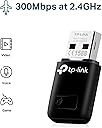
The TP-LINK TL-WN823N is a compact USB 2.0 Wi-Fi adapter delivering up to 300 Mbps wireless speed, ideal for HD streaming and gaming. Its mini design ensures portability, while SoftAP mode lets you create a Wi-Fi hotspot from a wired connection. Compatible across Windows, Mac OS, and Linux, it features one-touch WPS for quick, secure setup and comes with a 3-year warranty.


| Asin | B0088TKTY2 |
| Best Sellers Rank | #285 in Computers & Accessories (See Top 100 in Computers & Accessories) #2 in Wireless USB Adapters |
| Box Contents | Wireless Adapter TL-WN823N, Resource CD and Quick Installation Guide |
| Brand Name | TP-Link |
| Color | Black |
| Compatible Devices | Desktop, Laptop |
| Compatible Operating System Family | Windows |
| Country Of Origin | India |
| Customer Reviews | 4.1 4.1 out of 5 stars (69,116) 4.1 out of 5 stars |
| Data Link Protocol | USB |
| Data Transfer Rate | 300 Megabits Per Second |
| External Testing Certification | ANATEL: 36481203177 |
| Hardware Interface | USB 2.0 |
| Importer Contact Information | TP-Link India Private Limited Office No.1, Tower 2, Level 2, Raiaskaran Tech Park, Andheri Kurla Road, M.V Road, Andheri East-400072 Contact: Toll Free 1800-209-4168, [email protected] |
| Item Dimensions L X W X H | 18L x 8W x 39H Millimeters |
| Item Part Number | TL-WN823N |
| Item Type Name | Wireless Adapter |
| Item Weight Unit Of Measure | 2.12 Ounces |
| Manufacturer | TP-Link, TP-Link Systems Inc. 10 Mauchly, Irvine, CA 92618, USA or TP-Link India Private Limited Office No.1, Tower 2, Level 2, Raiaskaran Tech Park, Andheri Kurla Road, M.V Road, Andheri East-400072 |
| Manufacturer Contact Information | TP-Link Systems Inc. 10 Mauchly, Irvine, CA 92618, USA or TP-Link India Private Limited Office No.1, Tower 2, Level 2, Raiaskaran Tech Park, Andheri Kurla Road, M.V Road, Andheri East-400072 |
| Manufacturer Part Number | TL-WN823N |
| Minimum Required Operating System Version | Windows 10 |
| Model Number | TL-WN823N |
| Number Of Items | 1 |
| Number Of Packs | 1 |
| Packer Contact Information | Pacific Technology Private Limited Survey No, 57/3/55, 57/2/56, 57/1/57, Silver Industrial Estate, village Bhimpore, Nani Daman, daman Dadra and Nagar Haveli and Damn and Diu, India 396210 |
| Unit Count | 1 Count |
| Upc | 013342001307 |
| Warranty Description | 3 years warranty |
User
Windows professional
Wifi dongle is working properly, installtion process easy I'm using windows professional software supporting.
User
Good Product
PROS : Product quality, Value for money, Functionality, Connectivity, Ease of installationCONS : Heating
User
Very durable
Nice quality support with laptop desktop both easy to use but only 2.4ghz
User
Very good
Best for cctv cp plus camera
User
It's not useful
Not working, it's connected show available WiFi but not connected to WiFi for access internet. Not worthy.
User
Poor quality China made product.
Previously I have purchased this item for my father in December 2015 and very pleased with its look and performance. It was exactly the same as in the picture.Now recently I have ordered this product again and this time it's for my use. I have got it in a lightning deal for INR 499/- and when I received the product I was shocked. The product is not like the same product which I received 11 months ago. It looks like a very cheap product with poor quality.According to details the product was manufactured in the month of Sep 2016. With the previous product I received the installation DVD in mini DVD (80mm) size and now its in a standard DVD(120mm) size. Its a made in China product. Though it is working properly I wonder how the quality become so low within few months. May be is it due to the lightning deal?Window 7,8 and 10 doesn't require any installation just plug in play. But need to install through DVD for all windows XP editions.This product is not supporting Linux Ubuntu. I have struggled a lot and applied many solutions to make it work with Ubuntu desktop.So overall the quality is not acceptable and TP Link should make note of it.
User
Value for money
Very fast wifi and good quality
User
Good with some drawbacks
Good Up/Dwn speed. But heats up so quickly. And sometimes get bugged and fail to detect in device manager. Software issue happens somtimes
User
Preis/Leistung
Ich habe den TP-Link TL-WN823N WLAN USB Stick bereits dreimal gekauft und möchte meine äußerst positive Erfahrung teilen.Das Mini-Design des Adapters macht ihn äußerst praktisch, da er bequem transportiert werden kann, ohne dass dabei die Leistung beeinträchtigt wird. Diese Zuverlässigkeit ist besonders unterwegs von Vorteil.Der TP-Link TL-WN823N ist vielseitig in Bezug auf die Unterstützung von Betriebssystemen. Ich habe ihn erfolgreich unter Windows XP, 7, 10 und Linux getestet, wobei er einwandfrei funktioniert hat.Ein unschlagbarer Pluspunkt ist der attraktive Preis von nur 9€ im Angebot. Diese kostengünstige Lösung ist eine ausgezeichnete Möglichkeit, Ihre WLAN-Verbindung zu verbessern. Die vielseitige Kompatibilität mit verschiedenen Geräten ist ebenfalls ein großes Plus.Besonders erwähnenswert ist, dass der TP-Link TL-WN823N WLAN USB Stick sich besonders für ältere Laptops, etwa bis zum Baujahr 2015, als sinnvoll erweisen kann. Bei diesen älteren Geräten ist die interne WLAN-Antenne oft langsamer und hat eine geringere Reichweite. Hier kann der USB Stick Abhilfe schaffen und die Verbindungsgeschwindigkeit sowie die Reichweite deutlich verbessern.Es gibt jedoch einige Überlegungen bei der Verwendung dieses Adapters. Er unterstützt nur das 2,4 GHz Frequenzband, daher ist eine Verbindung zu 5 GHz Netzwerken nicht möglich. Das bedeutet, dass schnellere Internetgeschwindigkeiten möglicherweise nicht optimal genutzt werden können. Bei meiner Nutzung habe ich festgestellt, dass der USB Stick Geschwindigkeiten im Bereich von 50-70 Mbit/s erreicht, was allerdings auch von der USB-Buchse beeinflusst werden könnte.Zusammenfassend betrachtet bietet der TP-Link TL-WN823N WLAN USB Stick eine kostengünstige Möglichkeit, Ihre WLAN-Konnektivität zu verbessern. Sein kompaktes Design, die einfache Einrichtung und die breite Kompatibilität machen ihn zu einer empfehlenswerten Option, insbesondere wenn Sie eine stabilere Verbindung mit Geschwindigkeiten unterhalb von ca 50-70 Mbit/s benötigen.
User
Great wifi adapter
I bought a 2nd hand desktop PC but discovered it had no internal wifi. I bought the TP Link TL-WN823N 300Mbps Mini Wireless N USB Adapter and connected it to my Desktop PC. I installed the drivers with the C.D included. Setup was easy and it worked first time. I am using my smartphone as a wifi hotspot to this wifi adapter and it works perfectly. The internet speed is fast and i can watch Youtube videos with no issues. Highly recommend this wifi adapter if your PC does not have wifi or your wifi card is not working.
User
Nice
Connecting good
User
Very nice little device. Excellent price/performance point.
This little wireless dongle is performing flawlessly, attached to a 2009 Mac Mini running El Capitan.The mini was built from collected parts but without the WiFi antennae. Those antennae sell, on the used market, for about twice the price of this TP-LINK device and don't provide better performance. Both the TP-LINK and the factory WiFi are "N" spec. so they should give similar throughput.I purchased this model (TP-LINK TL-WN823N) because I needed an adapter for a dead-cheap computer build.This target machine contains most of an actual Apple 2009 model, its not a hackintosh, although I can't imagine why it wouldn't work nicely in the latter.The price/performance was perfect for what I needed.The TP-LINK adapter uses a software utility/driver to function under MacOS. The software is included in the package on an optical disk.There is also some software for Windows and Linux but I can't comment on that because I didn't try any of it.The size of the device makes insertion and removal from a USB port easy, even if the ports around it are occupied, but it's small enough not to stick out and get brushed/broken.Once this device and its app are installed it just does what it is supposed to do. In fact, I tend to forget it is there. To my mind, that is exactly the way a WiFi adapter should work.The app puts an icon on the bar at the top of the screen, much like MacOS does. Through that icon, you can control the TP-LINK device independent of the other Mac network facilities.The idea that it uses a proprietary app to handle it, rather than trying to integrate with MacOS, can be seen in a positive light because it means that TP-LINK has control of both the hardware and the software. That makes it independent of any changes the OS manufacturer might make in the future.I have several TP-LINK devices and their product support is pretty good. In fact, the products are good enough that I've never had to contact TP-LINK other than to look for updates or get product information/specs from their site.As a last thought, Amazon offers a range of these WiFi devices. Some of the higher performance models could be used to improve on the built in hardware in older machines.So, if you have the support for AC/Dual Band from your router or access point, you could buy a pretty significant WiFi boost with one of the more powerful TP-LINK products in the list. The increments in performance are less than ten dollars in price.If your machine has an on-board "G" spec. WiFi adapter then one of these units will give you a very satisfying speed boost for very little money.Keep in mind, if you plan to use one of these adapters on the road (laptop), most public WiFi hot-spots don't offer more than "N" spec. service.I consider the TP-LINK TL-WN823N a good purchase, and I would do it again.
User
Linux, Peppermint OS 3 user
This works for a system that uses Peppermint OS 3 very well. I plugged it in and it ran. No need to install the drivers from the CD that came with this adapter. It gets a strong signal. It doesn't even get warm like my older adapters. It does not disconnect while using the Peppermint OS 3 system. I tried to load the drivers and wireless manager from the CD and it just kept freezing on the XP system so I just installed the drivers. Although, XP had drivers for a 300Mbps wireless adapter already to be used when I plugged this in. So maybe you don't need them with XP. I have been using it for a week. I have 2. One for my laptop and one for my Desktop and both run well on Peppermint OS 3. My Desktop is a dual boot Linux Peppermint and XP. Now I can use both and have faster downloads and uploads.I purchased this because I had a wireless adapter that kept getting disconnected when using the Peppermint OS 3 operating system. The XP system on the same machine used the adapter just fine but the Linux side didn't. I read that some adapters just didn't stay connected if using a Linux system and to try a kind that did. I saw a list of adapters that were reportedly operating well with Linux and one of them was the TP-Link brand. I had a 54 megabyte adapter before and thought I would try something with more capacity. Yes, it says 300 megabytes per second. I am not sure if it reaches that speed as the router that I have only goes to 150Mbps. (yeah, only, that is fast for my casual emails and YouTube, I am not a gamer.) I am in another room from the router and I am getting 144.5mbps and 3 out of 4 bars for connection. It works better than my old adapter and it works on my Linux system. I am using Peppermint 3 and a 2005 desktop computer with XP pro. I also use it on a 2003 Laptop running Peppermint 3 and it works great. I had to put a usb card into the side of the old Dell Inspiron 4150 to get USB2. Now I can use Linux with a fast USB wireless adapter. Nice! I recommend this adapter. The price is good and it is half the size of my old adapter. I am not as nervous like I was with my old adapter sticking out so far. This one is much shorter. And it works better. 5 stars for Linux users and Dual booters like me!
Trustpilot
2 days ago
2 months ago