📸 Print your moments, stick your story—anywhere, anytime!
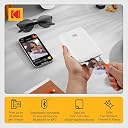
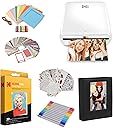
The Kodak Step Printer is a compact, wireless mobile photo printer that uses ZINK zero-ink technology to produce 2x3 inch vibrant, smudge-proof photos directly from iOS or Android devices. Featuring Bluetooth and NFC connectivity, a rechargeable lithium-ion battery with up to 25 prints per charge, and a powerful editing app, it’s designed for on-the-go printing with creative customization—ideal for millennials who want instant, stylish physical memories without the bulk or mess of traditional printers.

| ASIN | B08CY9MF79 |
| Additional Printer functions | Print Only |
| Batteries | 1 Lithium Ion batteries required. (included) |
| Batteries Included | Yes |
| Batteries Required | Yes |
| Battery cell composition | Lithium Ion |
| Best Sellers Rank | #1,049,054 in Electronics ( See Top 100 in Electronics ) #80 in Portable Photo Printers |
| Colour Screen | No |
| Compatible Devices | Smartphones |
| Control Method | App |
| Controller Type | iOS |
| Customer Reviews | 4.4 4.4 out of 5 stars (7,713) |
| Date First Available | 7 February 2024 |
| Device interface - primary | Buttons |
| Does it contain liquid? | No |
| Dual-sided printing | No |
| Duplex | Automatic |
| Form Factor | Printer |
| Generic Name | Kodak Step Instant Photo Printer |
| Hardware Interface | Bluetooth |
| Hardware Platform | Smartphone, Tablet |
| Included Components | Printer and accessories |
| Includes Rechargeable Battery | Yes |
| Ink Colour | ZINK |
| Item Weight | 454 g |
| Item model number | AMZRODMP20K1W |
| Manufacturer | C&A Marketing Inc. |
| Max Copy Speed (Black and White) | 1 ppm |
| Max Input Sheet Capacity | 10 |
| Max copy resolution black-white | 300 x 300 dpi |
| Max copy resolution colour | 300 dpi |
| Maximum Black and White Print Resolution | 300 dots_per_inch |
| Maximum Colour Print Resolution | 300 x 300 |
| Maximum Media Size | 2x3 |
| Maximum copies per run | 1 |
| Memory Storage Capacity | 64 GB |
| Model | AMZRODMP20K1W |
| Model Series | STEP |
| Net Quantity | 1.0 Count |
| Number of Trays | 1 |
| Number of items | 1 |
| Operating System | Android,Ios |
| Output sheet capacity | 20 |
| Print media | Glossy photo paper |
| Printer Ink Type | ZINK |
| Processor Count | 1 |
| Product Dimensions | 7.4D x 11.9W x 2.3H Centimeters |
| Resolution | 300 x 300 |
| Scanner Type | Photo, Portable |
| Sheet Size | 2 inches |
| Special Features | Compact, Lightweight, Portable |
| UPC | 843812140492 |
C**E
Brought this for my 12 year old daughter to start journaling and what a fantastic product. Easy to set up with the app and the print quality was far better than I expected from other reviews. Does the job perfectly. Super happy with this, it only arrived a couple of hours ago but it’s already printed about 20 pictures and they look fab! Would recommend!
E**.
Easy to use and connect to mobile app. It’s about the same size as a small portable hard-drive, and lightweight. Picture quality is great, not brilliant but perfectly fine for a relatively cheap mini photo printer. If you’re looking for something that prints top quality photographs, then a printer that uses non-zinc paper, like ones made by Canon would be better, though they are pricier. To place the photo paper in: Slide back off the printer and place the paper in with the blue calibration card first facing down and then the photo paper on top (back facing down - ie. plain white side facing up) App is downloadable on the AppStore using the QR code found in the quick start guide. There are several other Kodak apps, so make sure it’s the Kodak Step Prints app. NB: if you don’t have the QR code to hand, then simply connect to the printer via Bluetooth via your mobile settings (press and hold power button on the side of printer until white light shows) and it will take you to the AppStore link. Charges via USB, but no plug adapter is included, so will either need to plug directly into a USB charge socket, or use any other plug adapter (phone, camera etc) that has a USB port. Can’t speak for Android, but have had no problems connecting to the app using iOS. There size of the photos are 2x3, so may need to edit photos, but can do so easily in the app which has a useful indicator of what will be printed. There are other editing tools within the app and the ability to add borders too. Also included with the pack are five sticky borders that you can stick onto the photo. Very pleased with this so far! Only downside is that there are only five photos sheets included so will need to purchase more! Edited to add more info: Still going strong several months later - occasionally a thin line will appear on the prints. If this happens, just recalibrate the device with the calibration card. Also, the printer will take any 2x3 zinc paper so it doesn’t have to be the Kodak stuff. Only thing to note here is that you’ll need to keep the original blue Kodak calibration card as the other cards (i.e. Canon do not work).
A**T
Parfait! Idéale pour le scrapbooking par exemple. L interface de l’application est intuitive et simple.
M**E
Hacw su función pero no tan buena impresión ..lo que si que tardo mucho wn llegar y me hicieron el cobro por individual unque se supone que es un paquete que incluye todo con el costo que me cobraron
P**O
Llego mucho antes del tiempo estimado de entrega. Es muy ligera e imprime las fotos muy lindo. El único defecto que le veo es que el instructivo es muy general, tuve que buscar un tutorial para ver cómo es encenderla porque no encontraba cómo, incluso llegué a pensar que no servía 🥴
ترست بايلوت
منذ شهر
منذ شهرين