Desertcart purchases this item on your behalf and handles shipping, customs, and support to EGYPT.
🔍 Don’t get left behind—know your cables inside out with Bit Trade One!
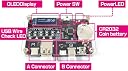
The Bit Trade One USB Cable Checker 2 (model ADUSBCIM) is a compact, battery-powered diagnostic tool designed for professionals and tech enthusiasts to test MiniB, microB, and TypeC USB cables. Featuring 15 LED indicators and precise resistance measurement powered by a CR2032 battery, it provides clear English status updates on cable health, wiring, and grounding. Lightweight and easy to use, it helps you avoid slow or faulty cables, ensuring optimal charging and data transfer performance.


| ASIN | B07Y8BPVV4 |
| Are Batteries Included | No |
| Brand | Bit Trade One |
| Customer Reviews | 4.5 4.5 out of 5 stars (425) |
| Date First Available | 20 January 2024 |
| Item Weight | 45 g |
| Item model number | ADUSBCIM |
| Manufacturer | BitTradeOne |
| Package Dimensions | 15.19 x 11 x 2.01 cm; 45 g |
A**.
❤️ Very accurate, informative and precious cable tester
I am providing an overall comment for three USB testers, all of which deserve to be purchased as they complement each other perfectly and are consistent in their results. I would like to dedicate the majority of this review to the Bit Trade One model, which has recently arrived on Amazon. It deserves a shoutout because the tool is exceptional and inexpensive for what it offers. The ADUSBCIM is a USB cable tester that truly complements traditional USB cable testers. Only the cable to be tested needs to be plugged into the A and B ports, and the tool does the rest. The reference value for calculating the cable's resistance is taken using a CR2032 battery, and I note that the calculation is very precise and stable. You can find on Bit Trade One's ADUSBCIM GitHub page, in the Pull Request section, a manual in English in PDF format. This is my small contribution to the project, as the current official English manual is more of a word-by-word description that is difficult to understand. Thanks to this tester, I discovered, for example, that Anker cables, the 765 series, were actually poor high-resistance cables, and that I had much better options for charging. I ended up wasting money on cables that turned out to be slower than cables that were given to me for free with computer accessories. The FNIRSI FNB58 is a very comprehensive USB-A and USB-C port tester. It notably offers numerous rapid charging protocol tests, can test the quality and resistance of a cable, and obtain oscilloscope-like graphical representations. Now that we are on PD3.0 and with PD3.1 approaching quickly, owning one of these tools is now essential to validate the proper functioning of an installation. I've read a lot of advice on Reddit, and if you're looking to equip yourself with the best products offering the most testing possibilities, here are the tester references to get: - Bit Trade One ADUSBCIM (very thorough cable tester testing all the lines of a cable) - FNIRSI FNB58 (the most comprehensive, many ports, many scenarios, USBA/C Micro) - ChargerLab KM003C (the most modern, TB4, 250W) If you have these three or at least a combination of the cable and usb tester, it will take you no more than a few days to become a USB expert. 👌
A**様
これさえ有れば、USB規格に悩む事が無くなります。
L**T
Extremely useful tool!
When every product comes with its own USB-C charging cables these days, this is an extremely useful tool to have. This nifty little gadget helps me separate the good cables from the e-waste!
太**郎
確実にケーブルの性能を測ることができます!
少々お高いですが、家中のケーブルすべてを確認できて良かった。抵抗値がかなり異なるのことがわかりました。性能確認はLEDの点灯で判断できますが、なかなか記憶できないので解説サイトの説明を印刷して見ながらテストしました。 安価な類似製品もありましたが、素人には実績ある本製品がやはり安心です。
M**C
Far more useful than I expected
This is the only "smart" USB cable tester that I found (all the others were passive, simply using LEDs to show continuity between ends). Aside from the basic good/bad test, here are two features that are most useful to me: 1. Identifies power-only cables (no data lines) 2. Identifies whether a USB-C cable supports all of the data lines for SuperSpeed or SuperSpeed+ -- just because it has C-type plugs doesn't mean it's high speed! There are passive testers that can satisfy the points above (if they have more than four LEDs, of course), but here's what you get with this smart tester: 1. Line resistance -- high resistance on power lines (VBUS and GND) makes for a poor charge cable 2. CC line checking: a) USB-C cables may have a pull-up resistor inside the plug that's used to signal to the power supply the maximum current that should be allowed b) or for high-power cables, there could be an E-marker chip on this line for more advanced power capability identification c) some cables have a different pull-up/pull-down resistor on the other end of the CC line, which is a non-standard implementation and could indicate that the connector is sensitive to orientation So, who needs this tool? 1. It might not be a justifiable expense for the average user. if you have a pile of USB cables and just want to know which ones are good and which one to throw out, or which ones are power-only, a simpler LED-based tester would be enough. 2. IT professionals and tech-nerds will benefit from the ability to confirm whether a USB-C cable is really just a USB 2.0 cable in disguise, or if it actually support full-speed data transfer. Maybe that external SSD is slow because you're using the wrong cable? 3. Microcontroller software/electronics developers implementing USB power for their high-power prototypes, or high speed data transfer capabilities, will want to make sure they're using a proper cable for testing. Flaws: 1. The device seems to be sensitive to connectivity on the shells of the USB jacks. Slight movement of a cable plugged into these will cause the LCD to clear and redraw (so there's a noticeable flicker) as it re-determines whether the shell is bonded to GND. Not sure if it's a flaw with the electrical connectivity between the shells and the microcontroller, or suboptimal firmware -- probably some combination of both. 2. Given the physical nature of this tool (a raw PCB sandwiched between acrylic plates) and the fact that it uses an easily-programmable Atmel ATmega88PA MCU, I'm a little surprised that the firmware (and maybe the schematics) isn't open source. I can see some fellow nerds wanting to tweak the firmware for the benefit of all users, or even customize the firmware for their own use. But given the subjectively high price tag, I'm betting there's a rather wide margin that they aren't willing to cut into, so I get it. Given the flaws, it's still a very useful tool.
Trustpilot
3 days ago
3 weeks ago