🚀 Elevate your workflow with the Surface Laptop 2024 — where power meets precision.
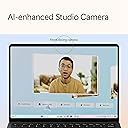
The Microsoft Surface Laptop (2024) is a premium Windows 11 Copilot+ PC featuring a 13.8" PixelSense Flow touchscreen, powered by a Snapdragon X Plus 10-core processor, 16GB LPDDR5x RAM, and 512GB SSD. It offers up to 20 hours of battery life, fast charging, and a sleek black recycled aluminum design, tailored for professionals seeking cutting-edge performance and AI-enhanced productivity on the go.


| ASIN | B0CXL6B4QF |
| Audio Output Type | 1 x Headphone/Microphone Combo Jack (3.5 mm) |
| Audio Recording | Yes |
| Audio features | Omnisonic Speakers with Dolby Atmos |
| Automatic Backup Software Included | 13.8" Touchscreen |
| Available M2 Slot Count | 1 |
| Battery Cell Type | Lithium Ion |
| Battery Life | 20 Hours |
| Best Sellers Rank | #34,615 in Computers ( See Top 100 in Computers ) #350 in 2 in 1 Laptops |
| Biometric Security Feature | Face Recognition |
| Bluetooth Version | 5.4 |
| Bluetooth support? | Yes |
| Brand | Microsoft |
| Built-In Media | 39W PSU, Laptop, QSG, Safety & Warranty documents |
| CPU Codename | Snapdragon X Plus |
| CPU L3 Cache | 42 MB |
| CPU Model Generation | X Plus |
| CPU Model Number | 1 |
| CPU Model Speed Maximum | 3.6 GHz |
| CPU model | Snapdragon X Plus |
| Cache Memory Installed Size | 42 |
| Camera Description | Front, Rear |
| Chipset Type | X1P-64-100 |
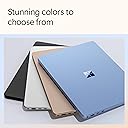
| Color | Black |
| Colour | Black |
| Compatible Devices | External displays with DisplayPort, USB devices, and Bluetooth-enabled devices |
| Connectivity Technology | Wi-Fi |
| Control Method | Touch |
| Customer Reviews | 4.4 out of 5 stars 457 Reviews |
| Display Maximum Resolution | 2304 x 1536 |
| Display Refresh Rate in Hertz | 120 |
| Display Resolution Maximum | 2304x1536 |
| Display Technology | PixelSense Flow |
| Display Type | PixelSense |
| Form Factor | Classic (Flap) |
| Global Trade Identification Number | 00196388283163 |
| Graphics Coprocessor | Adreno |
| Graphics Description | Integrated |
| Graphics Ram Type | DDR5 SDRAM |
| Hard Disk Description | SSD |
| Hard Disk Interface | Solid State |
| Hard disk size | 512 GB |
| Hard-Drive Size | 512 GB |
| Hardware Interface | USB |
| Has Color Screen | Yes |
| Human-Interface Input | Touchscreen |
| Item Dimensions L x W x Thickness | 30.1L x 22W x 1.8Th centimeters |
| Item Weight | 1.34 kg |
| Keyboard Description | Chiclet |
| Keyboard Layout | QWERTY |
| Lithium-Battery Energy Content | 54.12 Watt Hours |
| Manufacturer | Microsoft |
| Maximum Display Brightness | 600 Nit |
| Memory Slots Available | 1 |
| Memory Storage Capacity | 512 GB |
| Mfr Part Number | ZGM-00037 |
| Microphone Form Factor | Built-In |
| Model Name | Surface Laptop |
| Model Number | ZGM-00037 |
| Model Series | Surface Laptop |
| Model Year | 2024 |
| Model name | Surface Laptop |
| Native Resolution | 2304 x 1536 |
| Notebook Pointing Device Description | Keyboard and TouchPad |
| Number Of Cells | 15 |
| Number of Drivers | 1 |
| Number of Items | 1 |
| Number of Packs | 1 |
| Number of Ports | 3 |
| Operating System | Windows 11 Home |
| Operating System Family | Windows |
| Other Special Features of the Product | Copilot+ PC |
| Power Device | 39W AC adapter |
| Processor Brand | Snapdragon X Plus (10 core) |
| Processor Count | 1 |
| Processor Series | Snapdragon X Plus |
| Processor Speed | 1 |
| RAM Memory Installed | 16 GB |
| RAM Memory Slot Total Count | 1 |
| RAM Memory Technology | LPDDR5x |
| RAM Size | 1 GB |
| RAM Type | DDR5 RAM |
| Ram Memory Maximum Size | 16 GB |
| Resolution | 2304 x 1536 |
| Screen Finish | Glossy |
| Screen Size | 13.8 Inches |
| Screen size | 13.8 Inches |
| Series Number | 37 |
| Speaker Description | Built-in thin and lightweight speakers |
| Specific Uses For Product | Business |
| Supported Monitor Maximum Quantity | 1 |
| Total Usb Ports | 3 |
| Touch Screen Type | PixelSense |
| Touchpad Feature | Precision Haptic |
| UPC | 196388283163 |
| Unit Count | 1.0 Count |
| Video Output | DisplayPort |
| Video Processor | Qualcomm |
| Virtual Reality Ready | No |
| Voltage | 240 Volts |
| Warranty Type | Limited |
| Webcam Capability | Yes |
| Wi-Fi Generation | Wi-Fi 6E |
| Wireless Compability | 802.11.be, Bluetooth |
| Wireless Technology | Wi-Fi |
S**A
Copilot Laptop
Love this copilot laptop. Fast, and lovely color! One consideration is that certain older devices will not have compatible drivers for a copilot PC (even though they have Windows 11 drivers for non-Copilot PCs). My Canon wi-fi laser printer that is a few years old does not have compatible drivers for Copilot PCs.
T**A
Not worth the headache
I ordered this laptop for my daughter to use for school. The trackpad only worked intermittently so we had it replaced with a new device. We received a replacement laptop within 24 hours but the trackpad on the replacement laptop did not work at all. We ended up getting a refund and purchased a completely different brand of laptop. If you're considering purchasing this laptop I would advise you go look at something else and save yourself the headache.
M**H
Finally, a proper Macbook Air Competitor
Years ago, I had the original Surface Laptop, and I loved it. It remains one of my favorite laptops of all time. So before I purchased the Surface Laptop 7, I actually had a 14" 2021 Macbook Pro. It was honestly too much laptop for my needs, but the limited port selection on the Macbook Airs ruled them out for me. Of course, my Macbook Pro was better than the Surface Laptop 7 in many ways - the mini-LED screen is just about the best laptop display you can get, full-stop, whereas the Surface's display is good but not great. The speakers on the Macbook were amazing; the Surface's are quite good but can't compete in that regard. However, I don't regret my purchase for one second because the Surface Laptop 7 is really a Macbook Air competitor, and that is where it shines. I compared the Surface and Macbook Air 13" side by side and came away with the following conclusions: -Screen: I don't do any serious photo editing or graphic design. To me, the Surface screen is slightly better. It gets much brighter than the Air and colors seem more accurate. However, the Air has better black levels. The Surface is a touchscreen, but I never use it as I don't like fingerprints on my screens. However, if you want a touchscreen, the Surface is clearly the better option. The Surface also has a 120hz display, whereas the Air is stuck at 60hz. The difference in smoothness when scrolling or using trackpad gestures is very noticeable. The Surface's screen looks much smoother. -Speakers: I can't tell the difference between the two. The Surface's speakers are really good compared to other laptops in this class. The same is true of the Macbook Air. -Ports: I had hoped that by 2024, USB-A would be all but gone, but alas it is not. It was very annoying to have to carry around dongles to use USB-A devices on my Macbook Pro, and now I don't have to! The Air has only two USB-C ports, so clearly the Surface wins here. The Macbook Pro does have HDMI, which is nice, but I just bought a USB-C to HDMI cable that I carry around with me, so I don't need a dongle for that either. -Keyboard: I like that the Macbook Air has more than 3 levels of brightness control, but I slightly prefer the key feel on the Surface. - Trackpad: somehow, the Surface's trackpad is better. I am thrilled that Microsoft finally brought a haptic trackpad to the Surface lineup. It feels more delicate and the tactility is stronger. Macbook trackpads are still among the best in the business, but there is finally a Windows laptop that is comparable in this regard. -Login: hands down, Windows Hello is better than the fingerprint reader. It's so fast that my Surface often logs me that it feels like the laptop was left unlocked. The fingerprint scanner on Macbooks are very good, but they are not as fast, nor as convenient, as Windows Hello. My Macbook Pro could also unlock with my Apple Watch, but that almost always took longer than unlocking with my finger. -Build Quality: This has always been a strong point for Surface devices, and the Surface Laptop 7 doesn't disappoint. The laptop can be opened easily with one hand, and the fit and finish is flawless. The same is true of the Macbook Air. I can't say whether one is better than the other. The Surface is designed to be easier to service, however, and you can actually replace the SSD, which is very nice. Additionally, the black finish on my Surface is more resistant to showing fingerprints than the dark blue on the Macbook Airs, which is a fingerprint magnet. -Performance: After owning an Apple Silicon laptop, I could never go back to using an x86/x64 processor. I used Windows 11 for ARM on my Macbook for two years virtualized in Paralells, so I knew what I was getting into. All of the applications I need work beautifully on the Surface, and it is so darn fast. Of course, there are more powerful processors out there using traditional x64 architecture, but I have never used a Windows laptop that is just so snappy for every day tasks. Office apps open in 1-2 seconds. Firefox, Chrome, and Edge open in less than a second. Using gestures to swipe through apps is super snappy, and the high refresh rate screen makes transitions look so smooth. This is the kind of performance I came to except from my Apple Silicon Macbook, and it's wonderful to finally see Windows operating just as responsively. Overall, the Surface feels like an upgrade over my Macbook Pro, and I personally am fine with the tradeoffs that come with the thinner, smaller, and lighter Surface over the more powerful Macbook Pro. It is an utterly fantastic laptop that, in my opinion, is currently the best thin-and-light laptop in the world.
D**D
Grand
Beautiful computer
J**A
This is a fantastic laptop, IF you understand what you're signing up for.
Before making your purchase, consider what you're getting into. Most computers use an x86-64 CPU (a Complex Instruction Set Computer). However, this device uses ARM architecture (a Reduced Instruction Set Computer), not x86. Unlike macOS, which brute-forced compatibility by compelling developers to support ARM on their platform, Windows has not made such a choice but instead intends to support both ecosystems. Developers must now choose to create native ARM versions of their software for compatibility. Some have even blocked ARM support, as evidenced by reports of certain online exam programs restricting ARM-based Windows machines. My primary motivation for purchasing this laptop was its battery life, which is excellent depending on how you use it. My job primarily runs off web applications, so I have no issues there. While performance isn’t top-tier—hence why I rely on my desktop—it’s still snappy enough for everyday tasks. However, those involved in heavy development might find it underwhelming. I get an average of 10 hours of real usage, which is absolutely stellar for me. I never worry about running out of battery. However, screen brightness impacts battery life. My 10-hour estimate assumes a 60% setting since the display is quite bright. Turning it down doesn’t make it difficult to read. The screen size is ideal for me. Previously, I used a 13-inch device but found my workplace-issued 16-inch model too bulky for travel despite its larger display. The Surface Laptop 7 is very portable. The touchscreen seems more like a novelty. While scrolling is occasionally handy, the lack of foldability or 180-degree opening makes its utility limited. Still, it doesn’t detract from the overall experience. If gaming is your priority, consider a used desktop for affordability or a Steam Deck for portability. Reflecting on my own experience, I deeply regret not saving up for a proper desktop after high school. Gaming on a laptop simply doesn’t compare. Not to mention the gaming compatibility issues that will arise as most games that support ARM are mobile games and they're trash. The price of this laptop is fantastic (When it is on sale.) I bought a used one for $600, I would still be completely happy paying the just under $800 currently. A base model with 256GB of storage is a bit of a crime, however. I'm fairly technically inclined and have my own homelab so I just have a vpn network drive that I use for large files.
M**.
Overheats and Noisy Under Light Usage
The device heats up extremely fast and gets uncomfortably hot. Even with just two Excel files and Chrome open at the same time, it starts making a loud noise. This level of noise and overheating shouldn’t happen with such a light workload. Very disappointing performance.
Trustpilot
1 week ago
2 weeks ago