We remain fully operational. Our teams are working around the clock to ensure your deliveries continue safely.

قم بتنزيل التطبيق


معلومات عنا
حقوق الطبع والنشر © 2024 Desertcart Holdings Limited
قم بتنزيل التطبيق
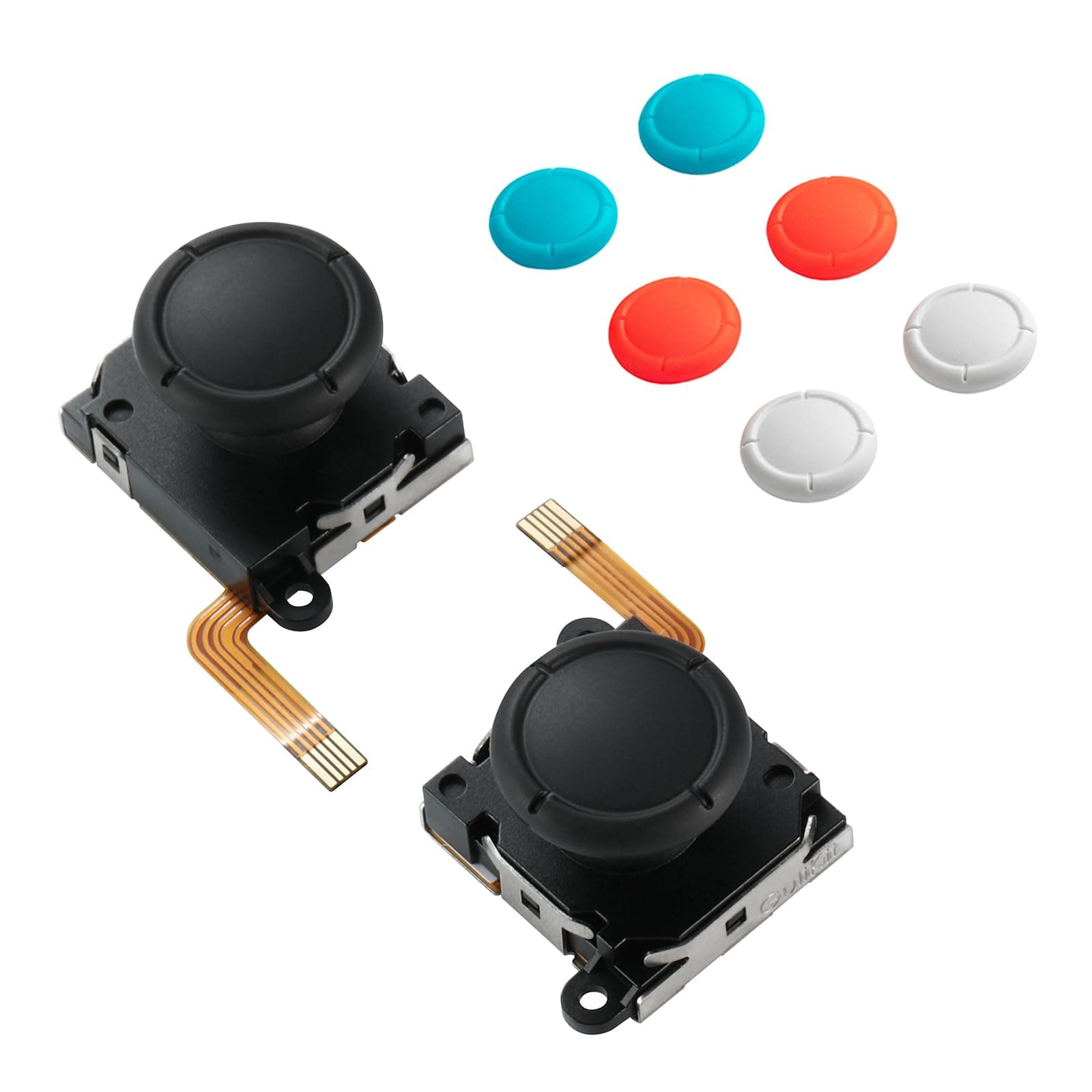
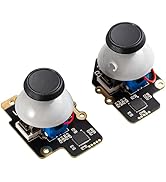
🎯 Upgrade your Switch sticks, never miss a move!
GuliKit’s Switch Joystick Replacement leverages advanced patented TMR electromagnetic technology to deliver precise, drift-free control with lower power consumption. Compatible with Switch LCD/OLED Joy-Cons and Switch Lite, it features an easy drop-in installation and four customizable stick caps. Designed for gamers seeking a reliable, stylish upgrade that enhances gameplay accuracy and longevity.





| ASIN | B0DSJ5JDK9 |
| Batteries | 1 12V batteries required. |
| Best Sellers Rank | #1,460 in Video Games ( See Top 100 in Video Games ) #61 in Nintendo Switch Controllers |
| Customer Reviews | 4.2 4.2 out of 5 stars (255) |
| Date First Available | January 8, 2025 |
| Item Weight | 0.635 ounces |
| Item model number | NS40T |
| Language | Japanese |
| Manufacturer | GuliKit |
| Product Dimensions | 0.8 x 1.2 x 0.8 inches; 0.63 ounces |
| Release date | January 8, 2025 |
| Type of item | Unknown Binding |
K**Y
These are my go-to replacements now (Tiny defect in one of mine however)
TL;DR - These are the replacement sticks you want for the Joy-Con. Drifting or just want something that feels a little better, get the GuliKit TMR sticks. Putting an edit here early: At first I thought I had a faulty unit, and perhaps I do, but it's something I can easily work around. See, sometimes when I turn the Switch on, the stick in my left Joy-Con seems to want to flick left. No matter how much I calibrate it always does this intermittently but always happens. I've taken it apart, cleaned it to within an inch of its life, reinstalled it, and still had the problem. I connected my Joy-Cons to PC and found there is ever so slightly an amount of drift. How did I fix it? You're not gonna believe this...I moved the stick around a little bit. Then the problem went away. That's why I never saw it in the Switch calibration screen, it requires tilting the stick to go into the menu that shows actual stick readings which seems to fix the problem. Even on PC with a Joy-Con tool program, this fixed the problem. So if you're having some kind of weird drift on startup/wake despite calibration, just get in the habit of rotating the sticks when you turn the Switch on. You shouldn't see the problem anymore? I can't say if this totally fixes the problem, and it's a weird issue that shouldn't exist, but maybe it's an issue with this particular Joy-Con model or a slightly faulty stick module. But doing this feel surprisingly natural and I haven't had it do weird things since. Might be worth a try for you before you deal with a return/exchange (Especially if you installed these on a Switch Lite, god help you). If such a fix helps you, it's a minor annoyance but better than a broken stick that always drifts. Hopefully you don't have this problem for what this costs but it's such a small issue to me that I can't justify knocking any stars off and will for sure buy another pair for my secondary Switch Lite (Either when those OEM sticks start to fail or when these go on discount again). I dread taking apart the Switch Lite for that but these sticks do feel that much better than OEM where I will do it (For the love of god follow an iFixIt guide and reference a teardown video if necessary if you take apart the Joy-Con/Lite to do this yourself. These aren't too hard to take apart but all the tiny ribbons get really annoying really fast and you need to be prepared for how to deal with them). First a bit of history - I had gotten some Gulikit Hall Effect sticks (Not these ones) for the Joy-Con before and thought they were great, until I played games that required some precision with the sticks. Namely Assassin's Creed II and Shadow Generations. Then I noticed they were really bad. The sticks didnt seem to have a circular gate, but more of a teardrop shape with a point in a lower corner, and it's like I could feel all the mechanisms inside the assembly fighting each other. On top of that, trying to move the stick straight up would cause the game to read it as more of a curved line, making Ezio and Shadow turn a bit to the left before going forward, which is problematic at many points. I know when I just have a skill issue and this wasn't it, I've played both games before picking them up on Switch. I recalibrated dozens of times and nothing helped. It was clear I lost the stick lottery on those original Hall Effect sticks (And didnt notice before the return window so I guess I'm SOL on those. Oh well). So I replaced them with these. Major upgrade. These sticks feel smooth, with just the right amount of resistance to them. They feel a little tighter than the original OEM Joy-Con sticks and push back against your thumb just a bit more. Normally I like control sticks to have a frictionless feel but for small sticks with very little travel like the ones on the Joy-Cons, this is perfect. I dont even need a stick cap to extend the stick length and make the angles better for accuracy, they feel perfectly usable as-is with the regular OEM-style caps (Your mileage may vary but I went from using rubber caps on top of the OEM/Hall sticks to just regular out-of-the-box with these TMR sticks. Experiment for yourself but that was my experience). The stick has a proper circular gate rather than wanting to snap into a corner, and I dont feel any of the internal gears and cradles knocking into each other. And, most importantly, the directional readings are accurate, Ezio and Shadow stopped veering to the left during a forward input. This is exactly what I wanted to replace the drifting OEM sticks and then some, having a better feel and some customizability with the cap colors. Good stuff. The only downside to these are the install process and that's not a fault of the product itself. Just pay attention to the iFixIt guide for replacing Joy-Con sticks, have a little patience, and handle it as if it's a delicate expensive controller (which it is) and it should be okay. You do so at your own risk but it's not as scary as taking apart a 3DS, especially if you have expedience with ribbon cables already. Otherwise, if you're uncomfortable doing it yourself, you might be able to pay a small fee to have someone do it for you (Secondhand game shops might be willing to do it for you within a day if you bring them the controller and the parts and ask nicely. Especially if they already offer console/controller repair services). And it's a "flaw" you never have to think about again once the sticks are installed and function correctly, something that goes for any repair but always worth mentioning for those who arent expecting it. Adding an edit to these because ever since placing them in my joycons, sometimes in the Switch menus I'll get a stray left-input from the left joycon (I know it's that one since I see it do that on the controller connection screen). Idk if this is caused by the stick because the calibration screen shows that the stick centers properly with not deviation at rest (I've even recalibrated several times to make sure), and I've never noticed any issues in games. There's no stray button presses as far as I can tell either. I've taken it apart and cleaned every ribbon connector to see if it was that and the issue still persists. Still better than a drifting stick or one that reads incorrect directions while tilting in one direction, but still sad I didnt notice this until after the return/exchange window. Again, I dont even know if this is the stick itself, but the issue didnt happen until I replaced the stick with this one. The right joycon is completely fine. The only fix I have for it if to give the left joycon a good whack on the palm (Not directly on the stick, just on the side of the controller) and that makes it settle down. Still leaving the review at 5 stars but if I had the option, I would knock it down half a star because other than this issue, it seems perfect. Hopefully this is just a small case of bad luck on my end. I would still get these sticks again when it comes time to replace the modules in my Switch Lite.
T**L
Pray You Don't Get USED STICKS!!! (But they will make it right if you do!!!)
Update: 5/8/2025 In an update to this post, there WAS a mistake and a mix-up took place and I received USED sticks instead of proper NEW sticks. Having brought this to the attention of Gulikit they were quick to respond and correct the mistake by resending a NEW set. Gulikit is great! And their mistake didn't change my feeling on Gulikit being a great company! Their quick action only makes deeper my support for them and their products. I strongly advise buying from Gulikit! Previously: I bought an order of 2sets for 2respective sets of my Joy-Cons! In my first installation, it went great and the sticks functioned as expected! Sticks will click when pressed and rotate great! When I moved on to my second set... PROBLEMS I installed a stick in my left Joy-Con and realized...the stick didn't click. Then when I attempted to calibrate the stick, it had no left and right movement. IT WAS BROKEN. The same for the second stick in the package! It also did not click and I didn't even bother attempting to install the stick! This was not a mix up on my end. I did not accidentally install my previous stick by mistake. Even still, my previous stick has click and rotation and was OEM with a cap that could not pop off. Looking closely at the second stick in the pack, the ribbon cable was not flat!! It had a bend. These connectors should be FLAT! All things point to this second box containing USED STICKS! Not NEW! I think GuliKit was scammed in a previous RETURN SERVICE and these broken sticks got mixed up with my order! Likely a fluke, mishaps, happen. Looking at the GOOD box, it's listed as NEW! Looking at the BAD box, it is not listed NEW. Ultimately I'd buy from Gulikit again. Give Gulikit a chance, but I simply can't give this specific purchase a glowing review. I bought a set of broken used sticks...😕
D**N
So Far, So Good!
So far, so good! I decided to finally try out a pair of replacement sticks for my original Switch joy cons. The replacement was not bad and easy to follow with online instructions. Afterwards the sticks worked immediately, no calibration necessary! I’m surprised with such a delicate replacement going down smoothly. A couple hours of testing on a game later and the sticks are still working perfectly! All drift is gone. Going to order 2 more sets to replace the drifting sticks on my kids’ switches. Will report back if any issues develop over time. Feels like original joy con sticks. Just take your time with the replacement and have the right tools ready to go.
V**C
Really bad drift made it almost unusable - had to return!!
My OEM joycons haven't developed any drift yet, but I figured I would just replace them now after my friend recommended this brand. The left joycon had REALLY bad left-sided drift, to the point where it was unusable. It would drift left so hard, that even when pushing right as far as possible on the home page, I couldn't scroll past the 2nd game without it immediately jumping back to the current game I was playing. I could barely make it past the 'News' or 'Nintendo eShop' icons on the bottom of the home page before it went straight back to the 'Nintendo Switch Online' icon. The drift would go away after jiggling the left joycon/clicking it repeatedly. After that I calibrated multiple times and the issue seemed to be fixed... until I put the Switch to sleep. Just like many others have said in their reviews, the drift came back every time after I woke my Switch up. Really really annoying to deal with. I just returned them and put my old OEM joycons in - no drift. Everything works perfectly, so it wasn't an installation problem.
E**.
Don't lose the pads! Other than that, they're awesome.
This is the gold standard for joysticks. They're better than brand new with these. Console and controller manufacturers really need to switch to these. Installation is easy, and they feel great. The only thing I knocked a star off for is the pads come off the sticks really easy, which I think is why they give you all the extras. I used a little drop of CA glue to get mine to stay on, which isn't ideal, but works.
B**S
THE BEST ONES
If you think your new sticks have drift, try calibrating from the configuration of the switch, it takes less than 2 minutes and the results are incredible, if you do not know where to find the calibration, go to configuration/controls and sensors/ calibrate sticks.
K**E
Well worth it
These worked perfectly first try. I already had an iFixit screwdriver kit, some plastic tweezers, and my fingernails to pop open the casing, which is all I needed. I just winged it without watching a video and it went relatively smoothly. I think it took around 15min to install. I didn’t realize I needed to remove the rubber caps of the original sticks before they can be pulled through the casing. The new sticks have a much better design for stick/cap removal/swapping. My original switch analog sticks weren’t drifting, but I could feel them snapping in cardinal directions. It was super annoying in games like Pizza Tower, where Peppino would start a super jump out of nowhere. After calibrating the new sticks, they have a full range of motion, which is exactly what I wanted. I wanted to get the Hall Effect sticks when they came out, but I saw they had a much higher power draw and inconsistent quality. I’m glad I held off to get the more efficient, and seemingly more reliable out-of-box, TMR sticks. The only thing I have to compare these new TMR sticks to are the original analog sticks, but these have a higher resistance to them. So far, I like this feature, although I did have to crank up the sensitivity in games to make it “feel” right. I also like the variety of colored caps included. The blue seems a bit off from my joycon, but the red looks spot on. All in all, easily worth the $20. I’m glad I got them and would recommend them to others.
X**O
Worked as it should.
Purchased for a Zelda TOTK edition OLED Switch. Dropped in perfectly and easy to calibrate. Can't wait to start giving these a go. Quick shipment. Thanks!
ترست بايلوت
منذ 3 أسابيع
منذ أسبوع