Desertcart purchases this item on your behalf and handles shipping, customs, and support to EGYPT.
🌟 Stay cool, stay ahead — monitor like a pro with Elitech RC-5+!
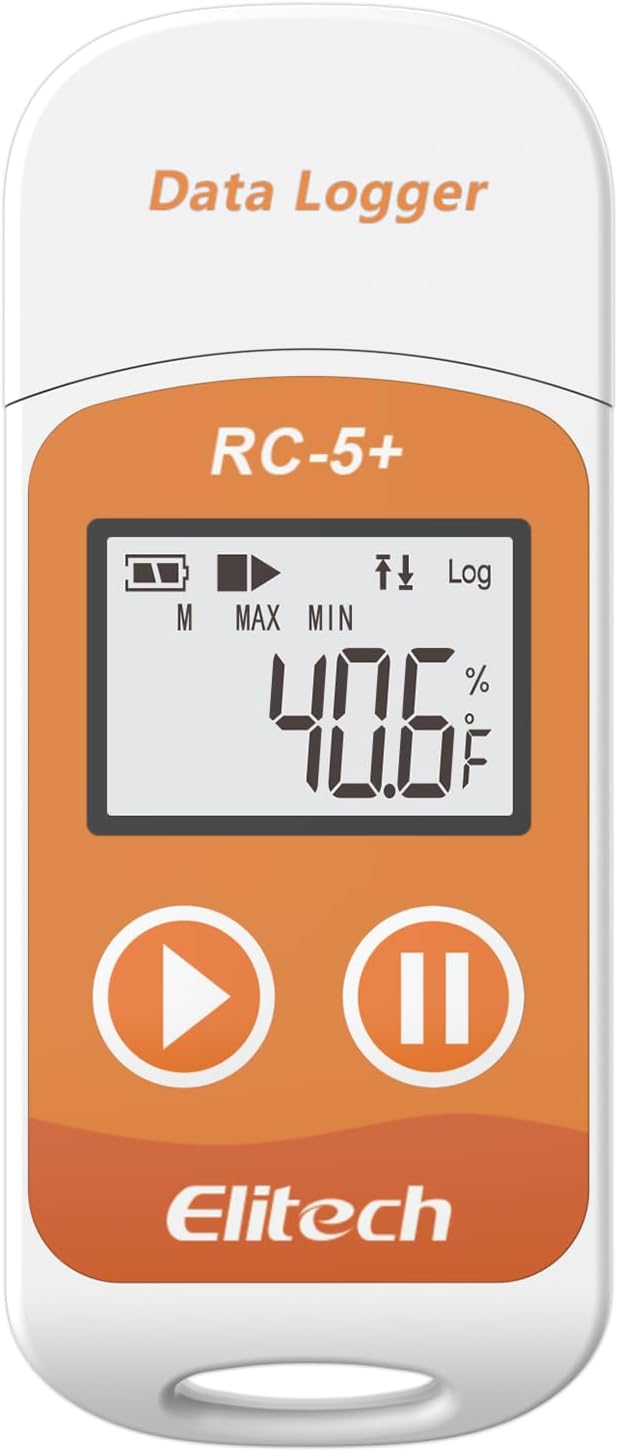
The Elitech RC-5+ is a reusable digital temperature data logger designed for precise monitoring from -22℉ to 158℉. Featuring ±0.9℉ accuracy, a robust 32,000-point memory, and a built-in USB port for instant PDF/CSV report generation, it’s perfect for pharmaceuticals, food transport, and storage. With customizable alarms, multiple start options, an LCD display, and IP67 waterproof protection, it offers professional-grade reliability and ease of use. Battery life extends up to 6 months, supported by free ElitechLog software and 24/7 US tech support.


| ASIN | B0DQKZ5XV7 |
| Additional Features | High Accuracy |
| Age Range (Description) | Adult |
| Age Range Description | Adult |
| Battery Life | 6 months |
| Best Sellers Rank | #27,131 in Industrial & Scientific ( See Top 100 in Industrial & Scientific ) #3 in Industrial Data Loggers |
| Brand | Elitech |
| Brand Name | Elitech |
| Color | Fahrenheit(℉) |
| Connectivity Technology | Usb |
| Customer Reviews | 4.2 out of 5 stars 538 Reviews |
| Display Type | LCD Screen |
| Included Components | Elitech 1pack RC-5plus Fahrenheit, with user manual, calibration certificate |
| Indoor Outdoor Usage | Outdoor |
| Manufacturer | Elitech |
| Model | RC-5plus Fahrenheit |
| Model Name | RC-5plus Fahrenheit |
| Number of Batteries | 1 CR2032 batteries required. (included) |
| Outer Material | Plastic |
| Part Number | US-RC-5plusF |
| Power Source | Battery Powered |
| Reusability | Reusable |
| Smart Home Compatibility | Not Smart Home Compatible |
| Special Feature | High Accuracy |
| Style Name | Industrial |
| Unit Count | 1.0 Count |
| Upper Temperature Range | 158 Degrees Fahrenheit |
M**G
Marvelous compact temperature-data logger
I initially purchased two units, an RC5+ and an RC-5+TE. I have since purchased two additional "TE" units. These loggers are intended for use in monitoring shipments of food and other goods that need to be kept cold, so of course a record of the shipping conditions is essential. Check the specs to get an understanding of their outstanding flexibility. My use is in monitoring temperatures in rooms in which the air conditioning or heating may have problems, so I need to be able to monitor fairly rapid temperature changes. If you need to monitor for conditions like this, you should buy the "TE" version which adds an external sensor on the end of a cable about 3 feet long. Nothing magic about that sensor, there is another one like it inside the RC-5+ case and you can choose which to use, but the external one has much less mass than the case so it responds more quickly to temperature changes. It took me a little while on line to find the correct application software to download. For a Windows PC that is ElitechLogWin V6.4.0. There is an understandable user manual included in the app, but it has some omissions I found annoying. Most of those have to do with how to transfer data from the logger into the PC, how to configure the logger, and how to choose stored database files to display. This is like any other competent tool that's new for you, not everything is obvious and there is a learning curve. But the hardware and software work just fine, and the plotting routine (PDF only) is marvelously capable. Not only can you overlay multiple data logs, you can even display (and export!) logs that only partially overlap -- and the software takes care of this offsetting and scaling for you! And you can change the X-axis scaling and location of the viewing window; it's a little clunky in my opinion, but workable and I'm making fewer errors now. If I didn't feel these are marvelously capable and well worth their cost, I wouldn't have bought two more soon after the first two! The only reason it didn't get 5 stars from me is what I consider some obvious omissions in the user manual explanations. Martt Harding
R**3
Handy device for recording temps, and easy to use!
I bought this little compact device to monitor the temperature inside of my storage unit. I pay for climate controlled storage and I noticed some of my things were starting to get ruined inside the unit. Sometimes I would show up and the temperature didn't feel right. Well, all of that was revealed after I purchased this and set it in the storage unit for a month! It turns out I'm not getting the climate controlled storage that I've been paying for, haha! Because of this, I now have evidence and proof that the storage unit has not been staying the proper temperature, and now I can file a claim for the things that were ruined and hopefully recoup some of my losses. The device itself is easy to use and it has a small built-in battery that's capable of lasting up to 6 months (and it's replaceable). Once you plug it into your computer and configure the settings, you simply set it where you want it and hit the play button. It starts recording until you hit the pause button. Once you are done, you just plug it into your computer and you can have a nice detailed report in either PDF or Excel spreadsheet format. I believe this was a great purchase and a great value for what it cost. For that small amount of money, it's going to save me literally thousands on the items that were damaged inside my storage unit! I highly recommend this device to anyone that needs accurate temperature recordings logs and data.
O**T
The software is not intuitive but it works fine once you have figured it out.
Be sure you have it set to "internal" sensor. If you don't, it will appear to be recording but will not have any data when you check it 30 days (or however long you choose) later. That is pretty frustrating. To be clear, I tested it, and it worked fine then when I reset it to use it in again (in an outdoor storage container for 30 days), the software defaulted to 'external" sensor. So, I wasted 30 days recording nothing. In order to avoid this, make sure that the last page you set in the parameters is under settings/advanced. Set the sensor to "internal" then save parameters while still on that page. Go back to settings/advanced again and verify that it is still set to "internal" then unplug it. (You can set it to start recording at a predetermined time or to start recording when the device is pulled out of the USB port.) Once you have unplugged it, check the screen to make sure that it has the "record" arrow and also that it displays the current temperature. If it says "nc" on the screen then it has defaulted back to external sensor and you will have to repeat the process to set it back to "internal". To be fair, it works pretty good once you figure out the software, but it is disappointing to wait 30 days only to find out it hasn't recorded anything. Keywords: problem, mistake, error, failed, nc, -100, pdf, csv, data
D**N
Read the Online Instructions
A very sparse set of instructions came with the item, so I had trouble getting it to work at first. I looked online and the instructions from the manufacturer there were much clearer. With that info, it is very easy to use. Once I got it running it did just what I wanted. The refrigerator in our new travel trailer wasn't holding temperatures right. I put this in the refrigerator and let it run for a couple of days. Then I plotted the results (done automatically from the vendor software) and was able to show the RV dealer what was happening. The refrigerator would get cold and stay cold for 6-8 hours, then it would stop cooling for 6-8 hours allowing the inside to get way too warm to keep food safely. It would have been very hard to see what was happening without this recorder. We've had some trouble getting repairs done on our trailer due to the factory refusing warranty repairs, but with the detailed data we gathered with this recorder we're confident the problem will get fixed.
T**B
Windows UI needs improvement; defaults have circular log off (anger ensues)
It is so aggravating to use this. You test it. It looks like it's cool and neat and the data is there. But once again, a refrigerator dies and I look at the log -- and it has the quick no need for software PDF and CSV file and I should be in data heaven!!! But NO! Apparently, the option for circular logging is off by default. It stopped after the first 30 days two months ago. The graph I'm looking at does not end today – in the last hour. No!!! It ended last March after it recorded 30-days. And then just chilled do’in the big nothing. So older versions had automatic start default to off -- or maybe as a newb user, maybe I clicked it off. But then the UI should have made that clear. The newer UI seems to make automatic on a default. But I try to test and then this "thing" keeps finding new ways to not have data. If the user base bifurcates between some users only wanting the first 30-days then stop by default and a second sane normal average user wanting data up to the present day, please have the software up front force a click between these two types. Somehow, it doesn’t seem like that first group would exist. But OK. Make the UI clear about this. I just want data. And for the third time weeks go by – and I tested – apparently during the first 30-days! I thought I was good to go. And then a refrig dies and I want data. Nope. NO SOUP FOR YOU! Also the circular logging option is greyed out. Clicking around. Changing from 30-day to interval-time on the first tab didn't enable circular. Who doesn't want circular and automatic on as a default? I now have PTSD. I'm going to find out that the play button gets smooshed in the refrig – then secretly the device is for months off -- And that’s when I learn about a hidden sub tabbed option -- stay on lock option. Or I’ll find out months from now that one of these devices didn't have the leap year capture option on, because leap years are disabled. Maybe there is a year of the dragon on/off options I missed. What’s next?
D**H
I'm a real user and it worked great for me.
I wanted to collect the temperatures in my well house so I ordered this product. It works great. I didn't install any software, I just plug it into my mac and it shows a PDF with the data logging points, perfect. You do have to install software to change the settings like how often it records the temp and C/F, I didn't do any of that, just put it in my well house and left it for a week. Worked perfectly. I'm actually leaving this review while I'm ordering a second one. BTW, like most digital thermometers, the response time to temp change is not rapid but neither does it cause it to be inaccurate unless you have very fast and wild temp swings where you're recording. If you think this is over priced, go out and shop data loggers, this is as budget as the come.
J**.
great item
Day one it solved the problem it was purchased for, saved a $250 service call. Resident reported his refrigerator was failing. It was rock steady. Day two and on it is just a bonus, already know which unit it will be in on Monday. Best $$ I have spent on the job. Note: read the manual to find the website to download the software. after that it is simple to use.
J**Y
Didn’t Work for Me, Switched to a Different Model
I really wanted this Elitech RC-5+ Digital Temperature Data Logger to work, but unfortunately I couldn’t get it to connect properly on my iPhone, iPad, or even on three different MacBooks. After multiple attempts and troubleshooting, I finally gave up and decided to return it. I ended up purchasing another Elitech model instead—the blue Elitech Digital Temperature Data Logger for medical refrigerators—and that one works much better for my needs. I’m sure this RC-5+ works well for some people, but based on my experience, the other model was a much more reliable choice.
M**D
Very good
Very good
C**S
Received in good condition
Good one.
G**A
Impressionante!
Fiquei chocado com a versatilidade! Comprei pra comprar pra garantia que uma geladeira não esfriava o suficiente e acabei arrumando desculpas pra usar na "caixa que esfria" alheia por pura curiosidade.
M**A
Calidad
Buena calidad
A**R
Very handy device
Works exactly as advertised. Very easy to use and quite accurate.
Trustpilot
3 days ago
1 month ago