Buy anything from 5,000+ international stores. One checkout price. No surprise fees. Join 2M+ shoppers on Desertcart.
Desertcart purchases this item on your behalf and handles shipping, customs, and support to EGYPT.
🚀 Compact power, limitless possibilities — your desk’s new MVP!
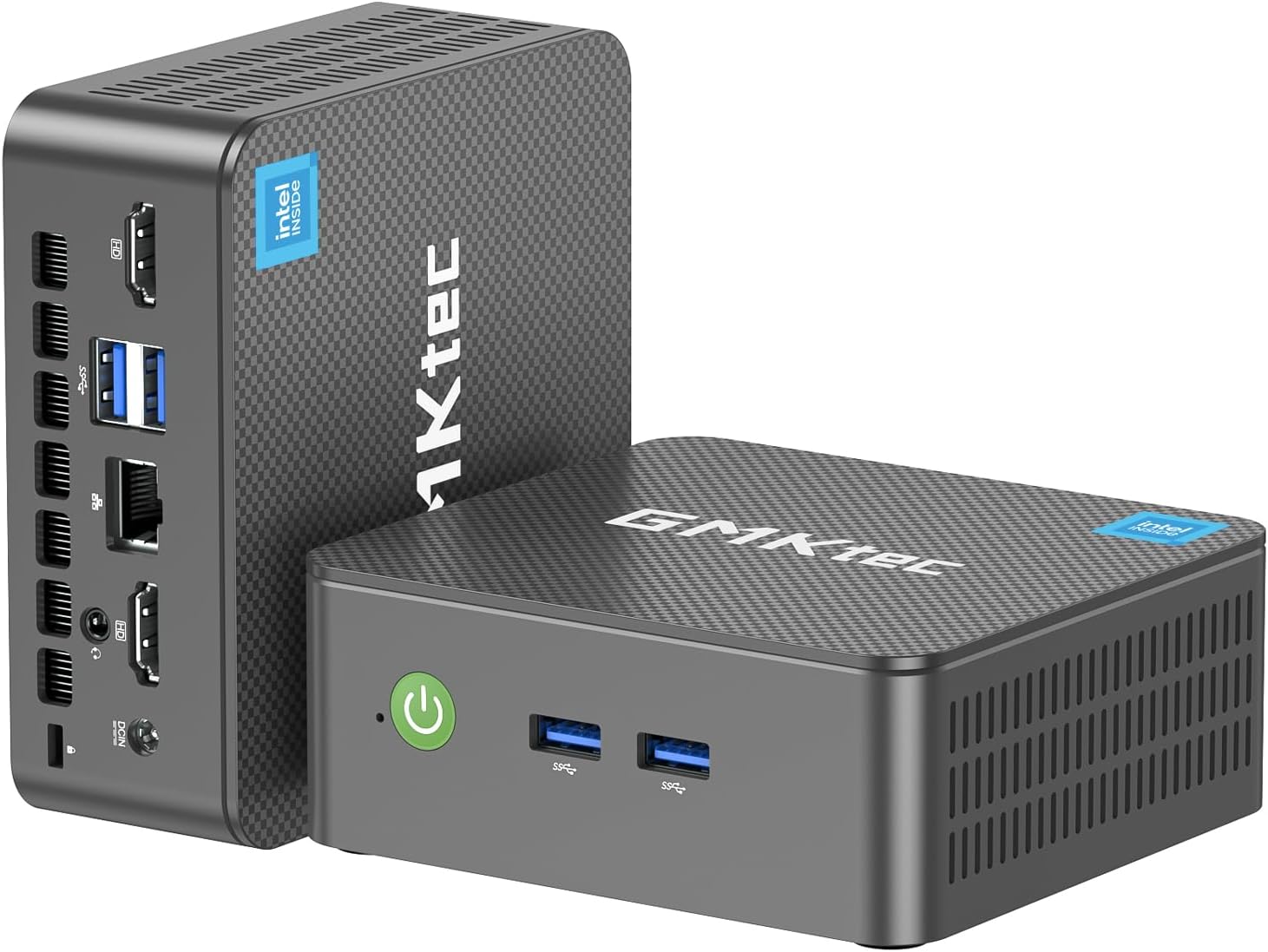
The GMKtec Nucbox G3 Pro Mini PC packs an Intel Core i3-10110U processor with 4.1 GHz boost, 8GB DDR4 RAM, and 256GB SSD into a compact chassis. It supports dual 4K displays, WiFi 6, Bluetooth 5.2, and ultra-fast 2.5GbE Ethernet for seamless connectivity. Designed for professionals craving efficient multitasking, media streaming, and server use, it combines silent cooling with versatile ports, making it a powerhouse desktop replacement that fits anywhere.


| ASIN | B0CQ4C9ZY1 |
| Additional Features | Auto Power On, Home Server, PXE Boot, RTC Wake, Wake On LAN |
| Aspect Ratio | 16:9 |
| Best Sellers Rank | #1,488 in Computers & Accessories ( See Top 100 in Computers & Accessories ) #35 in Mini Computers |
| Brand | GMKtec |
| Built-In Media | GMKtec Nucbox G3 PRO Mini PC Intel i3-10110U 8GB RAM 256GB SSD, HDMI Cable, Power Supply & Cable, User Manual, VESA Mount with Screws |
| CPU Model | Core i3-10110U |
| CPU Model Number | Intel Core i3 10110U |
| CPU Model Speed Maximum | 4.1 GHz |
| CPU Speed | 4.1 GHz |
| Cache Memory Installed Size | 8 GB |
| Cache Size | 8 GB |
| Color | Black |
| Compatible Devices | Keyboard, Mouse, Monitor, Projector, Television |
| Connectivity Technology | Bluetooth, Ethernet, HDMI, LAN, Wi-Fi |
| Cooling Method | Cooling Fan |
| Customer Reviews | 4.1 out of 5 stars 858 Reviews |
| Display Resolution Maximum | 3840x2160 |
| Display Type | LED |
| Graphics Card Description | Integrated |
| Graphics Card Interface | Integrated |
| Graphics Card Ram | 8 GB |
| Graphics Coprocessor | Intel Graphics 1000MHz |
| Graphics Description | Integrated |
| Graphics Ram Type | DDR4 SDRAM |
| Hard Disk Description | Dual SSD slots, M.2 2280 PCIe Up to 8TB; + M.2 2242 SATA Up to 2TB; |
| Hard Disk Interface | PCIE x 16 |
| Hardware Interface | PCI Express 3.0 |
| Human-Interface Input | Buttons, Keyboard, Mouse |
| Item Dimensions | 4.48 x 4.17 x 1.67 inches |
| Item Weight | 2 Pounds |
| Keyboard Description | Not Included |
| Keyboard Layout | QWERTY |
| Manufacturer | Shenzhenshi Jimokekejiyouxiangongsi |
| Memory Clock Speed | 3200 MHz |
| Memory Slots Available | 2 |
| Memory Speed | 3200 MHz |
| Memory Storage Capacity | 256 GB |
| Model Name | G3 Pro |
| Model Number | G3 PLUS |
| Model Year | 2026 |
| Native Resolution | 4096 x 2304 |
| Number of Component Outputs | 2 |
| Operating System | OS |
| Personal Computer Design Type | Mini PC |
| Power Consumption | 15 Watts |
| Power Plug Type | Type A - 2 pin (North American) |
| Processor Brand | Intel |
| Processor Count | 4 |
| Processor Series | Core i3-10110U |
| Processor Socket | Socket 7 |
| Processor Speed | 4.1 GHz |
| RAM Memory Installed | 8 GB |
| RAM Memory Technology | DDR4 |
| RAM Type | DDR4 SDRAM |
| Ram Memory Maximum Size | 32 GB |
| Resolution | 4500 x 3000 |
| Security Features | Windows Defender, Windows Hello, Windows Security, Wake On LAN, PXE Boot, RTC Wake, Auto Power On |
| Speaker Type | External |
| Specific Uses For Product | Education, Everyday Use, Multimedia, Server, Personal Computer, Business Computer, Office PC, HTPC, Online Learning, Work For Home, Education, Photo Editing, Web browsing |
| Specification Met | CE, FCC, UL |
| Style Name | G3 Pro |
| Total Expansion Slots Quantity | 2 |
| Total Number of HDMI Ports | 2 |
| Total Usb Ports | 3 |
| Unit Count | 1.0 Count |
| Video Output | HDMI*2 |
| Video Output Interface | HDMI |
| Video Processor | Intel |
| Warranty Description | 1 year manufacture |
| Wireless Compability | 2.4 GHz Radio Frequency, 5 GHz Radio Frequency, 5.8 GHz Radio Frequency, 802.11ax, Bluetooth |
| Wireless Network Technology | Wi-Fi |
| Wireless Technology | Bluetooth, Wi-Fi |
P**W
Even decent for lite gaming
I'm honestly quite shocked at the value this thing has packed into it. I originally wanted to just convert this into a Linux-only machine and set up emulation there but I quickly found that there were some issues with display and processing. What I thought was going to be a fairly light load, turned out to be more than it could handle. It was not even running a sega Genesis game well. I also found that there's something with the display/graphics that I couldn't even get dual screens to work in Ubuntu Linux. Nor could I send audio out via HDMI. GMKTec had a build of Ubuntu but when I tried to install it, the computer did not seem to like it. I never was able to get their build of Ubuntu working. I feel like their build could have solved some of the Linux issues. I don't think it was inherently that the machine couldn't handle the graphics processing. So after wiping the machine a few times through trial and error I was able to get both Linux and Windows installed and either selectable during the boot menu. Having reinstalled Windows again I needed to download the drivers from GMKTec's website and run the install script. This was necessarily to ensure that the graphics and sound worked properly. This time attempting to run emulation (on windows) I was been pleasantly surprised. This machine, currently being under $200, has been able to handle a wide variety of retro gaming from original NES to Wii U. The Wii and Wii U emulation has some stuttering during assets loading or busy environments, but when the games are running things are generally smooth and appropriately 30 or 60 fps. Switching to Steam, I was able to run Ori and the will of the wisps, but only after turning down the graphic settings to Low. Running normal day to day web browsing works fine and it has a great amount of storage 1TB. This is a perfect day to day machine for probably 70-80% of users. This is also a perfect solution for travel or hooking up to a TV where the small form factor is preferred over a big tower or laptop. I think for more serious PC gamers this is not going to be enough processing power to run any powerful modern games. For the price, this is also a perfect machine to try out configurations that might break your normal computer, like trying to install multiple OS's and accidentally wiping the machine. For me this is going to be a perfect machine for learning different technologies on where I don't want to clutter my main machine. What's crazy is that a machine like this would have been completely sufficient to do all of my college homework on, though I think a laptop is better for that job (especially taking notes). PC's have come extremely far since the late 90s and early 00s. From that perspective it is mind blowing what this thing can do. From the perspective of today, this is adequate to handle almost any task, but intensive gaming, number crunching, video editing, or 3d rendering this is probably going to fall short. That being said the price to value ratio is still extremely high.
D**D
The GMK Tec NucBox G3 is a great little Mini PC!
The GMK Tec NucBox G3 is a great little Mini PC! It’s packaged nicely, and setting it up was a breeze. It’s preloaded with Windows 11, and took just a short amount of time to set up. Some necessary updates took a little longer to download and install, but for most of that time it’s possible to work on other things with the Mini PC, so it wasn’t a big deal at all. This NucBox G3 has a good amount of RAM and Hard Drive Storage, especially for such a little machine. 16 GB of RAM is enough for these use cases, which are running Office Programs, Web Browsing, and playing YouTube Videos, etc. And the 1 TB Hard Drive should be more than enough storage. The system manages resources well for the above tasks, and everything runs smoothly. This is my first time using Windows 11, and it seems good so far. Sometimes Microsoft has to work out the kinks with every other OS release, but hopefully at this point they’ve gotten the bugs out of Windows 11. Regarding the hardware, the NucBox G3 is small and unobtrusive, but still manages to have a solid amount of connectivity. There are 2 USB Ports on the front, and 2 on the back, and one could always expand with a USB Hub. 2 HDMI Ports are nice in case a dual-monitor setup is needed, and both Video and Audio via HDMI work flawlessly. Also included are a Security Lock, an Ethernet Port, and a 3.5mm Audio Jack. The internal Wi-Fi 6 Card performs well, and there’s also Bluetooth 5.2 internally. I’m going to keep Windows 11, but if you prefer Linux, that would be an option. All in all, I’m stoked about the NucBox G3 Mini PC. It’s great for what we’re using it for, and is a really good value to boot! I definitely recommend the NucBox G3 from GMK Tec!
A**R
Worked partially for a month. Then failed in 1 1/2 years. See Update.
May 2024 I use this mini PC for my home theater use. I have the TVGuardian+ app (search TVG+, not the old set-top box) which does a very good job of taking out all the unnecessary foul language for Netflix, Prime, and several other similar apps (with more coming). The app works through Windows 11 and Chrome browser (only), hence, the need for a mini computer to run it, rather than having a laptop running for TV watching. When using this mini-PC for only this use it starts super fast not being junked up with lots of apps. My wireless USB Logitech trackball plugs into the mini-PC & can just sit on my recliner armrest to do everything after starting up the mini-PC with a Logitech keyboard on my coffee table that only needs to be on for 15 seconds to login. The min-PC easily plugs into my audio amp for 5.1 sound through HDMI, then the audio amp to the TV also through HDMI. I elected to get this model with not only the tiny, faster M.2 form factor, but an NVMe technology rather than the rapidly depreciating SATA in case for some reason TVG+ didn't work out I could use it with a big monitor in the office as a second computer. Well, after 9 months we really love TVG+ and the ability to watch many more shows now that the needlessly tedious foul language is muted and the closed captioning is replaced with nicer words. It has found its home on the TV component shelf. So far, 5 stars. UPDATE: June 2024 I started getting strange behavior: Whenever I moved my trackball to get around on Chrome or any programming app like Netflix, Prime, etc. the TV screen would go black for 1-2 seconds, then reappear. I thought it was a problem with TVG+ (TV Guardian+) and just put up with it. Update late Jan 2026 One of the two HDMI sockets on the GMKtec mini PC failed in strange ways causing Netflix to only partially connect - meaning I got only Netflix's top menu bar and an otherwise black screen. Thinking it must be something other than the GMKtec I began elimination diagnosis. Netflix worked fine on my laptop with HDMI out to my audio amp then to TV. So, I unplugged everything and switched to the other HDMI socket on the GMKtec. Everything went back to normal... with no 1-2 second black screen on every trackball movement... almost, that is. In order to get Netflix to work properly I could no longer just put the GMKtec to sleep like I had been doing since May of 2024 (with complete shutdowns about once a week). I have to now do a full Windows shutdown each time to get it to work. So, clearly something is wrong with the GMKtec and has been all along since June of 2024 when the momentary black screens began to appear. I contacted GMKtec to get their take on it and if they'd be willing to replace the unit since something was wrong with it a month after putting it into service. Nope! It's out of warranty. Never-mind it really began failing only a month into service, So, boo on GMKtecs warranty. AND, BTW, even during the warranty period you would have to ship it back to the manufacturer in guess where? Yep, China. So GMKtec is off my list of reputable, or competent manufacturers. Who would expect to have to replace a PC every year and a half? I went from 5 to 2 stars for unreliability, and then 2 to 1 star for bad repair or replacement policy for having to ship it back to China. Boooooo again. STAY AWAY.
H**N
Amazing Little PC
I'm blown away by how easy it is to get up and running with this little guy. Got it yesterday and today had it running. Connected to a wired internet cat cable, a monitor, a keyboard, a mouse and a power supply then power it up. Stepped through bloated Windows 11 Pro setup and paid attention NOT to buy any subscription and voila less than an hour later I had this thing ready to do real work. Tested 4k vdo youtube using Firefox, blah. Not impress. Using Duckduckgo player is much better. VLC player played 4k vdo nicely, no stuttering. Crappy Windows media player wanted me to buy some plugin to play some kinds of vdo format . Hello, there are free players out there! Gimp ran fine. Blender 3D ran fine. I'll try if I can run a virtualbox on this thing. If I can, I will have to retire many of my raspberry pi and consolidate them into one like this. Look like my Pi day is over. Just need to find the 64GB RAM of this thing and I will be very happy. Kids today to have so much power of a pc for so affordable pricing. I remembered the day I had to dished out couple grands just to get a Mac 64K machine. What a time that was! BTW, It took almost ten minutes to render an attached sample blender 3d file. Not that bad! I'll run this 24x7 to see how long it will last. Will post an update.
K**S
pretty decent
The GM1Tek is an excellent, beginner-friendly mini PC, ideal for educational and entertainment purposes that don't demand complex setups or expensive hardware. It features four USB ports and two HDMI ports. Due to its compact size, cable management can become a bit challenging, so it's wise to keep that in mind. In terms of power consumption, I use the GM1Tek for everyday activities such as emailing, writing papers, streaming content, browsing the internet, and gaming. To avoid putting unnecessary stress on the device, I recommend either putting it into sleep mode or shutting it off completely when not in use. Whether your needs are for education, playing GTA, or watching movies, the GM1Tek is a worthwhile investment.
C**L
I really like this little box. Running Linux Mint. Great for browsing and light applications.
It really does well for what I use it for. I have a second monitor and a KVM switch set up and I run Linux Mint on this box and it is basically a glorified media streaming box for watching YouTube while I am doing something else on my larger desktop machine. The RAM is very generous, the 1TB drive is ample and fast, combine that with the CPU and the desktop is fairly snappy and a pleasure to use. It isn't a workhorse machine, but it is more than ample for browsing, streaming, or running light application. I haven't had any issues with Linux when installing. Very happy with the price and power.
S**N
Powerful Performance in the Palm of Your Hand – GMKtec Mini PC Delivers!
I was on the hunt for a compact yet powerful mini PC that could handle daily tasks with ease, and the GMKtec Mini PC with Intel N150 and Windows 11 Pro exceeded my expectations. Several employees had been complaining about how slow their computers were and due to the low cost, I thought that I would give this computer a try. Compact Yet Capable This thing is tiny, yet it packs a punch. Whether I'm browsing, streaming, or handling office work, it runs smoothly and efficiently without lag. The Intel N150 processor does a great job for everyday computing, and having Windows 11 Pro pre-installed is a huge plus—no extra setup hassles nor extra costs associated with buying extra software. Perfect for Work & Play I primarily use this as a secondary PC for work, and it’s whisper-quiet while running multiple tabs and applications. It’s also great for media streaming—I hooked it up to my TV, and it plays 4K videos flawlessly. The fact that it supports dual monitors makes multitasking effortless. Energy Efficient & Space-Saving Unlike bulky desktops, this mini powerhouse barely takes up any space on my desk, and it consumes far less energy. Perfect for a clutter-free setup or even a portable workstation when traveling. Great Connectivity & Expandability Despite its size, the GMKtec Mini PC comes loaded with multiple USB ports, HDMI, and WiFi connectivity, making it easy to connect accessories and external storage. Plus, there’s room for storage expansion, which is a nice touch for future upgrades. Final Verdict: If you need a compact, efficient, and reliable mini PC for home, office, or media streaming, the GMKtec Mini PC with Intel N150 and Windows 11 Pro is a fantastic choice. It’s affordable, powerful for its size, and incredibly versatile. Highly recommend!
T**R
Woth the money for me
Perfectly sized for my RV, 12 volt powered from main batteries. Wall mounted. No fan noise at all so far, runs everything I ask it to after scrubbing the Windows 11 to run properly. Hasn't died yet.
A**O
Wrong advertised spec
Mini pc arrived safety and works fine. I was suspicious of the price because it seems too good for a 16gb ram 1tb ssd mini pc. The mini pc arrived with 8 gb ram and 256 gb ssd, which does fit with expected price for a mini pc with this spec but the advertised 16 gb/1 tb is very misleading.
D**N
Great little PC
Was worried about whether this PC could manage what I was looking for and so far it's passed with flying colors. When you think about it our phones are pretty damned good computers and this unit is no exception. If you need something to do heavy graphics or games forget it. I use mine as a Plex server and general Web interface without any problems. The issues with noise that I read on other reviews is simply nonsense. There is some, but it certainly is not distracting in any way. For the price, you can't go wrong.
P**S
It works
As described
E**S
Falso contacto y se calienta
El equipo trae falso contacto
I**A
Great little computer
Love it, It runs smooth for what I need. Came before time It has great customer support. Highly recommend this to anyone.
Trustpilot
2 days ago
2 weeks ago