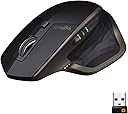
🚀 Elevate your workspace with precision, power, and seamless control.
The Logitech MX Master Wireless Mouse combines advanced Darkfield tracking technology, multi-device Bluetooth and Unifying receiver connectivity, and an ergonomic design to deliver professional-grade performance. With up to 40 days of battery life and customizable controls, it’s engineered for power users who demand precision and efficiency across multiple devices.
| ASIN | B07DHDFW5V |
| Additional Features | Wireless |
| Antenna Location | Office |
| Are Batteries Included | Yes |
| Are Batteries Required | No |
| Battery Average Life | 40 days |
| Best Sellers Rank | #3,571 in Computer Mice |
| Brand | Logitech |
| Built-In Media | mouse, quickstart guide, receiver |
| Button Quantity | 3 |
| Color | Black |
| Compatible Devices | Personal Computer |
| Connectivity Technology | Wireless |
| Customer Reviews | 4.7 out of 5 stars 8,181 Reviews |
| Embellishment Feature | Crystal |
| Enclosure Material | Plastic |
| Global Trade Identification Number | 00097855142986 |
| Hand Orientation | Ambidextrous, Right |
| Hardware Platform | Laptop, PC |
| Item Dimensions L x W | 5"L x 1.91"W |
| Item Type Name | Logitech MX Master Wireless Mouse – High-precision Sensor, Speed-Adaptive Scroll Wheel, Easy-Switch up to 3 Devices - Meteorite |
| Item Weight | 0.32 Pounds |
| Manufacturer | Logitech |
| Mfr Part Number | 910-005527 |
| Model Name | MX Master Wireless Laser Mouse |
| Model Number | 910-005527 |
| Movement Detection | Laser |
| Movement Detection Technology | Laser |
| Number of Batteries | 1 Lithium Polymer batteries required. (included) |
| Number of Buttons | 3 |
| Operating System | Multiple |
| Power Source | Battery Powered |
| Range | 10.0 meters |
| Special Feature | Wireless |
| Style Name | Mouse |
| Theme | Productivity |
| UPC | 097855142986 |
| Warranty Description | 1 year limited hardware |
J**G
Great Value for money! Get this if you don't want to pay the full amount of the MX3
Like many others during 2020, I was looking to upgrade my work from home set up. I've wanted a Logitech MX mouse for a long time but was pretty turned off by the higher price of 100+ for the new Master mx3. In comes this original MX. I came across it during my product research and saw that it was going for around 60 dollars which I thought was really reasonable considering it basically has most of the features the new MX3 has. Been really happy with my purchase in my 1.5 month daily usage of this! Pros: - Great ergonomic feel. While I would have like it to be a bit more tiled up like the new MX3, the slightly raised angle that is a bit closer to a traditional mouse is also very comfortable. Love how the mouse is big enough to let me rest most of my hand on it. Feels really solid and confidence inspiring. - Highly customizable. Really like how you're able to customize just about any of the buttons on the device. - Beautiful design. Just really well thought out design for the mouse. - Battery life. Been using it almost daily as it's my main computer mouse and I haven't really had to charge it for over a month - Multi Device support. Really convenient how I can go between my work Microsoft computer and personal Macbook computer. Cons: - Desktop switching on Mac. For the life of me can't get the mouse to switch desktops like I do on my Windows laptop on my Mac. I'm referring to the gesture function where you can supposedly hold the thumb button and then swipe the whole mouse to left or right to change desktops. I've resorted to setting the thumb scroll wheel to move desktops for my Mac. - Thumb wheel is a bit small. A little annoying but they apparently have already fixed this on the MX3 where they moved it to a slightly easier position to use. Overall for about 60 dollars this is great great buy. Highly recommend!
R**N
Great mouse
I’ve probably had this mouse for 5 or 6 years and I am very happy with it. It’s very comfortable and it has 0 problems even though it’s that old. It’s expensive but it will last you forever. You can change the scroll wheel to be frictionless and it is really good when you need to scroll quick. I’ve also never had problems with input delay or anything. The battery also lasts a long time and charges quick. I would buy again.
J**E
Very comfortable. Great features.
Two biggest perks: - very comfortable to hold and use - the scroll wheel automatically switches between free-scrolling and regular ("crunchy") and you can adjust the amount of momentum it takes to kick in. Overall, it's a great mouse. After getting used to it at the office, I found it hard to switch back to other mice so I picked up a 2nd one for home. It's kind of big, so I don't take it with me while traveling. The battery life is pretty good and I rarely am bothered by charging it. The gesture button is pretty cool, but I don't use it much because it takes a little too much pressure to trigger and the gestures you use have to be a little more exaggerated than I'd prefer. I bought the 2S version and that one has a higher DPI and is slightly better for casual gaming than this one. I like that it has bluetooth and you can switch between 3 devices. I don't use that often but it's convenient for the rare times I've wanted to use bluetooth and save a USB port or use bluetooth to control my phone using the mouse. It's very customizable through the logitech options app. It's the best mouse I've used.
Y**E
Great mouse and does everything I need (Mac and Windows)
I was worried about the ergonomics of the mouse based on some reviews, but found this mouse to be very comfortable for hours of use. I was worried about Mac compatibility as my previous logitech mouse did not work well. I opted to purchase this mouse since it says it is both Mac and Windows compatible. I use a Macbook pro 16" that has Windows bootcamped, so being able to switch between the two systems via bluetooth with this mouse has been really helpful, especially since there is no USB on this laptop. The ability to customize each of the buttons, support for gestures, and the ease of switching between two modes on the scroll wheel were exactly what I need for a variety of uses. I found it useful for doing work, gaming, and using art software (along with my wacom). It seems the mouse can also be set to have specific modes for specific software as well (I have yet to test this). Highly recommend this mouse all around. The only downside is if you have a laptop that only uses USB C like I do, the charging cable is not compatible without a dongle. I am considering purchasing a charging cord for USB C which will make charging this device much easier.
A**N
Nice mouse. Worth 60 bucks? Probably not.
As I've read and heard in other reviews, the back/forward buttons are indeed difficult and unnatural to reach so I just tend to not use them at all. The side scroll wheel is practically useless. Supposedly it's nice for video editing but I wouldn't know and haven't really found any other use for it. If you deal with spreadsheets that have tons of columns, it might come in handy for side to side scrolling. The adaptive speed scroll wheel could also be accused of being a novelty. I find myself flicking the wheel into free spin mode more because it's mildly fun, but not any faster (in fact, usually slower) than just using the scroll bar on screen. Oh I almost completely forgot about the gesture button as well because I never use it. Your hand has to be positioned very specifically on the mouse to utilize the gesture button effectively otherwise it's very inconvenient to use. Also unless you press in exactly the right spot, it is kind of hard to press and causes the whole mouse to want to tip over. And there aren't any gesture functions preloaded so it doesn't do anything out of the box, you have to go in and assign functions. You would think there would be some default functions assigned. So basically all of the "extra" features of the mouse kind of shoot themselves in the foot and I find myself using it like any other basic mouse. And you can only customize the buttons with a set of preprogrammed functions, no custom macros. You can map the buttons for specific applications and the mouse will recognize which application you are using, but you cant map the buttons to any application specific functions - only the generic preset functions in the mouse software. So once again an added feature that ends up not being all that useful. It is a little on the heavy side which could be good or bad depending on your preferences, I'm just pointing it out. It just kind of feels like a big hunk of plastic too. A decent quality hunk of plastic, yes. But not the kind of premo high end quality that is going to remind you why it's so expensive. Unless you have very specific needs for the aforementioned extra features of the mouse or you have actually tried it out and already know it is a good fit for you, you are better off looking for comparable mice in the $20-30 range. Or go the other direction and get something super premium and customizable in the $100+ range. I have weird feelings about this mouse because I'm not necessarily unhappy with it even with the $60 pricetag - it gets the job done and at least it looks cool and feels nice without being over the top like a typical high end gaming mouse. But I'm also not super impressed either. I'm not mad about how much I spent on it, but I wouldn't go back in time and buy it again either.
C**N
Awesome mouse at unbelievable price
This is my second purchase of MX Master for my son (first one was bought two years ago, and is still working really well). I use a lot of spreadsheet for data analysis and number crunching as well as SQL works. This is my go-to mouse - easy to use, ergonomically designed (fits my hand very well), functional buttons for heavy users, loved added weight feeling on scroll wheel, and many more... Battery lasts a couple weeks w/o a charge (8-10 hours a day, 5-6 days a week). Charging is easy - plug it in micro USB (little outdated, but still okay). Universal dongle works perfectly - connecting other wireless Logitech devices thru one dongle. Or connected via bluetooth. Pairing is painless. Using this mouse and pairing with my other computers (up to three). Sinve I haven't used other ones (2s and 3), unable to provide any feedback which one is better. However, I really like this version based on its function and performance. BTW, I bought the 2nd one at almost 30% less than my first one (at that time, it was 15% off from it's full price). Happy mousing!!!
A**H
Best Mouse I've Ever Used In My Life
This thing is brilliant. The ergonomics feel perfect. It uses Bluetooth to link with your system, instead of the little USB nubbin Logitech used before which had pretty poor connectivity if you ask me. Mine would cut out constantly and it drove me nuts. This BT one is perfect though. You don't need to use batteries, rechargeable or otherwise, because there's just a charge port in its 12 o'clock like where the cord for a mouse would normally connect, and the charge lasts a really long time before you need to plug it in again. I've had mine for only 3 days yet and charged it once, but it still shows all 3 of the tiny green lights on the side to indicate battery level remaining. Even if you need to charge while you're using it it's not a big deal and just feels like a corded mouse for a while is all. There's also one more feature I'd like to note which I think is fantastic and that's the enhanced scroll wheel on top - you can click a button below it to scroll smoothly or by clicked notches - But - If you spin the wheel quickly in either direction, like flicking it and letting go as to scan all the way to the bottom of a page or something, the smooth scrolling will auto-engage until you move the wheel again. Brilliant! There are other nice features but these are the ones that won me over so well as to write this review.
P**R
It's called "Master" for a reason
It was between the Master MX and the Ergo. I kept this and returned the Ergo (another great mouse/trackball, but it needs the endless scroll wheel). This has everything you could ever need, with programmable buttons in all the right places. It's extremely ergonomic. My wrist and hand feels great after switching from Apple's Magic Mouse. The endless scroll wheel is what makes the Master MX the winner above all others. Logitech's secret weapon, for all their mice, is their app. It's extremely user friendly and allows for multiple buttons to be programmed. Regarding the button programming you can 1. allow for three different users to program the buttons however they like, 2. customize the buttons to different programs/applications (Final Cut, Premiere, Photoshop, etc.), and 3. this is my favorite, you can program "gestures" meaning you can program FOUR separate controls into one button (you hold down the button and gesture up/down/left/right with the mouse). With the gestures, I have one button that controls my most recently used media player (up=play, down=previous, left=rewind, right=next), another allows me to pan throughout an entire document or web page, and another allows me to enter Launchpad, Mission Control, Expose, and navigate between apps. If you work on a computer, it's a no brainer. Your wrist will thank you.
U**1
أفضل ماوس على الإطلاق بلا منافس
N**S
Verdict After 5 Years: Great, Reliable Mouse with Extremely Useful Side Scroll
5 YEAR REVIEW Had this mouse since Nov 2021. I've dropped it several times over the years and it's held up well. All the buttons and wheels still work great. I love love love the side scrolling wheel. The only thing that needs replacing after 5 years are the feet, which you can find replacements for pretty easily.
G**H
Nice and smooth operation
Well built and works smoothly with all applications
A**Y
Excellent handling, no glitches. Buy it.
Like I said... excellent handling. Works superbly. It's now been 7 months and this little monster has become a necessity! Can't do with it :-)
L**A
Indecente de bom!
Ergonômico, bom material, várias funcionalidades, bateria que dura muito.
Trustpilot
2 weeks ago
2 months ago