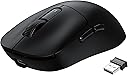
I wanted a wireless mouse with BT, min. 5 programmable buttons (6 preferable), light weight, long battery, PixArt PAW3395 sensor and LED lights (nice to have) and low cost. After couple weeks of investigation on the matter I have decided for this. Manbasnake X3 crossed all my requirements on paper, except for RGB lights and only 5 buttons, granted from the pictures I thought there is a DPI cycle button in the middle, but that is only a shape and a small LED that will indicate battery/charging status. Please NOTE: I paid for this item, I did not receive any personal discounts or future promises. I will update this review as time passes. 1. Presentation: a simple decent box containing mouse with dongle, USB type-C cable and instructions. Instructions are short, they do not say how to charge the mouse (sic), the obvious “do not immerse the mouse in liquid”, but most important in my view, and I quote here: "Violence against pressing the mouse is prohibited". You have been warned! Save the instructions in case you ever need to pair the mouse with dongle, or better download PDF instructions from MFG (manba-snake com) website. There is a small rattle noise when shaking the mouse, but usually I glide and not shake. First thing I did was to connect the mouse to the cable, plug it in to charge, remove the plastic from the feet, go to MFG to download and install the software for X3. When plugged in the software does not show battery percentage. 2. Sensor: PAW3395 it is a new gaming sensor 26K dpi, 650 ips, 50g, 1k Hz/1ms and programmable lift cutoff that is suitable for wireless due to its low power requirements, about 2V with 1.7mA in High Performance mode and 1.3mA in Low Performance mode. 3. Connection: Once fully charged, I unplugged the cable and switch to BT and right away it connected with my Intel AX210 BT 5.3 card. The switch button can be set to OFF, BT or 2.4GHz dongle but if USB cable is connected, the position does not matter. Also, there is BT switch on the back for 5.2 or 5.4, that’s two channels so you can connect the mouse with two BT devices – nice! The 2.4GHz dongle that stored inside the mouse can be used as well but I used this mode very short time since I favor BT connection. I did not notice any input lag or issues with BT. 4. Battery: the battery is supposed to last 200h. Cannot confirm that yet, but after 5 days of use (about 50h) the battery shows 80% when connected to dongle and 80% when connected to BT (via windows BT devices). To conserve the battery, mouse will go into light/deep sleep and can be woken up move/click. I emailed MFG to inquire about battery and warranty, but I received no response. I emailed the seller (Magic-Refiner) and I received a prompt response in less than one working day: battery is LiPo and capacity is 500mAh. After 11 days and a rough estimate of 90-100 hours of use, mostly on BT, mouse battery shows at 50%. 5. Weight: I used a kitchen scale and found the mouse weight without dongle at 54g. This is the lightest mouse I ever had. 6. Shape: mouse is for a right-handed, I have an average hand and usually a fingertip grip and the size and shape feels nice for me. 7. Buttons: I wished there was an extra button after scroll wheel. There are 5 programmable buttons. Side buttons are well placed, if I lift my thumb and press, I hit button #4 (forward), but move just a bit back and I can hit #5 (back), in other words easy fast access. While working, from time to time I had the impression that left click was a miss, though I heard the click, but while gaming I never missed a beat, maybe I’m pressing harder? I will continue watching this possible issue and will update. There is also a DPI cycle on the back and an LED indicator for that purpose. In the next hardware version, please move that button behind scroll wheel. 8. Switches: mouse has Kailh GM 8 switches (available here on amazon) and they are like a mechanical keyboard switch, in other words loud. I do think that sometimes I put less pressure on my left click and I hear the sound, but the action is not going through, still investigating this possible issue… 9. Scroll wheel: does not have side tilt, no infinite scroll/free spin, scrolling is smooth, easy and I like the feedback of the wheel. Middle click is a bit on stiffer side compared with other buttons, but that’s ok for me. Wheel’s edges are smooth and nice to the touch. 10. Feet: mouse feet are PTFE and they come covered with a thin transparent plastic for protection so do not forget to remove the plastic when setting up. Feet are white and this is a sign that they are 100% pure virgin grade PTFE and will offer lowest friction. 11. Software: after installation mouse was plugged and software is showing “charging” but no percentage indicator so at this moment I assume I keep it plugged until top LED turns to GREEN. Ther are several sections: Button settings (each click what to do), Macro Manager (this part can be improved), Profile (useful to have work/gaming profile), Battery (Percentage visible only with dongle, status only with cable) DPI Settings (6 DPI settings between 50 and 26k in 50 increments, tip use the wheel to fine adjust your desired DPI), Polling Rate Settings (125Hz, 250Hz, 500Hz, 1000Hz options only available for dongle/wired connection), Mouse attribute (opens old OS mouse properties), Lift of Distance (1mm or 2mm). Ther is no Apply/Save button for when you make changes, they are applied instantly, and it takes a couple seconds to do so. Software is 32-bit only, and it does not tell you, but you will have to reboot after installation. I had a froze once when I switched from BT to dongle and changed profile almost at the same time, I had to kill the app and launch again. 12. Warranty: Seller specified that warranty is 1 year. Overall: first keep in mind this is an on-going review, but so far, despite some minor things (software, no clear battery percentage, light rattle) I like the shape, the sensor, battery endurance, BT connection and response. In over 10 days of use, my BT connection was smooth and never dropped. For gaming, please keep in mind that if you are going to use BT, polling rate is limited to 133Hz, in other words, if you click the mouse more than twice in about 8 milliseconds, then BT is not for you and you will need dongle or wired connection, and this is not my case ☹. For the price, right now, I consider this hard to beat!