Desertcart purchases this item on your behalf and handles shipping, customs, and support to EGYPT.
🚀 Upgrade your home network—ditch Wi-Fi lag for wired speed supremacy!
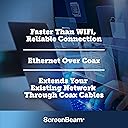
The ScreenBeam MoCA 2.5 Network Adapter Starter Kit leverages your home's existing coaxial wiring to deliver ultra-fast, reliable Ethernet speeds up to 2.5 Gbps. Ideal for 4K streaming, gaming, and remote work, it supports up to 16 network nodes and includes everything needed for a seamless wired network upgrade. Compatible with most routers and devices, this kit outperforms Wi-Fi by providing stable, high-bandwidth connections throughout your home.


| ASIN | B088KV2YYL |
| Amazon 売れ筋ランキング | パソコン・周辺機器 - 194,859位 ( パソコン・周辺機器の売れ筋ランキングを見る ) ネットワークカード - 506位 |
| UPC | 789286809469 |
| おすすめ度 | 5つ星のうち4.4 1,824 レビュー |
| カラー | ブラック |
| データリンクプロトコル | イーサネット |
| データ転送速度 | 2.5 ギガビット毎秒 |
| ハードウェアインタフェース | イーサネット |
| ハードウェアインターフェイス | イーサネット |
| パック数 | 2 |
| ブランド | ScreenBeam |
| ブランド名 | ScreenBeam |
| メーカー名 | ScreenBeam |
| メーカー型番 | ECB6250K02 |
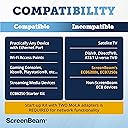
| 互換デバイス | MP3プレーヤー。, インターネットプロトコルカメラ。, ゲームコンソール。, ゲーム機, スピーカー, スピーカー。, スマートテレビ, スマートテレビ。, スマートフォン, タブレット, デスクトップパソコン, ネットワークカメラ, ノートパソコン, プリンター, プリンター。, マウス, マウス。 |
| 品目寸法(L x W x H) | 11.4長さ x 5.6幅 x 2.8高さ cm |
| 商品の寸法 | 11.4長さ x 5.6幅 x 2.8高さ cm |
| 商品の重量 | 0.65 ポンド |
| 型番 | ECB6250K02 |
| 対応デバイス | MP3プレーヤー。, インターネットプロトコルカメラ。, ゲームコンソール。, ゲーム機, スピーカー, スピーカー。, スマートテレビ, スマートテレビ。, スマートフォン, タブレット, デスクトップパソコン, ネットワークカメラ, ノートパソコン, プリンター, プリンター。, マウス, マウス。 対応デバイス MP3プレーヤー。, インターネットプロトコルカメラ。, ゲームコンソール。, ゲーム機, スピーカー, スピーカー。, スマートテレビ, スマートテレビ。, スマートフォン, タブレット, デスクトップパソコン, ネットワークカメラ, ノートパソコン, プリンター, プリンター。, マウス, マウス。 表示を増やす |
| 色 | ブラック |
S**N
Fantastic!
Works exactly as advertised! Zero speed loss from my main router to my mesh node. Very helpful system in an older house that isn't wired for ethernet cables. In my specific setup I needed a 3rd coax cable, but luckily I had a spare handy in my box of old cables.
M**.
Alternatively to laying cat 6 cables
I am so satisfied that I bought another set to covered the requirements for the other rooms.
R**U
Trop produit
1gb stable entre le salon et le grenier via le coaxial rapidité d'installation attention besoin adaptateur prise USA
J**M
Equipamento top
Fantástico, atingiu o máximo tanto em download como em upload, podem verificar na comparação que aqui deixo em fotos no comentário, medido num PC á saída do router, e uma outra medição efectuada noutro PC ligado através do ScreenBeam, em que a distancia do cabo coaxial que separa um ponto ao outro, tem uma extensão seguramente de 20 metros. Tudo de bom a apontar, parabéns merece todo o crédito.
A**R
Vastly improved network speed
In my house, the UHF TV signal is distributed throughout the house by a 12 way distribution amplifier fed from a log periodic aerial in the loft. There is a restrictive covenant covering all houses on the estate that prohibits any aerials other than satellite dishes and these must be fitted below the roof line. My house is in a dip and out of sight of the transmitting aerial some 15 miles away. The signal can be intermittent and prone to distortion especially in certain weather conditions. To provide a good signal to the two main reception rooms I used a SkyQ satellite dish to receive Freesat satellite signals. This meant that the two coax cables from the distribution amplifier in these rooms are not needed. However, a consistent high speed network feed for streaming is essential. This led to a decision to unplug these coax cables from the distribution amplifier in the loft and connect them together so that there is a continuous coax cable between the lesser reception room which houses the FTTP (Fibre to the premise) broadband feed and the main reception room. They are 15m apart. Initially, I purchased the ScreenBeam starter pack of MoCA Network Adapters (ECB6250) and they were an immediate success. Installation is very simple and quick. I had the link working in ten minutes. I was so pleased with the setup that I then purchased an additional single adapter to connect the Office computers to the net. I replaced the coax cable connector in the loft with one of the splitters included with the kits and then connected the Office cable to the splitter. I was delighted with the results. The average of a series of Ookla broadband speed tests using the computer in the office returned a download speed of 941 Mbps and an upload speed of 110 Mbps. If you are interested in using these MoCA adapters I would suggest using F Type cable connectors throughout. In my setup, the coax cables to the distribution amp were already F Type and I replaced the face plates in the Reception rooms and Office with F type faceplates. Also you will need to purchase USA to GB plug adapters as the kits come from the USA. That said, service from the company via Amazon was outstanding and the units were delivered within days and update information was timely and informative.
D**T
Extremely easy setup. Bad Instructions.
I like that this product, once installed, works. There isn't anything to configure, update, or maintain; you just plug everything in and it works. I read another review that said you have to have direct cable lines and no splitters for this to work, but that isn't true. I have 4 of these on opposite ends of my house with multiple splitters (at least 4 that I know Xfinity installed) in my home for TVs and the cable modem and these things perform just as they should. That person likely has the wrong type of splitter, as there are some that will filter out MoCA device frequencies. Per ActionTec's site, splitter requirements are as follows: The splitter needs to be: MoCa compliant Bi-directional 5-1675 Mhz 6kV Coax ports are -3.5 d(b loss) My speed using wireless repeaters was about 25Mbps max, but using these, I am getting about 95Mbps (average) when I do a speed test to Xfinity. Keep in mind that I am being limited by my computer's 10/100 ethernet connection and which tops out at 100Mbps AND the limited speed that Xfinity provides to my home. Connection stability and speed are both outstanding and unparalleled. The only negative I have is the poorly written instruction manual. It was either written by someone who isn't a native English speaker or someone with severe ADD, as they seem to be written out of order and don't make sense. Luckily for me, the instructions aren't really required as the setup is very straightforward and basically idiot proof, although some basic computer network knowledge is useful. You plug the cable in, the ethernet in, the power in, and you should be up and running within seconds. I didn't use the instructions to set mine up, and the only reason I know the instructions are poorly written is because I was wondering what the MPS button on the side was for. That's another reason that I believe that the instructions are poorly written because there is absolutely NO documentation on what that button does. I went to their website and this is what the MPS button does according to ActionTec, "The MPS (MoCA Protected Setup) button allows the ECB6250's to secure the data connection. This is only compatible with other ECB6250 devices. It will not secure on a mixed MoCA network." Just so everyone is aware of the functionality of that button and the limitation in the event they plan to use a mixed MoCA network. The only unknown is how long they will last. Everything electronic dies at one point or another and since I have never heard of ActionTec, I wonder how long these will actually last. For $400 (I bought four at $199/pair), if they last me at least five years, then I feel like I got my monies worth; but I hope they last longer than that.
Trustpilot
3 weeks ago
2 days ago