Buy anything from 5,000+ international stores. One checkout price. No surprise fees. Join 2M+ shoppers on Desertcart.
Desertcart purchases this item on your behalf and handles shipping, customs, and support to EGYPT.
🔌 Plug in. Power up. Stay connected like a pro.
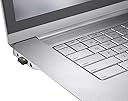
The Logitech Bolt USB-C Receiver delivers a secure, high-performance wireless connection with up to 10 meters range, supporting up to six Logi Bolt devices simultaneously. Designed for professionals juggling multiple computers and workspaces, it ensures seamless, encrypted connectivity across Windows, macOS, Linux, and Chrome OS. Compact and reliable, it’s the ultimate backup or multi-device solution to keep your workflow uninterrupted.
| ASIN | B0F9DWFSHP |
| Best Sellers Rank | #13 in USB Computer Network Adapters |
| Brand | Logitech |
| Built-In Media | Logi Bolt USB-C Receiver |
| Color | Graphite |
| Compatible Devices | Desktop, Headphone, Keyboard, Laptop, Mouse |
| Connector Type | USB Type C |
| Customer Reviews | 4.7 out of 5 stars 187 Reviews |
| Global Trade Identification Number | 00097855203229 |
| Item Dimensions | 1.08 x 0.65 x 0.36 inches |
| Item dimensions L x W x H | 1.08 x 0.65 x 0.36 inches |
| Manufacturer | Logitech |
| Mfr Part Number | 956-000156 |
| Model Number | 956-000156 |
| Number of Items | 1 |
| Number of Ports | 1 |
| Package Quantity | 1 |
| Power Plug Type | No Plug |
| Smart Home Compatibility | Not Smart Home Compatible |
| Specific Uses For Product | Multi-Purpose |
| UPC | 097855203229 |
| Unit Count | 1.0 Count |
| Warranty Description | 1 Year Limited Hardware Warranty |
E**N
Nice device
Nice device very functional
D**E
The best combo for unsurpassed wireless experience.
My 3rd Bolt, for multiple devices. Wireless mouse and keyboard without glitches and lags. Exactly as it should be, seamless, smooth. All other similar devices are clearly weaker.
D**Y
Works great with non-Mac MX mouse
Mac MX Master mouse users — The dongle will not work for you. Otherwise, works great with the non-Mac version of the mouse. I have no idea why logitech produced two versions of its MX Master mouse, one exclusively for Macs. The only difference is the Mac version doesn’t have the dongle, instead relying completely on bluetooth (there are three bluetooth connections available.) Makes no difference in the price, you just get a 4th option on the non-Mac version using the dongle.
T**K
The Bolt works perfectly on MacOS… IF you know what the heck to do.
TL;DR: Use Logi Options+. Ignore macOS’s fever dreams. Delete Bluetooth afterwards. Expanded version (a public service): Plug Bolt into your Mac. A macOS connection popup will appear - click Allow. (see photos) macOS will panic, toss you a popup window, and ask you to identify your ‘keyboard.’ It is lying. Close that window. Open Logi Options+ → Add Device → choose Bolt. Flip the mouse, press the channel button until it blinks rapidly. Complete the on-screen “click these buttons” test. Click the corresponding mouse button when it shows as gray, it will then verify by turning purple. Wait until the next gray one shows up. Just right click or left click until the last one and then it's both right and left at the same time. Mouse verified. Delete all old Bluetooth pairings so your mouse can stop trying to date two radios at once. Enjoy flawless, smooth, jitter-free mouse control forever. Notes: Logitech ships zero instructions. macOS ships maximum chaos. Bolt itself is perfect. Just needs a translator.
C**X
Easy to pair and works great
Easy to pair, a little chunky if you have tight USB C ports though
M**.
Great product! Works as expected!
Got this for a rouge keyboard & mouse set I have in the office because someone lost the original dongel. Got this in, and it worked right from the get go! Works as it should!
A**R
It is small, works great and is nice for the MacBook Pro as it is USB-C
I originally gave this five stars but am dropped it down to four. This device is fantastic on Windows and macOS. Performance is great and I really love how small it is and that it's USB-C. The reason for the four stars instead of five is that it creates a process on macOS that uses 811 MB of RAM. My understanding is that it's an Electron App and my guess it also runs under Rosetta 2. I could not find this process on Windows so it appears that it isn't needed there. I have 32 GB of RAM on my MacBook Pro so it's not a big issue but it might be if you are constrained for RAM. I hope that Logitech can eventually make this a native program that uses far less RAM.
B**R
Makes wireless Bluetooth connection really easy.
Looks slick. Works great. Just plug it in, and play. What a relief to need no pairing.
C**S
Works perfectly with the MX Master 3S mouse
A**C
Reciever needed if using Linux
I purchased the Pebbles 2 K380 keyboard on Amazon. It's Bluetooth, and both Windows and Mac recognize it; however, when I attempted to set it up on a computer using Linux Mint, it wasn't detected. I purchased the Logitech Bolt USB receiver (which doesn't come with the keyboard). I obtained the Solaar app from the software manager, and it connected right away. I've experienced no problems with the Logitech keyboard or the receiver since I bought them.
C**D
Needed for the Pebble Keyboard and mouse to work.
You need this gadget for the Logitech Pebble Keyboard and Mouse to work, in theory you can get up to 3 machines to work with this thing but it only seems to work from OS 12 onwards so it won't work on my Late 2013 iMac running Catalina OS 10, which by the way is still working perfectly, it does work on my new Mac mini. Sorry folks but I don't use Windows so can't help there, It might work on Linux but haven't tried it yet, if you saw my office you'd know why. Edit: I was wrong, although the literature says it needs Mac OS 12 to work it works using bluetooth on MacOS 10.15.8 Catalina, the device itself is plugged into my new Mac mini running Mac OS 15.7.4 Sequoia so my Pebble Keyboard and Mouse controls both machines, I am slowly transitioning from Catalina to Sequoia as I have several apps that won't run on Sequoia
A**N
Buen producto
El producto es muy bueno, solo tiene un detalle, si se conecta directo a una Mac y esta tiene una pantalla externa genera un poco de lag, pero si se usa adaptador, funciona perfectamente
A**N
Sehr hilfreiches Tool
Top, schnell geliefert und tut was es soll.
Trustpilot
2 weeks ago
2 weeks ago