
قم بتنزيل التطبيق


معلومات عنا
حقوق الطبع والنشر © 2024 Desertcart Holdings Limited
قم بتنزيل التطبيق
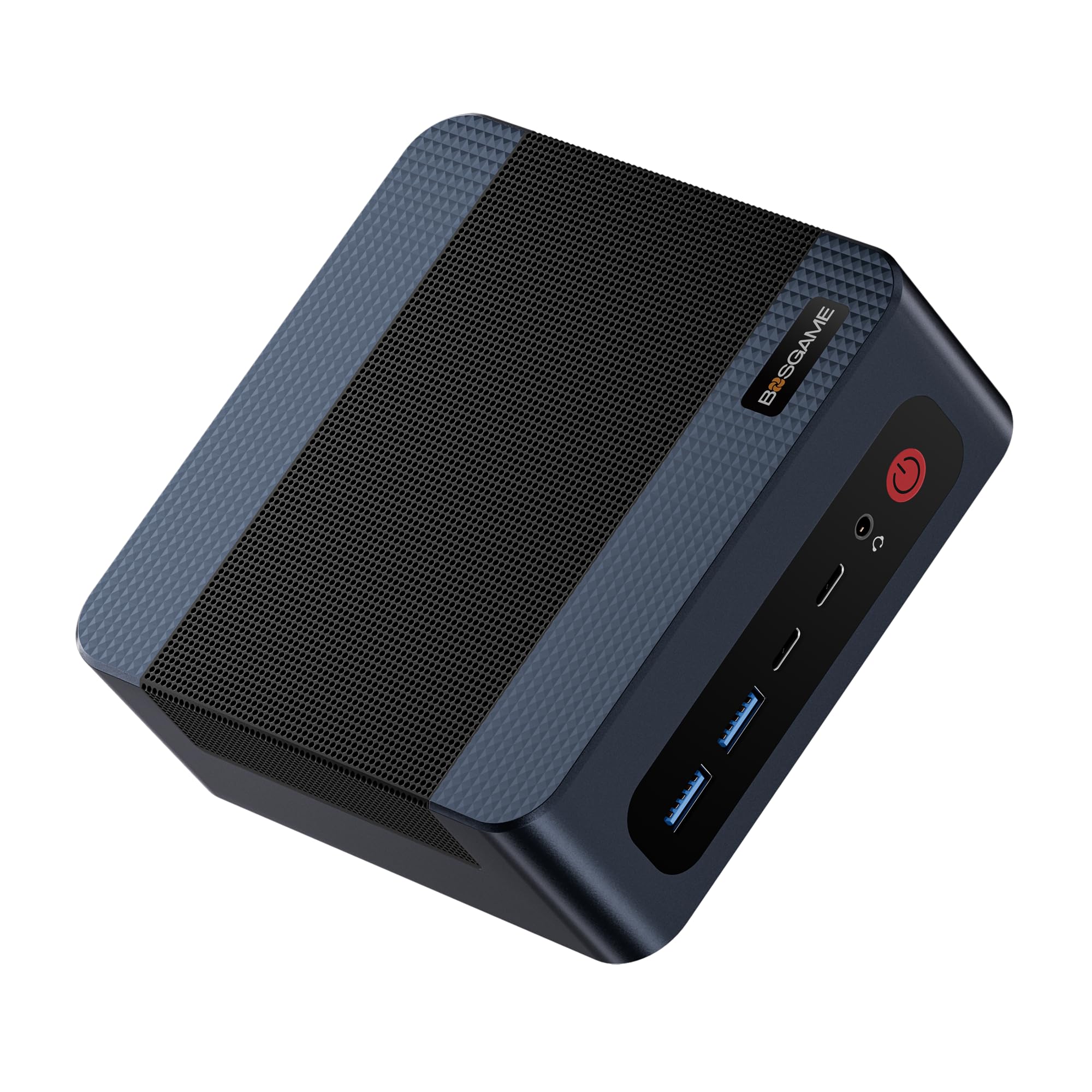
🚀 Compact power, colossal impact — own the future of desktop computing today!
The BOSGAME M4 Mini PC is a compact desktop powerhouse featuring an 8-core AMD Ryzen 9 7940HS processor with up to 5.2GHz turbo, 32GB DDR5 RAM, and a 1TB PCIe Gen4 NVMe SSD. It supports up to four 4K displays and offers cutting-edge connectivity with dual 2.5G Ethernet and WiFi 6E. Designed for gaming, streaming, 3D rendering, and professional multitasking, it runs Windows 11 Pro and supports Linux/Ubuntu, all in a sleek, space-saving chassis.


| ASIN | B0FGXJ2K7M |
| Best Sellers Rank | #3,752 in Computers & Accessories ( See Top 100 in Computers & Accessories ) #163 in Mini Computers |
| Brand | BOSGAME |
| Card Description | Integrated |
| Chipset Brand | AMD |
| Color | Neutral (Black, White, Silver) |
| Computer Memory Type | DDR5 RAM |
| Customer Reviews | 4.3 4.3 out of 5 stars (291) |
| Date First Available | July 7, 2025 |
| Graphics Coprocessor | AMD Radeon 780M |
| Hard Drive | 1 TB SSD |
| Hard Drive Interface | Solid State |
| Item Weight | 2.77 pounds |
| Item model number | M4 |
| Max Screen Resolution | 5120 x 2880 |
| Memory Speed | 5600 MHz |
| Number of Processors | 8 |
| Number of USB 2.0 Ports | 1 |
| Number of USB 3.0 Ports | 4 |
| Operating System | Support Win/ubuntu/Linux |
| Package Dimensions | 6.54 x 6.42 x 4.17 inches |
| Processor | 5.2 ryzen_9 |
| Processor Brand | AMD |
| RAM | 32 GB DDR5 |
| Screen Resolution | 5120 x 2880 |
| Series | M4 |
| Wireless Type | 802.11ax |
G**O
If you already have a good HD TV or a HD monitor , Mini-PC is a great choice!
This system as little and light as is, it really packs a lot of Windows 11 PC capable of doing pretty much what ever you want it to do. It comes with the semi-current AMD Ryzen 7 CPU (current one cost a little more) , 32GB of DDR4 RAM (Expandable to 64GB), 1TB of m.2 NVMe SSD with a 2nd open slot for a secondary drive, and a 3GB of (Shared) AMD Radeon Graphics Memory, what more can you ask for at this price? I bought this mini-pc to replace my travel/work 15in. laptop being used as a TV, connected to a big TV in my bedroom. It has the same spec as my 15in. laptop, and it cost me $200 less. I only had to connect a USB keyboard and a wireless mouse, connect it to my TV with the supplied HDMI cable, and it's all good to go! I already have a Microsoft account with back-ups from my other laptops, so the setup was very easy. I only had to copy the settings and the apps installed from the laptop that was connected to my TV. This TV laptop I was using, was upgraded to 64GB RAM, and with two 2TB SSD. This was originally going to become my travel laptop for photography stuff, so this BOSGAME P4 Plus served its purpose to replace it. To use this Mini-PC with 32GB RAM, 1TB SSD for a TV-Media Center, it's got more than enough to do whatever. Works like 20 times faster than my old Windows 10 (Win11 unupgradable AMD A10, 24GB Max RAM, sloooooow PC) that I gave a serious Karate chop to. Damn! That felt so good!! I should have taken a photo of the aftermath, and sent the photo to Microsoft to let them know how I feel about them. May be I should do that with the Windowsphone 10 I still have in my "Junk Box".☝🏻😂 My main PC has a AMD Ryzen 9 from 3 years ago, and it's an ASUS gaming laptop. Has 64GB RAM, and has great graphics with the Nvidia card with its dedicated memory. However, doing a task like editing photos, I really can't notice the difference in processing speed with the current and semi-current Ryzen 7 with the same amount of RAM. The only difference I notice is when I'm editing a large file size video, where the AMD Ryzen 9 and Radeon working with the Nvidia GeForce graphics card really out preforms my other machines with the Ryzen 7 with the shared memory Radeon card. So, if photo or video editing isn't the game, this Mini-PC will probably serve it's purpose, with lots of useable ports where you can connect a lot of things an make a wired mess. From about 15 years ago, I've been saying "a huge desktop and tower computers are a thing of the past". They run hot, consume a lot of wattage, take up space, and heavy. Right about the time Intel Core i5 came out, hi-spec laptops began to come down in price. Then, ASUS, Dell (Alienware), and Samsung just went nuts coming out with a high priced big "Gaming Laptops" (still weighed about 10Lbs) just overwhelming the desktops. Yeah, I had one from ASUS, but is was a replacement for an outdated tower PC I just got tired of upgrading. This is my very first purchase of a "Mini-PC", and I am just overwhelmingly impressed with this "BOSGAME". I have it on for 10 hours now, running updates, installing additional apps; etc., and it runs quiet, and much cooler (like room temperature) opposed to my "TV purpose laptop" does. Size is 5" x 5" Square, and only 1 - 3/4" in height. When I travel I need my laptop. I also, take my own movies and dramas to watch and stream with it. Now, I can just take this little bugger, along with a mouse and a mini keyboard, and just plug it in to the hotel's TV. I can now use my laptop as my laptop. 😂👍🏻
J**L
Snappy, small, silent, so far very impressed
I’m really impressed with this thing. I recently got a Mac Mini M4 and was smitten by the form factor, and my mother-in-law needed a new Windows PC. Enter this thing, which I decided to try based on the reviews despite never having heard of BOSGAME. It isn’t a gaming powerhouse or anything (and probably compares poorly to the Mac Mini for performance, which is hard to beat for its typical used sale price of ~$450), but is quite quick for typical Windows usage with size where it matters with 32GB of RAM and decent-sized SSD. It’s tiny, seemingly silent, has a decent array of ports (more USB-C would be ideal, but not a huge deal), and I got everything set up and installed with zero issues - no crashes or anything like that. It should last her many years and would be a great buy for the money assuming it does. I checked out budget mini-mid tower PCs like the Dell Optiplex I was replacing and they all were more expensive/bigger/uglier. Will update if things go south, but for now I’d highly recommend for this use case.
W**N
Good computer
Good computer specification.
D**X
Good value, tiny footprint.
Powerful computer in a small box. I can stream, work, play most* of the latest video games; newer games require a lower graphics setting in order to even run, so I wouldn't call this a gaming PC by any means. But simple computing and streaming are fantastic and it's amazing how small the computer is. Great option for tight spaces/small desks etc.
R**Y
Useless paper weight
My money doesn't come easy. Not for a 300.00$ paper weight. Crashes and freezes multiple times per day. After several reinstals, crashes within an hour. Support is nonexistent. Don't be fooled. avoid at all cost or...
R**.
Quality product
Works well I want to buy more.just because I can
M**E
Excellent Value To Replace My Windows 10 Device That Can't Be Updated
Great value for the money. Device is very fast and meets my needs. Mainly use it for amateur radio applications and large excel files. Browsing and video streaming also work well on the PC. Appreciate that it comes with Windows 11 Pro. This is a replacement for a high-end Windows 10 PC that can not be updated to Windows 11.
J**T
Insanely good purchase.
At one point I thought about building PCS and selling them. Once I bought this I realized there is absolutely no way I can compete with these prices. This thing works insanely well for what it is. Granted you're not going to be using this for high-end gaming but for school or work it operates at a high enough level of functionality that you won't need to replace it for years.
J**9
The primary factor in selecting this Mini PC was price having set a limited budget. I wanted Windows 11 Pro (not Home), a multi core CPU with minimum 32 GB ram and 1TB SSD storage. I did consider the cost of upgrading the ram / storage but in the end selected a model that I was unlikely to need to upgrade. I also limited my selection to manufacturers with drivers available online. The first thing that struck me about the H77 mini PC is how compact it is. The case is well ventilated with fans top and bottom. Access to the user upgradeable memory and single M.2 sata is straightforward but not tool free. The case can also house a single 2.5 inch SSD (not supplied) and an internal sata cable for this is provided. The fan noise varies depending how hard the CPU is working. It isn’t silent but I’ve not found it too distracting nor annoying so far. The case hasn’t ever felt over hot. The separate mains power adapter supplies 20V at up to 6A, and when the CPU is pushed you can certainly feel that in the warm air from the fan exhaust. There were quite a few updates required to the supplied Windows 11 Pro (23H2) when first powered on. I was able to create a local Administrator account (and not link to a Microsoft Account). I wanted a Mini PC for use primarily as a homelab to experiment with virtual machines. VirtualBox 7.1.4 installed without issue and I was able to import and run various Windows and Linux VMs created on earlier versions. The CPU choice wasn’t a major factor for me but I was mildly disappointed to discover that the AMD Ryzen Master application wouldn’t install as the H77 uses a mobile CPU version. I wasn’t previously aware of this restriction, but I don’t think it would have affected my choice. I’ve been impressed by the speed of the H77 generally and particularly with the VMs compared to how they run on my other host PCs. Cad applications that usually hog the CPU haven’t done so on the H77, although I’ve not yet had a chance to really stress test this. The graphic performance was not a factor for me but the benchmarks in this respect were slightly underwhelming. My only previous experience with Windows 11 was using a couple of laptops and that more or less convinced me to stick with Windows 10 for a while longer. However, I have to say I rather like Windows 11 on this Mini PC. I found I could customise things far more to my liking, although there remain a few irritations. The absence of third party bloatware is a plus. So far I’ve only had one issue: The H77 wouldn’t always boot. The solution turned out to be the selection of HDMI cable. I transport the H77 between sites and thus use different screens, cables and keyboards etc. I suspect that newer specification HDMI cables are required even though I’m mostly only using FHD 1080p displays. Overall, I’ve been very pleased with the H77 so far. It has more than met my expectations in terms of performance for my limited budget. Recommended as VM host and for office type applications, but not as a games PC.
M**T
I bought this as a standby machine because my everyday desktop was having issues and to be honest, didn't expect much at the price. Delivery was really fast, setting up the peripherals took a couple of minutes (be sure to have the correct cables for monitors) and then half an hour max for the Windows set up routine. Adding software, logging in to Dropbox and uploading files was straightforward and similarly quick. In about an hour it was ready to go and that's when I got the biggest surprise, this thing is quick! I use it for spreadsheets, accounting software and bookkeeping and for such a small machine it punches! And for the price, I'm deeply impressed. And as a bonus the graphics are better than my other desktop which cost more than double. Heat generation is minimal, it's been working all morning and it isn't even slightly warm. Noise, non existent. I cannot hear it even from inches away The 2TB SSD is more than adequate and if you need more there are plenty of online or external hardware options. I'm not sure what it would be like as a gaming machine, or for heavy duty editing, but I guess that's not its main purpose. Al in all, a very impressive machine.
D**P
Had this about a week or so. So far so good! I see a frequently returned warning came onto it's page now, I don't know if that's because of quality or people not knowing what to expect from a mini PC. Solid build, nothing cheap on build quality it is acceptable for the price. I've opened it up to examine, everything looks good. Packaged well too. 1) Some of these mini PCs or most of them come with no-name basically drives and RAM. Thankfully this had a Kingston M.2 drive. It has no-name RAM, but I can deal with that. Been monitoring it for a week in SIV and it's running just fine. 2)I'm not a PC game or got this for gaming, but tested Overwatch 2. It runs ok, mid settings, looks a little below but similar to PS4 graphics on that game. You have to go into the BIOS and allocate more memory to the APU you can do 8gb or even 16gb (set at 3gb "vram" by default). 3) Tested DaVinci Resolve extensively on this, runs just fine. Very impressive. Main reason to get this mini PC was for video editing and to use DaVinci Resolve. 4) When gaming and using DaVinci Resolve, SIV showed this runs at good temps and the APU is managed well. Current use it in 4k @ 60hz, have tested lower resolutions at 120hz like 1080p and it works fine.
B**.
Great little computer. Easy to set up fast and does everything needed to work from home. I don’t play games so can’t comment on that. I comes with Windows 11 installed.
J**I
very happy with this Mini PC BOSGAME P4 Plus Mini PC Ryzen 7 5825U (Upgraded 5700U), It is performing well and In am very satisfied with it and I believe it is good value for money.
ترست بايلوت
منذ أسبوعين
منذ شهرين