


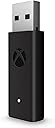


Wireless Adapter forWin10 EN
Product ID: 76597144
🎮Supports 8 wireless controllers
🔊High-quality stereo audio & chat
🔌Includes USB extender cable
Buy anything from 5,000+ international stores. One checkout price. No surprise fees. Join 2M+ shoppers on Desertcart.
Desertcart purchases this item on your behalf and handles shipping, customs, and support to EGYPT.
🎯 Level up your PC gaming with Xbox wireless freedom!
The Microsoft Xbox Wireless Adapter enables wireless connection of Xbox Wireless Controllers to Windows PCs, laptops, and tablets, supporting up to 8 controllers and multiple headsets. It delivers high-quality stereo audio and in-game chat, includes a USB extender for flexible setup, and is compatible with Windows 7, 8.1, and 10. Ideal for gamers seeking a seamless, cable-free experience with their favorite Xbox controllers on PC.

| ASIN | B00ZB7W4QU |
| Best Sellers Rank | #248 in Video Games ( See Top 100 in Video Games ) #1 in Xbox One Cables & Adapters |
| Country of Origin | China |
| Customer Reviews | 4.5 4.5 out of 5 stars (15,880) |
| Is Discontinued By Manufacturer | No |
| Item Dimensions LxWxH | 13.7 x 15 x 4.6 Centimeters |
| Item Weight | 0.1 g |
| Item model number | 1790 |
| Manufacturer | Microsoft Xbox |
| Net Quantity | 1.0 Count |
| Product Dimensions | 13.72 x 14.99 x 4.57 cm; 0.1 g |
| Rated | Ages 7 & Over |
| Release date | 20 August 2018 |
S**T
Good Adapter, Expensive though.
I bought this thing over a year ago, and I use my Xbox controller on PC. This adapter made it quite easy for me to use it wirelessly. Now, about the connection, it connects the controller properly - but the controller sort of has to be in a visible range. I use my PC in the living room as well as the bedroom, where the controller flawlessly works and maintains a stable connection with the controller. If anyone is standing between the adapter and controller, it still works the same. Although, if there is a metallic object between them, it stops working. Even if the controller is right next to that metallic object. For example, connecting it to the back of the PC. If I connect it on the back, it just refuses to connect. Regardless, if you know its quirks and workarounds, you'll be able to use it pretty comfortably. And, my advice is Xbox controller is a very good controller for playing games on PC.
L**R
Nice
It was very seamless connectivity I personally recommended this product
N**A
Nice product
The product is good works as expected, initially while setup in windows 11, the device wasn’t recognised even the light didn’t work , you need to install drivers separately and restart for it to work as intended, just i was about hit return and installing drivers didn’t work (you need to restart- this wont popup) and works like charm, no setup second time onwards.
J**E
A must have for PC owners
If you own an XBOX this does not add any value but if you are using xbox controllers on PC, this is a must have. This is infinitely better than bluetooth connection. Bluetooth connection are mediocre at best and they add micro stutters in the frametime. For a seamless console like experience on PC, buy this without a second thought. Also this doesn't add as a "Device" on your microsoft account with the serial number. So don't be surprised if you see "S/N not recognised". I contacted MS Support for this and they confirmed that Adapters do not add as a device under your account but you are able to claim warranty if anything goes wrong - within 90 days of purchasing (with genuine bill).
S**U
A little expensive but kinda worth it.
If you're a PC gamer and have a budget for these controllers and adapter, this thing is must to have. Works far better than third-party adapters and connects quickly. You can pair, I think, up to 8 controllers easily with this. I have two Xbox Series X wireless controllers that I use regularly, and the latency of those with this adapter over Bluetooth is just superb. In my opinion, pricing could be better for this. 2,000 INR is still expensive. The extension cable provided with this is of low quality. The adapter looks sturdy. Also, when you're controller is connected to this adapter. You can hook up your wired headphone directly into the controller, just like shown in the pic attached. I use my Logitech G Pro X wired with this, which works flawlessly (you can not do that with Bluetooth connectivity on PC). Pretty satisfied with my purchase.
A**R
It just works!
Works great as intended! No issues so far.
A**M
looks old
Its ok but when it came it looked old and had some scratches on it . After that i connected and i turned it on but it wont work and when i did it again it worked !!!
P**R
Very worth it.
I though this was overrated when I saw some latency figures in videos. But this is miles ahead of Bluetooth. I died 20 times trying to kill a minor boss in Black Myth Wukong. But killed him and a major boss in 4 tries with this adapter. I wish Microsoft keeps this in production. Must have gaming wirelessly on a PC with Xbox Controller.
H**A
Use your XBOX One controller wirelessly
The XBOX wireless adapter for Windows is the logical solution for those who want to use more comfortably the excellent XBOX One and/or XBOX One Elite controller for gaming. In my humble opinion, it deserves a five-star rating because ELIMINATES the annoyance of having a wired controller, at least when you are not charging the batteries. It’s simple, discrete, even elegant, and lightweight, in comparison with the wireless adapter of the XBOX 360 controller, which was bulkier and with an odd round shape, harder to accommodate somewhere in your computer case or surroundings. Besides, the extension cable is detachable, what is very convenient when you have almost or no room for this port in the front or back of the motherboard of your computer, in contrast with the 360 controller wireless adapter, in which the extension cable was included and permanently attached, and if the cord was not necessary, you must fold the excedent cable, in order to avoid the mess in front or back of your computer. The only complaint about this adapter is that takes more time to pair a device, and you must press the pairing buttons sequentially, in order to have a one-step device pairing. First the adapter, then the controller. I have another complaint, but I think is related more to Windows, rather than the device itself. Is the inability to recognize the paired controller in the XBOX Devices subprogram in Windows. You have to try several times for the proper recognition. Nevertheless, even if the subprogram cannot recognize the controller, you can use the controller as well. I recommend this device to anyone who wants to use the XBX One controller without more cables on the computer. It works well and serves the purpose… you won’t regret it.
R**T
game changer
I can finally plug my headphones in to my controller and it works flawlessly!!! also you can connect up to 8 controllers at once. at this price this is a steal buy it without any hesitation!!!
V**V
Seems like a genuine product
Looks like the original product, maybe it is a very good copy, maybe it is a genuine one, I cannot understand. The label underneath hides the original barcodes, serial number and information, that date of manufacturing is "1016", which could mean October 2016. Windows recognized this dongle without a problem. Xbox controller was successfully connected via dongle,
A**I
.....
Really, the wireless Adapter is great and excellent.
U**A
Bluetoothtan iyi, xbox one kolunu pcde kullanmak istiyorsanız edinmekte fayda var.
Elimde xbox one siyah (klasik) ve xbox one s var ikisi de kolayca bağlandı, bluettothla xbox one s beyaz controller bağlıyordum ama kulaklık özelliğini kullanamıyordum ve bağlantıda sıkıntı olabiliyordu. bu aletle bu hem klasiği hem beyaz olanı tam fonksiyonla kullanabiliyorum.
Trustpilot
3 weeks ago
5 days ago