Desertcart purchases this item on your behalf and handles shipping, customs, and support to EGYPT.
🖱️ Master your workflow with precision, speed, and silent power.
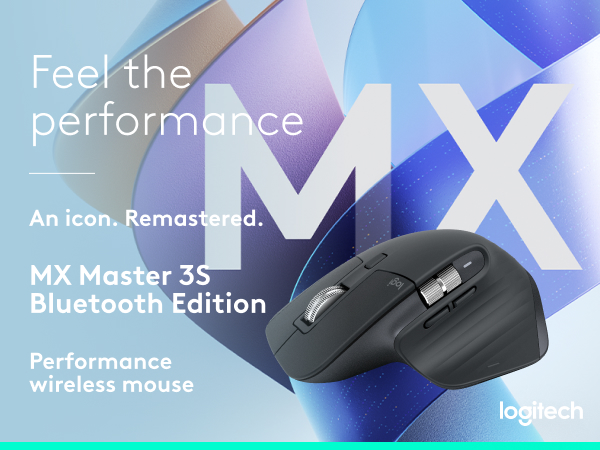
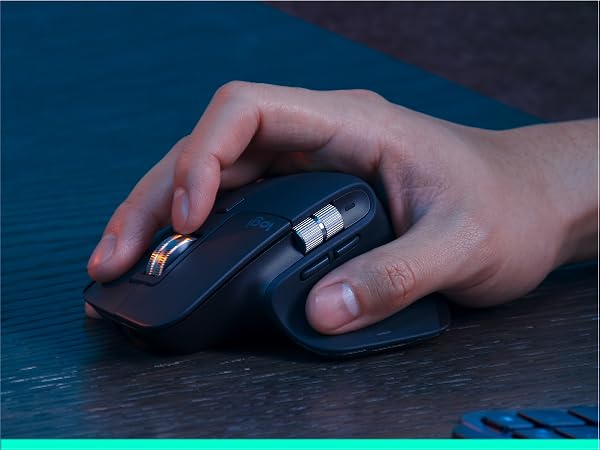
The Logitech MX Master 3S is a premium wireless mouse featuring an ultra-precise 8000 DPI sensor that tracks on any surface including glass. It offers MagSpeed scrolling that is 90% faster and 87% more precise, combined with Quiet Clicks for 90% noise reduction. Designed ergonomically for all-day comfort, it supports multi-device Bluetooth connectivity and FLOW cross-computer control for seamless workflow across Windows, macOS, Linux, and more. With up to 70 days battery life and customizable buttons via Logi Options+, it’s engineered for professionals who demand speed, precision, and silent efficiency.


| ASIN | B07W5JKHFZ |
| Antenna Location | Computer Work, Design, Data Entry |
| Are Batteries Included? | Yes |
| Are Batteries Required | Yes |
| Battery Average Life | 70 days |
| Best Sellers Rank | 2,875 in Computers & Accessories ( See Top 100 in Computers & Accessories ) 113 in Mice |
| Brand | Logitech |
| Brand Name | Logitech |
| Button Quantity | 3 |
| Colour | Gray |
| Compatible Devices | Personal Computer, Laptop, Tablet, Smartphone |
| Connectivity technology | Bluetooth |
| Customer Reviews | 4.5 out of 5 stars 15,046 Reviews |
| Embellishment Feature | Logo |
| Enclosure Material | Plastic |
| Hand Orientation | Right |
| Hardware Platform | General Purpose PC |
| Included Components | 1 battery |
| Item Dimensions L x W | 12.5L x 8.4W centimetres |
| Item Part Number | 910-006559 |
| Item Type Name | Wireless Mouse |
| Item Weight | 0.14 Kilograms |
| Manufacturer | Logitech |
| Manufacturer Part Number | 910-006557 |
| Model Name | Logitech MX Master 3S Performance Wireless Mouse |
| Model Number | 910-006559 |
| Mouse Maximum Sensitivity | 8000 Dots per Inch |
| Movement Detection | Optical |
| Movement detection technology | Optical |
| Network Connectivity Technology | Bluetooth |
| Number of Batteries | 1 Lithium Polymer batteries required. (included) |
| Number of buttons | 3 |
| Operating System | ANY |
| Pattern | MX Master 3S Old (USB-C) |
| Power Source | Battery Powered |
| Product Features | Magspeed scrolling, Silent click, Any Surface Tracking, Programmable Buttons, Multi-Computer FLOW Control |
| Product Finish Type | Matte |
| Product Warranty | 2 year manufacturer |
| Range | 10 meters |
| Special feature | Magspeed scrolling, Silent click, Any Surface Tracking, Programmable Buttons, Multi-Computer FLOW Control Special feature Magspeed scrolling, Silent click, Any Surface Tracking, Programmable Buttons, Multi-Computer FLOW Control See more |
| Style Name | Ergonomic |
| Theme | Professional |
| Unit Count | 1.0 count |
E**O
Best mouse ever used - Worth Every Penny!
I recently upgraded to the Logitech MX Master 3S, and I can confidently say this is the best mouse I’ve ever used. As someone who spends long hours on a computer, both for work and personal projects, this mouse has completely transformed my workflow. The ergonomic design is exceptional. It fits naturally in my hand, reducing wrist strain, and the thumb rest makes extended use extremely comfortable. The soft-touch finish feels premium and provides a solid grip, even during long sessions. With the 8,000 DPI sensor, tracking is ultra-precise, even on glass surfaces. Whether I’m editing videos, coding, or browsing, the smooth and accurate movement makes everything effortless. The Silent Clicks are a fantastic improvement from the previous model—same tactile feedback but much quieter, which is perfect for shared workspaces. MagSpeed Scroll Wheel: This is a game-changer! It seamlessly switches between precise and free-spinning scroll modes, allowing for ultra-fast scrolling. Customizable Buttons: The additional buttons are a dream for multitaskers. With Logi Options+ software, I assigned shortcuts for copy-paste, switching desktops, and even adjusting volume. Multi-Device & Cross-OS Support: Works flawlessly across Windows, macOS, and even iPadOS. The Easy-Switch feature lets me switch between my MacBook and PC with a single button press. Battery life is outstanding—a full charge lasts weeks, and USB-C fast charging is incredibly convenient. It connects instantly via Bluetooth or the Logi Bolt USB receiver, providing a lag-free experience. ⭐⭐⭐⭐⭐ 5/5 – Highly Recommended!
J**Y
The perfect mouse. No question about it.
I was a little sceptical a) of the strange, slightly more vertical shape and b) of the somewhat gimmicky horizontal scroll wheel and infinity scroll feature, however I can confidently say that I was a fool. The vertical shape is perfect. My arm and wrist have felt so much better, and my worries about my hand being uncomfortable were very quickly disregarded. My hands are a relatively average size (if not slightly on the larger side), and seem to fit this mouse perfectly. It is ridiculously easy to connect using the dongle AND Bluetooth (the latter, you literally just swap it to an unassigned device with the button on the bottom and then search for it in your BT settings). It works great both with my Mac and with my PC, so I can swap between quickly without issue. Even my programmable buttons carry over, assuming I’m logged into the same LogiTools. The horizontal scroll wheel has become my best friend. I work as a video editor, and being able to zoom in/out with just my mouse (rather than holding alt) is unbelievably convenient. All of that is applicable to the regular MX Master 3: the silent buttons are just a lovely bonus.
J**H
It’s worth it, you won’t regret buying this mouse
The Logitech MX Master 3S is easily one of the best mice I’ve used. The battery life is excellent and I barely need to think about charging it. Being able to switch between multiple devices is a game changer, especially when moving between my laptop and desktop. The Mac swipe actions that replicate trackpad gestures are amazing and make navigating so much quicker. It feels premium, comfortable, and has made my daily workflow much smoother.
A**R
Excellent mouse
I'm a great fan of Logitech MX mice, having had several over the years. The 3S model still continues to be an excellent mouse. Some things are better than the 2S model, some not so good. Ergonomically, it fits the hand beautifully. The scroll wheel is smooth and responsive, and you can choose whether you want it to click or be smoothly rotating. My preference is the latter. If you do go for the click scroll, you can still spin the wheel if you give it a decent flick. The positiion of the horizontal scroll wheel doesn't fall to the thumb in the same way as the 2S and this will take a little getting used to. On the plus side, the forward and back buttons now are easier to operate. The mouse can control up to three different devices and I use it to control a Mac, a desktop PC and a mini PC. It works flawlessly for all three. The new "quiet click" buttons are not silent but are much quieter than the previous model. This is good if you are recording videos or streaming and the mouse is near the microphone. The disadvantage is that they require less pressure, so accidental clicking is more likely - especially if you are a bit heavy-handed. You can connect to your computer using the supplied dongle or using Bluetooth. Both methods work fine and the dongle is useful for desktop PCs that may not have Bluetooth. These mice have never been cheap but they have proved themselves over and over.
J**3
6 month review: Maybe the best productivity mouse. But do not game with it.
Working, browsing, it's great. It's perhaps THE productivity mouse. I can't now imagine using anything else. The ergonomics are so comfortable. The battery charge seems to last months (turning it off entirely overnight). The Logitech Options+ software is... well, sometimes its good but then you try to set something and you're confused why it won't let you do that. The thumb rest is lovely for comfort, but personally I've found the extra thumb "touch" button too finicky to use: it requires downforce in a direction that I found unnatural for the angle my thumb is at. Occasionally, especially in Excel, I find scrolling a little too sensitive when one hits zoom in/out a little too much, it can cause Excel to zoom out massively and basically stop running for ten minutes while it catches up. I've learned to be more careful, but it still happens occasionally. I do like the scrolling action of the mouse, I'm merely pointing out that it may require some adjustment on how you use it based on your previous mouse experience. My main complaint though is the feet: they do not run at all well on my Kensington mouse wrist-support pad, so I have to have the pad backwards so the mouse is directly on my desk, my wrist is on the support gel, and my forearm is resting on the mousepad. The MX M 3S basically unusable in the correct orientation on that mouse pad. Now, I've not tried other pads so it's hard to know if it's just the pad is just too grippy or the MX's feet. I don't recall getting the same feeling with other mice, though. I do worry about whether the soft-touch material will degrade over time, and that is a concern for such an expensive product. That's a 2-year plus problem if it happens at all, so right now, after 6 months it's still so comfortable it's like resting my hand on a cloud. At 140g it's pretty heavy. I've no issues moving it around day-to-day when working, but I'm pretty sure I wouldn't ever want anything heavier than this, and it absolutely will be too heavy if you're gaming. It is not a gaming mouse. Do not try to use it as a gaming mouse. If you need this, probably the best, productivity mouse and also want to game, have two mice.
J**H
A Premium Mouse with a Price Tag to match.
The Logitech MX Master 3S is a flagship premium mouse. The build quality is excellent, from the soft and comfortable coating of the mouse, to the premium metal elements. The mouse has a virtually silent click which retains a tactile and positive feel in the hand, without a loud and annoying noise. The mouse offers a lot of customisation options for the buttons which can allow for a more efficient workflow. For example I have set the two side buttons to be Copy and Paste. This allows me to quickly copy and paste data between spreadsheets. The battery life is excellent, after 3 months of use I have had to charge it once. This is an impressive leap forward compared to my previous Logitech mouse which lasted 10 hours per charge. Unfortunately the battery is fixed in the mouse meaning if it fails in a few years you will not easily be able to replace it. The ergonomic design of the mouse is good but not quite perfect. There is a slight tilt on the mouse that is good for your wrists but means that you hard feels like it is falling off the edge. Over time I have found that the ring and little finger can become sore and agitated from the position. My previous Logitech mouse had a similar design but was much more comfortable. You are certainly getting a premium product, which should be expected at this price point. It will be subject to the individual to decide whether this is cost efficient for them. For anyone using a computer daily in their job it does make sense to have a productive and ergonomic mouse.
T**B
Gobsmacked Really
I have never owned a mouse in my life. Rarely write reviews. Love computers though. Here's me at 10 at night writing a review when I could be smashing Cyberpunk 2077. But no. Reason for 5 stars - I recently started an apprentice developer role which has been a dream since childhood, and have used a Mac for last 4 years purely trackpad. I have never in my life needed a mouse (especially personal), and honestly out of pure ignorance have never been able to realise that mouses have got more advanced since school days. So much more advanced. I was reluctant to get this and tried to convince myself the work computers small trackpad will be sufficient. On the recommendations from colleagues who had the master 2, it was prime day and I had just been paid, so impulsively bought this MX3, I regretted it instantly if I am honest (although the 2 would have been more than sufficient for me I won't lie). Damn you Amazon and your marketing !! I am still an apprentice, but all I can do is laugh at myself for regretting buying this mouse. In the space of a few days my navigation issues were a thing of the past and as of this moment writing this have finally experienced a proper 'flow state'. Managing to use keyboard commands through the mouse, the gestures, the ability to just fly to where you want to go is just mind-boggling and this is a SERIOUSLY handy piece of tech. I'm a bit of an apple nerd and they could only dream of this if I am honest. A lot of the beauty is in its simplicity and functionality that cannot really be streamlined (until we use our actual hands I guess..) Look I am an early days in my career and this will likely be the only mouse I ever buy, its that good. I have got the Logi Keys Mini which pair perfectly and both can be used on Mac and Windows simultaneously which is a bonus. It's just a shame I am early in my career as I think I'd see even more improvements. Just buy it and thank me later! Only thing I will add is that do not buy this if you are left handed (they do a left handed one btw), as I realise how amazing my review is and that I may cause someone to impulsively buy it like myself. OOOOPS.
P**V
Great overall, only minor nuisances
To get this out of the way first, the slides are not rounded around the edges as they used to be with previous versions. This means that they will catch into the fibres of the armrest when working sat on my fabric sofa, which will then require a mousepad. The new position of the side buttons (Forward/Back) feels awkward and will be difficult to get used to as I use the 2s in the office (which has the buttons lapping), but I'm using the 3s while at home (which has the buttons separated) but I suspect it shouldn't be a problem for people only using one mouse. Feels good in your hand, coating feels like the same material as previous models, but with a different texturing around gripping points Clicking is quieter and softer compared to previous version; some people find that good, others don't. Movement will register on just about any surface. Wheel also seems heavier and ratcheting scrolling is quieter too. The button switching scrolling modes is just as loud as previous versions, however, the component that moves the levers inside the mouse is quieter compared to previous models. There are loads of ways to customise what each button does, and you can have the same button carry out different functions depending on the program currently in focus (could do this with previous versions too). The button under your thumb now has a slit to make it more obvious when you press the button. This comes with the Bolt receiver; not sure how that's different from the Unifying received I got used to as I tend to only use it in Bluetooth mode. Pairing is just as easy as it was on previous versions, which makes it easy to work on various other machines with the same mouse: switch to the connection slot you want to overwrite, then press and hold the connection slot button until light starts flashing rapidly, start pairing from the new computer/phone/tablet.
F**R
Wow! Nice!
In the beginning, coming off a 2S, I was really not convinced. I have big hands and the 2S just seemed to have a nicer grip around it. It was very off-putting in the beginning, but I just needed some time to get used to it. In the end, I still think the grip of the 2S is a lot better, but the other benefits make this purchase a good one: - the polling rate, both on Bluetooth and on Bolt are a LOT higher! Very smooth experience. - Speaking of which: Bolt; I love it. Works really well. - The clicks are really silent, and I never expected this to be such a nice feature! At first, I missed my 2S's clicky sound, but when I use that mouse now, I immediately recognize how loud that mouse is. I'm in videocalls from the morning till the evening so the silent mouse is definitely a plus! - The sidescrolling wheel is awesome, much better than the previous mouse. - the design; I think it's a beautiful mouse to be standing on your desk. - The battery life is like magic. I don't understand how they do it, but it's awesome! I primarily use Bolt, so not sure if it uses more on Bluetooth. To be seen. Don't hesitate to buy this mouse. It will be an awesome addition to your desk and you'll feel good about being productive 👍
M**S
Exceptional Mouse – Smooth, Intuitive, and Built to Last!
The Logitech MX Master 3S is hands-down the best mouse I’ve ever used. The design is sleek and ergonomic, with a finish that feels luxurious yet sturdy, making it comfortable to use all day without any strain. The battery life is incredible—I use it heavily throughout the day, and it lasts well over a month on a single charge, which is a game-changer for anyone who hates constantly recharging devices. The software is highly intuitive and makes customizing buttons a breeze. Whether I’m working across multiple screens or toggling between apps, everything is smooth and seamless. The scroll wheel is another highlight, with a magnetic mechanism that’s whisper-quiet and allows for effortless, precise scrolling. Logitech has truly thought of everything with this model, from functionality to design. Worth every penny for anyone who wants a mouse that delivers on quality and performance.
C**N
Bu
En sevdiğim en sevdiğim
N**E
Perfekt
Svårt att använda jobbets "dumma" mus efter denna
L**S
Super
Ok
Trustpilot
1 day ago
1 month ago