Desertcart purchases this item on your behalf and handles shipping, customs, and support to EGYPT.
Review: Outstanding value at the price - Bought this combo modem/router because my old one was having issues staying connected to the internet. Received it, set it up with a direct connection from my PC, then a quick call to Optimum to have it provisioned and off to the races. I have since downloaded the Nighthawk app and been pleasantly surprised at the ability to easily manage the router. The speed both up and down are very good. The WiFi setup was easy, opting to go with Smart Connect has been a great success, one network name for all devices connecting. Would recommend this for anyone who is looking to pay for their modem once rather than a monthly forever charge. The Armour security trial needs to be determined whether to continue with it but it protects all devices on the network. Review: Best 2in1 wifi modem - CAX Modem Review: Reliable Performance and Impressive Speed and save on ISP rental fees As an avid internet user who relies heavily on a stable connection for both gaming and entertainment, I recently decided to upgrade my modem and went with the CAX modem. After using it for a few months, here’s my take on this device. Design and Setup: The CAX modem has a sleek, modern design that fits well in my home office setup. It's compact, which is great for saving space, and the LED indicators are clear and intuitive, giving you an immediate status update on your connection. The setup process was surprisingly easy; I followed the instructions included in the box, and I was online within 20 minutes. The modem is compatible with most major ISPs, making it a versatile choice for different users. Performance: Where the CAX modem truly shines is in its performance. With my previous modem, I often encountered buffering issues and dropped connections during high usage times and packet loss. However, since switching to the CAX, I’ve experienced significantly faster speeds, particularly when streaming 4K content or gaming online. The modem supports DOCSIS 3.1, which allows for lightning-fast download speeds, and I can confidently say it lives up to its promises. Connectivity: The CAX modem features multiple Ethernet ports, which is a fantastic addition for anyone with multiple wired devices. The Wi-Fi range is impressive as well; I’ve noticed a stable connection even in rooms that previously had weak signals. This feature has been extremely beneficial for my family, enabling seamless browsing and streaming on multiple devices without any lag. Value for Money: With its robust performance and modern features, the CAX modem is reasonably priced, especially considering the cost savings on rental fees from ISPs. If you’re a heavy internet user, investing in a quality modem like this can lead to significant long-term savings. Conclusion: Overall, the CAX modem has exceeded my expectations. Its design is user-friendly, setup is a breeze, and its performance is flawless. For anyone looking to enhance their home network experience, the CAX modem is certainly worth considering.


| ASIN | B0D6GZDYS3 |
| Antenna Location | Gaming, House, Professional, Video Games |
| Antenna Type | Internal |
| Box Contents | Ethernet Cable, Nighthawk® AX6/6 Stream WiFi 6 Cable Modem Router (CAX30), Power adapter., Quick Start Guide, ethernet cable, power adapter |
| Brand | Netgear |
| Brand Name | Netgear |
| Colour | Black |
| Compatible Devices | Gaming Console, Personal Computer |
| Connectivity Protocol | Wi-Fi |
| Connectivity Range | 2500 Square Feet |
| Connectivity Technology | Wi-Fi |
| Control Method | App |
| Controller Type | App Control |
| Country of Origin | China |
| Customer Reviews | 4.3 out of 5 stars 1,685 Reviews |
| Data Transfer Rate | 2700 Megabits Per Second |
| Frequency | 5 GHz |
| Frequency Band Class | Dual-Band |
| Has Internet Connectivity | Yes |
| Has Security Updates | Yes |
| Is Modem Compatible | Yes |
| LAN Port Bandwidth | 1000 Mbps |
| Manufacturer | NETGEAR |
| Manufacturer Part Number | CAX30-200NAS |
| Maximum Upstream Data Transfer Rate | 1350 Megabits Per Second |
| Model Name | CAX30-200NAS |
| Model Number | CAX30-200NAS |
| Number of Antennas | 4 |
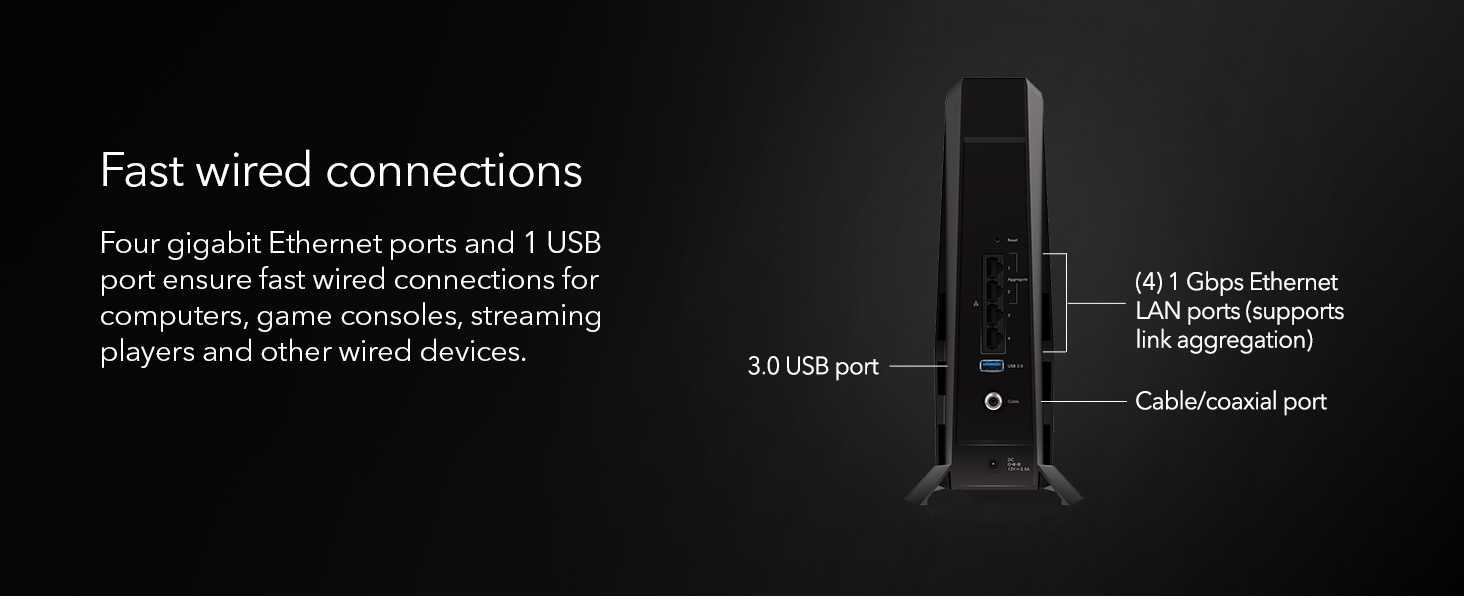
| Number of Ports | 4 |
| Operating System | ZyNOS |
| Other Special Features of the Product | 6-stream WiFi, One USB 3.0 port |
| Recommended Uses For Product | Gaming, House, Professional, Video Games |
| Router Firewall Security Level | Advanced |
| Router Network Type | hybrid |
| Security Protocol | WPA/WPA2/WPA3 |
| Special Feature | 6-stream WiFi, One USB 3.0 port |
| UPC | 606449170979 |
| Voltage | 12 Volts (DC) |
| Wi-Fi Generation | WiFi 6 |
| Wireless Communication Standard | 802.11ax |
| Wireless Compability | 802.11ax |
W**E
Outstanding value at the price
Bought this combo modem/router because my old one was having issues staying connected to the internet. Received it, set it up with a direct connection from my PC, then a quick call to Optimum to have it provisioned and off to the races. I have since downloaded the Nighthawk app and been pleasantly surprised at the ability to easily manage the router. The speed both up and down are very good. The WiFi setup was easy, opting to go with Smart Connect has been a great success, one network name for all devices connecting. Would recommend this for anyone who is looking to pay for their modem once rather than a monthly forever charge. The Armour security trial needs to be determined whether to continue with it but it protects all devices on the network.
P**H
Best 2in1 wifi modem
CAX Modem Review: Reliable Performance and Impressive Speed and save on ISP rental fees As an avid internet user who relies heavily on a stable connection for both gaming and entertainment, I recently decided to upgrade my modem and went with the CAX modem. After using it for a few months, here’s my take on this device. Design and Setup: The CAX modem has a sleek, modern design that fits well in my home office setup. It's compact, which is great for saving space, and the LED indicators are clear and intuitive, giving you an immediate status update on your connection. The setup process was surprisingly easy; I followed the instructions included in the box, and I was online within 20 minutes. The modem is compatible with most major ISPs, making it a versatile choice for different users. Performance: Where the CAX modem truly shines is in its performance. With my previous modem, I often encountered buffering issues and dropped connections during high usage times and packet loss. However, since switching to the CAX, I’ve experienced significantly faster speeds, particularly when streaming 4K content or gaming online. The modem supports DOCSIS 3.1, which allows for lightning-fast download speeds, and I can confidently say it lives up to its promises. Connectivity: The CAX modem features multiple Ethernet ports, which is a fantastic addition for anyone with multiple wired devices. The Wi-Fi range is impressive as well; I’ve noticed a stable connection even in rooms that previously had weak signals. This feature has been extremely beneficial for my family, enabling seamless browsing and streaming on multiple devices without any lag. Value for Money: With its robust performance and modern features, the CAX modem is reasonably priced, especially considering the cost savings on rental fees from ISPs. If you’re a heavy internet user, investing in a quality modem like this can lead to significant long-term savings. Conclusion: Overall, the CAX modem has exceeded my expectations. Its design is user-friendly, setup is a breeze, and its performance is flawless. For anyone looking to enhance their home network experience, the CAX modem is certainly worth considering.
P**N
Fast, reliable modem‑router combo that handles heavy streaming and uploads
I bought this modem and router combo about a year ago, and it’s been solid from day one. My internet stays fast and stable, and I haven’t had any random dropouts or slowdowns. I consistently get over 250 Mbps, which lets me upload long videos to YouTube while streaming at the same time without any issues.The setup was simple, the connection has been reliable, and the speeds are exactly what I need for heavy daily use. After a full year, I’m still very happy with this combo — it’s been one of the best upgrades I’ve made for my home internet
A**N
Buyer Beware- concerning business practice experience
I purchased this product on April 27, 2025. In full transparency the product worked very well up until about three weeks in. For an entire day, my household had trouble accessing the Internet so as part of my troubleshooting process, I first called the Netgear customer service line. After putting me on hold for a few minutes, the customer service rep got back on the line and told me that the reason why we were having trouble is because the complementary NETGEAR Armor Plus security feature was about to expire and that I needed to upgrade to purchase this feature in order to continue to have smooth Internet service. This made absolutely no sense to me because everything that I’ve read about this feature positioned it as an optional feature and I was not interested in purchasing it. When I questioned her about never hearing anything about this required feature that would disrupt my Internet, she said that this is a practice that started in 2024 and when I further pressured her to explain to me if this was a Netgear specific practice or that any company selling a modem or router required a purchase of this type of security feature, she said that this was required of any company selling modems. Quite frankly, it all sounded bogus and when I did my checking after hanging up, I learned that there is no such change to how modems are purchased regardless of the manufacturer that requires you to buy extra security in order to continue using the Internet. The customer service rep said a few more things that were totally inappropriate and borderline unethical, but it’s too much to write in this review. This is very telling: I later learned as part of my troubleshooting that my Xfinity coverage area was having difficulties, which was resolved the next day and then I no longer had problems with the Internet. This was clearly a blatant and as far as I’m concerned illegal attempt to try to get me to purchase a package that is technically optional. Because of that experience, I returned this modem and asked for a full refund which Amazon is processing. Thank goodness this happened before my 30 day refund was up or I’d be stuck with a modem from a company with a rogue customer service rep and/or unscrupulous business practices.
M**L
Recommended for large home
So my Orbi cable modem/router that was more than 7 years old. I went to Xfinity for options and received a modem/router that was no extra charge. After a week of short term offline experiences I called Xfinity and wanted help. They sent out a tech who said all my cable was testing good. Second modem installed. Immediately found the same issue of short term outages. Then the bill showed up for a $20 increase in the monthly and $100 for the tech visit. Researched options and found the Nighthawk and ordered it. 3 hours later I finally had it setup and after a week I can report it is excellent! Outstanding coverage in my 3,600 sq ft house. Speeds matching the advertised service from Xfinity and zero service outages. Recommended by me as great product. Disappointed in the 3 hour setup time and the Netgear help desk leaves something to be desired but the product if great.
Trustpilot
4 days ago
2 months ago