🔄 Share the Power of Connectivity!
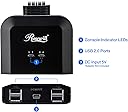
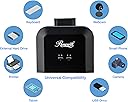
The Rosewill USB 2.0 Sharing Switch Box allows seamless sharing of up to 4 USB devices among 4 PCs, featuring easy switching, LED indicators, and broad compatibility across various operating systems.


| ASIN | B07FQYFN76 |
| Brand | Rosewill |
| Built-In Media | Rosewill USB 2.0 Sharing Switch Box |
| Connector Type | usb 2.0 |
| Customer Reviews | 4.3 out of 5 stars 62 Reviews |
| Item Dimensions | 7.9 x 4.5 x 2.5 inches |
| Item Package Quantity | 1 |
| Item Weight | 9.6 ounces |
| Item dimensions L x W x H | 7.9 x 4.5 x 2.5 inches |
| Manufacturer | Rosewill |
| Mfr Part Number | RCUS-17002 |
| Model Number | RCUS-17002 |
| Number of Ports | 2 |
| Package Quantity | 1 |
| UPC | 840951127001 |
| Unit Count | 1 Count |
| Warranty Description | 1 Year |
W**.
Put an end to cable swapping
A simple device that has made my daily PC use a lot easier. Certainly, when users say that something doesn't work or stopped working, it's a legitimate complaint and their consternation is very understandable. Still, 70 or 80 percent leave positive feedback and this item is very easy to return. You might have a negative experience but odds are against twice in a row for something as simple as this switch. The main problem is finding a device that will work with more than two Computers. Rosewill is one of only a few on the market for 4 inputs at a reasonable price. Plenty of switches available for two PC input. I have three, a Laptop, a Mac mini that are on the desk within easy reach and a PC Tower on the floor beside my desk. I've been using a two input device needing to switch cables to accommodate three computers. I was surprised to find this little gem that handles 4 PC's and four peripherals. I can see where it's possible someone could get confused and strike out trying to use it. That's because the instructions are not all that helpful, but if set up right, my experience has been great. What follows are the instructions that should have come with, but didn't: As you hold the device with the input cables pointing away from you it is important to know which one is which. Left to right, 1,2,3,4. 1 and 4 are long. More than what you will probably need. Indubitably, too long is way better than too short. Number 2 and 3, (the two middle cables), are shorter. This worked out well for me as the number 1 cable was long enough to reach around behind the desk to attach to a rear motherboard USB 2.0 port. Number 2 plugged into my Mini towards the rear of my desktop. number three to my laptop. It is important that you number each one of your computers, PC, (or Mac) 1,2,3,4. My Tower is 1 - Mini is 2, Laptop is 3. The 4th cable, the other long one, is unused, bundled up behind my desk. Most every thing comes tied up with a little black wire twist tie that I save, I have a bunch in my desk drawer, some I re-use to tie everything up nice and neat to prevent having an inscrutable rats nest of wires behind my desk. It's a good idea to head down to your local Dollar General and pick up some double-sided sticky back tape. Four small strips on the bottom corners of the switch holds it firmly to the desktop and is also easily moved or removed. A thumbnail sized piece will hold the switch to the underside of the desk, or wherever you choose. The switch cycles in a round-robin fashion. 1,2,3,4...1,2,3,4...1,2,3,4. i.e. green, green, red, red. When I press the switch and the left green LED lights up, that attaches my Tower PC number one. Next press is right Green, number two, my Mac Mini. Third press is left red LED, number three, my Laptop. 4th press is right LED that in my case is not used. e.g. Left green-1, right green-2, Left red-3, right red-4. I look at the switch and see the right green LED lit. At a glance I recognize it as number two, so my Mac Mini is attached to my mouse, keyboard, printer and even an external ssd drive plugged into the 4th USB port. I use a wireless keyboard and mouse with a dongle plugged into the switch. I bought a 2 amp ac adapter with a female USB A port. A USB A to USB mini-B cable connected to the switch to power the ssd drive. A caution if switching an external drive, or you can lose your data. Before making the switch from one Computer to another, it is imperative that you first disconnect the ssd from the present Computer via the little tray icon on the lower right of the screen, or power off that computer and then remove it. Everything works flawlessly. I was anticipating some problems but so far is nary a glitch. A single button press and my devices are seamlessly switched over. Used along with a monitor that is easily switched between the Tower and the Mac, this has really made it very feasible for near simultaneous use of my three computers. The USB 3.0 drive works, but transfer speed may be limited to USB 2.0 specs. I could have ordered the USB 3.0 switch but don't need it for keyboard, mouse etc. The ssd is for convenience, I save my most critical data to an NAS mirror. Have used a couple of other switches that have had minor, (annoying), glitches but I have used this little jewel every day for a few months and it works perfectly, just as it should Walter O
L**R
Great product.
Works great. I love that you can put three device out iif the way and have one switcher button on your desk. One dislike is that you have to cycle through each computer everytime, including the unused connections.
H**G
Great switch.
This switch works great for sharing 1 keyboard and mouse between 3 computers on my work bench with a spare connector. I would have given 5 stars but the labels on each cable are etched into the plastic making it hard to read. I easily fixed that with a label Maker. There was no power cord included and it used the obsolete usb mini connector instead of a microUSB. Again not a deal breaker as I had a cable and was able provide power. One may argue that the usintdraws power from the connected computers, that’s true but in my use case 2 of the computers are raspberry pi’s and another embedded system and they are touchy about power draw. It would have been nice to have a separate power supply provided. But overall I would definitely recommend this switch. A great way to organize your workspace and improve your workflow.
D**D
Works Like a Charm
I conected 3 computers 2 running Linux and a Mac Mini it works great I can share the keyboard and mouse and two other devices with each computer just by pushing a switch to change devices just what I needed Green led for one and two red led for three and four the cables are not marked but are in order it was not to hard to figure out
J**S
it does the job.
I easy to install I rotate between 2 or 3 computers. It will be a nice feature if it detected the computers in use and just rotate between the active ones. Sometime is hard to what machine you are using.
E**C
Compact all-in-one USB switch and hub combo, great service!
I used to have a separate 4-port USB hub connected to a separate 4-PC USB switch to share various input devices with up to 4 computers (Mac, PC, Raspberry Pi, and Smart TV). This one combines both into one unit, and makes my desk very tidy. Built-in USB wires to the computers are long enough to connect to multiple PCs on both ends of my table, with an extra mini USB port to connect a power adapter (not included) in case you need an external power. It also has a PC-switching button with long wire that is not buit in the main unit, so very convenient to place the button close by. Very thoughtful design. Some people may want auto-detected USB switch (switches to a PC just powered up), but I love how this one is completely controlled by me by avoiding auto-switching in the most inconvenient and sometimes random way. I really hate to lose keyboard control while working on a computer and booting up another computer that I don't need to access right away, or turning on the smart TV that acts both as a monitor and a media device sharing the keyboard (I don't need the TV taking over my keyboard when I turn it on after the PC is turned on). The customer service was also superb as I had issue with detecting a Mac (it turns out it was my Mac's issue) and they tried to resolve it for my convenience (I eventually decided to keep it and not get refund once I found it wasn't the device's fault).
P**K
Button is cheap.
Expected cheap, not sticky every time you hit the button cheap. Took the button apart to clearance it, but it is just loose, and that is probably why it sticks/wedges itself. it still works, just annoying.
R**B
Works perfectly
I am using this to share a Corsair gaming keyboard, a 6 button gaming mouse, and a usb mic among 2 desktop PCs and a laptop. Have only had it a week but so far it has worked perfectly from the start. Other usb/kvm switches in this price range did not work with gaming equipment, only standard k/b and 2 button mouse.
Trustpilot
1 week ago
1 month ago