Desertcart purchases this item on your behalf and handles shipping, customs, and support to EGYPT.
🌟 Elevate your control game with style and precision!
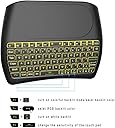
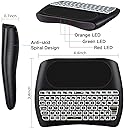
The Dupad story D8 Mini Wireless Keyboard is a compact, handheld device featuring a colorful RGB backlit keyboard and a high-sensitivity multi-touch trackpad. Designed with an ergonomic game-handle and anti-slip spiral pattern, it offers comfortable long-term use. With a stable 10-meter wireless range and broad compatibility across PC, Raspberry Pi, Android TV, and Windows systems, it’s a versatile tool for professionals and gamers alike. Its plug-and-play setup requires no software installation, making it an instant upgrade for your workspace or entertainment setup.


| ASIN | B07GPPRYD9 |
| Additional Features | Lighting |
| Antenna Location | Office |
| Best Sellers Rank | #1,320 in Computer Keyboards |
| Brand | Dupad story |
| Built-In Media | USB Cable |
| Button Quantity | 1 |
| Color | D8 Colorful Backlit |
| Compatible Devices | Laptop, PC, Projector, Smart TV |
| Compatible Operating System Family | Linux, MacOS, Windows |
| Compatible Tablet Computer Models | AAUB P30 |
| Connectivity Technology | USB-C, wireless |
| Customer Reviews | 4.0 out of 5 stars 505 Reviews |
| Enclosure Material | Acrylonitrile Butadiene Styrene |
| Generation | 3rd Generation |
| Hand Orientation | Ambidextrous |
| Item Dimensions L x W x H | 6.1"L x 4.53"W x 1.18"H |
| Item Weight | 160 Grams |
| Keyboard Backlighting Color Support | RGB |
| Keyboard Description | Multimedia |
| Keyboard Layout | QWERTY |
| Manufacturer | Dupad story |
| Mfr Part Number | 8541648516 |
| Minimum Required Operating System Version | Mac OS X 10.0 Cheetah |
| Model Name | D8 |
| Model Number | 8541648516 |
| Number of Keys | 79 |
| Power Source | Battery Powered |
| Recommended Uses For Product | Office |
| Series Number | 8541648516 |
| Special Feature | Lighting |
| Style Name | handle |
| Switch Type | Non-mechanical |
| Theme | Technology |
| UPC | 650985809084 |
| Unit Count | 1.0 Count |
E**0
Does work for PS5, even if PS5 says it's a mouse.
I was looking for a small keyboard for game text chats. I didn't want the one that plugged into the controller because of the controller case. But I didn't want a full-sized keyboard, because I'm just sitting in my chair. Pros -This is small enough to fit on my table beside my chair without taking up all the room on the end table. -It's backlite to be easy to see in the dark when I'm gaming -It works with Playstation 5 -It does show as a mouse but it does work like a regular keyboard. -So far the battery life is decent. But I'm not a 16 hour a day gamer, constantly text chatting Cons -It does feel very lightweight and cheaply made IF that matters to you. But you get what you pay for. I'm happy with it being lightweight. -The charging cord is the Micro USB instead of USB-C. -The charging cord is also tiny. Less than a foot. May want to use a longer cable. -The buttons are very small. Really small. If you're a kid or have the hands the size of a kid, like me, even you may have issues. It's the price to pay for small. Would not recommend for large hands at all. - Stretched out like Stretch Arm Strong, my hand span is 6 1/2 inches and my fingers are 1/2 inch in width. And I have to use my fingertips, and I still hit multiple keys at the same time. Or the wrong key with my fingernail I can't speak to longevity as it's a recent purchase. I've only had it a couple months.
J**U
Good quality but mouse is a little flaky
I like the back light. It charges and works properly. The battery life is 4 - 6 days using as a TV remote control with backlight on. The mouse is a little flaky though in the fact that it seems to have a delay which makes it hard to zero in on what you're trying to select. Having a larger mouse pad doesn't really make much difference if you're only using your thumb. It is nice to have two finger scroll. Not sure I would buy this one again because of the mouse delay issue.
C**R
Great, easy to use - works with Linux Mint Cinnamon!!
Linux Mint Cinnamon users UNITE! This works flawlessly on our favorite little OS! The color slider doesn't quite live up to the hype from my experience, however I can get a couple shades of blue, one is a teal-ish color, green, blue, red, yellow all show up, there are some other mixes that kind of just look like a bunch of dots of color, but that is an extremely minor detail. The low/medium/high level light works great, the 2 finger scroll and tap works fantastic. Now a lit bigger than say an Xbox controller, but it's a great value for the money
W**2
Mini multi-media wireless keyboard and touchpad
I've been using wireless mini keyboards as remote controls for Raspberry Pi 3, 4, and 5 computers for years. The computers are running LibreElec/Kodi, and function as a media center to watch movies and browse YouTube. Search Amazon for "mini keyboard kodi", and you'll see a bunch of the mini keyboards. They usually have circular areas on the upper right and left that provide the "arrow" type of controls, a touchpad area between the circular areas, a keyboard below that, and cost around $10. The problem with these mini keyboards is their wireless connections are terribly weak, and the keyboards fail in 1 - 6 months. The last 3 of these mini keyboards I bought were nearly useless. So, I decided to look for something better. The "D8 Mini Keyboard" is an incredible improvement over the ones I've been using. First, it actually works. The connection between the keyboard and the Raspberry Pi computer is very strong (I sit about 10 feet from the computer), and when I press a key it works, I don't need to press it a number of times to get it to work like I do with the other mini keyboards. The touchpad is very responsive. I usually keep the backlight turned off on the other keyboards because the colors are garish and annoying, but with this keyboard they are tasteful and helpful. I particularly like the green color. The keyboard has an auto-sleep mode that engages after 1 minute of inactivity. Just touch any key and it wakes back up. I haven't had this keyboard long enough to know how long it will last, but I can say that I am so happy with it that I purchased a second one as a backup. This is not a keyboard that I would think anyone would use for normal access to a computer because it is very small - it's about 5-1/2" wide and 4-1/4" tall. It seems to me to be more appropriate to be used as a remote control, and access to the letter and number keys is done via your thumbs, like on a cell phone.
M**A
Slow
It works fine and goes a good distance but when it goes to sleep it does have like a 10-second wake up time I'm sure it's only like three seconds but it seems like an eternity
D**.
Ughhhh. AGAIN Why?!? 😩 80% Great, Mouse Pad Double clicks too much
I have bought 6 of these, and NONE of them are great, they all are good keys, or good range, or good battery life, but they never have all three. And that is ABSOLUTELY the case here. I have several Rii ones where the range is horrible and it just keeps having the blue light flickering to tell me that it's having connection issues. Now here, the connection is PHENOMENAL, it's the best I've ever had, AND the keys feel great, clicky and solid, I am Soo happy with those two things. However, clicking on the touchpad, SUCKS. I have double clicked Soo many times in the last 24 hours. I keep trying to remember to use the actual mouse button, but I instinctively use the pad to click as I have with all the other ones. I don't understand why no company makes a high quality one, I seriously would pay $40-50 for it to have all these qualities necessary. I even bought a $40 "Mini" keyboard but it's too big and not handheld. So anyway, I'd you use this very minimally, or you can regularly just use the mouse buttons you may be alright, but I still have had issues when moving across the pad. And it sucks because even sliding my fingers across the pad it feels decent, it's just too sensitive where I don't even feel like I Clicked down and it just closes something or clicks on something I don't intend to.
G**S
Near perfect in size for an old guy with arthritis
I have had a few of these mini keyboards over the last few years. First one was just too small and I ended up giving it away. The second one was a little bit bigger but not enough to use on a regular basis. This one is great. It is big enough to function the touchpad is big enough to be useful. The fact that you can actually replace the battery is amazing. It takes the Nokia bl5c battery. These batteries are readily available online. It has to recharged more often than the smaller ones but I also have the backlight on the keyboard on all the time when I'm using it. So I can live with battery life it isn't a problem. I recommend this as a nice solution for multiple uses. In my particular instance I use it to control a computer that is my multimedia station connected to my bedroom TV and the surround sound in the room. Frequently it is dark in the room when I use the keyboard that's why I keep the back light turned on.
Q**1
Works well with most things even a Roku box.
It works ok, does get buggy when using on a raspberry pi running Linux otherwise it does fine and is a good deal and I would buy again
J**N
Parfait pour fire stick
Fonctionne bien
M**L
Nice little keyboard
I’m using this for my Mac in my theater and I was surprised at well it worked out of the box. The extended trackpad is a real plus. The only downside of course is that none of the special features work with the Mac OS. I’ve come to expect that after years of prejudice against Mac users. If you buy for a Mac the Win button is command. Enjoy!
J**E
Why didn't I buy it sooner.
Works amazing they way it should. Had for several years and still using greatly, making the functionality quick and easy.
S**H
Doesn't charge properly
This keyboard works great for what I need it for. The issue is now I have to charge it for the first time. -The first issue with this is it came with a faulty micro usb cable that is loose and doesn't charge. I tried using the cable with other devices and it's just a bad cable. -The second and main issue is when I use cable that works, the keyboard doesn't continuously charge. When I first plug it in, the charge light turns red to indicate it's being charged. The light will turn off after a less than a minute. At first I thought it was still charging when the light is off, but I left it plugged in charging all night and it still is low battery, which means the keyboard does not charge if the light is off. So now I have to unplug and replug the USB from the computer or keyboard each time the light turns off in order to charge it, which again, is literally every few seconds to a minute. I've included a video. In the video it will show the light off. I unplug and replug the USB cable from the computer which will activate the red light charging indicator. It will turn off again in a few seconds. I turn the keyboard on to show that the light is still flashing green which means low battery. If the battery is at a good power level, it will be a solid green, not flashing.
J**.
Was a great little keyboard, then died after ONE MONTH.
I bought this little keyboard and loved it. It's been used gently, but continuously, for about a month for my TV. It worked great, until today. Today, while sitting on a table totally undisturbed by any external force, the backlight started flickering randomly, and it started sending random key strokes to the TV. Tried power cycling it, removing the battery, charging. Nothing. It is now unusable. Well that sucks. I really liked that little keyboard. Edit: It came back to life and is working fine now. Your guess is as good as mine.
Trustpilot
1 month ago
2 weeks ago