⌨️ Elevate your Smart TV experience—type, browse, and control like a pro!
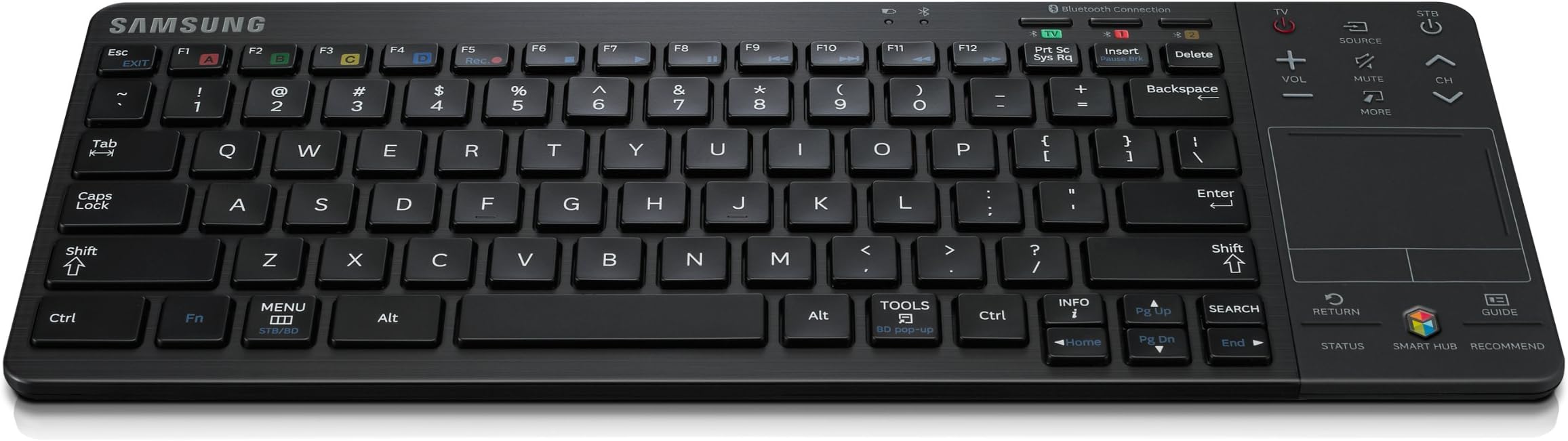
The Samsung VG-KBD2000 Wireless Keyboard (2014) enhances your Samsung Smart HDTV experience by providing wireless keyboard functionality compatible with select 2012 and 2013 models. It doubles as a remote control, enabling effortless web browsing and content navigation on your TV. Powered by included AA batteries, its compact design and plug-and-play setup make it an essential accessory for professionals seeking seamless smart TV interaction.
| ASIN | B00BMMPPBE |
| Additional Features | Wireless |
| Antenna Location | Business |
| Best Sellers Rank | #6,823 in Computer Keyboards |
| Brand | Samsung |
| Built-In Media | Keyboard, tabs |
| Button Quantity | 78 |
| Color | Black |
| Compatible Devices | Laptop, Smart TV |
| Compatible Operating System Family | Windows |
| Connectivity Technology | Wireless |
| Customer Reviews | 3.9 out of 5 stars 573 Reviews |
| Enclosure Material | Plastic (or a similar material like polycarbonate or ABS) |
| Global Trade Identification Number | 00887276019093 |
| Hand Orientation | Ambidextrous |
| Item Weight | 1 Grams |
| Keyboard Description | Wireless |
| Keyboard Layout | QWERTY |
| Manufacturer | Samsung Electronics |
| Mfr Part Number | VG-KBD2000 |
| Minimum Required Operating System Version | Windows 7 |
| Model Name | VG-KBD2000 |
| Model Number | VG-KBD2000 |
| Number of Batteries Required | 1 |
| Number of Keys | 78 |
| Number of Sections | 3 |
| Power Source | Battery Powered |
| Recommended Uses For Product | Business |
| Series Number | 12 |
| Special Feature | Wireless |
| Style Name | Contemporary |
| Switch Type | Scissor-Switch |
| UPC | 887276019093 |
| Unit Count | 1.0 Count |
M**0
Makes Samsung Smart Hub Browser Functional!
I knew from reading reviews of the previous versions of this keyboard (1000 and 1500 models) that this keyboard was not going to be perfect when navigating through the Samsung Smart Hub. I have used it for three days and have found it to be very capable in the Smart Hub's Web Browser function! By the way, it can be used in some of the Smart Hub apps, but usually there is a limit. I can live with that. I do not think that the limitations are in this keyboard, but in how Samsung has build its Smart Hub and the apps in it! Hopefully, Samsung will roll out more software upgrades that will allow this keyboard to be more functional in all of the Smart Hub apps. Manual could be better, but overall it is adequate. The build quality seems to be above average. I like that the keyboard also can be used a remote for my Samsung Plasma HDTV--very nice touch. In a nutshell, this keyboard has allowed me to get on the WWW on my plasma, while my wife is using our PC and I do not want to squint while using the web browser on my smartphone. It is a bit pricey for what it is, but I highly recommend it if you want to gain a whole lot of functionality in your Samsung HDTV!
A**R
Exceeded my expectations
Very nice Keyboard. Now, I don't want to get anyone overly excited. But it works really well. I'm pleasantly surprised. (Only small issue it it's very easy to forget to turn off, and might cause the batteries to be used up quickly...but I can't even say that has happened though.) I entirely expected this too be buggy technology, and to have lots of issues. So far, I really can't complain. It seems to be working pretty good, and taking everything I can throw at it...based on my very limited usage of it.
B**T
Worst Samsung product I've ever owned.
I purchased the KDB2000 keyboard to go with my new 55" Samsung, smart TV. It was a complete disappointment. Though it has a "Smart Hub" key the directional arrows and cursor don't work all of the Apps. Notably does not work with NetFlix. I don't understand what the point of releasing this project was? Why produce a "dedicated" keyboard that isn't even as functional as the remote control that came with the set? It does nothing that a $40 Logitech wireless keyboard won't do just as effectively at less than 1/2 the price. I also sent a review directly to Samsung but they wouldn't post it because it "didn't meet their standards." Wonder what their standards are? Save your Money. This is a real waste.
M**3
Great wireless keyboard
I got this with the idea of using it with my new Samsung Smart TV, but it turns out I mainly use it as a wireless keyboard with my ipad. Initially I used it with my new tv for using the web browser. It gets the job done, it's a LOT better than fumbling around with that on-screen keyboard where you have to move the cursor up, down, left, right(that drives me crazy after a while, and so slow). The web browser does feel a bit clunky, but I think that is a reflection of the web browser/smart tv and not the keyboard itself. It has a replica of the remote control that came with the tv attached to the keyboard, which is super cool, although the touch pad feels like a prop, there's no clicking sensation when you press on it. Also, there is one app where the keyboard doesn't work with it(I think Youtube is the one). As it turns out, 95% of the time, I have been using this as a keyboard for my ipad. With my 5 year old laptop recently dying on me, I was forced to move the ipad into the no. 1 portable device slot. A keyboard was sorely needed and was about to buy an Apple wireless keyboard when I suddenly realized I had this one. It works great with the ipad! So basically, it has become the wireless keyboard that I use with my ipad, with the added convenient option of using it for surfing the web on my tv, which frankly I don't do very often. If you have a Samsung smart tv, and a need for a wireless keyboard for another device, this is a GREAT keyboard for you.
B**R
Excellent keyboard for a Samsung Smart TV
This synced perfectly and quickly with my Samsung 60" smart TV. Has a built in touchpad. Samsung just upgraded the software so that the browser in now full screen, and the keyboard makes it much easier to navigate than hunt and peck with the pointer. Appears to be well built and has Samsung function buttons on the keyboard that a generic would not have.
D**.
Very expensive remote control. Very slow responding.
I won't necessarily fault the keyboard. It is a nice enough tool but the typing in characters when searching for shows on You Tube or using the cursor is annoyingly slow. As is the touch pad, tap to click or click left/right. That may be the fault of the TV's firmware in which case Samsung needs to come up with an update and fix those bugs. The buttons that control various features are nice and there are some advantages but think of this as a huge remote control that doesn't always work as it should. That's a shame because the idea is amasing. Other brands that might offer the same type of product and interaction may be a lot faster but we were not happy with the slow toll imposed here. At this point, it isn't worth the extra fuss unless you have a different model TV than we. Make sure to check compatibility as not all Samsung TVs will work with the keyboard. Pairing is easy and quick, using the TV's menu system. Really, the issue is possibly with the TV but when you consider that this kind of product and what you expect in this day of smart phones and tablets, the TV should be every bid as responsive but isn't. Bottom line: Nice feature but not a must have until Samsung works out the bugs.
A**N
Amazing product; replaced remote, makes smart TV SMART
This is a gamechanger for my Samsung F6400 3D LED TV (Discontinued after last year). I'm not sure if it's compatible with every model of the smart TV, but it has made a world of difference for me. I had been interested in this right off the bat but was told it wasn't compatible with the apps; well I broke the remote which came with my TV and was looking for a replacement; I decided to go with this rather than the same remote I had just broken. I don't regret the decision. It is a bit bulky, so I may still replace the little remote, but being able to hit "esc" and "enter" and to use the arrow keys to navigate the screen is amazing (and it still has the touchpad/full original remote on the side if you prefer that). This product is the best of both worlds; I wish I hadn't waited to buy it, because then my little remote may still be alive. Anyways, I got it used through a 3rd party seller, it arrived promptly and packaged well; I replaced the batteries (I wish it hadn't shipped with dead batteries already installed; just in case I hadn't opened it right away and they would have rotted eventually) and it worked out of the box!
S**N
At first glance seems great but dig deeper and you'll find limited usefulness.
Within the first week of buying my Samsung PN51E7000 Smart TV I saw the need to pick up a wireless keyboard. Navigating around the SmartHub and apps like Netflix and YouTube where excruciatingly painful and slow using the supplied remote. So I bought this keyboard and was able to get it synced and up and running very quickly. Navigating around the TV menus and SmartHub screen was pretty easy. The trackpad mouse feature beats the hell out of moving the mouse around with the remote and browsing the internet was much easier too. The area where the keyboard fell flat on it's face though is it's integration with 3rd party apps like Netflix, YouTube, and Amazon Instant Video. One of the main reasons I picked the keyboard up was to make searching video sites like these much more easy. Unfortunately, not all SmartTV apps support the use of the external keyboard so you're still stuck keying in search terms using the onscreen keyboard using the remote control. Switching back and forth between using the Remote to do some things and the keyboard to do others is pretty ridiculous. I understand it's up to the app developers to provide support for the keyboard but it doesn't make the keyboard any less useless. Being that the keyboard supposedly can link to three separate Bluetooth devices, I was hoping I'd be able to pair it with my PS3 to at least get a little more usefulness but not such luck there either. I had a support chat with one of the Samsung reps and at first he told me that the keyboard could only be paired with Samsung TVs (Really?). After I pointed out that it was advertised as being able to "easily connect to other devices" he told he it could only be paired to bluetooth enabled STBs (Really??). I got the idea that he didn't know what we was talking about but didn't want to push the issue. I have the transcript copied if anybody familiar with pairing bluetooth devices wants a good laugh. Between not being able to pair this "Bluetooth" keyboard with any device other than a STB and the lack of support by major video content apps (Netflix, YouTube) I think I'm going to be returning the keyboard. Maybe I'll try again when more SmartTv apps support it and it can be paired with a wider range of devices.
Trustpilot
3 weeks ago
2 weeks ago