We remain fully operational. Our teams are working around the clock to ensure your deliveries continue safely.

قم بتنزيل التطبيق


معلومات عنا
حقوق الطبع والنشر © 2024 Desertcart Holdings Limited
قم بتنزيل التطبيق
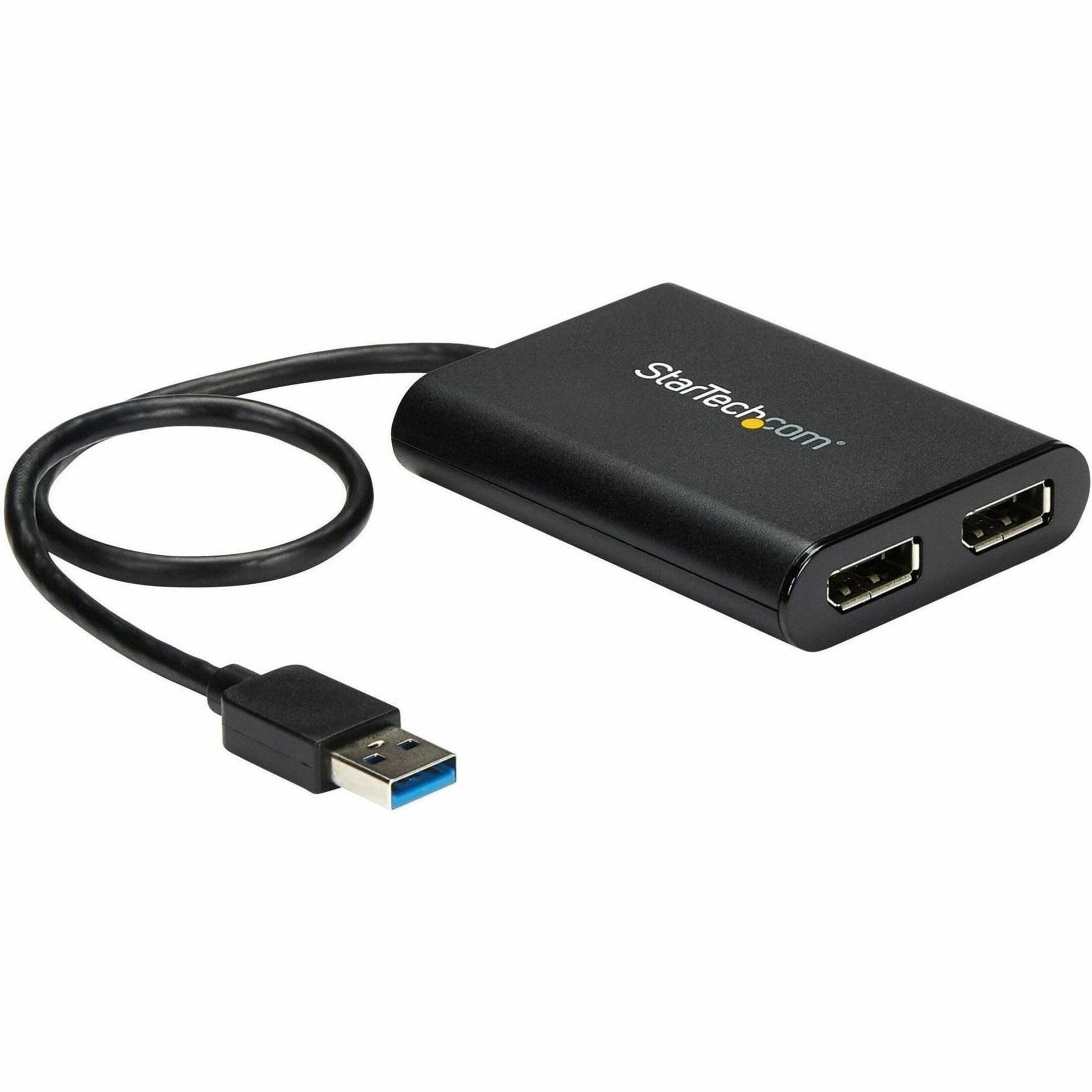
🚀 Double Your Screen, Double Your Impact!
The StarTech.com USB 3.0 to Dual DisplayPort Adapter transforms a single USB-A port into two 4K 60Hz DisplayPort outputs, enabling Windows and Mac users to extend or mirror their displays with stunning Ultra HD clarity. USB-powered and DisplayLink certified, it offers effortless driver installation and IT-grade reliability, making it the ultimate productivity booster for professionals craving a sleek, multi-monitor workstation on the go.


























| ASIN | B07C69HG33 |
| Best Sellers Rank | #1,088 in Computer Cable Adapters #1,299 in Audio & Video Connectors & Adapters |
| Brand | StarTech.com |
| Built-In Media | USB video adapter (1), quick-start guide (1) |
| Color | Black |
| Compatible Devices | Audio/Video Device, Laptop, MAC, Monitor, Workstation |
| Connector Type | DisplayPort/USB |
| Customer Reviews | 4.4 4.4 out of 5 stars (582) |
| External Testing Certification | CE, FCC |
| Finish | Matte |
| Global Trade Identification Number | 00065030878487, 00650308784876 |
| Input Voltage | 5 Volts |
| Item Dimensions | 6.1 x 5.6 x 1.2 inches |
| Item Length | 11.8 Inches |
| Item Type Name | A/V Cable |
| Item Weight | 0.16 Pounds |
| Item Width | 5.6 Inches |
| Manufacturer | StarTech.com |
| Model Number | USB32DP24K60 |
| Nominal Power | 4.5 Watts |
| Number of Items | 1 |
| Number of Ports | 2 |
| Package Quantity | 1 |
| Power Plug Type | No Plug |
| Specific Uses For Product | personal, gaming, business |
| UPC | 065030878487 650308784876 |
| Unit Count | 1.0 Count |
| Warranty Description | 2 Year |
| Warranty Type | Limited |
C**R
This Product Is Fantastic - BUY ONE IF YOU NEED TO ADD MONITORS
I hope this helps others to figure this out... This may be informative for anyone regardless of the cabling they need. Please read the entire review. I have a regular PC with USB 3 Ports...nothing special. I have 2 external Dell monitors. I need 3 screens for work. Make sure you have a USB 3 port available...the plastic tab visible within the port will be BLUE. The blue tab means USB 3. With this slick little adapter, you can use a USB 3 port to plug this in AFTER YOU INSTALL THE DRIVER. The packaging materials provide the URL from which to download the driver. 5 minutes tops from reading the instructions to having the download complete. Note: this adapter is for DisplayPort. My Dell monitors accept several different cables including DisplayPort. MAKE SURE YOU HAVE DisplayPort CONNECTORS ON YOUR MONITORS AND DisplayPort cables (I bought my cables from Amazon, too. I believe they were about $10.00 each). Plug the cables into your monitors, plug the other end of the cables into this adapter, then... plug this beauty into the USB 3 port. I believe I rebooted. after plugging in, too. Voila...3 working monitors. Excellent resolution, no lag time, no flicker...everything I had hoped for. Why This Works: This adapter is basically another graphics card...it can handle the 2 monitors. Your PC's internal graphics card might not be able to handle 3 monitors but all your PC knows is that a USB port is in use. What it is being used for does not matter. (Yes, I know...gross oversimplification but effectively accurate.) This adapter simply WORKS!!! You can count on it working if it has no internal problem. I mention that because the first one I received worked for about 15 seconds then I'd either see blank screens or vertical bars on one or both external screens. Nobody mentioned that so I wasted time troubleshooting. Just return it; it's not working if that happens.. NO BIG DEAL. Sending it back via Amazon returns is as simple as possible. Amazon, true to form, IMMEDIATELY sent me a replacement adapter. My new adapter was in use well before Amazon got the defective adapter back. This is a great product. 5 stars across the board The tech support at StarTech was good when I was troubleshooting, too. They did think it might be my PC but it was not. Naturally they had no way to be certain so kudos to them for faith in their product. I've waited months to write this review. I wanted to make sure. 100% endorsement. If you have external monitors with DisplayPort connections...this will WORK. BTW...I went to one of the big chain computer stores prior to figuring this out on my own. I spent HOURS and $185 on cabling and adapters the simply COULD NOT WORK. My monitors came with cables for one of the other connections on them. I tried to daisy-chain connections into the USB port. That will not work. Don't waste time trying. You may not have DisplayPort connections...I expect StarTech makes some other adapter that might work for you. Bottom line...monitor connects to adapter. Adapter connects to USB. NOTHING ELSE IN THAT CONNECTION CHAIN...and you are good. One final note...I believe this adapter is what is referred to as an "active" adapter.
D**D
Very simple third monitor adapter
Super simple to setup, just download the displaylink driver, plug in the adapter to the USB-A port on the Win 11 laptop, plug in the third 4K/60hz monitor, and it just works! No reboots necessary. Took about 5 minutes. Looks great. The other two 4K/60hz monitors are daisy chained DisplayPort plugged into a Thunderbolt USB-C hub. This is my second adapter as the first I purchased from a DIFFERENT manufacturer only worked as a HDMI or DP-ALT mode even though it was a Displaylink adapter. It was defective out of the box. Spent 2 hours on that one....
M**E
Works for M1 Macs, even on USB 2.0!
Due to the hardware limitation of the M1/M2 equipped Macs (not including M1/M2 Pro and M1/M2 Max), you cannot add more than a single monitor via DP alt mode (doesn’t matter what combination of adapters or docks). Fortunately via software adapters such as this one (DisplayLink) or others (SiliconMotion’s InstantView), you can bypass the hardware limitations for displays of any computer (Mac or PC) and add as many additional monitors as your machine can handle. In particular, I was looking for a DisplayLink adapter as it can handle up to a 4K 60Hz output whereas InstantView is capped at 30Hz. Additionally, DisplayLink has had more industry presence for longer so I decided to go with that. StarTech is also a long time industry vendor so that’s a plus as well. In testing the adapter was able to consistently hit 60Hz. Only quirks when using it on a Mac include a message on the login screen saying “your screen is being observed” and some DRM issues preventing playback of videos on some websites (workarounds exist) but the benefits outweigh the cons on this one. One added bonus is that it DOES work via a USB 2.0 with 4K output, but the refresh rate will not be 60Hz - in testing it’s what you would expect from a 30Hz output, more than enough for static images or spreadsheets. In my case, I just have Microsoft Teams on the secondary display.
1**N
Startech FIXED my stretched images on a new ultrawide
Would recommend the Startech display port to anybody stuck with an underpowered corp issued lap top that they are trying to pair with an Ultrwide monitor or high def monitor - completely game changing right out of the box. I bought a Dell 34" ultrawide to use primarily for work with a corp issued Lenovo Thinkpad - the ultrwide replaced a 27" standard monitor. I plugged in the monitor and it was basically worthless. On top of that my corp issued laptop blocks .exe files. Awesome. I read countless articles and youtube videos and nothing worked. Finally a gamer friend of mine suggested an external GPU which can run well into the 100s but that is when I found the Startech Display port adapter on a list of options to get more resolution out of your laptop and bought it. Literally plugged it in and it worked out of the box - monitor was perfect. I did run into glitchyness a little later where my monitor would go black for a second and reconnect the image - so I found multiple drivers on the Displayport site for Win 10 including .MSI file I was able to download on my corp locked down machine no prob. The monitor works perfectly! Startech has been totally game changing.
ひ**ん
仕事PCをHDMIケーブルで2560×1440 144Hzのモニターに接続しても60Hzまでしか設定出来なかったため、本製品を購入しました。 DP1.4ケーブルを使い、本製品を使用して2560×1440 144Hzのモニターに接続したところ、144Hzで設定出来ました。 ディスプレイチェッカーサイトで見ても144Hzになっています。ただフレームレートは使用状況によってはスクロールで60fpsほどに落ちていると感じることはあります。ただマウスカーソルはずっとヌルヌルです。 使用環境は 一般的なビジネスノートPCで、 CPU core i5 10210U メモリ 8GB×2(4GB×1から入れ替えました。) 内蔵グラフィックで普通に使う分には基本ラグもなく使用でき、USBの通信速度でどうやって実現しているのかわからないマジックアイテムです。 仕事PCで管理者権限が無かったためか、PCのUSB端子に挿しただけではドライバは入らなかったですが、サポートページからドライバをダウンロードしてインストールすれば動きました。 注意点はPCに直挿し推奨な点です。 USB3.0の延長ケーブルを使ったところ、ウィンドウのドラッグや、スクロールにてラグが発生しました。(私の使った延長ケーブルがダメなのかもしれません。) 直挿しなら問題なく使えるので直挿しで使用することにします。 1ポートしか接続していませんので、2ポート使った時の挙動は分かりませんが、とても良い商品だと思います。 耐久性についてはまだ使用し始めたところなので、期待を込めて星4としておきます。
D**O
Sui nuovi MacBook Air con chip M (1 o 2) c'è una limitazione e non gestiscono più di un monitor esterno. Con questo prodotto ne ho collegati TRE (quattro quindi con lo schermo del MacBook!) Due sulle uscite dello startech e un Arzopa USB direttamente sulla usb-c. Ricordatevi solo di installare i DisplayLink drivers ;)
A**R
I got a 2015 Macbook Air model that neither has a USB port and wish to extend the display to my dual screen set up. While my work laptop has consumed HDMI ports, I was on the lookout for DP adapters for 4K 60Hz display. After about 6 months of lookout, I am lucky to have my hands on this. USB 3.0 ports cannot transmit 4K @60Hz, this adapter processes the signal so you get what you are looking for. I am reluctant to upgrade my macbook yet and feel my current one has some life left in it yet. Cons: The device gets too hot on prolonged usage - about to 2 hours. Then the media starts to distort a bit, however this isn't a device made for streaming media on your large screen. Other productivity apps work mighty fine.
G**A
The product was easy to hook up and install on my Windows Laptop. For me, there was no need tp download any drivers, it just recognised the screens and functioned first up without any hassles.
T**N
Didn't got the 144 fps but could be related to my setup
ترست بايلوت
منذ شهرين
منذ شهر