
DOWNLOAD THE APP


Customer Services
Copyright © 2025 Desertcart Holdings Limited
DOWNLOAD THE APP
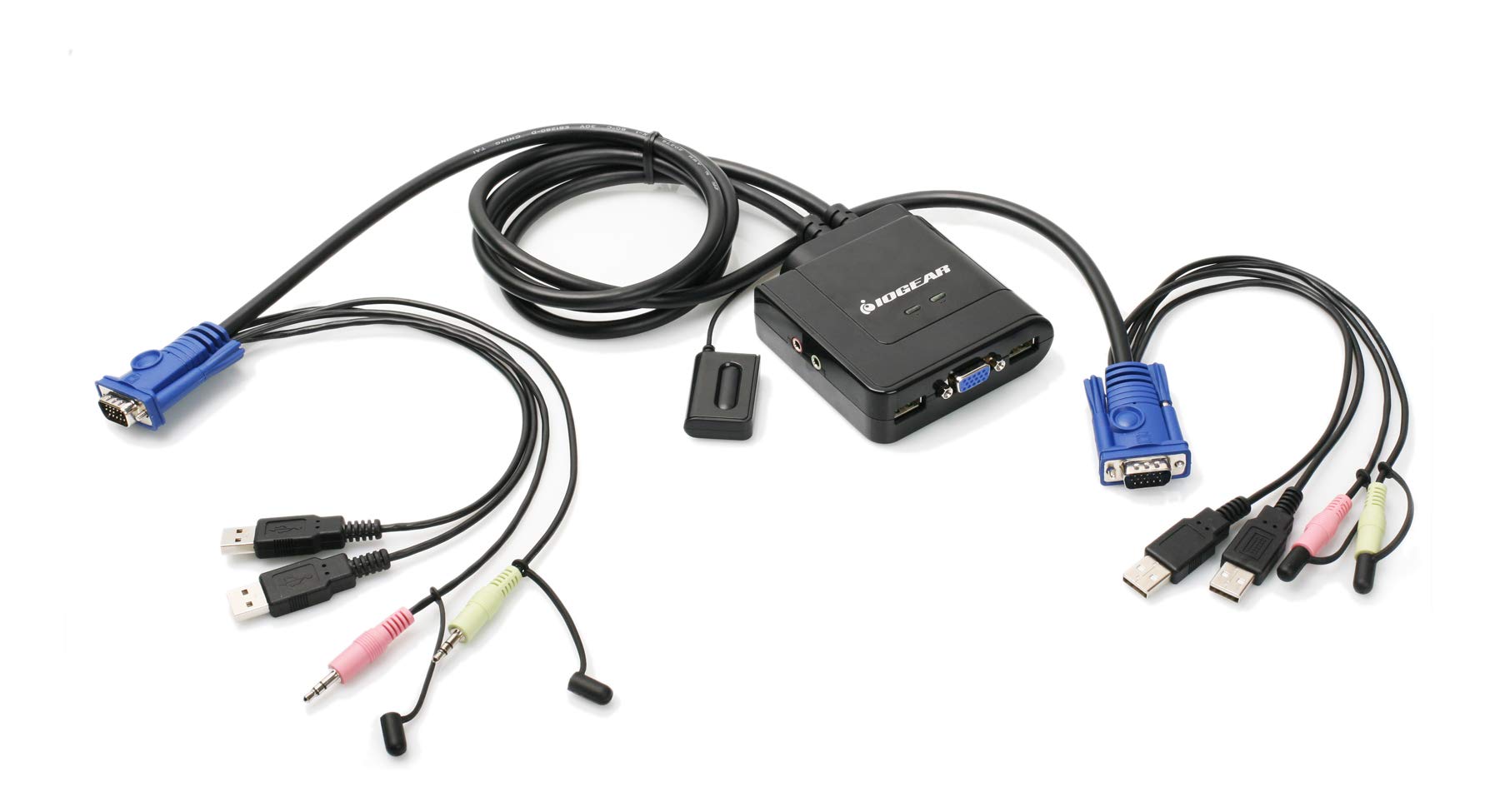
🔄 Switch It Up: Your Dual-Computer Solution Awaits!
The IOGEAR 2-Port USB VGA Cabled KVM Switch allows you to control two computers using a single USB keyboard, mouse, and VGA monitor. With a maximum resolution of 2048 x 1536 and support for 2.1 stereo audio and microphone, this compact device simplifies your workspace while ensuring high-quality performance. Plug-n-Play functionality means no software installation is required, making it compatible with PC, Mac, and Sun systems. Ideal for multitasking, this KVM switch is designed for professionals who demand efficiency and clarity.


| Brand | IOGEAR |
| Connector Type | Plug in |
| Cable Type | VGA |
| Compatible Devices | PC |
| Special Feature | Compact |
| Color | Black |
| Connector Gender | Male-to-Male |
| Shape | Round |
| Number of Pins | 34 |
| Unit Count | 1.0 Count |
| Item Weight | 13.12 ounces |
| Indoor/Outdoor Usage | Indoor |
| Number of Items | 1 |
| Customer Package Type | Standard Packaging |
| Manufacturer | IOGEAR |
| UPC | 071030042797 080850176551 230494831112 851905132637 881317504036 898029639796 999992674378 015438158339 159389692266 807030488040 168141485879 521227104956 172304248720 809385658529 803982753496 777786314019 172302707960 843024387555 763615872553 191120077758 086000400330 021111274616 |
| Global Trade Identification Number | 00881317504036 |
| Standing screen display size | 3 Inches |
| Item model number | GCS72U |
| Operating System | Mac |
| Item Weight | 13.1 ounces |
| Product Dimensions | 8.9 x 6.2 x 2.2 inches |
| Item Dimensions LxWxH | 8.9 x 6.2 x 2.2 inches |
| Language | English |
| ASIN | B002K0TU2C |
| Country of Origin | China |
| Is Discontinued By Manufacturer | No |
| Date First Available | August 1, 2009 |
J**F
AWESOME! Dual view GCS1942 works perfectly with Nvidia GTX-970 and dual LG 32" 4k/60HZ monitors!
THE GCS1942 ($433) IS THE ONE TO GET IF YOU HAVE DUAL 4K MONITORS!I recently upgraded my Win10 PC to a pair of LG 32" 4K monitors, which have DisplayPort inputs, and this $433 (OUCH!) IOGear GCS1942 DisplayPort KVM. My previous setup was a pair of 27" WQHD monitors with DVI-D inputs, and used an older IOGear DIV-D KVM which is also a dual-view KVM. I can then run two computers with dual monitors.So, I tried FOUR other KVM's, and had issues all around. Issues like the monitors "forgetting" window locations, monitors powering down, monitors not being recognized, proper resolutions and refresh rates not being recognizable, poor video quality, and having to try adapters to connect everything. I spent DAYS messing with settings, drivers, adapters, resetting everything, clean installing everything ... what a hassle. I returned them all.Due to the reliability of my old IOGear KVM, which is easily 10 years old, I decided to suck it up and spend the $433 for this new version. Long story short, this KVM is worth every penny!!!Computers:* Custom PC with GTX-970 which has a single DisplayPort and single HDMI output. I had to buy an active adapter for my GTX-970's HDMI port.* A 2019 Dell laptop for work, with a USB-C Dell D6000 docking port, with two DisplayPort outputs.Results:YES, I WOULD BUY THIS AGAIN even though it was $433 - it is worth every penny.PROS:* Very good quality, just like my old IOGear KVM. Big metal housing, clearly labelled ports, easy to use.* 4 DisplayPort cables included! All you need are the DP cables to your monitors.* Proper support of 4K 60Hz resolutions, which looks flawless on my LG 32" 4K monitors.* Familiar (at least for me) hotkey operation, the same as my old IOGear KVM. Just press [scroll lock][scroll lock][enter] and you switch to the next PC.* This KVM supports the "monitor is powered on" protocol when disconnected. This is VERY important - it means that when you switch from one PC to the next, and then come back, all your windows are in the same place, the resolution is the same, and it's PERFECT.* Supports wireless keyboard and mouse. Do NOT believe the IOGear support folks who say you need a wired keyboard or their IOGear keyboard. I am using an HP wireless keyboard and mouse, which is 5-6 years old, and I simply plugged the wireless USB nubs into the appropriate ports on the back of the KVM. If you plug them into the "standard" USB port, then it will NOT work, so pay attention!CONS:* Switching PC's takes about 2-3 seconds, instead of the 1-2 seconds of my old KVM. Horrors! LOL. :)* It is pretty big, so check the measurements. I put mine on a shelf behind my monitors so I don't see it and don't care.* The cables are only 4' or 5' long. Adding an extra foot or two length would have been helpful for me, but that is most because I have an antique desk and have to run the cables out my PC, under the back wall, then 4' up to the top or a raised shelf on the back.* It's $433! I hate paying that much money, but then again my last one lasted 10+ years and I use it every day for work. Plus, this works FLAWLESSLY. I figure it's worth it.
E**E
Works great, KVM cables short
This KVM switch functions well, no surprises besides the one meter (short) computer cables. I especially like the EDID capture feature, which prevents the video cards from resetting to VGA-unrotated when they aren't driving the screen. I run two screens turned sideways for editing (and comparing) page-format content, this GC932UB feeds the left "editing" screen.The right screen is driven by a cheap two-input "BolAAzul DVI Switcher" (also from Amazon) which does NOT capture EDID. When IOGEAR sells an EDID-capture equivalent, I will buy it. Both computers have older Radeon dual port R7 450 video cards, with Displayport outputs converted to DVI with FEMORO DP-to-DVI dongles (also from Amazon). I've also tested the setup with much older nVidia dual-DVI cards (which draw way too much power).But what's my beef about short cables?I sometimes pull the computers out (on a roller platform) to work on them; if the KVM is on the bench-top (with cables running down the back), the computers can't roll out far. My bench-top would be a litter of cables, the GC932UB status lights would be behind the screens, and the dust would grow to bunny size.Instead, I bolted a one foot length of 2x4 /beneath/ my workbench, above the computers and to the right of my leg well, and attached the GC932UB vertically to that board with zip-ties. The USB connections and remote cable hang downwards, and feed through a loose Velcro tie hanging from a large eye-screw on the bottom of the board. The DVI and KVM cables also loop through the Velcro tie, with a large bend radius to protect the cables, see the first photo.The second photo shows the desktop and the bottoms of my "tops-together" rotated screens. The remote button for the GC932UB is velcro-taped to the monitor stand on the left, the remote button for the BolAAzul right-screen switch velcro-taped to the right. (question for IOGEAR - why does a push-button switch need a four-conductor plug? A two-conductor plug would be cheaper to manufacture and much easier to repair).The third photo shows the tangle of wires from the GC932UB to the left screen and mouse/keyboard and speakers, forked power cord with USB monitoring to the Tripp Lite UPS, MANY ethernet cables, etc. The fourth photo is the same from a different perspective.I hope the GC932UB remains trouble-free for decades, like the ancient Antec computer cases with their third generation of motherboards and sixth generation of storage drives. The best computer hardware should demand no more attention than my office chair.(BTW, I'm a freelance electronics engineer, one of the "elizabeth statice" team, and my linux machines are "gate" and "ohm" for logic design and analog design respectively. nanometers to terameters, femtowatts to gigawatts)
Trustpilot
1 week ago
2 weeks ago