
DOWNLOAD THE APP


Customer Services
Copyright © 2025 Desertcart Holdings Limited
DOWNLOAD THE APP


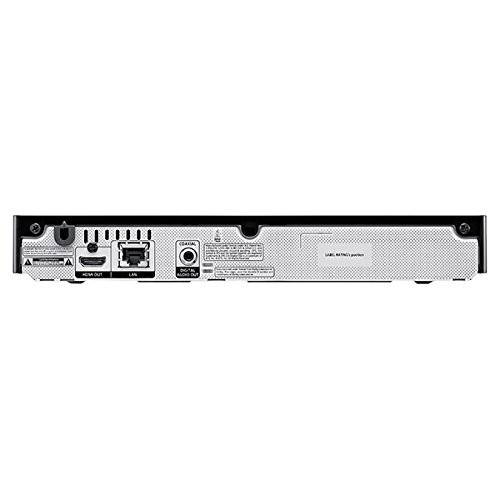


🎬 Unleash the Cinematic Experience at Home!
The Samsung BD-H5100 Blu-Ray Disc Player (2014 Model) offers an exceptional home entertainment experience with HD upconversion, 5.1 surround sound, and instant access to streaming apps, all in a sleek, compact design.
| ASIN | B00ICDAAX4 |
| Batteries | 2 AA batteries required. (included) |
| Best Sellers Rank | #188,048 in Electronics ( See Top 100 in Electronics ) #123 in Blu-Ray Disc Players |
| Customer Reviews | 4.3 4.3 out of 5 stars (1,198) |
| Date First Available | March 3, 2014 |
| Is Discontinued By Manufacturer | No |
| Item Weight | 2.2 pounds |
| Item model number | BD-H5100 |
| Manufacturer | Samsung Electronics |
| Product Dimensions | 26.9 x 19.3 x 39 inches |
J**N
Better Option Than Streaming Video Player
We have a few DVDs and our DVD player gave out. We also have a non-network HD TV and wanted to watch Netflix. This Samsung Blu-Ray player costs less than many streaming players yet provides both functions.This is a non-WiFi player (there is another Samsung model that has WiFi) and installation was simple. Connect to the router with an Ethernet cable. Connect to the TV with an HDMI cable. Put the batteries in the remote. Turn the player on. Done.The first thing the player does is check if the firmware is up to date. It was not, so the player asked for permission to download the latest version. No need for a computer to download the firmware update onto a USB stick, either.Major purpose for this purchase was to watch Netflix. Setup a brand new account using the player itself. Again, no computer needed. And the Netflix application is easy to use and fully featured.What about the other built-in apps? YouTube works fine, and you can pair it with a computer if desired. There is Pandora, AccuWeather (not as nice an app as the Panasonic Blu-Ray version), and a few other free and paid services. There is enough free content on YouTube and the other apps to keep you busy. And if one wants one of the paid apps, great.Thought the loading time for each app was reasonable. It's under fifteen seconds to go from the home screen to either YouTube or Netflix. And within NetFlix, the time to start watching is about the same as on a desktop web browser.The remote has some TV controls, but only for Samsung brand televisions. But that true with other manufactures as well: usually "Brand X" Blu-Ray remotes only control "Brand X" televisions.Five stars because this is a great value. A streaming player that makes any HDMI TV network enabled and a CD/DVD/Blu-Ray player. In one inexpensive, easy-to-setup box.
J**K
UPDATE 11/28/14
I saw this in a brick and mortar, $84 on sale, at Amazon, $64 with FREE SHIP over $35. It arrived in 3 days with carton and contents in perfect condition. I now have 3 days experience with Samsung BD-H5100. It replaces a PS3 as my BRD/DVD/CD/Streaming (Netflix) player. I plugged in HDMI and Ethernet connectors to BD-H5100, then unit to socket, then hit power button. Home screen in 8 seconds, arrow keys to Netflix, hit key in center of arrows. Netflix screen in a few seconds. First time you will have to enter your login and password, after that when shutting down, DO NOT "quit" Netflix, or you will have to go through login procedure again....instead use "HOME" button and then hit red power button on remote, top LEFT to power down. Netflix will remember login and password that way. BR/DVD/CD play is easy, BUT I recommend using the eject button on the remote to open and close the tray as the tray feels a bit delicate and if you're clumsy, like me, you might damage it. The BR/DVD/CD screens come up quick. I was concerned about the quality of play compared to the PS3 which in my opinion is the bench mark. I played "Avatar" for comparison. The quality ON SCREEN is exactly the same. So is the audio. My audio setup is Sennheiser RS180 and imaging is the same. I recommend navigating "settings" if for no other reason, to familiarize yourself with what's there. You can download updates in settings and today, my third day, a pop up showed an update available so I downloaded it. I didn't notice anything really different except the Netflix greet screen had a different look to it. I changed nothing in settings, just let it do what it does. Power usage must be low because by hand touch toward the back of the unit slightly to right of center it feels just above tepid. The PS3 has a fan to cool it down and you can feel how hot IT runs by putting your hand around the back of the unit. The hotter something runs, the more kWh it uses. Heat = $$$$$. Think incandescent vs. fluorescent. This unit takes up very little space. User friendly, the remote build is high quality, logical and feels good in the hand. I've read negative reviews but have had none of those experiences. Some might need to read the manual before they begin. There is also a WIFI and 3D version of this player. I HIGHLY recommend this unit.UPDATE 11/28/14: This unit is still operating magnificently. I had read reviews where after a short time there were glitches. I, again, have not had any of those experiences. A few more things I would like to note. I have a Samsung 32" LCD LN32A650A1F TV...a bit ancient technologically. The TV is at about a 90 degree angle difference from the player which makes my line of sight remote difficult to use to the player. However, since it IS a Samsung....the TV picks up the signal and sends the commands from the remote to the player via HDMI. A really nice bonus I discovered accidentally. The TV and player communicate. Isn't THAT sweet?!!! I suggest playing with all the buttons on the remote to see in what ways it helps to navigate through movies, be it BR/DVD/CD or streaming.
Trustpilot
1 day ago
1 month ago