Desertcart purchases this item on your behalf and handles shipping, customs, and support to EGYPT.
🚀 Upgrade your home network—stay connected, stay ahead!
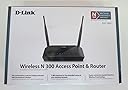
The D-Link DIR-632 is a Wi-Fi 4 (802.11n) wireless router delivering up to 300 Mbps speed, equipped with 8 LAN ports and 1 WAN port for versatile connectivity. Featuring WPA2 security, QoS for traffic prioritization, and easy app-based control, it’s designed for reliable home or small office networking. Though discontinued, it remains a solid choice for budget-conscious professionals seeking stable wired and wireless connections.
| ASIN | B003XMAD22 |
| Antenna Location | Gaming |
| Best Sellers Rank | #211,746 in Computers & Accessories ( See Top 100 in Computers & Accessories ) #3,757 in Computer Routers |
| Brand | D-Link |
| Color | Black |
| Compatible Devices | Printer |
| Connectivity Protocol | Ethernet, Wi-Fi |
| Connectivity Technology | Wireless |
| Control Method | App |
| Controller Type | Push Button |
| Customer Reviews | 3.7 out of 5 stars 268 Reviews |
| Data Transfer Rate | 300 megabits_per_second |
| Frequency Band Class | Single-Band |
| Global Trade Identification Number | 00790069336263 |
| Item Weight | 9.6 ounces |
| LAN Port Bandwidth | 10/100 megabits per second |
| Manufacturer | D-Link Systems, Inc. |
| Maximum Upstream Data Transfer Rate | 300 megabits_per_second |
| Mfr Part Number | DIR-632 |
| Model Name | DIR-632 |
| Model Number | DIR-632 |
| Number of Items | 1 |
| Number of Ports | 8 |
| Operating System | D-Link OS |
| Other Special Features of the Product | QoS, WPS |
| Security Protocol | WPA, WPA2, WPS |
| Special Feature | QoS , WPS |
| UPC | 151903029084 777779915230 854432518578 001910730612 763615840477 790069336263 |
| Unit Count | 1 Count |
| Warranty Description | 1-year limited |
| Wi-Fi Generation | Wi-Fi 4 |
| Wireless Communication Standard | 802.11n |
| Wireless Compability | 802.11n |
A**R
It's been a month, and it works fine!
(03/04/12) I saw a few bad reviews and a few good ones so I decided to try my luck as I really needed a couple of extra ethernet ports. I have 2 telephone lines, 2 tvs, a network drive, and a pc connected via cat5 cable and I have had not problems in 24 hours. The "easy setup" requires installation of the software first. I was too lazy to get my laptop (disk drive) from upstairs and decided to try a manual setup using my netbook. It was quick and easy. Besides the 6 devices I listed above I have a netbook, two smart phones, and a laptop that I have connected successfully to the router wirelessly. So far, so good. I will only update this review if I run into trouble. I hope this helps those that are hesitant about getting this device. (04/03/12) It has been 1 month, no major trouble, not sure why this device keeps getting such bad reviews. I live in a double and my mother lives next door and I could not get a signal before I switched from my not so old, not so cheap Belkin. I never bought it to boost the signal but I did a signal boost. I am happy, it all works fine. I did experience lost signal a couple of times on one of my android phones, but it was resolved by turning the wireless off and then back ON on the phone. Here is a suggestion for those still having trouble with theirs... if you live in an appartment building or an area where many signals overlap, your wireless signal may get "jammed" this can be solved by changing the channel on the router admin page. I had to do this with my Belkin wireless router and yes... it does make a difference. Hope that helps.
A**R
No FTP
This router worked fine for regular internet access. But I could never get it to work properly for FTP file transfers using FileZilla. The file would upload but the return signal verifying the upload was blocked, so FileZilla would just try to start the upload over again. I'm a medium-proficient IT/networking guy, and spent several hours on FileZilla and D-Link forums trying to figure it out, and tried dozens of likely-sounding configuration changes - to no avail. Ease of use - 3 stars - it runs, but doesn't perform needed function which SHOULD have been easy & automatic Reliability - 4 stars - only 1 day of experience, but it seems reliable enough Ease of setup - 1 star - initial setup was a little convoluted, but not horrible; there may be a way to get it running with FTP, but it sure isn't easy Overall - 2 stars - a well-engineered product it is NOT; would not purchase or recommend it to anyone else BTW, the Linksys router being replaced (which still works beautifully, just gave it to a family member) performed FTP transfers flawlessly with no need for setup tweaks whatsoever. I'm returning this router. I've ordered another Linksys router instead. Purchased at Amazon, return policy is second-to-none. Windows 7 - 64bit EDIT TO ORIGINAL REVIEW: It turns out the FTP timeout problem occurs with newer Linksys routers, too. As described in the excellent article at this link: [...] FTP and routers are having a harder and harder time getting along as router security advances. I tried out 2 late-generation Linksys routers and got the same error. So I'll upgrade the D-Link product to 3 stars, but not higher, because additional use before finally returning it revealed (a) coverage was marginal - I expected better with dual external antennas, and (b) wireless coverage locked up altogether and the unit had to be rebooted 3 times in a 24-hour period. Ease of use - 3 stars: coverage Reliability - 2 stars: lockups Ease of setup - 3 stars: ftp (a ding for Linksys as well) Overall - 3 stars
M**G
Worked great for a month or 2, then dropped connection daily.
This router is pretty good and has all the ports I required (8). The reason I give it 4 instead of 5 stars is because I had some installation issues. If you are using an older modem, this router will not connect to it and will give you no indication as to what the issue is. I ended up having to replace my modem to get everything to work. Update: 1 Star - After a month or 2 this router started dropping all wireless and wired connections and had to be reset to bring them back up. I spent hours on the phone with dlink and my ISP, each blaming the other for the issue. I tried the DD-WRT firmware and it didn't help. I tried bridging the router as suggested by dlink but it wouldn't connect. I ended up getting a switch and using the wireless connection from my ISP modem/router. No more issues since I removed this dlink from the system.
D**E
Eight Ethernet Ports, USB Port, Easy Setup, Fast, & Works Great!
This D-Link DIR-632 is a good match for my purposes. When my old 802.11b D-Link didn't work well with a new iPod Touch I was given for Christmas, I looked around for a new router. None of them had enough Ethernet ports for my needs and most didn't offer a USB printer port. Most of the highly rated WiFi routers were dual-band which I didn't need because I have no devices that can use the second 5 GHz band. Dual-band adds a lot to the cost of a WiFi router. Then I discovered the DIR-632 which I've had for a month now and I couldn't be happier. It was easy to install and has been working flawlessly with my 3 WiFi devices, my 6 Ethernet devices, and my USB printer all running at the same time. Of course, it also greatly increased my network speed compared to my old D-Link. I only have two minor complaints. The setup wizard only installs a medium security level. You have to manually enable the highest level security options. However, these features are well documented and didn't take long to set up. The USB printer option uses a until called SharePort which has to be installed on every PC and is yet another background process chewing up CPU cycles. It doesn't work with every printer but it runs fine with my Canon inkjet printer. If you don't need a dual-band WiFi router, I recommend this one especially if you want more than 3 or 4 Ethernet ports or you want a router with a USB printer/storage port. It works well with my Windows 7 and Windows XP PCs, Apple iPod Touch 4G, and other WiFi 802.11g, 802.11n, and Ethernet devices.
L**E
The setup is confusing, but otherwise it works swell.
Yep the setup is all sorts of confusing. Mostly because the day I got this my ISP went down for maintenance (D'OH!) so the entire time I was trying to set it up I thought the router was the problem. That being said, they should have some automated thing that picks out the subnet mask and IP addresses and stuff for you. That was a HUGE pain in the ass to set up. Mostly because I am NOT a techy. I am what you'd call an "average consumer with slightly better computer skills than a newbie". As well, the little antennas are garbage. They are flimsy and come loose ALL the time. If you need to use wifi it's not too noticeable, but I am always causing them to move all over the place and I'm afraid they might just break off one day. Overall, it's worth the money as it seems solidly built and provides constant and reliable internet so long as your ISP can as well. As well as some nice advanced features. But it is lacking in many areas that would turn this from a "nice router" to a "pretty freakin' awesome piece of technology". ----------------------------------------- Edit as of 6/10/2013 I just wanted to update to say that a little over a half a year later it's still going strong. The wifi is actually pretty awesome despite the flimsy antenna. There have been a few mishaps when my internet would go down, but 9 times out of 10 it was hughesnet, and the rest it was some connecting error or another, as a refresh of the terminal fixed it. Which I BELIEVE was hughesnet's fault.
P**S
Great with DD-WRT, Useless with Stock Firmware
This is a case of great hardware with crappy firmware. My rating assumed you're willing to take it on yourself to fix that problem (see below). With 8 wired ports, there aren't many (if any) routers at this price level that have that. Plus the USB port to add a NAS drive or printer. The stock firmware is utter garbage. Look through the rest of the reviews for all the reports of dropped wireless connections and random resets. I can't recall how feature rich the stock firmware is, since I didn't leave it in the router long enough to check it all out. After I flashed it with DD-WRT, there is no router I'm aware of that would give you this combination of hardware and features at this price point. Yes, you have to know a little bit what you're doing, or at least be prepared to do some reading and learning. And then you'd have to know enough about routers to set up the advanced DD-WRT features. But, it's a powerful beast with DD-WRT installed and properly configured. So, if you're looking at this as a stock router with the factory firmware, ignore my rating -- it should be one star at best. But if you're willing to flash it with DD-WRT, it's a five star winner!
S**I
Fast Set-Up - Works Well
For most of us, IT issues are too complicated. So when it comes to a router you want something that is fast and easy. This router fills that bill. In less than 10 minutes I had it up and running and with security. It works much better than my old router which kept hanging up or dropping connections. The great part of this router is that it has 8 ports - really 9 as the internet IN is a separate connection. This eliminated the need I had for a separate switch after I rewired my house during a remodel. In short well worth the money. I read a few reviews about it not lasting long, which I can't comment on but so far - works flawlessly.
S**R
Extra configs and 8 port not worth lack of gigabit and continual resets.
I traded in my linksys router in order to run my own cat 5 cable to all my rooms. I was excited at first by many of the features, it automatically detected my XBox 360 giving it the correct NAT configuration. Additionally I was able to assign ip addresses so I could alwasy rely on my computers having the same ip. The firewall setup is somewhat confusing, but I found if port forwarding didn't work the virtual server option did. Unlike my previous linksys router I was excited to see I could use the router to keep from reaching certain sites (in order to block certain programs from reaching update servers) although the amount of addresses I could place in was quite limited. Additionally it was truly nice to back up all my computers at 100Mbits. But now that I have a new computer I am sorry I didn't wait and get a router with Gigabit ports. I dont' use the usb port, and seems pointless as I typically plug my extra hard drives and printers into my old tower where I have infinitely more control how these devices are accessed. Finally though is my huge recommendation against this product. It appears to be a roll of the dice, but many of these routers suffer from an unrepairable problem where the connection is constantly reset. There is no firmware upgrade or settings modification to fix this. Very few of the pages I have load completely, and downloading large files is impossible. This isn't just a wireless or wired problem. As this occurs with all my connections. Next time I'll stick to the linksys brand routers. Cisco (the maker of linksys) is routers seem to be the most highly recommend from the network administrator forums
Trustpilot
1 week ago
2 weeks ago