
DOWNLOAD THE APP


Customer Support

Desert Online General Trading LLC
Warehouse # 7, 4th Street, Umm Ramool, Dubai, 30183, Dubai
DOWNLOAD THE APP
Customer Support
Desert Online General Trading LLC
Warehouse # 7, 4th Street, Umm Ramool, Dubai, 30183, Dubai
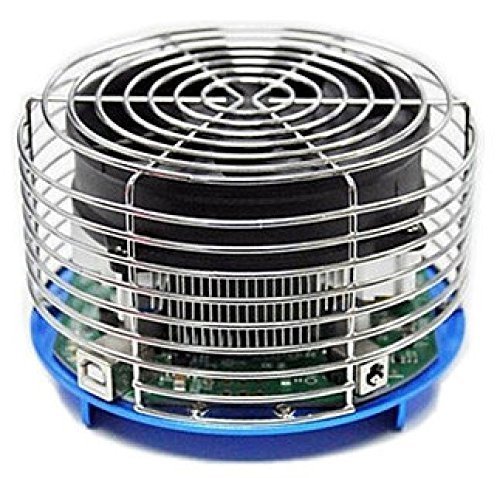
🚀 Mine Like a Pro with AntMiner U3!
The AntMiner U3 Bitcoin Miner Version 2 by Bitmain is a lightweight and compact mining solution designed for efficiency and reliability. Weighing only 2.95 pounds and measuring 8.8 x 6.8 x 4.2 inches, it’s perfect for both seasoned miners and newcomers looking to dive into the world of cryptocurrency.
| Brand | Bitmain |
| Series | Bitmain AntMiner U3 |
| Item Weight | 2.95 pounds |
| Package Dimensions | 8.8 x 6.8 x 4.2 inches |
| Processor Brand | VIA |
| Manufacturer | Bitmain |
| ASIN | B00TWK9208 |
| Is Discontinued By Manufacturer | No |
| Date First Available | February 22, 2015 |
N**N
very good miner, version 2 better than version 1, open design, for better air flow and cooling.
very easy to set up, getting 58.5 GH/s plus with the default settings. no volt/freq options in the command line. using cgminer version 4.9.0....running windows and this is how it was installed.....just go to this web site and down load zadig http://zadig.akeo.ie/go to http://ck.kolivas.org/apps/cgminer/ and download 4.9.0, version 4.9.1 doesn't work at this time.plug the power cord into the power brick, plug the power brick into the U3 and then plug it into the outlet at the wall or power stripplug the usb cable into the U3 then plug the usb cable into the usb port on the computer or a powered usb hub. (I like to use a power hub)if you don't have the powered hub already plugged into the usb port on the computer plug it now.wait till windows installs a driver or it states that it failed.run zadig, right click and run as adminclick on the options and then click on list all devices, in the drop down window select cp2102 usb to uart bridge controlercheck to make sure winusb is displayed just below that and in the right window just above the install driver or reinstall driver then click on the install/reinstall driver and wait for it to get done. when it is done installing the driver unplug the usb cable and plug it back in or reboot the computerunzip cgminer, open a cmd console, cd to that directory where you unzipped it and use the commandcgminer -n this will tell you how many miners you have installed and you should see an entry for cp2102 usb to uart bridge controlercgminer --benchmark this lets you check that it is running correctly, should see AU3 listed under the list of devices and lots of informationsnow the fun part after running the benchmark, press q to exit the benchmark test then fire it up on your poolcgminer -o your.pool -u myuser.worker -p passworklike I stated I am getting 58.5 GH/s with no volt/freq setting but you can play with them at your own risk with the--au3-freq <arg> Set AntminerU3 frequency in MHz, range 100-250 (default: 225.0)--au3-volt <arg> Set AntminerU3 voltage in mv, range 725-850, 0 to not set (default: 750)which would looks something like the following command linecgminer -o your.pool -u myuser.worker -p passwork --au3-freq 225 --au3-volt 750again change at your own risk the volt and freq setting.and yes you will need to buy a power cord that goes from the power brick to the wall, does not come with one.update: July 1, 2015cgminer version 4.9.2 is now out and works much better than version 4.9.0I still like this miner. just ordered 2 more. makes a total of 6.
E**N
Runs fine, but not at the speed advertised.
It runs perfectly, and it was a new experience learning experience, but it only runs at around 15 GH/s on average. Couldn't figure out how to get it running at the advertised speed.
P**N
Not as advertised
Even though the Bitmain AntMiner U3 is sold as 1Watt/GH/s is not entirely true.Let me explain... Just by connecting the miner without mining, it will drain more than 30Watts and if you start mining, the power consumption will go up to more than 100Watts.(Tested multiples U3 units with my Kill A Watt)As for today January 20th, with a speed of 60GH and with a power cost of 0.16 ($/kWh) the following is what you get with the U3BTC Coins USD Power Cost ProfitMonthly 0.00798598 $3.37 $11.52 -$8.15Annually 0.09716280 $40.99 $140.16 -$99.17The U3 would have been a superb miner if was not for the 100+Watt used to mine.
D**N
Nice for learning about mining - but you're not going to turn a profit
Of course, this is just to learn more about mining. It's too late in the game for this to ever turn a profit. I was awarded a $75 gift card from work so this only cost me about $10 out of my own pocket.The miner is hooked directly to a Raspberry Pi B+. Unfortunately, the connection between the Pi and the miner drops off frequently. It'll be running when suddenly the Pi goes blind to the miner. Running cgminer -n shows "err -3". I've replaced the usb cable twice and the power cord once. The longest it's run without a connection drop is about 1.5 days. A 3-7 hour connection is more common. The only way I can get the Pi to recognize the miner after a drop is to reboot. I've written a couple of scripts to monitor the situation and reboot automatically. The miner is connected directly to a power strip and to the Pi (i.e., there's no usb hub in the mix). The miner is not over clocked and the temperature is constant. It's sitting in a basement office so the ambient temperature is relatively constant as well.It's interesting that with bfgminer I get a hash rate < 10 Gh/s. The hash rate with cgminer has gotten up to about 50 Gh/s but 30 Gh/s is the norm. I've installed minera (highly recommend) and am using the cgminer that comes with it (bfgminer that comes with minera also gets very low hash rate).Update [2015 May 14]: I have overclocked the device (--au3-freq 240 --au3-volt 800). When overclocked it runs on average at 60 Gh/s and is more stable. It has been running since 2015 May 05 without issue. I expected the system to run stable by default.
A**7
Not worth it
My son bought the AntMiner U3 to learn more about bitcoin mining. Before buying it, he knew that it wouldn't turn a profit and he was content with the 54GH/s average speed using cgminer 4.9.2. What he didn't expect was having to unplug and plug it back in at least once a day because it would stop mining. So the U3 is not worth it just to learn about Bitcoin mining. Buying a small USB drive ASIC is much easier and less expensive.
A**S
Doesn't like USB 3.0 on Windows 10, but excellent unit
Probably one of the best packaged items I've ever bought online, definitely shows care in product. Took a little while extra to get this running in Windows 10 but 30 minutes was it to get mining solo on a non-bitcoin project for SHA256 currency.Following Nathan's instructions, I plugged in the wall adapter THEN plugged in the miner, then plugged in to USB. I had to use Zadig to correct the drivers Windows installed as well but not a big deal. The issue I ran into and what took me the longest to fix was that Windows 10 refused to work with this on the USB 3.0 slots, but did work on the single USB 2.0 slot on the laptop (thankfully).Quick example settings for my solo rig:cgminer.exe -o [...] -u XXX-p XXX --au3-freq 225 --au3-volt 750 --btc-address=XXXRunning so far averaging 56.41Gh/s. Probably best deal to mine your own currency or get started with a project in BTC, just don't expect any profit unless you tend to win the lottery.
Trustpilot
1 month ago
3 weeks ago