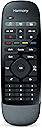
Desertcart purchases this item on your behalf and handles shipping, customs, and support to EGYPT.
🎯 Master your entertainment universe with one smart remote.
The Logitech Harmony Smart Control combines a sleek, ergonomic remote with a powerful Wi-Fi-enabled hub to control up to 8 devices—including TVs, streaming boxes, and gaming consoles—without line-of-sight limitations. Featuring an intuitive smartphone app for personalized one-touch commands and seamless setup via a web interface, it’s designed to simplify and elevate your home entertainment experience.
| ASIN | B00BQ5RYI4 |
| Additional Features | Ergonomic |
| Battery Type | CR2 |
| Best Sellers Rank | #118,570 in Electronics ( See Top 100 in Electronics ) #8,118 in Remote Controls (Electronics) |
| Brand | Logitech |
| Color | Black |
| Compatible Devices | Streaming Device, Television, iPhone |
| Connectivity Technology | Wi-Fi |
| Controller Type | ['Touch Control', 'Smartphone 'Button Control'] |
| Customer Reviews | 3.9 out of 5 stars 3,643 Reviews |
| Global Trade Identification Number | 00097855084637 |
| Manufacturer | Logitech |
| Max Number of Supported Devices | 1 |
| Maximum Number of Supported Devices | 1 |
| Maximum Range | 10 feet |
| Mfr Part Number | 915-000194 |
| Model Name | 915-000194 |
| Model Number | 915-000194 |
| Number of Batteries | 1 CR2 batteries required. |
| Number of Items | 1 |
| Special Feature | Ergonomic |
| UPC | 097855084637 |
| Unit Count | 1 Count |
| Warranty Description | manufacturer warranty |
K**I
Harmony to the rescue... Again!!!!
OK this is a bit long story.... How this started.. --------------------------- I owned the Harmony 700 that was working well for last 4 years. However with a new wall mount tv and moving all other electronics to a cabinet, the harmony 700 could no longer reach them as the Harmony 700 is IR only remote. The closed cabinet is in another room behind a wall - about 15 feet away. I have several electronics - LED TV, sound bar, hdmi switch, Dish Network DVR, Blu-ray player, Apple TV, XBox 360. I was able to program 6 devices on the Harmony 700 leaving the Xbox for manual operation but not a big deal as I do not use it that often. Naturally I purchased a IR extender - after a lot of research - a monoprice 300 ft range extender. It worked for a few devices but not others. It would also not work consistently and my wife gave me constant gripe about that. More research and found a NextGen IR to RF extender that had very good reviews on Amazon. But unfortunately for me it had the same issues. Worked well for some devices but not others. Finally I thought whether there were any remote extenders that work over wifi rather than IR. after looking round finally saw the Harmony Smart Control. With my prior experience with Harmony, I was very happy to see this. The main difference between this and the two previous extenders I got was the price - 30-40 for the others and 145 with tax for this one. But I needed something that worked, And I am glad I got this. Below are the benefits in my opinion. Programming --------------------- Programming the remote is super simple using The Logitech website. They have a web based app where you can do all the set ups and then just sync to the remote - the hub in this case using a USB cable. If you have used any Harmony remote before, this is a life saver to program complicated functions with ease. The Hub & Remote ------------------------------ The Smart Control gives you the hub and Remote. The hub is the IR blaster. I believe it communicates with the remote using RF or WiFi - I am not sure. The remote and Hub come paired out of the box. To get started you startup the harmony program and connect the hub to your laptop using USB cable that it comes with. Program your devices and sync. That's it. Unplug the hub from the laptop and connect it to the power cord that it comes with and place it in front of the devices. The Hub supports two IR blasters but come with only 1 external IR blaster. The Hub itself is an IR blaster. So essentially you can have 3 total and you already have 2 (Hub + 1 Eye included). In the other devices that I returned, the IR eye was a tiny IR led. Not sure about the Hub, but I just put it inside he cabinet and closed he cabinet door, and it just works - every time - never misses a Button press. And I did not even put it in line of sight - I have the DVR sitting , the Blu-ray player stacked on it, the Apple TV on top of that, and the hdmi switch on top of that. The Xbox sits in the lower part of the cabinet. But somehow it just works... The only issue I see ----------------------------- So I have my TV and Soundbar in living room and the Hub is no where in sight. My only gripe but jot a major one, was that the included remote is more of a controller and not a true remote - it does not have IR at all. So I have to run a wire behind the wall and attached the included IR blaster so it sits just on top of the Soundbar where it can send the IR to both the TV and the Soundbar. The included IR eye has a cable of about 6 feet or so. But I had to cover about 30 feet and the wire needed to be hidden. So I put together an extension cable because i could not find one in store locally. I used a 30 foot speaker wire that I had laying around, and got the 3/32" male and female connectors from RadioShack and soldered them. It worked!!! Finally ----------- So now everything works just right. One remote works for all devices. If you are thinking about buying this, stop reading and buy it already. IPhone app ---------------------- The Hub supports the use of the Harmony iPhone and android apps. Using the app you can control everything that you can with the remote and then some. For example if you press he OFF button on the remote and for whatever reason say the TV does not turn off, your remote will not be able to pick the TV and turn it off anymore. You would need to manually turn off. The App can do that, the remote can't. I Md not really using it though, so can't say much. I just tried it out and it works well for what I tried. I can see that you may need to get Used to it. The one thing what you can do with the App is have favorite channels up to 50 channels so a press of a button on your smartphone. Overall a great buy, I wish I had found it 2 weeks earlier. It would have saved me a lot of time and frustration...
J**Y
Best harmony remote so far
This is the 3rd harmony remote I've owned (I had the original pre-logitech Harmony, and the Harmony 880), and it's absolutely the best one of the three. I've been using the Harmony Smart for almost a year. Setup: Getting the hub connected to the wifi network was easy and painless. Since I was replacing an older harmony, most of my settings transferred from the old remote to the new one (although that was a bit of a problem because Logitech changed the software/web sites that holds the configuration, and when reregistering I accidentally used a different email addresses, so I had to start over). If you're concerned by some of the negative reviews, keep in mind that some of those people didn't complete the setup - they're just using the Harmony as it is out of the box, which does work OK but it's not ideal. Part of the setup process involves going to the myharmony.com web site where you can choose *exactly* what the buttons do - so most of the complaints about "it doesn't have a button for..." or "it doesn't control..." can usually be fixed by taking some time to twiddle it to your liking (the smartphone app lets you change some things, but if you don't go to the web site you miss lots of the real benefit of setting up this remote). Sometimes there's more than one match for your device, so choosing the other match may work better if it seems like you can't get it working right. For me, my settings did transfer from my old Harmony remote, but that doesn't mean the new one worked perfectly. Since the buttons were different on the old remote, the functions didn't end up exactly where I would have liked them on the new remote, so I did need to change a few buttons. For instance the "long press" and "short press" for the fast-foward and skip-forward functions were exactly backwards from what I wanted for my TiVo. So I switched them - it only took a couple of seconds to do that. I also had to add back some special functions that didn't transfer from the old remote, but they were unusual to my TV/receiver setup and my weird personal preferences. Buttons and usage: The remote is small and light, comfortable to hold and easy to operate. I use it with a TV, Blu-ray player, audio receiver, TiVo, AppleTV and a FiOS cable box, I can control just about every function that I want to get at with all of those devices. I do NOT miss the screen with the six "soft" function buttons from the old Harmony 880 - the 3 "hard" function buttons on the Harmony Smart are better, because they are consistent. Visitors to my house could never figure out the old Harmony 880, but this one is much easier for them. Again, keep in mind that out of the box the buttons won't all do exactly what you want. You have to go to the web site to change them in any way you like. My main complaint about this remote is that it's hard to use in the dark. That's not just because the buttons aren't lit - for me the more important thing is that buttons are all small and indistinguishable by feel. I occasionally hit the "music" button when I meant to hit "rewind", so end up turning off the Blu-Ray and switching to another device as a result. If you can remember the positions of the buttons ( rewind is the 3rd from the top, on the left) then you can use it without looking at it. But that can be tricky. My only other complaint is that the "short press" and "long press" difference is a little confusing at first. Once you know about it, fine - but this is the new issue that visitors to my house get confused about, I usually have to demonstrate that a couple of times before they get it. This is mostly a problem with the fast forward and rewind buttons, which do double-duty as "next chapter" (or "skip forward") and "previous chapter" buttons, depending on how long you hold the button down. You can change that in the myharmony.com setup, but there's no obvious choice for what other buttons to use for those functions. Smartphone app: It's convenient at times, and it works well. But it's not the main reason to buy this remote. Basically, it's always easier and faster to grab the real remote than it is to grab your phone, unlock it, find the harmony app, wait for it to load, then wait for it to connect and then you can use it. So 98% of the time, you'll use the real remote. But the app is still handy when you have less-used functions that you want to get at sometimes - for instance, I almost never use the "zoom picture" or "closed captioning" buttons on my TV, but sometimes it's useful so I use the app when I want to get at those. The app is also useful when you want to control a different device without interrupting what you're currently watching - say you want to turn on your Blu-ray player to eject a disk while you're in the middle of watching an AppleTV stream - you can use the app to control the blu-ray without switching the TV to *watch* the blu-ray (you can't do that with the real remote). The smartphone app makes it so you don't need to keep all the old original remotes nearby, for those odd moments when the harmony remote won't work. On my old Harmony remotes, some buttons eventually stopped working after a few years (the 880 lasted from 2007 until 2013 before it became partly unusable - just the volume buttons were a problem). A year into using the Harmony Smart, and that is *not* a problem so far. But time will tell, but this one does feel better than the earlier models so I have hopes that it will last longer.
C**T
Great Remote; Some Issues
First, I commend Logitech for developing a product that makes simple a very complex problem of integrating a managing a tremendous number of devices as a single system, particularly given the price. I was a bit hesitant to spend the money on a remote, but it should be well worth it once a I receive my second mini IR blaster. More on that later. From a set up perspective the documentation provided is sparse to the point of not being helpful and resulted in unnecessarily lost time in the setup process. Since it is not overly obvious, you should commit to setting up the hub with your smart phone. There are limitations to this method, which I will describe later, but it is not clear if there is another way to set up the hub. It might be possible to do this through your computer from the beginning, though that is not how you are guided. You must download and install the app on your smartphone. Then you pair your phone with the hub. Don't worry about the app scanning for the hub and not finding it on your network once the app is installed on your phone. This will happen later. Trying to configure the hub to be on your wireless network at this stage of the process is red-herring and a complete waste of time. You will pair your hub with your phone first, outside of your wireless network. Your phone should be configured to work on your wireless network prior to starting this process as the hub and will communicate with your phone over the wireless network once the hub has been configured to access your network. Be sure to have your wireless network password handy, you'll need to enter that via the app on your phone for transfer to the hub. The lack of documentation on this point loses a half star. At this point, you can start setting up the hub via the app on your phone. This is where the the other half star is lost. While I again commend Logitech for trying to hide a significant amount of complexity (and they do succeed in some remarkable ways) the problem remains that they are trying to bring together a huge number of systems into a single control and there will be some bumps in that road. As part of the setup you enter your devices with manufacturer and model number in the app. Logitech will pull the appropriate codes for the manufacturer's remote from its database on the web and assign them to the appropriate keys on the Harmony remote. I have a somewhat obscure pre-amp and yet, it was part of the database and worked perfectly. However, the app did not recognize an Oppo BDP-103 as a Blu-ray player. Yet, going online and continuing the configuration of the hub through the web worked fine for that device, though with some version caveats from Logitech. The issues that I had with the rest of the setup, though seem to be with how the Harmony system communicates with your gear. It use the hub and the mini IR blaster to relay the commands sent by the remote to your equipment. This means that while your normal operation with individual remotes may work fine from head-on, you need to position the hub and the IR blaster in such way that they can communicate with all of your gear. This is where I had another set of problems in the setup: some pieces of equipment did not respond or responded in either irregular or inconsistent ways to commands from the remote that at first seemed like a setup programming error, but in reality it was the hub and IR blaster not communicating with the equipment due to obstructions within my A/V cabinet. Again, the communication is between the hub/blaster and the equipment is very likely going to be more lateral in nature than head-on, as when using a traditional remote pointed into the cabinet. This difference in communication paths from a traditional remote with the equipment and the placement of the hub and IR blaster within or on your cabinet, now brings into play obstructions created by interior cabinet walls and other equipment within the cabinet. Of course, this is highly dependent on your particular equipment set up. It was problematic in mine. I have ordered a second IR blaster which, I am fairly confident will eliminate my current control gremlins. This is another good point for the Harmony Smart Control Hub: it has the ability to connect a second IR blaster, though the remote ships with only one. If you have equipment separated by an interior wall and an upper shelf/top you might need a second IR blaster. If you have control issues during setup start with moving the hub and blaster to ensure a good communication path before doing any other troubleshooting. This will likely save you time. The good news is that when the communication channels are working properly this remote seems to work like a dream where series of complex instructions are passed with a single click of a button, eliminating fumbling around with 3-4 different remotes to change settings. It really will make you happy to not have to deal with a box full of remotes anymore. I don't plan on using the smartphone app for the control of my system (wireless dead spot where my couch sits). The remote, though called "simple" does a tremendous amount. It is only the interface that is simple, which is as it should be. So, dropped star for unnecessary lack of documentation about the setup process, and seeming reliance on the smartphone method of configuring the hub with its attendant setup issue of equipment identification versus the web interface. It seems like it should be possible to setup the hub directly on the web, but that is not how you are directed. The remote itself promises to greatly simplify interacting with my home theater system to the point where a single click of button kicks off all that is required to watch a movie, TV, listen to music or connect to my Internet streaming device. Entertainment bliss. It is definitely worth working through the setup issues, as you will only do this once. The enjoyment of using a single remote control with one click media setup will last a long time. A lot of thought has clearly gone into the designing of this remote, the hub, the backend supporting systems and the app/interfaces. Good job, Logitech!
S**T
Updated: Poor Build Quality, But Consider It
Update 2014.01.22: I have tried to contact Sandeep "Sam" Honest four times but have consistently rolled to his voicemail. Sandeep, if you would still like to set up a time to discuss my review and problems with receiving broken remotes, please post a time when I can phone you and definitely get the call answered; otherwise, my review stands. Having received two units that were both broken in exactly the same way (non-functional yellow free button), and with the difficulty of orienting the remote correctly in the dark due to its "used bar of soap" shape with uniform edges/sides, and buttons that are not illuminated and much too small for the average adult hand to operate, I will return this sad disappointment of a remote and seek a suitable solution elsewhere. Update 2014.01.11: Having been contacted by Logitech in response to my original review, I have agreed to speak with and work with their representative, Sam. We have not yet been able to connect (my fault) but, in the interim, I thought it was premature to return this item for a refund. I will work with them in good faith, and with my mind open to the possibility that there was something I missed or misunderstood about how this remote is actually awesome (though my current opinion is still far from that conclusion). So, because the first item was defective, I requested a replacement from Amazon which has now arrived. Upon testing it out, it is not only broken but is broken in exactly the same way as the first (the yellow free-assignment button does not work). This either means that I am getting something wrong, or that their build quality is extremely consistent but far, far too low. I will update my review again after Sam and I conclude our collaboration. Original Review: Summary: If you watch your media in a well lit room and have fingers the size of needles, you'll love this one! Everyone else: Keep searching. Narrative: I bought this remote after doing some research to replace my Logitech Harmony 900 that finally croaked. My first observations were that this is a thin, light remote. Setup (because I was porting from another Logitech remote) was not bad at all. Not pre-school level, but do'able. I can't say how it would be for someone without an existing Harmony account and configuration but I would imagine it's about the same as setting up my Harmony 900, which was a pain but, again, do'able. After the setup was complete, I have to say that I was elated. The Harmony 900 used an IR blaster to reach components inside my cabinet. I swear, inside the blaster there was a 90 year old man who apparently had to translate my intent into the cabinet via interpretive dance. It took FOREVER after I pressed a button on the 900 to get a response from my equipment. But the Smart Control was INSTANT response! It was amazing. I had to re-train myself on how frequently I could press buttons and expect things to happen. At this point, I named my new Smart Control "Renfield" because he seemed to *live* to do my bidding instantly. Then night fell. Because I watch media in the darkest room possible, it was then that I first noticed that the buttons do not illuminate. They don't glow. And they're sized/shaped/textured almost identically throughout the remote. The number buttons are as small as a single grain of long grain rice, and packed together really tightly at the bottom of the remote. Big negative. Big, big negative. "Hello, Disappointment. I haven't seen you since... since... I signed up with Sprint, I think... How've you been?" "But...", I tried to console myself, "...I bet the battery will hold a charge a lot longer!" So I looked into how to charge the battery. You can't. It's a button battery -- so... not exactly littering my gadget drawers with replacements. "Disappointment, meet Disillusionment." I'm not sure if the designers just decided to "have a go" at we former Harmony owners or not, but all of the buttons familiar to Harmony owners are now in brand new locations, with buttons of completely different shapes and sizes. Play controls are now near the top where it is SUPER easy to hit the Activity buttons by mistake. Imagine the frustration of trying to pause a video only to switch to your BluRay player instead. Grrrr. "Disappointment and Disillusionment, I'd like for you to meet Disgust." I have held back on returning it for several days thinking that I'd eventually get the muscle memory of where buttons are. But now I don't think I can, and here's why: If you hold the remote in such a way that your index finger is over the directional navigator (round button roughly centered on the remote), you can very easily access up/down/left/right, channel +/-, volume +/- and mute. But to access play, pause, forward, reverse, record or stop you have to shuffle it in your hand until your index finger is now reaching the top row. Now the directional navigator is in your palm and inaccessible. So I tried it with my thumb on the directional navigator and quickly patented a "Fumble-Flip" move. In one position, my thumb lands on the directional navigator; in the other, my index finger lands on the play/pause/etc buttons at the top. Sweet!...almost. But because it never lands the same way twice, you're always going to be stuck doing the "braille" search to orient yourself (in a dark room). This is complicated significantly by the indistinguishable shape/size of the buttons combined with the thin, absolutely uniform shape of the remote housing. And this brings me to something else that surprised me. Would you like to guess how they made this remote so much shorter than the Harmony series? They removed a bunch of buttons! That's how! So Harmony 900 had one button for skip forward, another for skip backward, a third for fast forward and a fourth for fast rewind. But the Smart Control has just one button with two images on it. If you just "tap" the one with arrows pointing to the right, it skips forward. If you press-and-hold for about a second, it begins to fast forward. Now I'm paring it with a Tivo, which has three forward speeds. So you have to go " one, Mississippi...<release> two, Mississippi... <release> three, Mississippi" to achieve maximum forward movement. Pair the reduced buttons for basic functions with the fact that mine had a dead "free" button (the row of colored buttons that can be assigned to any task or activity) dead on arrival. Lame. But, when they work, all of the buttons on the remote can be assigned a "tap" action and a "press-and-hold" action for each Activity in your profile. That's a TON of setup (and a TON to remember, too). This brings me to the Activity buttons. There are only three. And, unlike the Harmony series remotes, they have a fixed image on them -- one for music, one for movies and one for TV/DVR. This isn't really quite enough for me, as I want to watch Tivo, watch BluRay, watch Roku, stream Bluetooth music from my phone through my system and play my iPod through my system. Sure, over time I would eventually remember that a press-and-hold of the music Activity button would get me to my Bluetooth streaming device... but I'm just gagging to understand why there couldn't have been another row of Activity buttons just above the existing row in that vast, uncharted plain of wasted space at the top and bottom of the remote. Upon unpacking it, the Smart Control feels remarkably thin, light but well constructed. Impressive. But when it stops being an aesthetic experience and starts being a functional one, I couldn't stop eyeing the box in which it came and planning to return it. "...find the Nav button... CAREFUL NOT TO PRESS THE OVERLY-SENSITIVE 'SELECT' BUTTON AS YOU PASS OVER IT... find up one (... I hope that's 'up') and right one (... I hope that's 'right') is ... I think... that's... 'Guide'." <click> "D### it all to h###!!! That was the 'Info' button!!" At this point, my neighbors began leaving fliers for Tourette's treatment centers in my screen door. Also, I renamed Renfield "Genie" because whatever he did was only inspired by my request, but it never came out exactly as I hoped it would... after dark, anyway... Also, this sleek, thin profile turns out to be perfect for slipping down into the crack of the sofa or recliner and disappearing altogether for a while. Magic. I have tried and tried to get the hang of it. During daylight, I do love it. It controls everything so smoothly and quickly that I would keep it as my "daytime" remote if the price were half what it is. For those of you who watch in a lit room (or who, inexplicably, never feel even so much as a tinge of urgency about hitting the right buttons in the right order to create the experience you want) then this might be a fantastic -- and I truly mean FANTASTIC -- little gem. But the tiny TINY tiny size of the number buttons and the lack of any tactile directional indicators makes it a non-starter for those with darkened media rooms. Oh, and if you're drawn to this by the smartphone integration... I've tried it. Imagine wanting to pause a movie using your smartphone. You have to unlock (biometrics? password? unsecured?) your phone, navigate to the remote app (if it wasn't already running), launch the app, switch to the controls menu and then tap pause. THEN it happens instantly. But geez... why was I pausing again? The app does have the option of preventing your phone from sleeping while you're using it as a remote. I think this is a service to be certain that your battery will be dead if you hear an intruder clawing at the back door just after midnight. Clever, Logitech. Clever. The smartphone app bit is just a gimmick in my mind, and won't be your favorite part of this remote. For lit-room/daylight watchers: I honestly can't say enough good things about it. It's clearly labelled buttons, lightening fast response and relative ease to set up complicated Activities makes it a fantastic choice -- if you don't mind going questing for weird button batteries whenever they die, that is... A little back lighting and a more tactilely distinctive design would make this remote The One of whom the prophecies speak... So I'm back in the market for a new Universal Remote at this point. I guess I'll just entertain myself with some do-it-yourself shadow puppet theater until it arrives. For tonight's early show, I'm putting on my shadow version of 'Downton Abbey'. Should be a hoot. So... Thanks, Logitech. Before this, I had no idea that an otherwise brilliant device could be so easily rendered useless. (For dark-room viewers, anyway)
N**K
Powerful system that allows automation of all your devices including IR, WIFI, Bluetooth and RF devices
Logitech Harmony Smart Control - Black I've been a longtime fan of Logitech Harmony remotes having owned several of them in the past. If you aren't familiar with them, Harmony remotes are programmable universal remotes sold by Logitech, that allow you to automate multiple operations like turning on TV's DVD's and other components in home entertainment systems among other things. I had a bit of time over the holidays and decided to upgrade my old Harmony 650 remote to the new Harmony Smart Control system. I even integrated the system with voice control using a Google Home Mini which is a nifty little WIFI enabled speaker that includes Google Assistant. More about that later. The first time I tried Harmony Remotes was over 10 years ago when Harmony was not owned by Logitech and I was blown away by how cool their tech was. These guys were definitely way ahead of their time with a cloud based back end that could access IR remote configurations for every imaginable piece of equipment. You would connect your remote to a PC via USB and using the Harmony software you would tell it what devices you wanted to control. Then it would build a "firmware patch" and upgrade your remote with all the commands necessary to control your equipment. Whoever designed that system is a genius engineer! The Harmony Smart Control is a major evolution of the original Harmony universal remotes and takes it to a new level with WIFI, Bluetooth, home automation and smart phone integration. All the configuration of the hub can now be done via your smartphone over your WIFI network by using the Harmony app. The Harmony Smart Control package includes a Harmony Remote, a Harmony Hub which is the center of the new WIFI enabled Harmony series, and one IR Mini Blaster extender. The hub allows you to control hard to reach IR devices within closed cabinets and supports Wifi, Bluetooth, IR and RF protocols. This makes it capable of controlling several newer devices that don't use the older IR (infrared) protocol for remote control. Some examples are the Amazon Fire TV, IOT devices and home automation systems like Philips Hue lights etc. Setting up the Harmony Hub is done using the Logitech Harmony app on Android or iOS or by using their standalone desktop app. Programming it is not necessarily the most intuitive thing in the world, but boy once set up its pretty sophisticated and can make some really cumbersome and error prone operations really simple. You first have to wire up the hub and the IR Mini Blaster, which is only needed if you have equipment hidden in a cabinet like I do. I actually was not aware that the hub itself also sends IR commands so ended up unnecessarily buying a second IR blaster (the Smart Control package comes with one extender). The hub communicates with the remote using RF and then sends out all the IR commands as well as other command protocols as needed. The big advantage here is that once you are set up, you no longer have to worry about pointing your remote exactly at your system. The hub takes care of all the messy stuff. Genius! Once you power on the hub, you have to launch the harmony app on your phone to connect it to your WIFI network and finish configuring the hub. Since I was a previous harmony user, all I had to do was log in to my harmony account and it imported all my configuration settings from my old Harmony 650 remote. Woot! I was immediately able to control my equipment without any major setup time. You literally press one button on the Harmony remote and the Harmony Hub will do all the messy work of turning on and setting up your devices. The other major advantage in this system is that your smartphones can also act as remotes, since all the buttons and commands are available when using the Harmony App on the phone. Although the provided Harmony Remote is simple with only 3 activity buttons you can set up the buttons for long press, to access other activities which is handy and actually space saving. Another thing new for me was having access to non IR devices through the hub as well. I was able to add an activity to control my Amazon Fire TV Stick which has a custom non IR remote. The hub knows how to send commands to that directly so I can use one remote for everything now! Once I had everything set up and tested with the remote I looked into how it could be integrated with my Google Home Mini. Since the mini understands Google Assistant voice commands I wanted to see if I could get it to talk to the Harmony hub. Took a some research and googling to find out how to do this since there are no instructions in the box. Not a lot of great info available online but I found some notes from Logitech and Google on integrating with Harmony Hub to set this up. You will need to first install the Google Home app from the play store for this, and then ask the Google assistant to link to the harmony hub "Ok Google, ask Harmony to link my account." This creates a "card" that appears in Google Home and then sign in to your harmony account. Once you get past this non-intuitive mumbo jumbo, this will give the Google assistant access to the Harmony hub and your associated programmed activities. You can now issue voice commands to target the harmony hub, like "Ok Google, ask Harmony to turn on the TV". Since those commands can be too long to remember, fortunately you can also assign shortcuts in Google Home. You can set up shortcuts from the Settings | Shortcuts menu in the Google Home app. Voice control of the Harmony Hub via Google Home adds a nice second layer of control to the Harmony hub which allows you to control your devices hands free without needing the remote altogether. While its may not necessarily be convenient to use voice commands, its a handy way to quickly do certain operations when the remote is not within reach. In the video I turn on the TV, then switch to the Amazon Fire TV Stick and finally turn off the TV completely using voice commands. There are all kinds of cool extensions you can do with the google home, like tell it to raise or lower the volume or even load up a specific show. In this case, using the google Home app integration, I have mapped the words "turn on TV" to my corresponding Harmony Hub activity called "Watch TV" and "Watch Fire TV"
C**E
Great Product, Easy Setup, but customizing Nightmare
I am not new to Logitech remotes and have had at least 4 others before purchasing this product. A few months ago I setup a family room in my Basement, and have naturally accumulated a barrage of remotes. One for my Television, HTPC, cable Box, and BD Player. As everyone knows, it become increasingly annoying to have to figure out witch remote to use to do some simple stuff, and my wife can never figure out how to operate anything down there, with that being said it was time to purchase a universal remote. Honestly the cost of purchasing this product is only slightly more than purchasing a standard Logitech remote. I bit the bullet and purchase the item, here is my preliminary review. I will give myself another week of usage before determining whether I am going to keep it or not. PROS: Easy setup. If you are familiar with the Logitech system, you will realize the setup is fairly straight forward you do not need a long user manual. Plug the hub into your PC, go to the Logitech harmony website and setup an account if you have a remote with your devices in their system you will be able to copy it over as well. Following the process will setup the hub onto your WiFi network. Setup your devices, and you're done. Smart Phone App. The nice thing about this item is the smart phone function the smart phone apps (Android, iOS) allows you to easily control your devices, even if you are not in the same room. As long as your device and the hub are on the same WiFi network you are able to control the devices. Simple Remote: Having a simple remote with limited buttons allow anyone in the family to use the media centers. HUB: The hub can be placed anywhere that's in the line of sight of your devices. I chose to put the hub on a table adjacent to my devices. It received directly line of sight insuring that everything can be control, and eliminating the need to use the IR extension that came with the device. The sleek style of the hub makes it inconspicuous on a side table. Cons: Below are the issues I found the most annoying with the remote and maybe its me navigating from the standard remote to a phone integrate. LAG: In many instances I experienced a noticeable lag between the control on the apps and the response on the television. This was not experienced with the remote Programming: The setup for the device is easy, but I feel it will take months to get the remote buttons to be program exactly the way you want, having had experiences in the past with Logitech you will realize every feature is programmable but its annoying as heck. For example when I want to change the input on the television, the signal sends a double signal forcing my one input press to be done twice on the television. Lack of Buttons on remote. While having limited buttons on the remote is great, its also has its disadvantages as there are some crucial buttons am missing that I need. For I have a smart TV that has a Netflix button. I have not found a way to teach the remote how to learn the Netflix option, hence I still have to go back to my TV remote to turn on NetFlix Battery Change: Looking at the remote I have no freaking idea how to remove the back panel to change the battery. It comes with a little tag that you pull to create a connection with the batteries to operate the remote, but have no idea to change the remote batteries when I need to. In conclusion this remote definitely has some positive features, but am not sure I could not have done better with a standard Logitech remote with display that I could program every button to give me what I want. The Jury is still out from this buyer.
F**Y
Great electronics, Android app leaves a lot to be desired
We've had this item for a little over a week. Current devices are a recent-model TV (Vizio); DirecTV satellite DVR; Sony stereo + DVD/CD player; Roku for streaming; an older DVD player which we use only for playing HD-DVD disks; and our original DVD player, which uses old-style closed captioning technology (for disks produced prior to HDMI). The two older DVD players are in a glass-fronted cabinet, and we don't use them very much at all. Everything else is on top of cabinets, out in the open. The new TV's remote was the real incentive for finally going universal: it was AWFUL. We're pleased with the remote so far. In fact, it'd be fair to say we're very, very close at the moment to rating this higher than 4 stars. Having a single "thing" to juggle instead of a half-dozen is of course a blessing -- but that'd be true with any decent universal remote. So what, specifically, do we like about this one? (1) Size (speaking of the remote control itself): it's not one of the overwhelming "I might as well use an iPad" monsters which practically need a shelf of their own. (2) As you can probably tell from the description, this is actually a three-piece SYSTEM, not a single piece of equipment. It includes the remote itself, a hub unit -- sort of base station/signal routing device -- and an IR "blaster" for reaching devices which might not be able to receive the signal from the hub. I was a little skeptical, but these three components work exceptionally well together. I've even experimented by pointing the remote backwards, over my shoulder; everything responds just as well as if I'd aimed precisely at the desired units. (3) Setup was a BREEZE once I got the hang of it: plug the hub into a computer, go online, identify your devices and which ones you want to work together, and bang -- all done. (4) The interaction among devices is set up in terms of "activities," with each activity defined as a combination of answers to questions like these: Which devices do you want to include in the activity? Which device do you want to control the sound? etc. Each activity is matched to one of three buttons on the remote itself, and you can define separate activities for simple presses of the buttons vs. "long presses" -- for a total of 6 activities. This gives you one-click access to instantly turn on + off only the devices you want; you don't have separate on + off buttons for each device. (5) The (Android) smartphone app has potential, although I'm not ready to nominate it for any awards just yet. (More below.) So what don't we like? (1) The aforementioned app. Oh gods. I won't say do NOT use it, because maybe it will do what you want, as you want it to. But I'd really strongly recommend that you do not use it to set up your system. USE THE COMPUTER + HUB + INTERNET instead. Then (maybe?) use the app for the more everyday functions. (2) Probably an issue with other universal remotes, I don't know: once you decide (say) that you want to watch regular TV just via the TV's own speakers, not with the stereo, if you decide on a case-by-case basis that you want to turn the stereo ON with regular TV then you've got to hunt down the stereo's own remote, to override the "off" state which you've already programmed into the remote. (You CAN set up "watch TV without stereo" and "watch TV with stereo" as two separate activities. But the number of activities is limited, at least with our device, to 6. All the with/without alternatives would basically double the number we need.) (3) The pre-HDMI DVD player uses component cables, not HDMI. We have not yet been able to control that player with the remote, but I think it's because I simply misidentified the device during setup. (Will update the review later if this turns out to not be a problem after all.) (4) If the TV is off, and we want to stream video through the Roku, the remote should turn on the TV *and* select the Roku as the input source. It doesn't turn the TV on, though. Instead -- so far! -- we have to turn on the TV in "watch via DVR" mode, and then switch to "watch via Roku." (That said, though, once everything is actually on, the switch back and forth works exactly as desired.) That's about it for now. Will return for revisions/followup comments after we've used it a while more. UPDATE: I've upgraded my four stars to five, because the old (component video) DVD works just fine. Some other notes: (U1) If you want to turn on and control a device which is not pre-defined as part of a given activity -- as described above, in "what we don't like" #2 -- you CAN do it with the smartphone app. I'm still not comfortable with the app in general, and still wouldn't recommend it for the initial setup. But this is a decent feature. (U2) One thing about the remote which I thought I might get over but am no longer so sure about: in a future release, maybe they can figure out how to add some kind of lighting or other visual cue to help you identify the buttons in dim lighting. Eventually my fingers will get used to the buttons' locations without having to look down, but I'm not there yet. (U3) We had a MAJOR problem which relates back to item #4 above: suddenly, the remote would no longer operate the TV -- AT ALL: no power on/off, no volume control, and no response when we switched activities. (The attached devices themselves worked fine, going on and off and so on as needed. But the TV wouldn't recognize anything other than the current device, whichever it was.) Drove us crazy. It worked on Wednesday night; when we got home from work the next evening, it didn't work. The problem persisted a week, and I was about at wit's end. The problem: you get an "IR Blaster" with the hub (base) and the remote itself. This is used to reach devices which are out of range of the hub itself. Despite the omni-directionality of the remote control, this IR Blaster is apparently UNI-directional. We had somebody come in to clean the house, and evidently in dusting the console they slightly repositioned the IR Blaster. So even though it was within about 3-4" of the TV's remote sensor, the TV wasn't "seeing" it. (U4) I depend on closed captions for watching pretty much anything. Until we installed this remote (with hub, etc.), all captions worked fine: we set them and they stayed on. Now, though, Netflix -- via the Roku 3 -- often seems to forget that we want captions ON, ALWAYS. (Amazon Video, Hulu Plus, etc. -- no problem. Just Netflix.) It's possible that this is the result of a Netflix-Roku software change, rather than the remote, but I thought I'd mention it. Kinda coincidental.
R**L
Good home entertainment control system, but not for Chromecasts and Fire Sticks
The Logitech harmony remote and hub is a good system. I wish the Amazon rating system can do 1/2 stars, so I could give it 3 1/2 stars, but I'm going to give it the benefit of the doubt and give it 4 stars because it truly does work better than most other systems I've tried. Although there is not much documentation, I did find the system relatively easy to set up. For reference, I will say that I have this Net Gear router: Netgear R7500 Nighthawk X4 AC2350 Dual Band WiFi Router .I had no trouble connecting the Harmony hub to this router in my house. I also have the Lutron Homekit hub: Lutron L-BDG2-WH Caseta Wireless Smart Bridge, HomeKit-enabled and the system found all the lights connected to this hub as well. Any lights that are on can be seen in the IOS app on my phone and tablet. For setup, the system asks you the manufacturer and model number of your device. Then it loads the codes needed for the device to work. If you input a model number that it does not know about, then you can use the existing remote for that device to program the hub. To do this, you just need to connect the hub to a laptop, with the supplied USB cable, and then follow the instruction on the screen. The instructions tell you point the remote to the hub and press and few buttons so that it could figure out what codes the remote uses for your device. I had one device that it did not recognize and I had to do this step. After I did it, then my device was connected to the system and worked properly. The hub also recognized that I had an Amazon Fire TV connected to my TV and guided me through setting that up to work with the hub as well. I also have a Chromecast Video and a Chromecast Audio in the house and the system found both of them. However, the hub got confused about which one was a Chromecast Video and a Chromecast Audio and I still haven't figure out how to tell it to distinguish one from the other. Setting up an activity was also not too bad. Connecting my receiver, TV, and cable box together was not too bad. I can setup and activity that turns on the TV and power on the receiver, as that is the way my Av system currently works. I can even schedule the activity to come on at a certain time of the day. The scheduling feature also includes controlling devices at Sunrise and Sunset. However, what is missing is the X minutes before/after Sunrise/Sunset feature. The other note worthy thing I found that can be done is turn on an activity, or a device, when I'm not on my home Wi-Fi. This was a welcomed surprise as I have not seen this mentioned in a lot of reviews I have read. The big issue I have is with the Amazon Echo IFTTT integration. Basically, it's hot or miss. Sometimes the trigger works and sometimes it does not. I can definitely control the all devices with the IOS app. But using Echo to trigger an activity just doesn't work reliably. I can hear the "ding" notification on my phone when the IFTTT trigger happens, but the activity sometimes does not happen. I wish there was native Alexa integration as the Echo integration was one of the primary reasons I bought this system. So, the faulty IFTTT and Echo integration is really a bummer for me. Also, I find the user interface dated. It doesn't feel like something that was written for the year 2016. It feels clunky. It feels like something that was written in the 1990s. Also, I wish it had Apple Homekit integration so that it could recognize all the other Homekit appliances I have. However, besides the faulty IFTTT/Echo integration and lack of Homekit support, I still recommend the system. Update 11-02-2016: After using this device for a while, I've lowered my rating for the following reasons: First, when the software finds a Chromecast or Fire Stick, it does not use the name that is associated with these devices. Further, when it finds multiple Chromecasts and multiple Fire Stick, it names them Chromecast 1, Chromecast 2, etc.... Fire Stick 1, Fire Stick 2, etc. So now, it's up to the user to figure out which device is which. If Logitech would do, what all other software does in this case, which is query the devices for the names, then this issue would not come up. Bu they don't, so it's up to the user to rename the devices back to what they originally was named. If the software finds Chromecast Audios and Chromcast Videos, then the system really gets confused. It simply doesn't know what to do with Chromecast Audios. Next, Logitech does not realize Chromecasts and Fire Sticks implement HDMI-CEC. This means, sending these devices a signal will make them turn on the TV and switch to the right input. You don't need to associated a TV input with them in this software. It's just not necessary. Logitech forces user to associate a TV with these devices, and does not give the option not to do so. When adding a TV, to an activity, you don't have a lot of flexibility as to what you can do with it. For instance, when I tell Alexa to turn off a Chromecast, or a Fire Stick, I'd like the option to switch the TV input back to cable, instead of turning the TV off. This option is not there. The whole system is very inflexible when it comes to controlling Chromecasts and Fire Sticks. The new Alexa integration is good, but the user interface is flawed. Once you go to the Harmony Alexa Skill to set it up, you have to go back to the Alex app to disable, re-enable, and reconnect the account, just to make changes. It's not a great user experience.
A**R
Works as expected, best we can get for our money for now
I like this product. already had one, so it was easy to setup. My only regrets is that Logitech doesn't really improve the remote itself. This one works fine, and with the possibility to assign 2 commands per button is useful, but I'm missing the screen of my previous Logitech Harmony like the Harmony 650. They do offer a much too expensive remote with a screen, but they misplace the Play/REwind/FForward buttons, so this one is the best we can get for our money for now. Don't forget that it also works with Blue tooth devices like Wii and PS3
R**A
One of the Best even in 2024
Still the Best in the game
G**.
Han mejorado mucho respecto de modelos anteriores
Muy buen producto. Se nota mucho más rápida la respuesta. Antes tuve un Harmony 1100 y se me hizo muy lento. Además ahora es mucha más sencilla la configuración
C**N
Buen Control Remoto
En general muy buen producto, facil migrar la configuración de me control anterior de Logitech, lo unico que le falta para ser perfecto es que los botones se vean en la obscuridad.
J**Y
Tricky to set up...but great to use!
So... My set up is a little more intense than the average would likely be, but I couldn't figure out how to make it happen. The app is not super user friendly. I ended up calling in to support and they did the set up (it took him over an hour). Now that it's set up, it works great! Very happy with the purchase. One remote to rule them all.
Trustpilot
4 days ago
1 month ago