Desert Online General Trading LLC
Dubai, United Arab Emirates
Desert Online General Trading LLC
Dubai, United Arab Emirates


⚡ Elevate Your Display Game — Connect, Stream, Dominate!
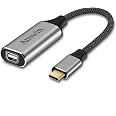
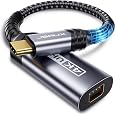
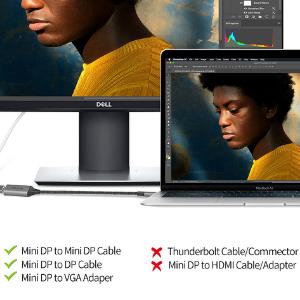
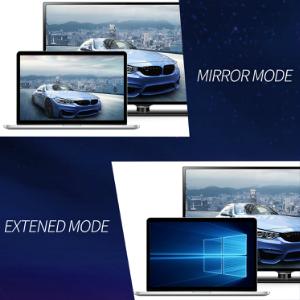
This USB-C to Mini DisplayPort adapter delivers crisp 4K@60Hz video and high-fidelity audio by leveraging Thunderbolt 3 and DisplayPort Alt Mode compatibility. Engineered with 24K gold-plated connectors, triple shielding, and pure copper wiring, it ensures robust, corrosion-resistant performance. Perfectly suited for the latest iPhone 15-17 series, M1-M4 MacBooks, Galaxy S20-S25, Steam Deck, and more, it offers plug-and-play convenience for seamless multi-device connectivity and supports both extended and mirrored display modes.


| Unit Count | 1.0 Count |
| Number of Items | 1 |
| Package Quantity | 1 |
| Finish Types | Gold |
| Color | Grey |
| Warranty Type | Lifetime |
| Current Rating | 1 Amps |
| Power Plug | No Plug |
| Connector Type Used on Cable | USB Type C |
| Number of Ports | 1 |
| Compatible Devices | Laptop, Monitor, PC |
| Specific Uses For Product | Monitor,Tv |
H**E
USB C to Mini Displayport
The media could not be loaded. This seemingly little adapter delivers a powerful punch, enabling me to seamlessly connect my USB-C devices, including the most recent iPhone 15 series, M1/M2 MacBooks, and even the cutting-edge Steam Deck or ROG Ally, to external monitors that have Mini DisplayPort inputs. Putting it together was a piece of cake; all you had to do was put it into the USB-C port on your smartphone, and you were done! The display may now be mirrored or extended onto a bigger screen, depending on your preference. The adapter is capable of supporting resolutions as high as 4K at a delightfully smooth refresh rate of 60Hz. This guarantees a viewing experience that is both sharp and fluid, regardless of whether you are working, gaming, or streaming multimedia material. With this small miracle, I was able to incorporate it into my workflow without any difficulty, removing the need for various adapters and cords that were cluttering up my workplace. It worked with everything from my reliable MacBook Pro to the most recent Galaxy handsets.
M**Y
THIS is the adapter you need for a 27" LED Apple Cinema A1316
If you are looking for a way to connect an older Apple Cinema display there's a few things to consider:1. Which monitor do you have? Is it an A1316 or the Thunderbolt version (A1407)? There's a difference in how they connect and the older A1316 has three leads (besides the power cable) coming out of the back, one is USB , one is a magnetic power connecter like for the older macbooks and the third LOOKS like a Thunderbolt 2 adapter, but here's the catch IT IS NOT THUNDERBOLT...and Apple is pretty clear about it but there's a lot of confusion here, it is a mini display port and if you hook it up to a pure thunderbolt 2 to USB-C (aka Thunderbolt 3/4) it will not work...What you need is a USB-C to MINI DISPLAY adapter and that is what this item is...I have used it on a Mac Mini M1 and a MacBook Pro M2 and it connects just fine and all the built in available resolutions are there, I am using it as a mirror of my MBP because the laptop screen in only 14" and my eyes need more.If you have an LED Apple Cinema 27" A1316 THIS is the adapter you need...there is a lot of misinformation out there but I am using it now and it works fine.
J**R
Not sure why some think this works - TLDR - It Doesn't Work
Doesn't work on older monitor. I had a MiniDP to DVI for a Surface Pro 3 hookup to an older monitor. It works well. So instead of buying a USB-C to DVI cable for my new Surface Pro 7 I thought just get an adapter. Good idea but the adapter doesn't adapt, no video, nada.
J**R
Target Display Mode on old iMac works!
I hope this review helps someone in my position. I've had this old 27" iMac for years. I think it's a 2011, and the hardware just doesn't hold up anymore, but the screen is a 2K screen, and it's massive. I've always wanted to just use it as a second monitor. I purchased an HDMI to MiniDisplayPort cable a few years ago, and it didn't work, so I thought all hope was lost. I did purchase a MiniDisplayPort to MiniDisplayPort cable before that for my 15" MacBook Pro (which also has a MiniDisplayPort out on it), and it worked perfectly, but I couldn't get the HDMI to MiniDisplayPort connection to work. Since then, I have a new iPad and a work MacBook Air with only USB-C ports. I thought, maybe this adapter could work and took a chance, and sure enough, the iPad and MacBook connected perfectly. I'm so glad I kept this iMac around after it was sitting around and taking up space. I was about ready to part ways with it, but now I think I'll be keeping it around for a little while longer.Just a heads up though about Target Display Mode: you won't be able to change the brightness of the iMac with your plugged-in devices. You'll have to have a keyboard connected; otherwise, it will be at whatever brightness it's set to when you plug in. So glad I found the adapter.
C**.
Functional item, just not with what I needed it for
Item works with other computers, but actually needed it to connect a 2021 Macbook Pro to an Apple A4107 Thunderbolt display and it doesn't work. Item name says it would work with that laptop. Apparently only the $50 Apple adapter will work.
C**S
Excellent product. Good value.
Excellent product. Good value.
F**)
just what I was looking for
Works perfectly with my Mac mini m4 and my old 2010 Led Cinema Display with Mini DisplayPort.
C**S
Exactly what I needed for my Apple Cinema Display
I have an older Apple Cinema Display from 2011 that has Mini DisplayPort. This adapter allows me to cheaply and easily connect the display to my 2023 MacBook Pro. So far it has worked flawlessly. Since my initial purchase and testing, I've added a Thunderbolt dock to my desk setup and it works well with that too. To clarify, that's Macbook Pro > Thunderbolt dock > USB-C to Mini DisplayPort Adapter > Apple Cinema Display with no hiccups. A simple, affordable option.
Trustpilot
2 days ago
5 days ago