Buy anything from 5,000+ international stores. One checkout price. No surprise fees. Join 2M+ shoppers on Desertcart.
Desertcart purchases this item on your behalf and handles shipping, customs, and support to EGYPT.
🔗 Connect Smarter, Work Faster — Your 4-in-1 USB Command Center
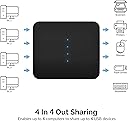
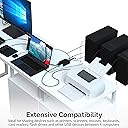
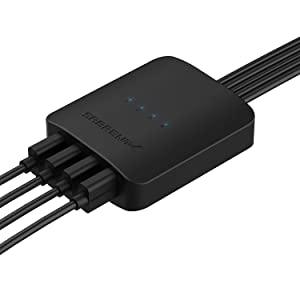
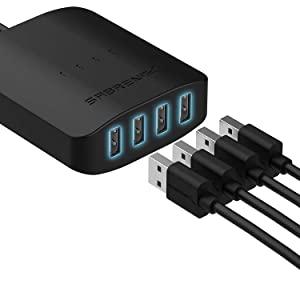
The SABRENT USB Switch Selector (USS4) is a compact, manual USB 2.0 switch that allows seamless sharing of one USB peripheral across four computers. Supporting data transfer speeds up to 480Mbps and compatible with all major operating systems, it offers a driver-free, plug-and-play experience ideal for professional environments requiring efficient multi-PC control.


| ASIN | B07RC8F2L3 |
| Actuator Type | Push Button |
| Best Sellers Rank | 16,331 in Computers & Accessories ( See Top 100 in Computers & Accessories ) 53 in KVM Switches |
| Brand | SABRENT |
| Circuit Type | shared circuit configuration |
| Colour | black |
| Compatible Devices | Desktops, Laptops, MacBook, Nuc |
| Connectivity Protocol | USB 2.0 |
| Connector Type | USB-A |
| Connector type | USB-A |
| Contact Material | Metal |
| Contact Type | Normally Open |
| Contact type | Normally Open |
| Control Method | Touch |
| Control Type | Manual |
| Controller Type | [Other] |
| Country Of Origin | Taiwan |
| Current Rating | 2 Amps |
| Current rating | 2 Amps |
| Customer Reviews | 4.1 out of 5 stars 1,715 Reviews |
| Global Trade Identification Number | 00840025210288 |
| Included Components | Audio Video Cables |
| International Protection Rating | IP00 |
| Item Dimensions | 7.6 x 6.1 x 1.5 centimetres |
| Item Type Name | Computer Data Switch |
| Lower Temperature Rating | 15 Degrees Celsius |
| Manufacturer | SABRENT |
| Manufacturer Part Number | USB-USS4 |
| Material | Acrylonitrile Butadiene Styrene |
| Model Number | USB-USS4 |
| Mounting Type | Surface Mount |
| Number of Items | 1 |
| Number of Positions | 4 |
| Operating Voltage | 5 Volts (AC) |
| Operating voltage | 5 Volts (AC) |
| Operation Mode | manual |
| Operation mode | manual |
| Product Warranty | 2 years limited |
| Smart Home Compatibility | Not Smart Home Compatible |
| Switch Type | Custom Electronic Switch |
| Terminal | Physical |
| UPC | 840025210288 |
| Unit Count | 1.0 count |
| Upper Temperature Rating | 39 Degrees Celsius |
| Wattage | 10 watts |
P**N
Worked right out of the box for 3 PCs
I was originally looking for a KVM switch to hook up 3 PCs to one monitor keyboard and mouse, but they're expensive (I need VGA or DVI as well as 1440p HDMI) and reading reviews many of them seemed to have potential issues. So I bought a cheap additional monitor to use for work and and my old optiplex (I only ever use one of those at a time) and this box to hook up a keyboard for 3 PCs. I haven't tried 4 (yet) and will update if I get round to it. One wireless dongle for the keyboard and mouse (Logi brand) and just tap the wired switch to change between them. No appreciable delay in switching and no issues with lag in gaming (I'm not a competitive gamer, I think a wired mouse would be better for that anyway). No software to install, it just worked, even on my fairly locked down work PC. I did read that a power supply is needed for multiple USB connections, but as I'm only likely to use 2 at most (the dongle and maybe a memory stick) I've got no need. And yes I did plug in my 64GB USB drive and it worked fine so a cheap and cheerful way to move files (slowly) from one computer to another. Only downsides (mentioned in other reviews) are the fixed USB cables coming out of it which are a bit of a rats nest behind my PC and potentially a failure point if the plan is to move this device around a lot and a short lead on the switch to change between devices (the only way you can do it). I'm not planning to move any of my PCs or take this device anywhere so not an issue for me.
L**A
Glitch when switching between devices - use the Micro-USB Power Port and an old Phone Charger
Hi all, Using this in anger to switch between my PC and Laptop. Plugged into this I have my peripherals, and my laptop docking station (a Cablematters USB C Multiport adaptor which includes USB 2.0 and DisplayPort). The intention was I could have a single USB-C to give my laptop video and keyboard/mouse. So with the two devices working together, I can ping the switch and switch peripherals, and then with the monitor I can select DisplayPort. This means I have a single USB-C cable for my laptop (which also charges it too). Anyway, I had an issue that meant when my laptop wasn't powered on, the Sabrent KVM wasn't having enough juice to "switch" my keyboard on. I discovered that the Sabrent KVM actually has a micro-USB to feed power into, to fix this issue (as my previous fix was to plug it out and then in again, highly annoying). I grabbed an old 1amp phone charger with a micro-USB and it has been perfect ever since. Hope this helps someone.
M**T
Works very well, some downsides for cable management
I have only two small gripes with this product (and why I didn't give it 5 stars) 1. The cable to the switch is too short 2. The cables to the different machines are fixed I'd like to have a tidy desk, so had planned to put the device under my central monitor and then have the switch running under the desk (I use velcro strips for things like this to fix them in place), but the cable is far too short. Once you combine this with the two huge cables from the back of the device that aren't used and the cables from the keyboard and mouse, you end up with a writhing nest of vipers on your desk. This could all be fixed with replacing all of the fixed cables with usb connections and allow the user to invest in better ones. Aside from this, the switch has a healthy sounding click (no confusion or accidental pressing) and the indicator light isn't bright enough to require eye protection. As said previously, I use velcro to fix things like this in place, so the ten mile cables out of the rear don't affect how it sits. The switch doesn't need any. It seems well constructed and doesn't scream for you to look at it, which I also like, but it's always going to be visible just because of the multitude of leads.
R**B
Only lasts about 3 years
Bought mine in Feb 2023. It's worked a dream for switching between controlling my home PC and my work Laptop. Lately it's started crapping out though. The keyboard and mouse will briefly lose power and then come back to life, interrupting your work. Sometimes, even once back to life, the keyboard will not register keypresses. It's alive because it's lit up again, but none of the keys do anything. Requires switching to the other device and back again for it to work again. I've verified this is not a keyboard issue either, definitely something failing on this product. Great device when it works, but I'm let down by the lifespan.
N**N
Switching between 4 devices just works.
This thing is amazing. It's no sweat setting it up and lets me use one keyboard/mouse between multiple PCs/Macs/laptops - you name it, it's made super easy. An external button is a nice thing to have, to cycle through devices from your desk conveniently without all the wires in the way. No issues with the connection cutting out. A great price for what it is.
A**H
Connection Issues
I'm looking for a decent USB switch hub that allows me to connect my mouse and keyboard between two devices: A work-supplied laptop, and my own desktop. Having arranged a return for another switch hub that disconnects due to very temperamental USB cables), I tried this one out since it allows a push button that allows the hub to stay out of sight. It's easy enough to set up (though it would be nice if the cables for the PCs were labelled) Unfortunately this seems to be another temperamental device. It connects to the laptop fine and anything that connects to it is fine. The switch detects any device which is plugged in and changes at the literal push of a button. However, it constantly connects and disconnects with the PC and no devices plugged in are discoverable on it, making this a product that is useless to me. Doesn't matter which cable I use on the hub, doesn't matter which USB port I use on my desktop, it simply will not connect properly. Seems amazing to me how no brand seems capable of making a decent quality, affordable USB switching hub that does what it needs. Yet another product to return.
M**N
Faster switching and more reliable than any other USB sharing device I've found.
This is almost perfect. The supplied cables are plenty long, but it's a shame that they're permanently attached rather than using USB sockets. At this price I'm not going to complain too much about that though. The actual switching process is far faster and more reliable than other USB sharing hubs I've tried before and having the option for 4 connected hosts means even my nerdy needs are catered for. I was frankly amazed to find that it happily skips over any unconnected or powered down hosts when cycling through them. And after two weeks of work I've not had a single USB device get "confused", which was a daily occurance with the simpler 2-host one it is replacing.
J**Y
Cost effective alternative to a KVM to connect a mouse and keyboard
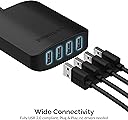
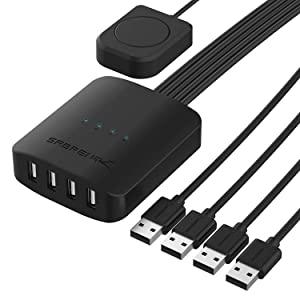
A reasonable switcher for the price. My small computer desk has two Windows mid-towers, and an Apple MAC mini, that all feed into an ASUS ProArt monitor. The issue is using one mouse and keyboard. I also needed to pick up the audio from each of the three computers, and play it back through a FOSI K5 Pro pre-amp and PreSonus Eris speakers (all obtainable from Amazon). The ASUS ProArt monitor has an inbuilt KVM that accepts HDMI, DP, and USB-C video inputs. The FOSI has USB-C, S/PIDF, and COAX inputs, so the easiest and cheapest solution was a 3 way or a 4 way switch. I know SABRENT from SSDs, so it is a known company. The plastic body has four female USB-A peripheral inputs such as a mouse and keyboard. On the other side are four male USB-A plugs, each on a long separate lead; these plug in up to four computers that connect to the peripheral devices. On a shorter lead is a push button that sequential operates four switches, each separately connected to one of the four leads to the computers. There are four tiny LEDs on top of the case, that indicate the selected lead to a computer. This is a cheaper solution than a three or four KVM, made possible by the inputs to the ProArt monitor. The lead to the push button needs to be longer, and each of the longer leads needs a number matching the number of the LED indicator.
A**R
Tappar tangentbord/mus vid byte mellan olika PC
Man behöver ofta dra ur/sätta i mus och tangentbord efter man bytt mål-PC
M**Y
Convenient and reliable
Easily lets me switch between a laptop and desktop so I can work from home using a work laptop and game at home on weekends using the same keyboard, mouse and monitor. Seems to manage the switch between machines reliably but has a button for the rare occasions it does not switch automatically. Pretty impressed with how neat it makes my set up.
�**�
Muy práctico, recomendable sin duda!
SABRENT USB Switch KVM USB 2.0 de 4 Entradas y 4 Salidas. Gratamente sorprendido por este dispositivo. Lo primero dejar claro que no es un KVM, donde también "swicheas" una pantalla, en este caso sólo permite trabajar con dispositivos que se conectan por USB. Lo que me ha sorprendido gratamente es que los 4 dispositivos que puedes conectar de entrada (ej. teclado, ratón, pendrive, HDD externo) trabajan hacia el ordenador con un único cable USB (de salida). Cuando utilizas el botón para hacer switch, pues redirecciona esos 4 dispositivos de entrada al siguiente PC ...es muy rápido y lo hace automáticamente sin necesidad de instalar anda. En mi caso la pantalla aplico el "switch" manual, al contar con varias entradas, pues tengo una al PC de sobremesa y otra al portátil. La única pega es que no me ha gustado el tacto del botón para cambiar entre ordenadores, tiene un tacto y ruido algo "plasticoso", pero de resto genial, los cables USB incluidos se ven de calidad y de un largo más que suficiente. Resumen: dispositivo muy muy práctico, fácil de usar, pequeño ... deberías tenerlo aunque no lo necesites ahora mismo (viene genial para cuando un colega te trae su PC para reparar por ejemplo).
Z**H
Pretty good
I kept buying generic USB switches that are just rebrand of another manufacturer, and they all had a common problem. They all had ghosting key presses. They would either not register a key stroke or double up on a key stroke. They often randomly stop switching all devices attached(mouse, keyboard, webcam, headset), and would bug out. Sabrent is a well known brand, and so far this thing hasn't dropped a beat. The price is great, even less then some of the many others I've tried. While this is working well, I haven't had it as long as the other, so this review may change in the future. If it last a year without bugging out, I'll be happy. Pros: 1- Switching from 1 PC to another is quick, with no delay. It's only as fast as your OS will register the peripherals being connected. 2- Can have a USB micro connected to give additional power to the USB devices(I havent needed it, but glad it's an option). Cons, every product has at least 1: 1- The USB cables that connect to the 4 other PCs(if you want to connect to 4, the option is there, I needed 4) is attached to the HUB, so if you only need 2, you have to cable manage the other 2 lose cables. Not a huge deal, but worth mentioning. 2- The button to switch, while big and responsive, only cycles through 1-4. It would have been nice to be able to press, Left for 1, up for 2, right for 3, down for 4, or something. Again, not a huge deal, but it can be annoying hearing the other PC's make the USB connecting sounds when rotating through. That's it. I would recommend this one for sure even with the cons, since it hasn't been ghosting my key presses, and switching to the next PC instantly with no delay.
A**U
Switching is very inconsistent
I purchased this item because I have two computers, and want use both the mouse and keyboard for both. It works well enough when I'm using my mouse and keyboard on my main computer consistently, but when I have to switch back and forth it doesn't work nearly as well. Specifically, sometimes it simply doesn't switch, or when I turn on my computer it simply isn't sending the signal to the correct place. Often with some plugging / unplugging, and repeated clicking it eventually works, but I'll be buying another simpler and more consistent item to accomplish this.
Trustpilot
2 days ago
1 month ago