🎉 Level Up Your Gaming Experience!
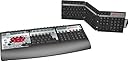
The SteelSeries Zboard Gaming Keyboard is a cutting-edge gaming accessory designed for serious gamers. With full key customization through the SteelSeries Z Engine, it supports over 150 pre-defined game profiles, features interchangeable keysets, and boasts anti-ghosting technology for up to 7 simultaneous keystrokes. The keyboard also includes a built-in USB hub with 2 ports, making it a versatile addition to any gaming setup.
| ASIN | B0002H7F3G |
| Additional Features | Rechargeable |
| Antenna Location | Gaming |
| Best Sellers Rank | #148,021 in Video Games ( See Top 100 in Video Games ) #915 in PlayStation 2 Accessories #5,658 in PC Gaming Keyboards #14,747 in Computer Keyboards |
| Brand | SteelSeries |
| Built-In Media | USB Cable |
| Button Quantity | 104 |
| Color | Black/Silver |
| Compatible Devices | Gaming Console |
| Compatible Operating System Family | Windows |
| Connectivity Technology | USB |
| Customer Reviews | 4.2 out of 5 stars 230 Reviews |
| Enclosure Material | Metal, Plastic |
| Global Trade Identification Number | 00826734000594 |
| Hand Orientation | Ambidextrous |
| Item Weight | 4 pounds |
| Keyboard Description | Multimedia |
| Keyboard Layout | QWERTY |
| Manufacturer | SteelSeries |
| Mfr Part Number | PW1USE1-B3ZBD01 |
| Minimum Required Operating System Version | Windows 10 |
| Model Number | PW1USE1-B3ZBD01 |
| Number of Keys | 108 |
| Number of Packs | 1 |
| Number of Sections | 1 |
| Power Source | USB Powered |
| Recommended Uses For Product | Gaming |
| Series Number | 1 |
| Special Feature | Rechargeable |
| Style Name | Contemporary |
| Switch Type | Tactile |
| Theme | gaming |
| Total USB 2.0 Ports | 2 |
| UPC | 826734000594 |
| Unit Count | 1 Count |
| Warranty Description | 1 year warranty |
B**N
Great gaming keyboard
I have been using this keyboard for years and love it. I use to avoid first person shooter games because I just couldn't get use to the WASD movement. My fingers would always slip off the keys and I would end up hitting the other keys and end up blowing myself up with a grenade ore something. That all changed when I found the Zboard. I love the butterfly pad on the left hand side that is set up perfectly for ease of movement and improved access to other important keys. The butterfly keys are large and slightly angled to keep your fingers in the proper position. This set up also works great for MMORPGs and man other games that allow WASD movement. The right hand two thirds of the board is a standard keyboard that you can use for typing. The gaming keyboard does not have a num-pad. Some thing had to go to make room for the butterfly pad. Also, there is no ~ key. I guess they ran out of room and figured that was the least used key. Quite a few games do use that key. They should have kept that and got rid of the Ins key. Who uses that? None of that is a real issue. If you need the total functionality of a full keyboard, you just have to swap out the gaming keyboard with the standard keyboard and you are good to go. It only takes 15-20 seconds to do. One thing to note is that the keyboard requires that the drivers be installed. The keyboard will not function properly without them. Also, the keys are programmable through the software that comes with the board, but there is really no point in that. It is far easier to program the keys within the game itself. The one premise that this keyboard was built around was the ability to swap out the keyboard with different key sets designed for specific functions. They have key sets that are specific to certain games and applications. In my opinion, you don't need any key sets other than what comes in this package. Every popular game that comes out gets a key set. Most are just the basic key set with with some artwork and keys labeled for specific functions. I really don't find it practical. The FPS ones are not bad, because they are designs are functional but, in most cases, once you set up things the way you like it on the default gaming board, you don't really need to have a specialty board. Most FPS games are set up pretty much the same way. I did get the DOOM 3 one packaged with the game. It did offer a slightly better setup specific to the game, but I could have easily w got by without it. That said, the additional key sets they create for the MMORPGs seem completely worthless to me. Movement in those types of games are now more like the FPS games. I'm sure that there are still a lot of people in those games that use the arrow keys for movement instead of the WASD, but that is because they lack a better option. The butterfly pad is the perfect solution, but they don't design those boards that way. They basically give you a standard keyboard setup with colorful graphic of the game, and keys labeled for specific function, but it leave movement on the right hand side arrow keys. Movement on the right hand side is impractical. That is the mouse side. People have to reach across their body to use it. People use it that way on standard keyboards because they have to, but you would think that a keyboard designed for gaming would give the a better option. They are not even enhanced butterfly type keys, just the standard arrow keys. I don't understand this design at all and I find them completely useless. I use the standard gaming board that comes in this set for all my gaming. They also make the MERC gaming keyboard, which I also own. In some ways it is designed a little better for gaming, but unfortunately some design flaws on that keyboard sent me back to my Zboard.
D**R
Versatile Keyboard with small learning curve
I got the Zboard a few weeks ago after I saw they finally had divers for Vista (It didn't when I got my PC, so had to use the Fang gaming pad before that). I also got the Tabula Rasa & Guild Wars keyboards from Amazon & ordered an out of print gaming keyboard & 2 business keyboards from the Ideazon site. First, I had no problems with the Ideazon site. Found the Vista driver (not on the CD) and Warrantee info (1 year on keyboards & Gaming Keyboard inserts if you have the receipt & don't peal off the keyboard label.). Their site is well laid out, so I don't know what the complaints are, unless they are old reviews & the Ideazon site has changed since then. I also found they had keyboards for Business programs like DreamWeaver, Excel & Photoshop. I thought I'd try something I knew very well (Excel) and something I knew enough to get by (DreamWeaver) but more on them later. The keyboard comes with 2 inserts, a "normal" keyboard and a gaming one. The normal keyboard has all the expected keys, but seems like the keys are about 10% closer together, so it takes some minor getting used to. It also has a bunch of functions at the top, like Sound +/- & mute, and instant start programs like calculator, notepad, e-mail, chat, Web browser, Ideazon site & Zboard key changer. After a day my typing speed returned to normal getting used to the compression. The keys have the same top surface area, but are less pyramid like at the base, so may not accumulate as much dust. Even if it does, it's an easy thing to shake off the keyboard. They gaming keyboard put something like the Fang on the left side, removed the 10 key pad, causing me to purchase an USB 10 key pad to plug into one of 2 USB ports in the keyboard, since I used that for gaming a lot. There is also a weird break in the middle, separating the B from the N by at least 2 key spaces. Also the Tab is tiny and the Cap lock huge, so typing can be an experience. Have not recovered my typing speed on this, and resorted to "hunt & peck" on a few occasions. But I want to game more than type, so it's not a big deal. (I always manage to get myself killed if chatting too much during gaming, and if chatting is my objective, I can swap out the keyboards in less than a minute, even in the middle of a game.) I'm not sure this is better than my old keyboard with a Fang, except Vista has stopped crashing while gaming, which it used to do on occasion with the Fang. So it is at least as good. Tabula Rasa has a normal keyboard with special keys in the num pad area, plus the letter keys list what they do above the letters. I like this a lot except I used unused keys to turn on the Fang, and the keys in that position have weapon switch listed on them, which is a problem with the game Tabula Rasa, not the keyboard. I hate mouse navigation. The business keyboards were a delight. Excel has everything I knew how to do, but saved me keystrokes, instead I could type an Alt or Ctrl letter or such for the commands. Very nice & I picked up on it instantly. DreamWeaver had the keys labeled so I knew how to do stuff I was too lazy to research, and just fixed in HTML because it was easier than learning how DreamWeaver did it! Excellent! I am planning to get one on Photoshop, which I know nothing about & use a less featured graphics program instead of buying a manual to teach me how to use this powerful program. The Guild Wars keyboard I purchased works well. The only problem I had, was one time I snapped it into place without having it lined up correctly (which wasn't easy for me to do. Really had to force that lock.) and the only problem it gave me was a slow response time. Other than that one time, it has faster than normal keyboard response time, lets me easily switch my powers, has a row that can be made into often used emotes, has excellent movement keys including turning, and everything has lables to remind me what it does. The num pad is replaced by movement keys & keys to bring up windows, like your armor, or stuff in your bags. Not all gaming keyboards have normal keys. Civilization has well over 100 circular keys. I plan to get this one too. So, changing keyboards take almost no time & pulls up the programming that goes with that keyboard. You can create sets of macros for keyboards & easily save them & the response time is very fast if the keyboard is in correctly. The only problem I see is that I want to get every keyboard they make for every program I have or might get. I like this a lot.
L**N
Ideazon Zboard Gaming Keyboard
The gaming keyboard is great for in-game play. I love being able to use the ergonomically placed keys when I'm enthralled in an intense battle. The original key boards are ok, but zboard provides the gamer with the perfect finger/key placement for every move, weapon selection, or communications with fellow troops. Two thumbs up for game play. There is one nuisance that you have to be whiling to put up with though. Switching the gaming keyset out to play a game works fine the first time, but not for the next switch. When switching back to the original keyset, it is a 50/50 chance that it will work right. So, a reboot is required to make life normal again. As long as you are playing the game, you will have the advantage. It took me about eight hours of straight game play to get really comfortable with the new keyset. The time can be shorter or longer depending on the person playing. I found it very easy to locate and download the new keyboard drivers. The keyset drivers were very easy to update too with all the most common games listed. I would recommend the keyboard, but don't get frustrated after one hour of dying because you will see a decrease in your scoring for a little bit and then it will sky rocket afterwards.
L**N
Great board!
The zBoard is sweet. The ease of the keysets and the keysets that are available (like the World of Warcraft one) make it a worthwhile buy. The keyboard is comfy and feels good on the fingers. And it has TWO low-power USB ports on it for accessories like your mouse. If you are into gaming and looking for a good keyboard to use, this is one to look at. I am quite picky when it comes to keyboards and I love the zBoard system. ^_^ If you decide to buy one, buying from Amazon.com will save you a few bucks. BUT BE FOREWARNED! As someone else has already mentioned here in feedback, when I received my zBoard, it came with the OLD version of the standard keyset. I have been told by [...] support that that keyset is not even produced anymore so why (and how?) Amazon.com is shipping them with the new zBoard base and gaming keyset is beyond me?? FYI, the current zBoard model is ZBD101. Amazon.com did offer a replacement if I wanted to send the zBoard gaming system back in, but I really don't want to wait on shipping. lol Plus, I bought mine for gaming mostly anyway so no big deal as I won't be using the standard keyset much. Amazon.com did offer me a 20% refund, though, since I didn't choose to return the item. (So yay! I saved even more money. ^_^) In case you are wondering, the new version of the standard keyset has colored-coded labels (green, blue, white) with more keys/shortcuts labeled. The old version (which I was sent) has all white labels with fewer keys/shortcuts labeled. The zBoard is a 5/5 for me. Note: You will want to get the newest drivers from [...]. I have had a problem in the past with updating the driver and had to contact zBoard support to have them tell me all the registry keys that I needed to remove before I could suceessfully install the newest version. I have never again experienced that problem, though. ;) EDIT 2/4/05: I was contacted via e-mail by [...] support again. They're going to replace the old version standard keyset that I received from Amazon with the new version. I think this is very nice of them, especially considering I never asked for a replacement. Just some food for thought since a couple people here have had problems with [...]/Ideazon. EDIT 2/21/06: Well, it has been a little over a year that I've had my zBoard. I've had no problems with it - with exception of the wrist rest tabs breaking off, but that's because that part is cheap and the zBoard got knocked off a table twice by my cat. The zBoard base and keysets are very durable, however, (it's been knocked off the couch a few times, too. lol) and work fine. ;) The gaming keyset IS very awkward to type on like others have mentioned. Usually, I have my World of Warcraft keyset in, though, and have no problems typing. (My boyfriend hates it -lol- and complains until he snaps in the standard keyset.) Easy, durable, functioning, feels good on the fingers.... Those all describe the zBoard. Still 5/5 after a year.
T**R
Cool but not necessary
I bought this hoping to make World of Warcraft easier to play. It does but for the life of me I'm not a macro programmer so there's lots of features that I still don't use like the extra row of buttons to the top edge of the board. And I use print screen regularly and I haven't figured out how to program it into the board. The Technology is cool but a bit delicate so take care switching the keyboards and Z board takes great care in the manual it state this fact. It seems well enough made if you take this precaution. I also bought the WOW board and found that although it moves the quick links into groups and marks them well enough, that really doesn't matter to a person able to use a regular keyboard well. It's a good product just not really my bag.
W**K
Awesome new innovation!!!
I was skeptical, at first about this product. I purchased it as a bundle with the Age of Conan keyset (which included a $20 rebate so I got that keyset for free). I did this as a pre-order and the z-board came about a week before the AOC keyset. I had been playing Call of Duty 4 so this was the first game I tried with the z-board and the "gaming" keyset. Whoa, very awesome. It was a new dimention in my gaming experience. Not only was the keyboard easy to install but it had so many features that I was overwealmed. The keyset itself could be programmed easily for COD4 with a simple mouseclick. All the special keys were mapped and in very finger friendly places. The keyset itself was ergonomically designed for ease with larger movement keys and rounded keys for ease of use. You can even program your own hotkeys and multiple key commands! This product is awesome! The regular keyset is smooth and very responsive. I'm typing this review on it now. There are specialty keys at the top as clear buttons that give you easy one touch access for getting to the z-board website, opening up a web window, the calculator, lists, mail, and all sorts of others. As an added bonus the base itself has 2 USB ports in it so you can quickly add a mouse, flash drive or other USB item. The z-board is very sturdy and well made. Lots of thought has gone into this product and there are many keysets add ons out there to purchase. The very nice thing is that each keyset has it's own memory to remember your programmed keys and pre-programmed keys. Just drop in your keyset and go. I love this product and give it the highest rating. Easy to use, updates on the web, easy to install, smooth key operation, and soooo many special features they are too numerous to name. Check out the z-board website for product info. Just remember that there are two versions a standard keyboard plug (you know, the round one) and a USB one. GET THE USB one. I have heard horror stories about the regular keyboard one. I have had zero problems with installation, use, or with any of the keysets. If you want THE BEST (in my opinion) gaming keyboard and most adaptable keyboard (I say this generally because they have a Photoshop and other "work-type" keysets available too!) this is the one for you.
U**N
good idea...
it's just junk, the thing had potential but it was done terribly, as for hardware it's alright, but it isn't any better than a regular keyboard, AT ALL. the thing that makes it junk is the software, i used if for a few months because i didn't want to waste my money, but i just gave up, whenever i changed keysets it would freeze and i would have to reboot or unplug the usb, i tried using their costomer support but it was worthless, i then tried to download the newest version of the software, while installing it it just froze, then i couldn't use my mouse, so i couldn't do anything, the fact that the keyboard software messed up my mouse is pathetic, i had to manually turn off my computer and do a safe start to be able to finnaly remove the horrible software. save your money, this keyboard is worthless, i'm using a $10 dollar keyboard that i got at wallmart right now, and it is way better
R**A
Awesome Keyboard!!!
It did not take me too long to realize that I wanted this keyboard after seeing all of its features on Amazon.com. I can only say that I am absolutely blown away by this keyboard! You cannot get anymore features packed into a keyboard for this value! First off, the construction of the base/keysets is top-notch, not plasticky-feeling like many keyboards out there. You get 2 USB ports to boot! Second of all, I like the intuitive software that enables the gaming keyset to recognize the game that is loaded. I especially like the fact that this keyboard comes with 2 keysets instead of one (gaming and standard). The Standard keyset has all of the key shortcuts beautifully integrated via color-coding on the keys. As for the Gaming keyset, I was very impressed with how comfortable it felt while gaming. The keys are very well spaced out and easily identifiable. I've read complaints about how expensive other gaming keysets are for the Zboard and all I can say is this - with the customization that is available with the gaming keyset included, there really is no reason to get any other keyset (sorry Ideazon, but there isn't). Awesome product!
Trustpilot
5 days ago
2 months ago