Desertcart purchases this item on your behalf and handles shipping, customs, and support to EGYPT.
🚀 Upgrade Your Home Network to Gigabit Greatness!
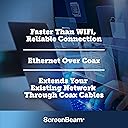
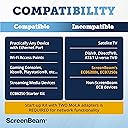
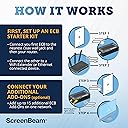
The ScreenBeam MoCA 2.5 Network Adapter kit leverages your home's existing coaxial wiring to deliver ultra-fast wired internet speeds up to 2.5 Gbps. Ideal for 4K streaming, gaming, and remote work, it supports up to 16 connected devices with low latency and broad compatibility. This all-in-one starter kit includes two ECB6250 adapters, power adapters, Ethernet and coax cables, and splitters, making it a plug-and-play solution to bypass Wi-Fi limitations and future-proof your home network.


| ASIN | B088KV2YYL |
| Best Sellers Rank | #4,155 in Electronics ( See Top 100 in Electronics ) #199 in Computer Networking (Electronics) |
| Brand | ScreenBeam |
| Built-In Media | 2 Coax Cables, 2 ECB6250 Adapters, 2 Ethernet Cables, 2 Power Adapters, quick start guide |
| Color | Black |
| Compatible Devices | MoCA/Ethernet/Wireless Extenders/coax |
| Customer Reviews | 4.4 out of 5 stars 1,874 Reviews |
| Data Link Protocol | Ethernet |
| Data Transfer Rate | 2.5 gigabits_per_second |
| Hardware Interface | Ethernet |
| Item Dimensions L x W x H | 4.5"L x 2.2"W x 1.1"H |
| Item Type Name | MoCA 2.5 Network Adapter for Higher Speed Internet, Ethernet Over Coax - Starter Kit |
| Item Weight | 10.4 ounces |
| Manufacturer | ScreenBeam |
| Mfr Part Number | ECB6250K02 |
| Model Number | ECB6250K02 |
| Product Dimensions | 4.5"L x 2.2"W x 1.1"H |
| UPC | 789286809469 |
| Unit Count | 2 Count |
| Warranty Description | 1 Year Parts and Labor |
M**T
Upgraded from Cable to Fiber and extended WiFi mesh network using Cable lines
I recently upgraded from cable to fiber and was looking for a way to get better coverage from my mesh network. The master of my mesh had been set-up within a couple feet of my fiber modem/router to enable a physical connection of the two through an ethernet cable. Having two access points right next to each other limited my coverage. I bought a pair of MoCA Network Adapters and was able to move the mesh network master to the far end of my house and send the signal back to my fiber modem/router through my cable lines. This process was simple and took less than 20 minutes (mainly disconnecting and reconnecting the cables and hardware). It worked perfectly and I now have much better speeds/coverage throughout my entire home.
S**H
It works great and simple to set up! Highly recommended.
This worked great for me. It feels like a high-quality adapter, and I would highly recommend it if you need one. It’s very simple to set up once you figure out where your coax splitter is. It genuinely improved our home setup—I was sick of Roku buffering in the basement due to a Wi-Fi dead spot, and now everything runs at maximum speed. One note for FiOS users: if you’re using the FiOS G3100 router, remember that it has a built-in MoCA adapter. You’ll only need this adapter if you want to bring an Ethernet signal to another room. And if you want Ethernet in multiple rooms, you’ll need one adapter per room. Also, if you're planning to put a wireless access point in another room, keep in mind that the FiOS E3200 extender already has its own built-in MoCA adapter. In my case, I specifically needed Ethernet in additional rooms, which is why this adapter was essential.
D**A
If you have a poor WiFi signal you're dealing with. YOU NEED THIS SYSTEM!
This MoCA 2.5 system is the bomb! My job is remote, and I work for a company in Massachusetts while living in Arizona. I work with CAD modeling software and the models get pretty big with 1000's of parts. Previously, I was using WiFi which was provided by COX and their modem with panoramic WiFi didn't cut it, download speeds were horrible. If I was near the router I would get 325-330 Mbps. In the room where my computer system is which is a straight run down a hallway, I was getting 10-20 Mbps. I installed a net extender and the best I could get with it was about 30-40 Mbps. It would take 30 minutes to upload the model I was working on and that would sometimes result in a communication error. After installing a ScreenBeam MoCA 2.5 which was so easy to install, I was downloading at 324.7 and that was through a secure VPN tunnel! Model open time was 33 seconds! These devices are amazing and will be saving me from lots of frustration and lost time! I will probably buy 2 more of these extenders for 2 more rooms. The only drawback I will say is the installation took 3 coax cables at the router and 1 in the room where it was going. The system I purchased only came with 2. Normally it wouldn't have been a big deal because over the years, I accumulated dozens of coax BUT, we moved in to our AZ home back in March and I threw out all the junk I didn't want to carry across the country and the coax cables were part of the cleanup. I got these the evening before Thanksgiving and I was fortunate enough to have my cousin stop by and bring me a coax cable and stay for Thanksgiving dinner. It was a 10 minute install and it works flawlessly! So make sure you have a spare coax cable or 2 hanging around. The image below is a picture of my laptop computer on the left and my desktop computer on the right. The left is running the MoCA 2.5 system and the right is using Cox WiFi at 2.5 GHZ with a net extender halfway between the modem and my desktop. Total length between modem and computer room is about 55-60 feet.
D**E
FAST INTERNET
We have a back house detached from the main house with poor wifi reception. These worked great. Super fast internet now. Before, I could not even work because it lagged so much.
J**E
Works as advertised.
Used this for streaming content to smart TV located far from WiFi reception. Fortunately all my coaxial cables originated from a single source in my furnace room and my cable modem is in the same furnace room. Using the two adapters it was very easy to connect the internet in the furnace room to the Apple TV box in the far room using the adapters and coaxial cable. All plug and play with no configuring needed. This tripled my internet speed and there have been no drop offs in signal. Only gave it four stars as it seems an expensive solution but it does the trick, was easy to install, and negated the need for (even more) costly rewiring.
D**T
Extremely easy setup. Bad Instructions.
I like that this product, once installed, works. There isn't anything to configure, update, or maintain; you just plug everything in and it works. I read another review that said you have to have direct cable lines and no splitters for this to work, but that isn't true. I have 4 of these on opposite ends of my house with multiple splitters (at least 4 that I know Xfinity installed) in my home for TVs and the cable modem and these things perform just as they should. That person likely has the wrong type of splitter, as there are some that will filter out MoCA device frequencies. Per ActionTec's site, splitter requirements are as follows: The splitter needs to be: MoCa compliant Bi-directional 5-1675 Mhz 6kV Coax ports are -3.5 d(b loss) My speed using wireless repeaters was about 25Mbps max, but using these, I am getting about 95Mbps (average) when I do a speed test to Xfinity. Keep in mind that I am being limited by my computer's 10/100 ethernet connection and which tops out at 100Mbps AND the limited speed that Xfinity provides to my home. Connection stability and speed are both outstanding and unparalleled. The only negative I have is the poorly written instruction manual. It was either written by someone who isn't a native English speaker or someone with severe ADD, as they seem to be written out of order and don't make sense. Luckily for me, the instructions aren't really required as the setup is very straightforward and basically idiot proof, although some basic computer network knowledge is useful. You plug the cable in, the ethernet in, the power in, and you should be up and running within seconds. I didn't use the instructions to set mine up, and the only reason I know the instructions are poorly written is because I was wondering what the MPS button on the side was for. That's another reason that I believe that the instructions are poorly written because there is absolutely NO documentation on what that button does. I went to their website and this is what the MPS button does according to ActionTec, "The MPS (MoCA Protected Setup) button allows the ECB6250's to secure the data connection. This is only compatible with other ECB6250 devices. It will not secure on a mixed MoCA network." Just so everyone is aware of the functionality of that button and the limitation in the event they plan to use a mixed MoCA network. The only unknown is how long they will last. Everything electronic dies at one point or another and since I have never heard of ActionTec, I wonder how long these will actually last. For $400 (I bought four at $199/pair), if they last me at least five years, then I feel like I got my monies worth; but I hope they last longer than that.
A**N
Doesn't work for HDMI over ethernet distribution leveraging coax.
BLUF: Can I connect this to OREI 4kHDMIsplitter(TV) over ethernet by converting hdmi->cat6->cable->cat6->hdmi? OREI works and I have tested coax to location. The answer was no. I currently have this HDMI to Ethernet Splitter in several homes: 4K 1x8 HDMI Extender Splitter by OREI Multiple Over Single Cable CAT6/7 4K@60Hz 4:4:4 HDCP 2.2 with IR Remote EDID Management - Up to 115 Ft - Loop Out - Low Latency - Full Support It is awesome, however, I have one bad ethernet cable and I am unable to get the signal to that TV. We use this to watch football games and movies in multiple rooms at once. I have a coax cable to that location and thought this would be great, however, when testing it on a TV that has been workign with the OREI, and a known great ethernet connection as well as a known great Coax connection (tested with Klein both for continuity and for identification)... when we inserted this on the coax line, nothing came through on the signal. So we tested the unit set up with just a long coax cable the two end units and plugged the Klein tester into the two ethernet points on this unit and it identified as a short. The product didn't work for us. I see some have had better luck but I wanted to post this for those network engineering and home theater folks who want to really use this for something other than just internet since most have wifi these days and ethernet is finding expanded use for home theater and many restaurants and bars use HDMI over ethernet TV distribution. I may be willing to give it one more go on another unit after I return this one. If I do, I'll update a review to share the findings from the additional unit. It may just not be capable of handling true home theater and gaming applications of this nature, or it may be a faulty unit.
B**E
Works as advertised as a Fios customer
I switched from Comcast to Verizon Fios this weekend for internet and TV. I had my own modem/router so I didn't have to rent from Comcast, and I wanted the same thing for Verizon. Just one nitpicky thing from me because in the end, the equipment to replace the Verizon router ended up costing about $60 more than the router if I had "purchased" it outright ($300) but I couldn't be happier about it. So I bought my own standard router (an ASUS with Wifi6) and after swapping it out for the Fios router, I realized that the cable set top box stopped work after about a day while it was trying to retrieve TV guide, DVR, and On Demand data. I had thought that I was just going to miss out on DVR and On Demand since I have never used those features for any service I've had, so that was a whoops. Purchased this and the problem was immediately resolved. Fios TV and internet worked just fine and I reset the set top box to make sure it wasn't using cached data from the Verizon router. Didn't have to do any setup, it was just plug and play. I bought a 2-pack because I am also in the process of setting up a wired link to an upstairs office after figuring out the mysterious second connection Comcast made to my wiring because the Fios tech was surprised that I still had working Comcast wifi coming from my upstairs router after he disconnected the cable coming into my home from outside. It's been over 24 hours with the current setup and everything is still perfect. Blazing fast upload and download speeds and all of my TV guide data is there. The Verizon router has been sitting in a corner waiting to be returned and I've also tested the setup again by connecting a MOCA filter that arrived a couple hours ago. So 5/5 stars from me so far. My setup is: fiber optic cable from outside -> ONT in my living room ethernet cable from ONT -> router coax cable from ONT -> 4 way splitter coax from splitter -> one of these MOCA adapters -> ethernet to router another coax from splitter -> Verizon set top box -> HDMI to TV third coax from splitter -> waiting to be connected to wall port after I resolve the Comcast coax issue November 25 update: Setup still works fine, turns out the upstairs coax isn't connected to the first one downstairs so instead I bought a wifi6 extender to put upstairs, connected an ethernet switch to it, and I'm getting the same fast speeds over a "wired" connection now. There wasn't a problem with the second MOCA adapter since when plugged into the four way splitter with the first one, the coax light was fully lit (unlike when it was connected upstairs). So while it looks like I bought one more MOCA adapter than I actually needed, it's not the fault of the device itself so still 5/5 for me.
M**.
Alternatively to laying cat 6 cables
I am so satisfied that I bought another set to covered the requirements for the other rooms.
R**U
Trop produit
1gb stable entre le salon et le grenier via le coaxial rapidité d'installation attention besoin adaptateur prise USA
A**R
Vastly improved network speed
In my house, the UHF TV signal is distributed throughout the house by a 12 way distribution amplifier fed from a log periodic aerial in the loft. There is a restrictive covenant covering all houses on the estate that prohibits any aerials other than satellite dishes and these must be fitted below the roof line. My house is in a dip and out of sight of the transmitting aerial some 15 miles away. The signal can be intermittent and prone to distortion especially in certain weather conditions. To provide a good signal to the two main reception rooms I used a SkyQ satellite dish to receive Freesat satellite signals. This meant that the two coax cables from the distribution amplifier in these rooms are not needed. However, a consistent high speed network feed for streaming is essential. This led to a decision to unplug these coax cables from the distribution amplifier in the loft and connect them together so that there is a continuous coax cable between the lesser reception room which houses the FTTP (Fibre to the premise) broadband feed and the main reception room. They are 15m apart. Initially, I purchased the ScreenBeam starter pack of MoCA Network Adapters (ECB6250) and they were an immediate success. Installation is very simple and quick. I had the link working in ten minutes. I was so pleased with the setup that I then purchased an additional single adapter to connect the Office computers to the net. I replaced the coax cable connector in the loft with one of the splitters included with the kits and then connected the Office cable to the splitter. I was delighted with the results. The average of a series of Ookla broadband speed tests using the computer in the office returned a download speed of 941 Mbps and an upload speed of 110 Mbps. If you are interested in using these MoCA adapters I would suggest using F Type cable connectors throughout. In my setup, the coax cables to the distribution amp were already F Type and I replaced the face plates in the Reception rooms and Office with F type faceplates. Also you will need to purchase USA to GB plug adapters as the kits come from the USA. That said, service from the company via Amazon was outstanding and the units were delivered within days and update information was timely and informative.
S**N
Fantastic!
Works exactly as advertised! Zero speed loss from my main router to my mesh node. Very helpful system in an older house that isn't wired for ethernet cables. In my specific setup I needed a 3rd coax cable, but luckily I had a spare handy in my box of old cables.
M**E
Perfect !
It works perfectly ! I also buy some devices to switch from US to European connection
Trustpilot
5 days ago
1 month ago