Desertcart purchases this item on your behalf and handles shipping, customs, and support to EGYPT.
💡 Upgrade your home IQ with smart control that’s as easy as a tap!
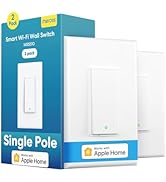
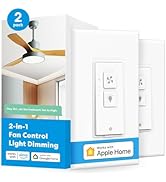
The meross Smart WiFi Switch (MSS550) is a versatile 3-way/single-pole light switch designed for quick DIY installation. It supports 2.4GHz WiFi, integrates with Apple HomeKit, Alexa, Google Assistant, and Siri, and enables remote and voice control. Featuring customizable scheduling, energy-saving automation, and a fire-retardant build, it fits standard Decora faceplates and requires a neutral wire. Perfect for modern homes seeking smart convenience without the premium price or complexity.


| ASIN | B0894KT8DC |
| Actuator Type | Push Button |
| Best Sellers Rank | #30,462 in Tools & Home Improvement ( See Top 100 in Tools & Home Improvement ) #115 in Electrical Light Switches |
| Brand | meross |
| Brand Name | meross |
| Circuit Type | Support 3-Way or Single Pole |
| Color | White |
| Compatible Devices | Apple HomeKit, Amazon Alexa, Google Assistant, SmartThings |
| Connectivity Protocol | Wi-Fi |
| Connector Type | Clamp |
| Contact Material | Copper |
| Contact Type | Normally Open |
| Control Method | Voice |
| Control Type | App, Voice, Remote Control |
| Controller Type | Amazon Alexa, Google Assistant, homekit |
| Current Rating | 2 A |
| Customer Reviews | 4.4 out of 5 stars 1,086 Reviews |
| Included Components | 1 x Quick Installation Guide |
| International Protection Rating | IP00 |
| Item Dimensions | 4.7 x 2.8 x 1.5 inches |
| Item Weight | 3.2 ounces |
| Manufacturer | meross |
| Material Type | Plastic |
| Model | MSS550 |
| Mounting Type | Wall Mount |
| Number of Items | 1 |
| Number of Positions | 3 |
| Operating Voltage | 120 volts |
| Operation Mode | ON-OFF |
| Part Number | MSS550 |
| Specification Met | Fcc,ic,etl |
| Switch Type | Support 3-way Or Single Pole |
| Terminal | Spdt |
| UPC | 787446925547 |
| Unit Count | 1 Count |
| Upper Temperature Rating | 104 °F |
| Warranty Description | 2 Year |
| Wattage | 200 watts |
D**D
Works great.
Great replacement switch. I had a few problems and customer service was very helpful, easy to get a hold of. Integrates easily with Home Assistant.
T**Y
Great switch at the right price
To start with, I am very happy with my purchase thus far. It was priced right, easy to install (took about 5-10 min), and works very consistently. I have started to get more into smart devices recently, and had a problem I needed to solve. I own a 3-story townhome, with a deck on the 2nd/living room floor. There is a bright light over the deck, but there is no light switch near it or on the same floor. For whatever reason, it is controlled by (2) 3-way light switches: one on the top floor in the bedroom, and one on the bottom floor in the utility room. Why would the light be configured that way? I have no clue. To turn it on or off, I have to go either upstairs or downstairs. So here is where the idea of a smart 3-way light switch came up. The idea was to have it controllable while out on the deck, but still controllable from the light switches. Also, as I get more into the smart devices, I was wanting Apple HomeKit support as I am being heavily persuaded by loved ones to jump over to the Apple side of things and away from Android. Although I'm not fully convinced to make the jump, I wanted support for both options just in case. I purchased this 3-way switch from Meross for about $28, which was great compared to others I had seen that supported both Android/Alexa and Apple Homekit. You only need to replace one 3-way switch to make it smart, so I chose the one in the utility area on the bottom floor. At first I was a bit apprehensive due to not having messed with 3-way light switches before, and rarely have had to change a light switch (primarily rent). So a 3-way was a bit confusing to me. However, Meross made it quite simple with their instructions and wiring diagram. I have attached some photos, 2 of which I've added some notations for some guidance that I learned along the way. Also, your first step should be to shutoff the breaker in order to kill power to the light switch. Safety first. I was not familiar with "Traveler" wires that are used with 3-way switches. I found that these red and black "Traveler" wires connected to the original standard 3-way switch using brass-colored screws. This made them easy to identify. You just disconnect the wires from the original light switch and use the provided wire-nuts to connect them to the wires coming out of the new switch. So here is how it goes, referencing the marked-up wiring diagram and light switch photos I've attached: L = Live = Black wire connected to original light switch T1 & T2 = Traveler 1 & 2 = Red and Black wires connected to brass screws on original light switch N = Neutral = White wire. The neutral wires should be bundled/connected with a wire nut and stashed behind your original light switch, but not connected (mine wasn't). Just undo that wire-nut and add the white Neutral wire from the new switch, then screw on the wire nut again to bundle ⏚ = Ground = Green wire connected to original light switch (If you have one. My original light switch didn't have one) Hopefully that gives enough detail for others (like myself) who have never done this before. Simple enough. So, a few notes: the plate that comes with this switch is slightly skinnier than your standard light switch wall plate. It didn't seem to be a big deal for me, but just something to keep in mind. Also, you have to use the cover plate that comes with the new switch. It is designed to snap onto the switch and doesn't screw on (likely because there are more to the internals of a smart switch to house the additional electronics you don't have with a standard switch). Just something else to be aware of. This was fun to do and really helped solve my problem. I brought it into my Alexa app and I can control the light from my phone or Echo now and don't have to stop drinking on the deck! ADDED BONUS: If you use Alexa and configure this as a "light", you can use it with Alexa Guard, which allows an "Away Mode" with automated lighting. The Alexa Guard will use sunrise and sunset times (based on your location) to know when it starts getting nighttime, and will use some logic to turn your lights on and off automatically to make it seem like someone is home. With my outdoor deck light, this is easy for anyone outside to see and will be a great deterrent and protection. I already have my neighbors confused on if I'm home or not. Working as intended!
N**Y
Great product, difficult wifi connect
I will start off by saying that I love the Meross products. I have installed several mini smart plugs and single-pole smart switches. They all installed great, no issues. Get them wired, connect your phone to the switch as an access point, add them to the Meross app, then use Alexa Meross skill to get them recognized by Alexa. On this 3-way switch I could not get the phone to connect to the switch. Half the time it wouldn't even see the switch as a network to connect to, then when it did it would say it was connected in the wifi settings, but then the App couldn't connect to it. I tried this on an iPhone 8 and an iPhone 12 and nothing would work. I tried selecting it as a 3-way switch type and standard switch in the app and nothing. I finally decided I would try to connect to it with iPhone Home since it seems to have a different way of connecting. I had to first connect my iPhone to my 2.4GHz wifi, then add device to Home, I assume Home then just transfers the wifi connection settings from the iPhone to the switch (SSID and pwd), and it will then connect to the network. After that I was able to go into Meross app and see it as an unbound device, which I could then select. It was then recognized as a device in Meross app, and then instantly recognized by Alexa. I am not sure what is different about the networking on this device, but it definitely does not behave the same as the single-pole switches I have. I even returned my first 3-way switch thinking it was defective. I hope this review helps others out there that may be struggling with this. I now feel confident in buying more of these for the rest of my house. I would give this item 5-stars if it were not for this wifi trouble.
S**R
Meross makes good switches for a very good price.
I like these Meross light switches. They install easily and are very easy to connect to your network. They work on WiFi and don’t need a hub. You do however need to download the Meross app and create an account. It is free. You connect all of your different types of Meross devices, then on your Amazon Alexa activate the skill and you can do voice commands. You can also connect your Meross account with SmartThings and it works great. Another great feature if you use the three way switch like I do is that you can just leave your second (or third) switches as they are. You don’t need to purchase a second ore remote switch. This saves you money and makes installation much easier as you only change one of the switches… your choice of when you want to change. These do look like up and down toggle switches, but they really are just one push button at the bottom. In other words, you press it like you’re turning it off all the time and it toggles between on and off. You get used to this quickly. I’ve also had other switches that work with the toggle up and down, and some that feel more substantial when you press them, but they can be triple the price of this one. I’ve had quite a few of these Meross switches installed for years, and have only had one fail. I wouldn’t hesitate to use them. I still give them 5 stars.
D**1
Great switch that now supports HomeKit
Bought this 3 way smart switch to add to my hallway outside the laundry room. Install was very similar to the other Meross switches. The wires are color coded and everything you need to install is included in the box. I like that some labels for the existing wires were included in the box to keep the wires straight. The switch was easy to install and you only need to purchase and replace one switch. I had this 3 way switch installed in about 15 minutes as this was my second 3 way switch. The Meross app guides you through setup and I was able to secessfully setup this switch with the Meross app. My account was linked to Google Home from my other devices so I only had to navigate through the setup / install steps in the app and give the switch a name and it was working like a charm. It responds well to Google Home commands. The big addition to this version of the switch is support for Apple's Home Kit. I have an iPad and I had no trouble getting this switch added to HomeKit. I followed the directions that are included in the app and they were acurite. I wasn't able to scan the code to add it; however the directions say you'll most likely have to scan the network for the device and then enter the provided HomeKit number. That's what I did and it worked fine. The number you need to enter for the HomeKit setup is located on the front of the switch right before you put the wall on. Like the other switches from Meross, the flange or the part that screws into the electrical box is to thick and it makes standard plates stick out from the wall. I continue to hope they will reduce the thickness of the plate so that it works with the existing wall plates, but that is minor issue. I would also like to see other colors like ivory so that it matches all of my other switches and outlets throughout the house. This 3 way switch is very affordable and only having to purchase 1 is even better. I would recommend this switch, just like the other Meross devices I have purchased. Notes: The Legrand brand create a plate wall plates that you get at the home improvement stores do not work with the Refoss / Meross. The flange on the plugs are to thick it hits where the plates snap together.
A**S
Really nice 3 way switch
I bought this for homekit as i am starting to add some smart switches. I needed a 3 way switch that could replace a dumb 3 way, but oddly, they were quite hard to find. I found this and one from Kasa. this was the only one which worked with homekit, so i went with it (this is also listed on the apple website). Electrical installation was straightforward. I have a standard wall junction box with a neutral, so it was just a matter of making sure i kept the common wire labeled. Everything connected without an issue and tucked into the box. Setup in the app was weird as you have select the correct version, but version options provided didnt sync up with the label on the box. I selected one (guess) and homekit was fine, but it didnt install in the app. I started over (removed the switch from homekit) and tried the next option. This one worked as it completed the install in the app and then automatically finished the homekit one. a little odd, but worked in the end. i have it for about a week and so far, no issues. i do have a weird issue where sometimes the entire circuit will turn off or encounter a power hiccup, but i do not believe that is this switch as it has happened when i toggling the 4 way dumb switch. WiFi is lost with the this switch, but i am happy to say within a few seconds, the switch is back online. Overall, i like the switch.
F**2
Good... but perhaps a short lifespan?
I've purchased 15+ Meross devices now. In general I have liked them and they work well. However after 2+ years of using them I have now had 2 fail in the past 6 months. I am now worried about the longevity of their switches.
J**.
Great
Workedflawlessly
A**O
Muy bueno
Buen producto, fácil de instalar y configurar, solo asegúrate que tengas un cable Neutro en tu sistema eléctrico. Funciona bien con Home Kit de Apple. Es una opción económica que funciona muy bien. Lo recomiendo.
A**R
Just one thing!
This looks, feels and operates well at a great price. Wish I’d been able to set it up years ago. Just one thing! Getting it set up with Apple Homekit took days and several attempts. Finally buried in some extended setup instructions found on the Meross website, I found the instruction to check the Meross app to ensure that switch had access to Local Network. Mine was turned off and once it was turned on, bingo! problem solved. The Meross folks should add this instruction to their quick notes included in the package. Setup was a breeze after that. Great product!
J**K
Love it
Love these switches by Meross! Great for your apple home. Would definitely recommend.
D**O
Excelente producto!!
Excelente producto, funciona realmente como lo indican, compatible con HOMEKIT sin necesidad de otra aplicacion. Compatible en mexico, muy facil de instalar y el diagrama muy claro.
H**O
Great switches!
I have purchased 18 of these Homekit switches and they all work great. Installation was a breeze and the setup was simple. All I need is a few homekit dimmers and I’ll be set. Updated Nov 10: I love these switches so much I just purchased an additional 8, this is on top of the 6 mini plugs and 4 outdoor plugs I purchased in the last month. They are all are great products, easy to install and setup and so far they have been 100% reliable. I just hope they launch their Homekit dimmer switch in Canada soon!
Trustpilot
3 weeks ago
2 months ago