Desertcart purchases this item on your behalf and handles shipping, customs, and support to EGYPT.
⚡ Elevate your workspace with power, speed, and seamless connectivity!
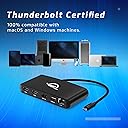
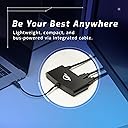
The OWC Thunderbolt mini Dock is a compact, bus-powered 5-port docking solution delivering up to 40 Gb/s Thunderbolt 3 speeds, dual 4K HDMI display support at 60Hz, and 1 Gb/s Gigabit Ethernet connectivity. Designed for professionals on the go, it offers plug-and-play convenience with broad compatibility across Mac and Windows systems, enabling enhanced productivity without the clutter of external power adapters.


| Asin | B08FM3NVKD |
| Best Sellers Rank | #749 in Computers & Accessories (See Top 100 in Computers & Accessories) #77 in Laptop Docking Stations |
| Brand | OWC |
| Color | MINI DOCK |
| Compatible Devices | Desktops, Laptops, MacBook Air, MacBook Pro |
| Customer Reviews | 4.2 4.2 out of 5 stars (1,907) 4.2 out of 5 stars |
| Global Trade Identification Number | 00810586035101 |
| Hardware Interface | Ethernet, HDMI, Thunderbolt 3, USB 2.0 |
| Item Dimensions L X W X H | 2.6"L x 4.9"W x 0.7"H |
| Item Highlight | Thunderbolt 40Gb/s - Thunderbolt Host Integrated Cable - 2x HDMI - 1GbE - USB-A (5Gb/s) - USB 2.0 |
| Item Weight | 150 g |
| Manufacturer | Other World Computing |
| Mfr Part Number | TB3MDK5P |
| Model Number | OWCTB3MDK5P |
| Number Of Items | 1 |
| Number Of Ports | 5 |
| Total Number Of Hdmi Ports | 2 |
| Total Usb Ports | 2 |
| Upc | 810586035101 |
| Wattage | 10 watts |
User
Reliable, Fast, and Feature-Packed—A Must-Have for Power Users
The OWC 11-Port Thunderbolt Dock is a game-changer for anyone juggling multiple devices. From the moment I connected it, the performance was impressive—drives mounted within seconds, and data transfers were swift and seamless. The inclusion of three Thunderbolt 4 ports, four USB ports, Gigabit Ethernet, an SD card reader, and a 3.5mm audio jack provides all the connectivity options I needOne of the standout features is the 96W power delivery, which efficiently charges my laptop while powering connected peripherals. The build quality is solid, and the dock feels durable and reliable.The OWC 11-Port Thunderbolt Dock is an essential companion for anyone dealing with multiple devices. Right from the moment I connected it, I was struck by its impressive performance—drives mounted in an instant, and data transfers were remarkably fast and seamless. With three Thunderbolt 4 ports, four USB ports, Gigabit Ethernet, an SD card reader, and a 3.5mm audio jack, it effortlessly covers all my connectivity needs.One of its standout features is the 96W power delivery, which charges my laptop efficiently and powers all my connected peripherals. The build quality is exceptional; it feels solid and reliable, providing peace of mind for everyday use.I have a minor quibble about placing the main Thunderbolt cable port on the front of the dock. While this setup might appeal to some users, I would prefer it positioned at the back to maintain a cleaner workspace. This is just a personal preference and does not take away from the dock's impressive functionality.The pricing is reasonable, given its strong performance and extensive array of ports. My trust in OWC products has only grown, and this dock reinforces that faith. It's a high-performing hub that checks all the boxes for connectivity.If you need a reliable and effective docking solution, look no further than the OWC 11-Port Thunderbolt Dock. It excels in every regard and is an invaluable investment for professionals and tech enthusiasts.My only minor gripe is the central Thunderbolt cable port placement on the front of the device. While this might be convenient for some, I preferred it on the back to keep my workspace tidier. However, this personal preference doesn't detract from the dock's overall functionality.The price point is reasonable, considering its robust performance and the array of ports. I've always trusted OWC products, and this dock reinforces that trust. It's a reliable, high-performing hub that meets all my connectivity needs.**Final Verdict:** If you're looking for a dependable and efficient docking solution, the OWC 11-Port Thunderbolt Dock is an excellent choice. It delivers on all fronts and is a worthy investment for professionals and tech enthusiasts alike.
User
Great addition to my computer setup
This is truly a must add on hardware. Delivers all of its functionality as described. Highly recommend.
User
Deserves 10 ⭐️⭐️⭐️
“Powered every device I needed for my streaming setup without a single issue. It’s compact, stable, and keeps everything connected and running smoothly. Excellent dock for a clean, professional setup.”
User
pretty disappointing
I've purchased a lot of stuff from OWC over the years, mostly internals like RAM, and never had any issues with any of it. But this thunderbolt port was disappointing. It worked alright at first, but my MacBook pro always had intermittent issues with it in clamshell mode. Sometimes after a restart, it just wouldn't come back on. I'd have to disconnect the mac from the hub, and restart again - it would restart into recovery mode, and then I'd have to restart it a third time, wait for it to boot, then reconnect it to the hub, then finally close the laptop lid. Quite frustrating. I also had issues with the one button eject, which is a great idea in theory but often didn't work. I'd eject, wait until it was safe to unplug, then unplug only to get errors that some of my drives hadn't actually been ejected. I also had issues running one screen vertically, which is my preferred setup. There were strange scaling issues trying to run in this mode that just weren't workable, which was a problem I hadn't had before this dock. I wasn't sure if this was an issue with the hub or some strange hardware issue with the MacBook pro 16 inch, but I had never experienced it with my 15 inch computer sans hub.But the real blow came about 8 months or so into use, when it just stopped pushing two monitors. It could push to either thunderbolt 3 or to DVI but it wouldn't push to both. It was inconsistent in which one it chose to push for. restart after restart, it would push to the dvi, then to thunderbolt, then back to dvi. I replaced all my cables to see if the problem was somewhere there, but it didn't change anything. Around this time I also started seeing anomalies in screen performance, where certain apps would show blitzed-out screens from time to time. I even wrote to complain to some developers bug depts. before I realized it was likely the hub. I never experienced any of these issues when not connected to the hub.I was under warranty, so I reached out to OWC support for help, thoroughly explained that I knew both monitors and all cables were working, and that the hub was just pushing one video signal at a time. After something like 10 or 12 days they finally responded—I know everyone is supposedly slammed because COVID and I can sympathize—but the response I did get was along the lines of, try making sure your hub is plugged in and replacing all your cables! Let us know if that works!between trying to trouble shoot the issue myself, and waiting for tech support to finally respond, I'd been down to a single screen for weeks, first world problems I know, but it was quite a hit to my productivity. The condescending response from tech support was it for me. I replaced this hub with an Anker PowerExpand Elite, and voila. Both monitors sprang to life immediately. So far, the clamshell issues and glitchy app screen problems have also gone away, as has the scaling issues with running a vertical monitor.I can't give this hub good marks. I just didn't have a good experience with it.
User
Solid hub for M-series Macs
I have this jacked into a Mac Studio because you can tap out the computer's built-in ports pretty quick. It's solid, stable, and delivers power to peripherals with far more stability than the Mac itself (the hub exports 5v whereas the Studio exports 4.5v, half a volt short for some external drives). The manual says it still support older Thunderbolt 2 externals but that's only kind of half true; yes, it will connect but it's not a stable connection and I found older TB2 externals just drop off the desktop when the computer goes into sleep. But if you're on TB3 and up, this is a pretty sweet piece of kit, and frankly, almost necessary in Apple's New World Dongle Crazy Order.
User
Expensive, but gives you a lot more than 'competing' units for the same price.
These hubs are, of course, pricey. It would be nice if Apple actually provided more connectivity on their computers to begin with, but they don't.I've used other units at this price point and this one gives me all I need with both my MacBook Air and my 2019 Mac Mini.I'm not looking for a lot of monitor connectivity but this unit will certainly give you that via the T/bolt 4 connectors if you need it.I can charge my MacBook Air, use its other built in USB C/Thunderbolt out AND connect 3 more USB-C / T/bolt devices at 40Gb/s AND connect 3 USB 3.2 devices at 10Gb/s! (AND my mouse dongle in the USB 2 port). PLUS headphones, Ethernet and an SD card slot!The T/bolt 4's will also send video to a monitor or monitors (using either a USB-C to HDMI or USB-C to display port cable... which of course you would have to purchase separately).The number of external monitors and resolution available will be dependent upon your computer and its operating system.I did a speed test with a Samsung T7 drive and it was reading and writing close to 1,000MB/s when connected to this devices T/bolt 4 connectors (using the 2019 Mac Mini). I'm guessing that the T9 would run at close to 2,000.PS. The MacBook Air M1 WILL NOT give you these speeds... it's a know limitation built into the MB Air laptop... thanks Apple for dumbing down the external drive speed capability. They may have fixed this with the M2's but I don't know.If you download the OWC app. the unit will supply high power for charging you phone and or tablet etc. quickly. With this app. you can also eject all of the drives connected to it right from an icon on the task bar.I can't find another dock at this price that gives you so many connections! I probably need to order a second one.
User
A Game-Changer for My Desk Setup!
I recently purchased this docking station for my MacBook Pro M1 Pro, and it has truly been a game-changer for my workspace. Let me share my experience and insights for those who might be in a similar situation.Firstly, I had been struggling to find accurate information about DisplayLink and whether it was necessary for my MacBook Pro M1 Pro. It can be quite confusing, especially with various models available. To clarify, if you have the base M1 or M2 models, you'll need a docking station with DisplayLink and have to install the drivers to connect to just one monitor. However, if you own an M1 or M2 Pro/Max model, you won't need DisplayLink as these models naturally support at least two monitors. This docking station handles my M1 Pro scenario seamlessly.One of the standout features of this product is how it simplifies desk organization. I was able to connect my two monitors effortlessly using USB-C to DisplayPort cables, and the result is a clean and clutter-free workspace. No more tangled wires or hassle when switching between work and personal tasks.Another huge advantage is the convenience of charging both my MacBook and work laptop without needing extra chargers. As someone who works from home, this feature has been a lifesaver. It ensures that my devices are always ready to go, and I don't have to fumble around for different chargers.In summary, this docking station has exceeded my expectations. It's compatible with various MacBook models, offers fantastic wire management, and provides a charging solution for multiple devices. I have no complaints, and I look forward to enjoying the benefits of this high-quality product for a long time. If you're in need of a reliable docking station, this one is definitely worth considering.
User
Dual external displays with MacBook Pro!!
This little hub is simply amazing! I recently got a new MacBook Pro and I couldn't use my old Lenovo dock for my dual monitors on my desk because of issues that Macs can't tell the difference between the different monitors. But this dock is thunderbolt and the communication lets it tell the monitors apart so I can have 3 separate displays (laptop and two external monitors) or close the laptop and have 2 separate displays. Works perfect, no software required. The only thing worth noting is that this is buss powered and my laptop seems to want to power down when I close the lid unless it is plugged in. I might be able to fix this in settings but I'm really happy I don't need an expensive hub or dreaded extra software to get my external displays working for the Mac. Additionally, this hub also works flawlessly with my Lenovo laptop, where the actual Lenovo hub would take forever to recognize it was plugged in and still would shut off one monitor while working randomly..
User
Top sur MAC sans besoin de drivers
enfin, une docking station qui permet du dual screen 4k avec un MAC bookpro (ex : M3 Pro), sans driver (comme les modèles displaylink) qui dégrade la qualité du signal.Marche parfaitement sous windows 10 également (sans driver)Bémol : le prix ! (qui peut valoir le prix d'un monitor 27pouces de milieu de gamme
User
Works great with my m1max macbook pro to drive 2 4k monitors @ 60hz.
User
Well built and reliable.
User
MacBook Pro M4 Maxの性能を最大限に引き出す理想のドッキングステーション
MacBook Pro M4 Max(16インチ)を使い始めて、デスク環境の整理とポート不足の解消を目指してOWC Thunderbolt 5 Dockを導入しました。開封と第一印象製品が到着して最初に感じたのは、そのずっしりとした重量感です。530gという数字以上に重厚に感じますが、これが実は長所になっています。デスクに置くとゴム足の安定感と相まって、ケーブルの抜き差し時にもびくともしません。スペースグレイのアルミシャーシはMacBook Proとの相性も抜群で、見た目の統一感も気に入っています。Thunderbolt 5の真価M4 MaxチップがThunderbolt 5に対応したことで、このドックの性能をフルに活かせています。付属の1mケーブルで接続するだけで、最大120Gbpsの帯域幅を実現。手持ちのThunderbolt 5対応SSDでテストしたところ、読み込み速度が5000MB/s超えという驚異的な数値を記録しました。8k raw素材の動画編集も捗ります。ポート拡張の利便性11ポート構成が実に秀逸です。背面にThunderbolt 5ポートが3つ(うち1つはホスト接続用)、USB 3.2 Type-Aが3つ、2.5GbEイーサネット、前面にはSD/MicroSDカードリーダーとオーディオ入出力。私の場合、外付けSSD 2台、4Kモニター、を常時接続していますが、まだ余裕があります。140W給電の安心感MacBook Pro 16インチは最大140W充電に対応していますが、このドックも140W給電対応なので、ケーブル1本でデスクに接続するだけで、充電もディスプレイ出力もデータ転送もすべて完結します。高負荷な動画編集中でもバッテリーは確実に充電されており、電力不足を感じたことは一度もありません。熱問題についての所感Thunderbolt 5ドックを選ぶ際に最も懸念していたのが、Redditなどで報告されている熱暴走問題でした。CalDigit TS5+やその他の競合製品では、長時間使用時に本体が極端に熱くなり、ディスプレイが一時的に消えたり、接続デバイスがランダムに切断されるという報告が多数上がっています。特に140W給電と10GbEイーサネットを搭載したモデルは発熱が顕著で、ユーザーの中には外付けファンで強制冷却している方もいるほどです。しかし、このOWC Thunderbolt 5 Dockでは、そうした熱暴走による問題は一切経験していません。確かに本体表面は温かくなりますが、触れないほどではなく、何よりも熱によるパフォーマンス低下や接続の不安定さが皆無です。ファンレス設計でありながら、アルミシャーシ全体がヒートシンクとして機能しているようで、熱を効率的に放散できているのでしょう。デスクに直置きではなく、付属のゴム足で若干浮かせて設置することで、底面からの放熱も確保されています。熱による障害は一度も発生していません。安定性についてこれまで1ヶ月間使用してきて、接続が不安定になったことは一度もありません。スリープからの復帰も確実で、ケーブルを抜き差しした後も全デバイスが即座に認識されます。ファンレス設計なので動作音も完全に無音で、夜間の作業でも気になりません。発熱も許容範囲内で、表面がほんのり温かくなる程度です。総評価格は46,280円(購入時ブラックフライデーセール)と決して安くはありませんが、MacBook Pro M4 Maxの性能を余すところなく引き出せる数少ないドッキングステーションです。Thunderbolt 5の帯域幅、充実したポート構成、140W給電、そして何より安定性と熱管理の優秀さを考えれば、投資する価値は十分にあります。他社製品で報告されている熱問題に悩まされることなく、安心して使い続けられる点は大きな魅力です。デスク周りのケーブル地獄から解放され、作業効率も大幅に向上しました。M4 Pro/Max搭載Macユーザーで本格的なドッキングステーションを探しているなら、間違いなくおすすめできる製品です。
User
Works well with MacBook Pro with M1 Pro and M4 Pro processors.
I've tried a number of hubs, docks, stations that claim to work with Thunderbolt. I found that having an HDMI and DisplayPort doesn't mean you can plug in two monitors and get extended display. Even if I tried using a DisplayPort to Thunderbolt cable, i.e. USB-C port, it would only mirror what was in the HDMI or DisplayPort connection.The Go Dock has an SD Card slot, audio jack, USB-A 2.0, and USB-C 3.2 on the front. I've used the SD Card and USB-A ports to read SD Cards and USB Thumb Drives. They work fine. If you are using macOS, you might need to go to System Preferences -> Sound to switch the output to the Go Dock. Plug speakers or headphones into the audio jack, go to System Preferences and change the output to the Go Dock.On the back of the Go Dock are 2 Thunderbolt ports, HDMI, Ethernet, 2 USB-A 3.2 and a power connector. The Go Dock comes with a power cable. It can be used as a power supply for your MacBook laptop. I'm using it right now and it works great. I plug an external keyboard and mouse into the USB-A ports, a 4K monitor into the HDMI, a second 4K monitor into one of the Thunderbolt ports and an external 4K camera in the other Thunderbolt port.I can plug my laptop into the Computer input port on the side. If I used it with my M1 Pro laptop, it will display two extended displays, i.e. screen 1 and screen 2. If I have my laptop open it will mirror the main display, screen 1. If I use my M4 Pro laptop, it can also do extended display. But with my laptop open, it shows 3 screens. The laptop is screen 1, monitor 1 is screen 2 and monitor 2 is screen 3.No need to run DisplayLink software. No issues. Works great.I did want to be able to have two computers connected via a switch. That is, plug the switch into the Go Dock, plus M1 Pro into computer input 1, plug the M4 Pro into computer input 2 but a USB-C switch won't work (design limitation) with Thunderbolt. If I wanted to be able to use it as a docking stations AND switch, I'd need to buy a Thunderbolt 4 KVM. These are almost twice the price of the Go Dock. For now it is just easier to unplug laptop 1 and plug in laptop 2 when I want to switch.
Trustpilot
4 days ago
1 month ago