


Desertcart purchases this item on your behalf and handles shipping, customs, and support to EGYPT.
🛠️ Fix it yourself, flaunt flawless: iPad 7/8 screen upgrade made sleek & simple!
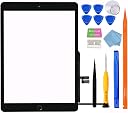
This JPUNG replacement glass touch digitizer is engineered exclusively for iPad 7th and 8th generation 10.2" models (A2197-A2430). Featuring ultra-clear 99.9% HD transparency and a robust 9H tempered glass surface, it offers superior scratch resistance and visual clarity. The kit includes a pre-installed home button (non-TouchID), a full set of professional-grade tools, and a detailed video guide, enabling confident DIY repairs. Highly rated and top-ranked, it’s the smart choice for restoring your iPad’s touch functionality without breaking the bank.
| ASIN | B086X8TVM9 |
| Best Sellers Rank | 2,118 in Computers & Accessories ( See Top 100 in Computers & Accessories ) 1 in Computer Tablet Components & Replacement Parts |
| Brand | JPUNG |
| Brand Name | JPUNG |
| Clarity | 99.9 |
| Colour | Black |
| Compatible Devices | iPad 7, 8 |
| Compatible Phone Models | A2197, A2198, A2200, A2270, A2428, A2429, A2430 |
| Compatible devices | iPad 7, 8 |
| Compatible phone models | A2197, A2198, A2200, A2270, A2428, A2429, A2430 |
| Country of Origin | China |
| Customer Reviews | 4.2 out of 5 stars 5,616 Reviews |
| Finish Type | Glossy |
| Item Dimensions L x W | 20L x 13W centimetres |
| Item Hardness | 9H |
| Item hardness | 9H |
| Manufacturer | JPUNG |
| Material | Tempered Glass |
| Model Name | JPUNG iPad 7/8 10.2 inch Tempered Glass Touch Screen Replacement |
| Number of Items | 1 |
| Product dimensions | 20L x 13W centimetres |
| Screen Size | 10.2 Inches |
| Screen Surface Description | Glossy |
| Special Features | 9 H Surface Hardness |
| UPC | 732489483554 |
| Unit Count | 1.0 count |
| Water Resistance Level | Waterproof |
A**S
Great product for iPad 6th gen
Screen wash exactly what was needed and all the accessories needed for a repair are provided with the screen. Install was easy. I had incorrectly installed which was causing touch issues, however I undone everything and redid the connections. I think most issues people are experiencing are likely due to screen error. I had also cracked my screen that was initially sent, but the seller promptly sent out a replacement. All in all, I would buy from them again
R**R
Really happy, Value TOP, and no issues
As a first time repair, no issues at all, tools work, part works, adhesive could've been a bit better but thats me nit picking. Really happy, I didn't use the video attached I used a popular youtube video and worked a treat! I have expierance repairing and building PC's so I have done similar things.
M**T
Good kit with everything you need to change the digitiser.
Everything you need in the kit and all works as should. Tools are not the greatest but do the job. Screen works perfectly and all instructions are easy to follow
S**T
Don’t take the tape off first!
The screen is fine and fits my old IPad Air good but the instructional video is not great! It’s obvious that they have taken their screen off first with the ease that they slide an piece of cardboard down the side of the screen. I ended up using the orange tool that comes in the package and even then I ended up shattering the screen, I popped on a pair of safety google just incase. Don’t take the sticky tape covering off the main 4 sides until your practically ready to stick down the screen, or you will end up catching everything on it and it dulls the stickiness. Also, there was not sticky tape on certain sections of the wire that they show on their video and no inside screen protector as they also show on the video. Apart from that, for the price and if you’re confident about having a go yourself at screen replacement this is a good product.
A**L
Great product.
This is excellent. First off I have to say if you want to do this screen replacement yourself then go on YouTube and watch a few videos first. It’s not easy and you have to be slow and patient to get it right. Remember these screens are glass and they will crack if you use too much force. Anyway took me around a hour or so to fit it all. I was very pleased with the result. What I will say is you need to swap the center button if you want it to be fingerprint which is risqué to the glass screen so just be aware Top tip…. Heat the iPad before you do this. I put mine near to electric fire for 3 mins to warm up the glue. You can also use a heat gun or hairdryer.
B**G
Poor
Screen cracked within days
M**F
Hard task - kit okay, instructions badly presented
Replacing and iPad screen is hard. Apple has put lots of glue inside and would much rather you bought another iPad rather than fix it. I've built and repaired many PCs in my time, but phones and iPads are much more fiddly. Unless you have a lot of patience, I'd suggest taking your iPad to a repair store rather than trying to fix it. The instructions that go with this product are really the best case scenario. They show the screen without any cracks and it comes off pretty easily, and the LCD just lifts up. The reality is that you are replacing the screen because it is cracked. You'll want rubber gloves and to take care with the fine sharp shards. The LCD won't just lift up because Apple has squirted glue behind it. It needs very careful lifting. There is more tape inside the iPad than shown in the videos too. To get the screen off your iPad, you need to heat the glue around the edges of the screen to around 70C. The best way to do this is with a heated mat for tablet repair. You can also use a heat gun. Chances are you won't own either, so you can use a hairdryer to do this but blows everything on your worktop in all directions. There is an important detail when removing the screen - the existing screen has the touch-id sensor in the button. If you manage to remove the screen super carefully, you can use the touch-id sensor that is attached to the origin screen. If your screen is cracked keeping the touch-id sensor in working condition is quite challenging (I failed). The replacement screen in the kit includes a non-touch-id button so you can use that as a fallback. Getting the connectors re-attached is fiddly. I can't get the connector to the main button to go back in. It was originally taped in place and it appears to just slide back in position, but it does not remain there. The cable is going to need folding to make this work. This might be okay when you are doing it for the 10th time, but it is gnarly the first time you try. Ultimately, this was worth a try, but not something I'd recommend for the average iPad owner. The written instructions are not really intelligible and the videos posted here highlight things to avoid, but it is quite hard to avoid some of those when your screen is cracked. The video also has multiple voices talking at the same time which does not help.
R**Y
Great customer service and support
After ordering a new screen for my son’s iPad and trying to fit it I accidentally damaged the ribbon connector pins a fault on my behalf so it wouldn’t connect to the motherboard and in the box was a user error card which allowed me to order a replacement screen free of charge due to my mistake.it arrived the next day.now fitted and works perfectly with no issues. I would recommend using this supplier and will use them again if needed.good product and great customer service too.
T**A
Great item and experience
The item fits perfectly. We accidentally damaged the first one during the replacement, and I contacted the seller directly as advised on the card that came with the item. There was no negotiation at all—they simply sent a new screen for free, without even charging for delivery. It was a great experience, and the screen is excellent. Highly recommend!
J**.
Works great EZ to install, but have one warning
Works great EZ to install, but have one waNot a licensed pro but I have replaced over 50 touch screen for tablets / iPads and cell phones for friends and friends of theirs. For the average consumer it is not hard. Use a hair dryer (if you do not have heat gun), business cards or playing cards, and watch screwdriver kit. **wear eye protection and gloves** Only warning I have is the home button finger print ID, will not work without the original finger print ID component on the home button cable. To fix the problem you will have to use tools for component replacement (Flux, soldering iron, solder, and microscope). Move the finger print ID component from the old home button cable to the new replacement screen. “Or”… If the old power button / cable are in great working condition, you can transfer them to the new replacement touch screen. You will need exacto knife and very strong glue. rning
R**O
Satisfait de mon achat
La livraison était rapide, la boîte est bien organisée et l écran était bien protégé. l installation n est pas difficile, il faut juste prendre son temps à enlever l ancienne colle et bien nettoyer les surfaces. Je vous conseille d utiliser une colle plus forte lors de l installation. qualité prix c est un bon achat, je suis satisfait, tout fonctionne correctement.
A**G
ممتاز
انصح بالشراء مطابقة للجهاز تشبه الاصليه
A**R
Not sure if it’s the right one for ipad7 A2197
I tried, but it did nit work, so returned it. The screen was getting pressed/touched on its own.
Trustpilot
2 months ago
1 week ago